
Introduction
This manual provides essential instructions for the installation, operation, and maintenance of the DUQTMBDT Smartgen 6110N Generator Controller. This device is designed to monitor and control generator sets, ensuring reliable and efficient power generation. Please read this manual thoroughly before installation and operation to ensure correct usage and to prevent damage.
Product Overview
The Smartgen 6110N is a sophisticated generator set controller featuring a clear display panel and intuitive controls. It is capable of monitoring various parameters and managing the generator's start, stop, and protection functions.

Figure 1: Front view of the DUQTMBDT Smartgen 6110N Generator Controller with its display active, showing various operational parameters like voltage, current, frequency, power, temperature, and pressure.

Figure 2: Front view of the DUQTMBDT Smartgen 6110N Generator Controller with its display inactive, showing the physical layout of buttons and indicators.
Setup and Installation
Proper installation is crucial for the safe and reliable operation of the generator controller. Ensure all power is disconnected before beginning installation.
1. Physical Installation
Mount the controller in a secure, dry, and well-ventilated location, away from excessive heat, vibration, and moisture. Refer to the dimensions diagram for proper panel cutout and mounting.
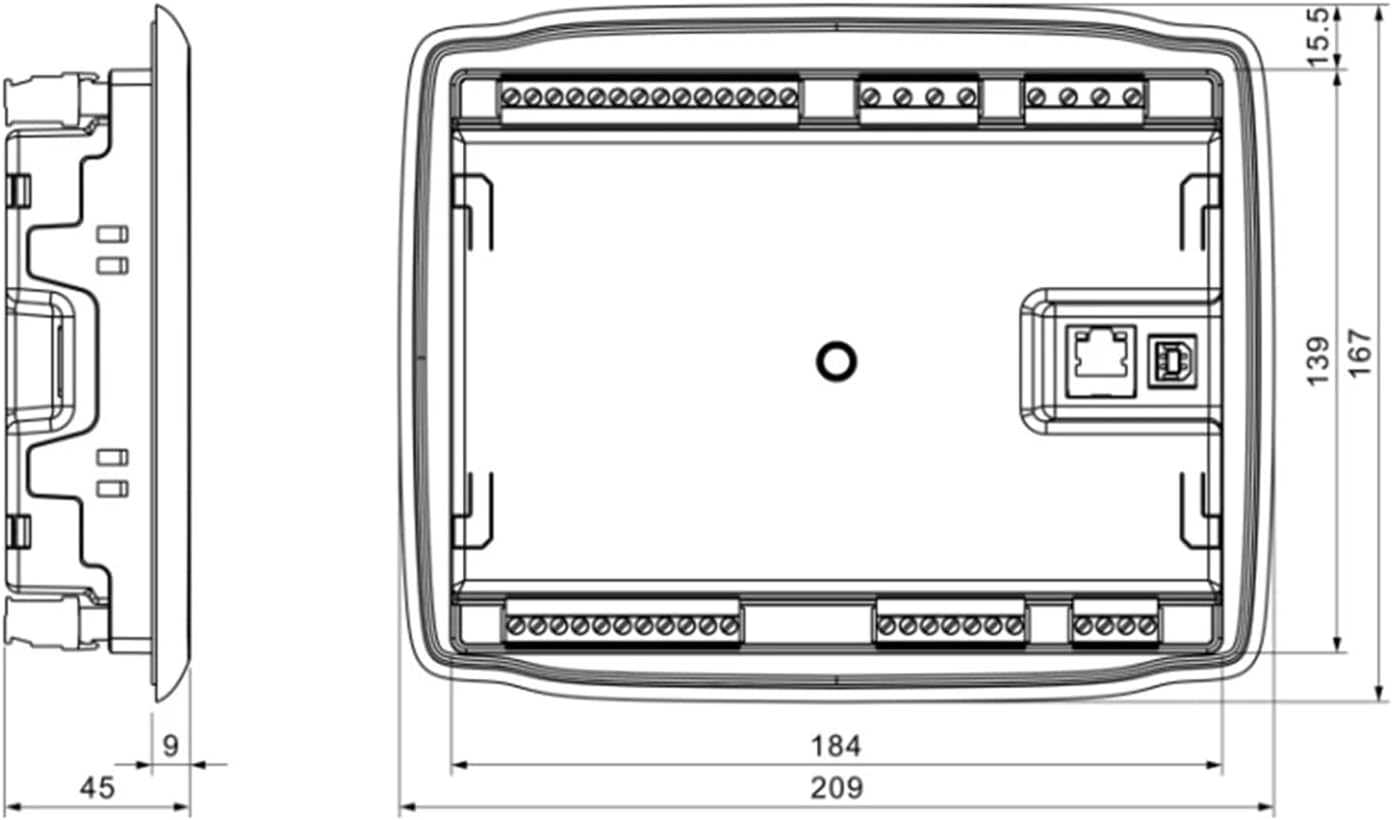
Figure 3: Dimensional drawing of the generator controller, showing measurements in millimeters for panel cutout and overall device size. The width is 209mm, height 167mm, and depth 45mm, with a mounting depth of 9mm.
2. Wiring Connections
Connect the controller to the generator set according to the wiring diagram. Pay close attention to power supply, sensor inputs, and control outputs. Incorrect wiring can lead to malfunction or damage.

Figure 4: Rear view of the generator controller, illustrating the various wiring terminals for connections. These include terminals for emergency stop, fuel, crank, auxiliary outputs, generator voltage, mains voltage, engine sensors (temp, oil pressure, fuel level), and communication ports (RS485, Ethernet, USB).
- Power Supply: Connect to a stable DC power source (typically 12V or 24V, as indicated by the generator system).
- Generator Voltage/Current: Connect the appropriate voltage and current transformers as per the diagram.
- Engine Sensors: Connect sensors for engine temperature, oil pressure, fuel level, and RPM.
- Control Outputs: Connect to the generator's starter, fuel solenoid, and other control relays.
- Communication: Utilize RS485, Ethernet, or USB ports for remote monitoring or configuration if applicable.
Operating Instructions
The control panel provides access to all operational modes and settings.

Figure 5: Front panel of the generator controller with key buttons and indicators labeled. Labels include Alarm, Status, Close, Load, Open, Gen Normal, Auto Mode, Manual Mode, Start, Stop, Up/Increase, Homepage/Return, Set/Confirm, Down/Decrease, Stop Mode, and Stop/Reset.
Control Panel Functions:
- Display Screen: Shows real-time operational data, alarms, and status messages.
- Navigation Buttons (Up/Down/Set/Return): Used to navigate menus, adjust settings, and confirm selections.
- Start Button (Green 'I'): Initiates the generator start sequence in Manual mode.
- Stop Button (Red 'O'): Stops the generator in Manual mode or resets alarms.
- Auto Mode Button: Activates automatic operation, where the controller manages the generator based on predefined conditions (e.g., mains failure).
- Manual Mode Button: Allows for manual control of the generator's start and stop functions.
- Alarm Indicator: Illuminates to signal an active alarm condition.
- Status Indicator: Provides visual feedback on the controller's current operational state.
Operating Modes:
- Manual Mode:
- Press the Manual Mode button.
- Press the Start button to initiate the generator start sequence.
- Press the Stop button to shut down the generator.
- Auto Mode:
- Press the Auto Mode button.
- The controller will automatically start and stop the generator based on configured parameters (e.g., utility power status).
Maintenance
Regular maintenance ensures the longevity and optimal performance of your generator controller.
- Cleaning: Periodically clean the controller's exterior with a soft, dry cloth. Do not use abrasive cleaners or solvents.
- Connections: Routinely check all wiring connections for tightness and signs of corrosion. Loose connections can lead to intermittent operation or damage.
- Environment: Ensure the operating environment remains within specified temperature and humidity ranges.
- Firmware: Check the manufacturer's website for any available firmware updates.
Troubleshooting
If you encounter issues with your generator controller, refer to the following basic troubleshooting steps:
- No Power: Check the DC power supply connections and ensure the battery is charged. Verify fuses if present.
- Generator Fails to Start:
- Confirm the controller is in Manual or Auto mode correctly.
- Check fuel level and engine oil pressure.
- Inspect starter motor and fuel solenoid connections.
- Look for active alarms on the display.
- Alarm Active: Note the specific alarm message on the display. Consult the full product manual (if available from the manufacturer) for detailed alarm code explanations and remedies.
- Incorrect Readings: Verify sensor connections and calibration.
For complex issues, it is recommended to contact qualified technical personnel or the manufacturer's support.
Specifications
The following are the general specifications for the DUQTMBDT Smartgen 6110N Generator Controller:
| Feature | Detail |
|---|---|
| Brand | DUQTMBDT |
| Model | Smartgen 6110N |
| Item Weight | 1.76 ounces |
| Package Dimensions | 1.18 x 0.79 x 0.39 inches |
| ASIN | B0F4MQQN4N |
| Date First Available | April 12, 2025 |
Warranty and Support
For specific warranty terms and conditions, please refer to the documentation provided at the time of purchase or contact the seller directly. Technical support may be available through the manufacturer or authorized distributors.
Always ensure to provide your product model (Smartgen 6110N) and ASIN (B0F4MQQN4N) when seeking support.