
ANENG 620A Black
ANENG 620A Smart Digital Multimeter User Manual
Model: 620A Black
1. Introduction
The ANENG 620A is a full-screen intelligent digital multimeter designed for precise measurement of various electrical parameters. It is suitable for hobbyists, students, and engineers, offering functions such as AC/DC voltage, AC/DC current, resistance, capacitance, frequency, temperature, diode testing, and continuity buzzing.

Figure 1: ANENG 620A Smart Digital Multimeter and accessories.
2. Safety Information
Please read and understand all safety warnings and operating instructions before using this instrument. Failure to do so may result in injury or damage to the meter or equipment under test.
- Always disconnect power to the circuit before making resistance, capacitance, or diode measurements.
- Do not apply more than the rated voltage between the terminals or between any terminal and ground.
- Use caution when working with voltages above 30V AC RMS, 42V peak, or 60V DC. These voltages pose a shock hazard.
- Ensure the test leads are properly connected and the correct function is selected before making measurements.
- Do not use the meter if it appears damaged or if the insulation on the test leads is compromised.
- The meter features a built-in double fuse to prevent short circuits and burning. However, always operate within specified limits.
3. Setup
3.1 Battery Installation
The ANENG 620A requires 2 AAA batteries for operation. To install or replace batteries:
- Locate the battery compartment on the back of the multimeter.
- Open the battery cover.
- Insert 2 AAA batteries, observing the correct polarity (+/-).
- Close the battery cover securely.
3.2 Connecting Test Leads
Connect the red test lead to the "VHz-Ω" or "mA" or "10A" input jack depending on the measurement type, and the black test lead to the "COM" (common) input jack.

Figure 2: Details of the multimeter, including battery compartment and test lead input ports.
4. Operating Instructions
The ANENG 620A features an intelligent full-screen display and automatic recognition for many functions. Turn the rotary switch to the desired measurement mode.
4.1 AC/DC Voltage Measurement
To measure voltage, connect the test leads in parallel to the circuit or component. The meter will automatically detect AC or DC voltage.

Figure 3: Various measurement functions including AC/DC Voltage, Resistance, Capacitance, Diode, and Buzzer.
4.2 AC/DC Current Measurement
To measure current, connect the multimeter in series with the circuit. Ensure the red test lead is plugged into the appropriate current input jack (mA or 10A).
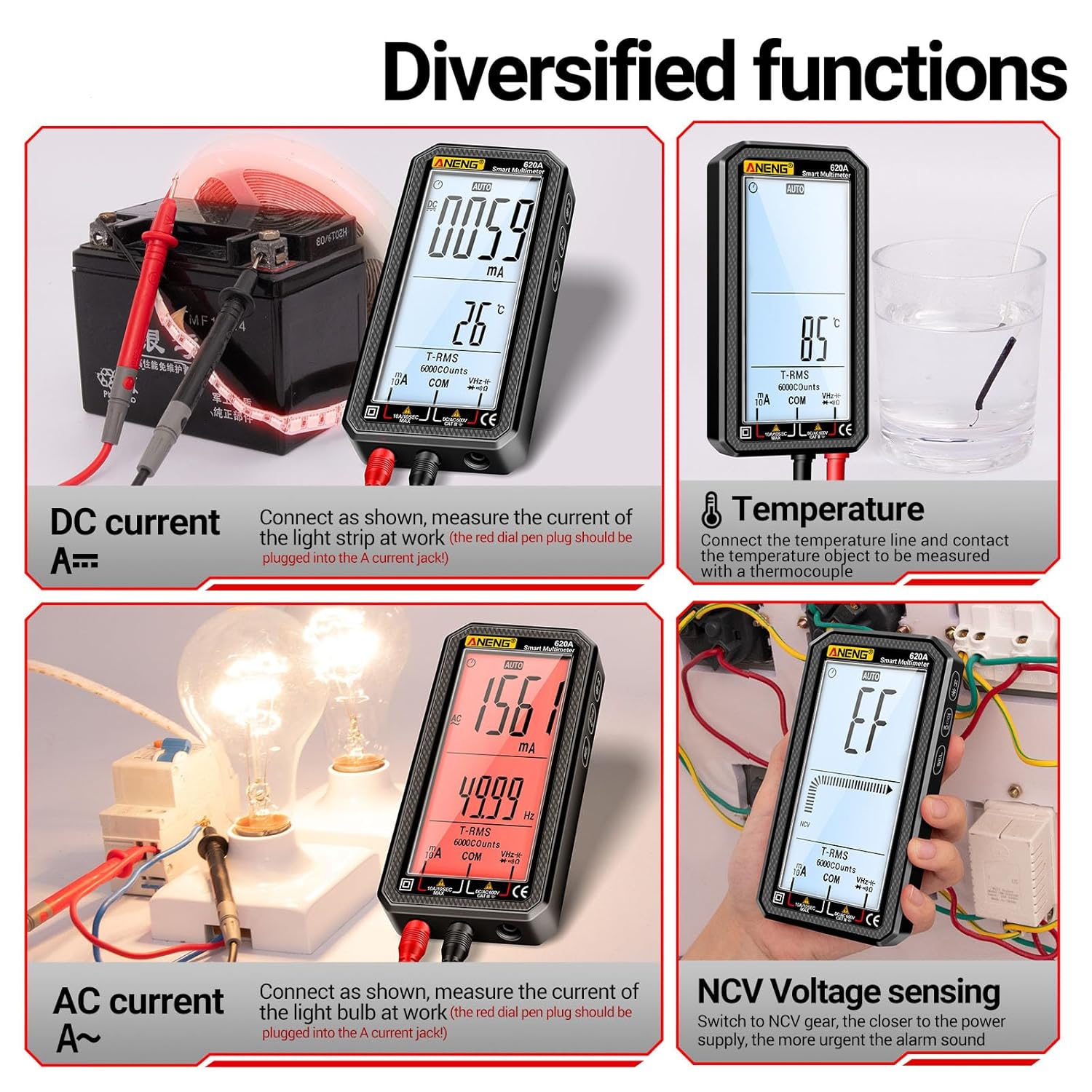
Figure 4: Various measurement functions including DC Current, Temperature, AC Current, and NCV Voltage Sensing.
4.3 Resistance Measurement
To measure resistance, ensure the circuit is de-energized. Connect the test leads across the component. The meter will automatically recognize the resistor.
4.4 Capacitance Measurement
To measure capacitance, ensure the capacitor is discharged before connecting the test leads. For safety reasons, the capacitor needs to be measured using the provided test leads.
4.5 Frequency Measurement
The meter can measure frequency simultaneously with AC voltage measurements, displaying both values on the screen.
4.6 Temperature Measurement
Connect the temperature probe to the multimeter and place the probe on the object to be measured. The temperature will be displayed on the screen.
4.7 Diode Test
Switch to diode gear and touch the positive and negative electrodes of the Light Emitting Diode (LED) with the test leads to check its functionality.
4.8 Continuity (Buzzer) Test
The continuity test checks for an unbroken electrical path. If the circuit is unobstructed, the buzzer alarm will sound.
4.9 NCV (Non-Contact Voltage) Detection
The NCV function allows for non-contact detection of AC voltage. When AC voltage is detected, a buzzer alarm will sound, and the signal strength will increase as the meter gets closer to the source.

Figure 5: NCV (Non-Contact Voltage) detection in action.
4.10 Live Wire Recognition (Zero FireWire Recognition)
In Live mode, use one test lead to identify live wires. The screen will turn red and a beep sound will indicate a live wire. A neutral line will show no response.

Figure 6: Live Wire Recognition feature.
4.11 Backlight and Flashlight
The ANENG 620A is equipped with a backlight for the display and two upgraded dual light bulbs on the back, serving as a flashlight. This improves visibility in dimly lit working environments and helps avoid the risk of electric shock by illuminating the measurement position.
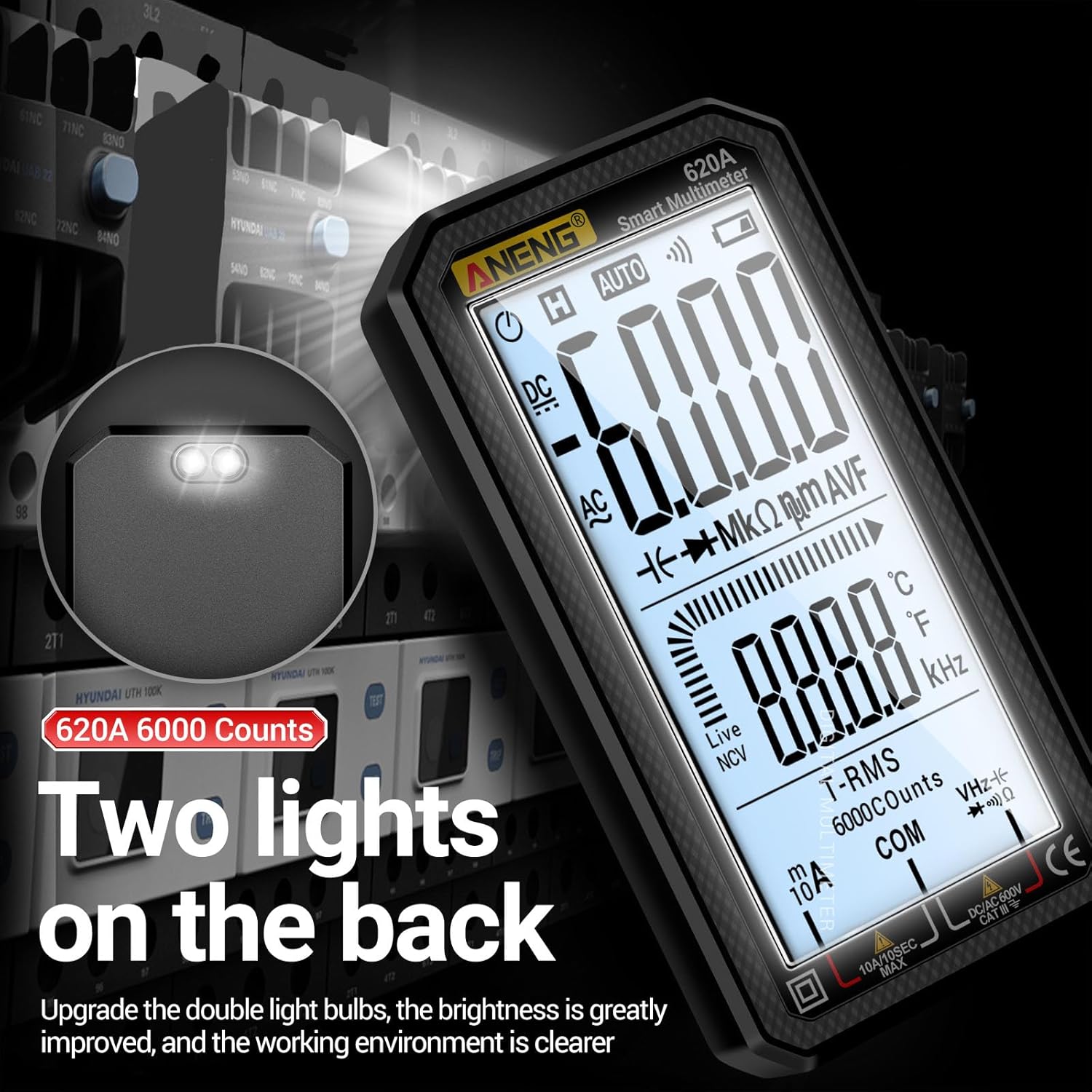
Figure 7: Backlight and Flashlight feature.
5. Maintenance
5.1 Cleaning
Wipe the case with a damp cloth and mild detergent. Do not use abrasives or solvents. Keep the terminals free of dirt and moisture.
5.2 Fuse Replacement
The multimeter has built-in double fuses to protect against short circuits and burning. If the meter stops functioning correctly, especially in current measurement modes, the fuse may need replacement. Refer to the specifications for the correct fuse type and rating. Fuse replacement should only be performed by qualified personnel.
5.3 Storage
When not in use for extended periods, remove the batteries to prevent leakage and store the multimeter in a cool, dry place away from direct sunlight and extreme temperatures.
6. Troubleshooting
| Problem | Possible Cause | Solution |
|---|---|---|
| Meter does not turn on. | Dead or incorrectly installed batteries. | Check battery polarity; replace batteries. |
| No reading or "OL" displayed. | Open circuit; range too low; incorrect function selected. | Check connections; select higher range (if manual ranging); select correct function. |
| Inaccurate readings. | Low battery; dirty test leads; external interference. | Replace batteries; clean test leads; move away from strong electromagnetic fields. |
| Buzzer not working during continuity test. | Open circuit; meter malfunction. | Ensure circuit is closed; contact support if issue persists. |
7. Specifications
- Brand: ANENG
- Model: 620A Black
- Product Weight: 0.6 g
- Product Dimensions (LxWxH): 50 x 50 x 200 mm
- Measurement Accuracy: / (Not specified in detail)
- Included Accessories: 1 Multimeter, 1 Temperature Line, 2 Test Leads, 1 Manual, 1 Packaging Box
- Power Source: 2 x AAA Batteries (not included)
- Display: Full Screen Digital Display, 6000 Counts
- Safety Features: Built-in Double Fuse, NCV, Live Wire Recognition
8. Warranty and Support
Specific warranty details are not provided in this manual. For warranty claims, technical support, or service inquiries, please contact the seller directly.
Seller: ANENG Stores
Related documents620A Black


Ask a question about this manual
Ask about setup, troubleshooting, compatibility, parts, safety, or missing instructions. Manuals+ will review the question and use this page’s manual context to help answer it.