
Introduction
The 1Mii ML302+ is a versatile 2-in-1 Bluetooth 5.3 audio adapter, functioning as both a transmitter (TX) and a receiver (RX). It enables wireless audio streaming for a wide range of devices, supporting advanced audio codecs like aptX Adaptive, aptX HD, and Low Latency for high-quality, synchronized sound. This manual provides detailed instructions for setting up, operating, and maintaining your device.

Image: The 1Mii ML302+ device illustrating its dual functionality as a transmitter (TX) for TVs, PCs, and game consoles to Bluetooth headphones/speakers, and as a receiver (RX) for wired headphones/speakers/car audio from smartphones/tablets.
Package Contents
Please check the package for the following items:
- 1Mii ML302+ Bluetooth Transmitter & Receiver
- User Manual
- 3.5mm Audio Cable
- RCA Audio Cable
- Type-C Charging Cable

Image: A visual representation of all items included in the product package: the ML302+ unit, a user manual, a 3.5mm audio cable, an RCA audio cable, and a Type-C charging cable.
Product Overview
Features
- 2-in-1 Functionality: Operates as both a Bluetooth transmitter (TX) and receiver (RX).
- Advanced Bluetooth 5.3: Provides stable and reliable connections with a transmission distance of up to 10 meters.
- Low Latency & High-Quality Audio: Supports aptX Adaptive, aptX HD, and aptX Low Latency codecs to minimize audio delay and ensure clear sound.
- Dual Device Connection: Connects to two Bluetooth headphones/speakers simultaneously in TX mode, or two Bluetooth source devices (e.g., smartphones, tablets) in RX mode.
- Long Battery Life: Up to 32 hours of continuous use on a single 3-hour charge.
- Wide Compatibility: Equipped with 3.5mm AUX and RCA audio jacks for connection to various non-Bluetooth devices.
- Intuitive Controls: Simple buttons for mode switching, pairing, and volume control.
Controls and Ports

Image: Top and side views of the ML302+ device, highlighting the TX/RX mode switch, volume/track control buttons, multi-device connection indicator, AUX interface, RCA jacks, and the Type-C charging port.
The device features a TX/RX mode switch, volume/track control buttons, and input/output ports including 3.5mm AUX, RCA, and a Type-C charging port. An LED indicator shows battery status and connection codec.
Setup
1. Charging the Device
Before first use, fully charge the ML302+ using the provided Type-C charging cable and a standard USB power adapter (not included). The device takes approximately 3 hours to fully charge.
2. Mode Selection (TX/RX)
Slide the TX/RX switch on the side of the device to select the desired mode:
- TX (Transmitter) Mode: To send audio wirelessly from a non-Bluetooth device (e.g., TV, PC) to Bluetooth headphones or speakers.
- RX (Receiver) Mode: To receive audio wirelessly from a Bluetooth device (e.g., smartphone, tablet) and play it through a non-Bluetooth audio system (e.g., wired speakers, car stereo).
3. Connecting to Audio Source/Device
Use the appropriate audio cable (3.5mm AUX or RCA) to connect the ML302+ to your audio equipment.
TX Mode Connection Example: TV to Bluetooth Headphones
- Set the ML302+ to TX mode.
- Connect the ML302+ to your TV's audio output (3.5mm headphone jack or RCA audio out) using the corresponding cable.
- Ensure your Bluetooth headphones are in pairing mode.
- The ML302+ will automatically search for and connect to nearby Bluetooth devices.

Image: A user enjoying TV audio through Bluetooth headphones, connected via the ML302+ device, illustrating the low-latency audio transmission feature. For optimal low latency, your headphones must also support aptX Low Latency/Adaptive.
RX Mode Connection Example: Smartphone to Wired Speakers
- Set the ML302+ to RX mode.
- Connect your wired speakers (or car stereo) to the ML302+'s audio output (3.5mm or RCA) using the corresponding cable.
- Enable Bluetooth on your smartphone/tablet and search for "ML302+" in the Bluetooth device list.
- Select "ML302+" to pair and connect.

Image: A family dancing in a living room, with music playing from wired speakers connected to the ML302+ in RX mode, demonstrating wireless audio reception from a mobile device.
Operating Instructions
Power On/Off
To power on, slide the TX/RX switch from the OFF position to either TX or RX. To power off, slide the switch to the OFF position.
Pairing
In TX or RX mode, the device will automatically enter pairing mode if no device is connected. For manual pairing, press and hold the pairing button (often indicated by a headphone or Bluetooth icon) for 2 seconds until the LED indicator flashes rapidly.
Volume and Track Control
Use the '+' and '-' buttons on the device to adjust the volume. A short press typically adjusts volume, while a long press may skip tracks (functionality may vary based on connected device).
Checking Battery Status
Press the main button three times to quickly check the battery level. The LED will flash a certain number of times to indicate the remaining battery percentage (e.g., 1 flash for 20%, 5 flashes for 100%).
Dual Device Connection
The ML302+ supports simultaneous connection to two devices:
- TX Mode: Connect two Bluetooth headphones or speakers to the ML302+ simultaneously. After connecting the first device, put the second device into pairing mode and press the pairing button on the ML302+ to connect.
- RX Mode: Connect two Bluetooth source devices (e.g., two smartphones) to the ML302+ simultaneously. After connecting the first device, enable Bluetooth on the second device and connect to the ML302+.
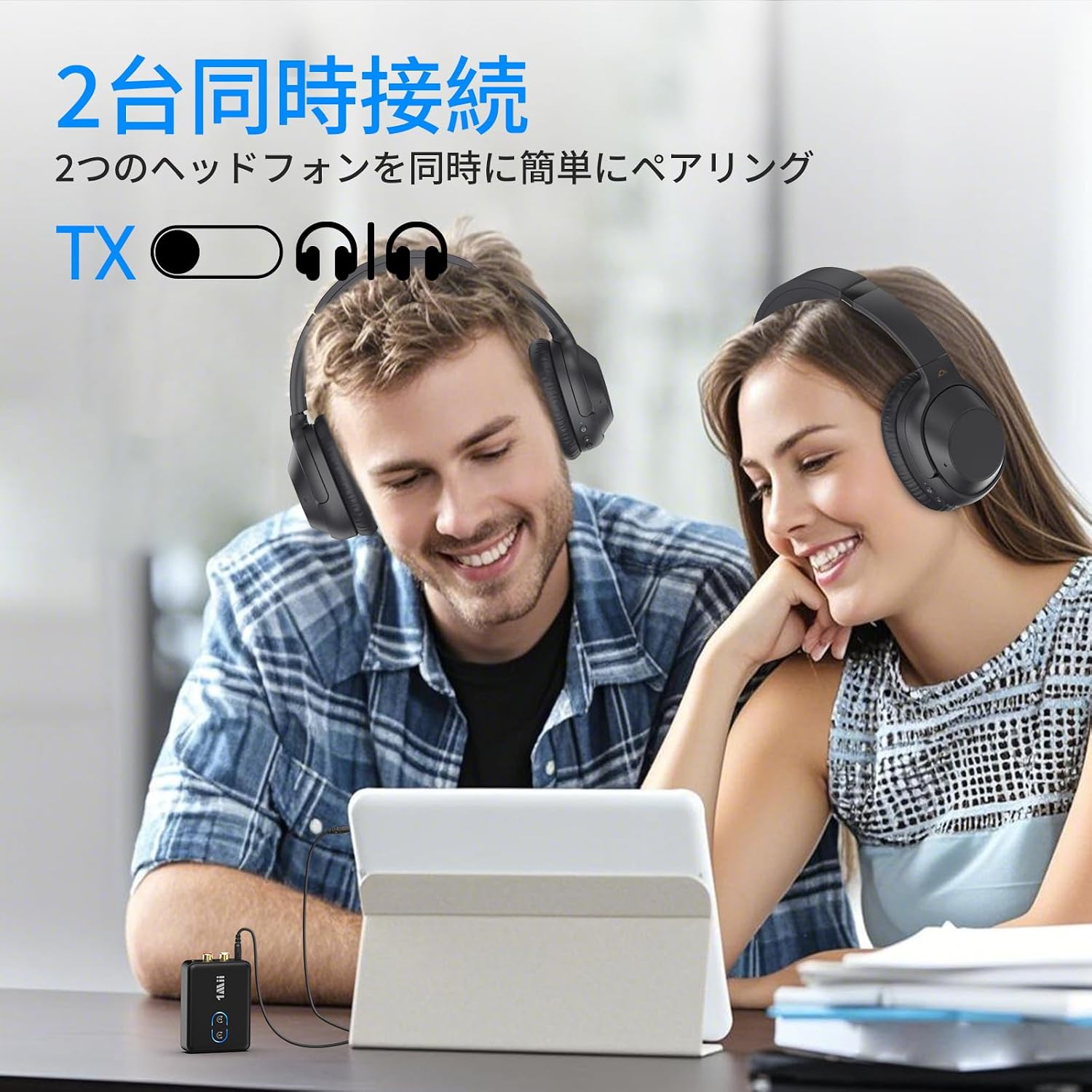
Image: Two individuals wearing Bluetooth headphones, both connected to a single ML302+ device which is receiving audio from a tablet, demonstrating the dual connection feature in TX mode.
Maintenance
To ensure the longevity and optimal performance of your 1Mii ML302+:
- Keep the device dry and away from moisture.
- Avoid extreme temperatures.
- Clean the device with a soft, dry cloth. Do not use harsh chemicals or abrasive cleaners.
- Store the device in a cool, dry place when not in use.
- Avoid dropping or subjecting the device to strong impacts.
Troubleshooting
No Sound or Poor Audio Quality
- Ensure the ML302+ is correctly connected to both the audio source/device and the receiving/transmitting Bluetooth device.
- Check that the volume levels on both the ML302+ and the connected devices are adequately adjusted.
- Verify that the ML302+ is in the correct TX or RX mode.
- Confirm that the connected Bluetooth headphones/speakers are within the 10-meter transmission range.
- If experiencing latency in TX mode, ensure both the ML302+ and your Bluetooth headphones/speakers support aptX Low Latency or aptX Adaptive.
Cannot Pair Bluetooth Devices
- Ensure the ML302+ is in pairing mode (LED flashing rapidly).
- Make sure the other Bluetooth device is also in pairing mode.
- Clear the pairing history on both devices and attempt to pair again.
- Move the devices closer to each other during pairing.
Device Not Powering On
- Check if the battery is charged. Connect the device to a power source using the Type-C cable.
- Ensure the TX/RX switch is not in the OFF position.
Specifications
| Model | ML302+ |
| Bluetooth Version | 5.3 |
| Supported Codecs | SBC, AAC, aptX, aptX HD, aptX Low Latency, aptX Adaptive |
| Operating Modes | Transmitter (TX), Receiver (RX) |
| Audio Interfaces | 3.5mm AUX, RCA |
| Charging Port | Type-C |
| Charging Time | Approximately 3 hours |
| Playback Time | Up to 32 hours |
| Transmission Distance | Up to 10 meters (33 feet) |
| Dimensions (L x W x H) | 8.2 x 5.7 x 2.2 cm |
| Material | Acrylonitrile Butadiene Styrene (ABS) |

Image: An internal view of the ML302+ circuit board, emphasizing the Bluetooth 5.3 chip, which ensures stable and efficient wireless connections.
Warranty and Support
The 1Mii ML302+ comes with a 1-year quality warranty from the date of purchase. If you encounter any issues or defects within this period, please contact our customer support for assistance. We are committed to providing responsible support for our products.
For further support or inquiries, please refer to the contact information provided on our official website or the product packaging.


