1. Introduction
Thank you for choosing the Titan Maestro Smart Watch. This manual provides essential information for setting up, operating, and maintaining your device. Please read it carefully to ensure optimal performance and longevity of your smartwatch.
The Titan Maestro combines sophisticated design with advanced technology, featuring a vibrant AMOLED display, Bluetooth calling, comprehensive health tracking, and robust construction.
2. What's in the Box
Upon unboxing your Titan Maestro Smart Watch, please verify that all the following items are included:
- Titan Maestro Smart Watch (with Stainless Steel strap)
- Extra Silicone Strap (Black)
- Charging Cable
- User Manual (this document)
3. Product Overview
The Titan Maestro Smart Watch is designed with a full stainless steel construction and an SS316L surgical-grade metal bezel, ensuring durability and a premium feel.

Image: The Titan Maestro Smart Watch showcasing its full stainless steel construction and SS316L surgical grade metal bezel, highlighting its bold and distinct design.
The watch features a 1.47-inch AMOLED display with a 60Hz refresh rate, 466x466 pixel resolution, and up to 650 nits brightness for clear visuals.
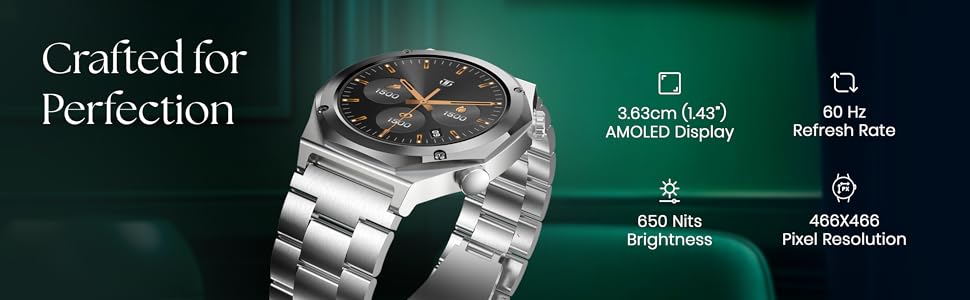
Image: Close-up of the Titan Maestro Smart Watch display, detailing its 1.47-inch AMOLED screen, 60Hz refresh rate, 466x466 pixel resolution, and 650 nits brightness.
Powered by the ATS3085S chipset, it offers smooth performance and supports Bluetooth calling.
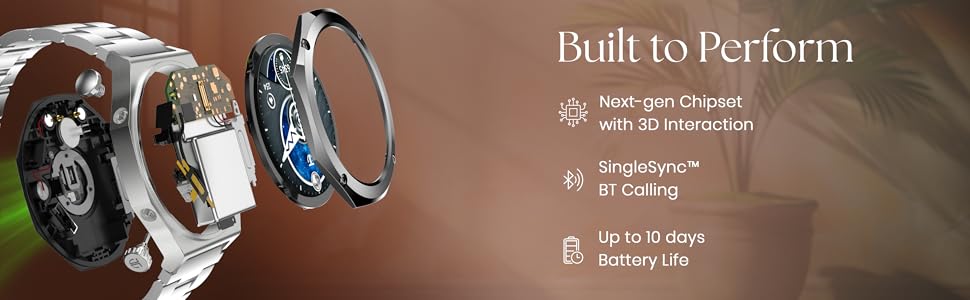
Image: Exploded view of the Titan Maestro Smart Watch, illustrating its internal chipset, Bluetooth calling capability, and long battery life.
4. Setup
4.1 Charging the Smart Watch
Before initial use, fully charge your Titan Maestro Smart Watch. Use the provided charging cable and connect it to a standard USB power adapter (not included).
- Connect the magnetic end of the charging cable to the charging points on the back of your smartwatch. Ensure a secure connection.
- Plug the USB-A end of the cable into a USB power adapter (5V/1A recommended) or a computer's USB port.
- The watch display will indicate charging status. A full charge typically takes approximately 2 hours.
4.2 Pairing with Your Smartphone
To unlock all features, pair your Titan Maestro with the companion app on your smartphone.
- Download the Titan Smart App from your smartphone's app store (available for Android and iOS devices).
- Ensure Bluetooth is enabled on your smartphone.
- Open the Titan Smart App and follow the on-screen instructions to create an account or log in.
- Select 'Add Device' or 'Pair New Device' within the app.
- The app will search for your Titan Maestro. Select your watch from the list of available devices.
- Confirm the pairing request on both your watch and smartphone.
5. Operating Your Smartwatch
5.1 Basic Navigation
- Touchscreen: Swipe left, right, up, or down to navigate through menus and notifications. Tap to select items.
- Crown/Buttons: Use the physical buttons on the side for quick access to functions or to return to the home screen.
5.2 Bluetooth Calling
The Titan Maestro supports Bluetooth calling, allowing you to make and receive calls directly from your wrist when connected to your smartphone.
- Ensure your watch is successfully paired with your phone via the Titan Smart App.
- Access the 'Phone' or 'Call' function on your watch to dial numbers or view recent calls.
- When a call comes in, you can answer or reject it from your watch.
5.3 AI Voice Assistant
Utilize the integrated AI Voice Assistant for hands-free control and information retrieval.
- Activate the AI Voice Assistant through the watch menu or a designated button.
- Speak your commands or questions clearly into the watch microphone.
5.4 Sports Modes and GPS
Track various activities with dedicated sports modes and built-in GPS.
- Select 'Sports' from the main menu to choose from activities like Cycling, Running, and Walking.
- The built-in GPS provides accurate location tracking, elevation data, and is compatible with Strava.
5.5 Other Features
- Weather Display: Get real-time weather updates on your wrist.
- Camera & Music Control: Remotely control your smartphone's camera and music playback.
- Find Phone: Locate your misplaced smartphone using your watch.
- DND Mode: Enable Do Not Disturb mode to silence notifications.
6. Health Monitoring Features
The Titan Maestro offers comprehensive health tracking capabilities to help you monitor your well-being.
- Heart Rate Monitor: Continuously track your heart rate throughout the day.
- Blood Oxygen Monitor (SpO2): Measure your blood oxygen saturation levels.
- Sleep Duration & REM Tracking: Monitor your sleep patterns, including REM sleep.
- Stress Monitor: Track your stress levels and receive insights.
- Hydration Alerts: Receive reminders to stay hydrated.
- Breathing Exercises: Guided breathing exercises to help manage stress.
- AI Morning Briefs: Get personalized daily summaries of your health data.
Video: An overview of the Titan Maestro Smart Watch's health tracking features and daily usage.
7. Customization
Personalize your Titan Maestro to match your style and preferences.

Image: The Titan Maestro's Hyper Personal UI, demonstrating animated menus for sports, various menu style customizations (Orbital, List, Gird, Tubular), and 3D menu styles.
- Watchfaces: Choose from over 150 curated premium watchfaces to suit any occasion.
- UI Customization: The hyper-personalized UI allows for multiple menu styles (Orbital, List, Gird, Tubular) and animated menus.
- Straps: Easily swap between the stainless steel and the additional silicone strap to change your watch's look.
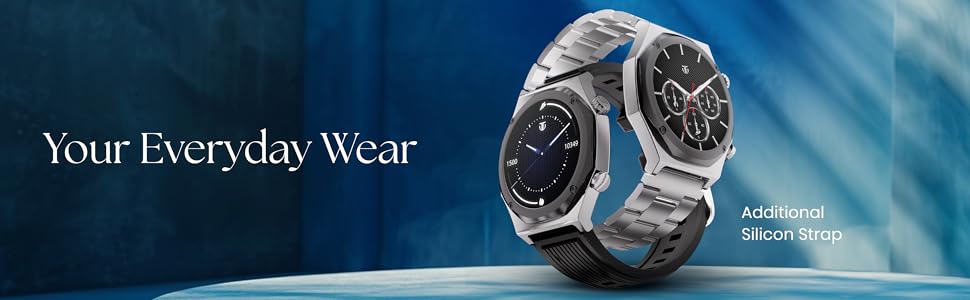
Image: The Titan Maestro Smart Watch displayed with both its metal and additional silicone strap options, emphasizing its adaptability for various styles and daily wear.
8. Water Resistance
The Titan Maestro Smart Watch is rated IP68 for water and dust resistance. This means it is protected against dust ingress and can withstand immersion in water up to 1.5 meters for 30 minutes.
Note: While water resistant, it is not recommended for diving, high-pressure water activities, or prolonged submersion. Avoid exposure to hot water or steam.
9. Battery and Charging
Your Titan Maestro is equipped with a Lithium Polymer battery designed for extended use.
- Battery Life: Enjoy up to 10 days of battery life on a single charge, depending on usage. Average battery life is 7 days.
- Charging Time: The watch fully charges in approximately 2 hours.
- Charging Cable: Use only the provided magnetic charging cable.
Video: Demonstrating the charging process and battery features of the Titan Maestro Smart Watch.
10. Maintenance
- Cleaning: Wipe the watch and straps regularly with a soft, dry cloth. For stubborn dirt, use a slightly damp cloth and mild soap, then rinse and dry thoroughly.
- Avoid Chemicals: Do not use harsh chemicals, cleaning solvents, or strong detergents, as these can damage the watch's finish and seals.
- Storage: Store your watch in a cool, dry place when not in use.
- Charging Contacts: Keep the charging contacts on the back of the watch clean and free of debris to ensure proper charging.
11. Troubleshooting
If you encounter issues with your Titan Maestro Smart Watch, refer to the following common solutions:
| Problem | Solution |
|---|---|
| Watch not turning on | Ensure the watch is fully charged. Connect to the charger for at least 15 minutes. |
| Unable to pair with phone | Check if Bluetooth is enabled on your phone. Restart both the watch and phone. Ensure the Titan Smart App is updated. |
| Inaccurate health data | Ensure the watch is worn snugly on your wrist, not too tight or too loose. Clean the sensor on the back of the watch. |
| Short battery life | Reduce screen brightness, disable continuous heart rate monitoring if not needed, limit notifications, and ensure background app usage is optimized. |
| Charging issues | Verify the charging cable is securely connected to both the watch and power source. Clean the charging contacts. Try a different USB power adapter. |
For further assistance, please contact Titan customer support.
Video: A promotional video showcasing the Titan Smart Crown Collection, which includes the Maestro model.
12. Specifications
| Feature | Detail |
|---|---|
| Model Number | 90208NM01 |
| Display Type | AMOLED |
| Screen Size | 1.47 Inches |
| Resolution | 466 x 466 pixels |
| Max Brightness | 750 Nits |
| Refresh Rate | 60Hz |
| Operating System | Android (compatible) |
| Connectivity | Bluetooth |
| Special Features | Activity Tracker, Phone Call, Health Tracking |
| GPS | Built-in GPS with Strava Compatibility |
| Water Resistance | IP68 (up to 1.5 Millimetres depth) |
| Battery Type | Lithium Polymer |
| Average Battery Life | 7 Days (up to 10 days) |
| Charging Time | 2 Hours |
| Case Material | Stainless Steel |
| Band Material | Silicone, Stainless Steel |
| Item Weight | 160 Grams |
| Dimensions (D x W x H) | 1.1D x 5W x 4.7H Centimeters |
13. Warranty and Support
Your Titan Maestro Smart Watch comes with a 1-Year Limited Warranty from the date of purchase. This warranty covers manufacturing defects under normal use.
For warranty claims, technical support, or any inquiries, please contact Titan customer service. Keep your proof of purchase for warranty validation.
Manufacturer Contact Information: Imported by Titan Company Limited 3 Sipcot Industries complex, Hosur- 635126


