
FLAMMA FF02
FLAMMA FF02 Drum Machine and Footswitch Toppers User Manual
Model: FF02
Product Overview
The FLAMMA FF02 Drum Machine is a versatile rhythm pedal designed for guitarists, offering a wide range of drum grooves and customization options. It comes bundled with 10 durable metal footswitch toppers to enhance the longevity and feel of your pedals.

Image: The FLAMMA FF02 Drum Machine (blue pedal) shown alongside a set of 10 colorful metal footswitch toppers.
Key Features:
- Extensive Drum Grooves: Features 121 drum grooves across 11 distinct styles, including rock, jazz, blues, metal, and funk, suitable for various musical genres.
- Customizable Rhythms: Provides 66 memory slots organized into 11 groups (6 slots per group) for saving and quickly recalling customized drum loops.
- Real-Time Fill Function: Allows for the addition of creative drum fills during playback.
- Tap Tempo: Enables precise setting of the beats per minute (BPM) for drum patterns.
- Durable Footswitch Toppers: Constructed from high-quality aluminum alloy with internal plastic inlays, designed to protect and enhance the feel of your pedal footswitches.
Setup Guide
Package Contents:
- FLAMMA FF02 Drum Machine
- 10 Pcs Metal Footswitch Toppers
- User Manual (this document)
- Power Adapter (sold separately, unless specified otherwise)
Connecting the FF02 Drum Machine:
- Power Connection: Connect a compatible 9V DC power adapter (center negative) to the DC IN jack on the FF02. Ensure the power supply meets the pedal's specifications.
- Audio Input: Connect your instrument (e.g., guitar) to the INPUT (MONO) jack using a standard 1/4-inch instrument cable.
- Audio Output: Connect the OUTPUT L (MONO) jack to your amplifier, audio interface, or next pedal in your signal chain using a standard 1/4-inch instrument cable. If using stereo output, connect the OUTPUT R jack as well.

Image: The FF02 Drum Machine integrated into a pedalboard setup, demonstrating typical audio connections with other effects pedals.
Installing Footswitch Toppers:
- Identify the footswitches on your pedals where you wish to install the toppers.
- Align the footswitch topper over the existing footswitch. The internal plastic inlay is designed to grip the switch.
- Press down firmly until the topper is securely seated. Do not force it if it doesn't fit; ensure compatibility with your pedal's footswitch size.
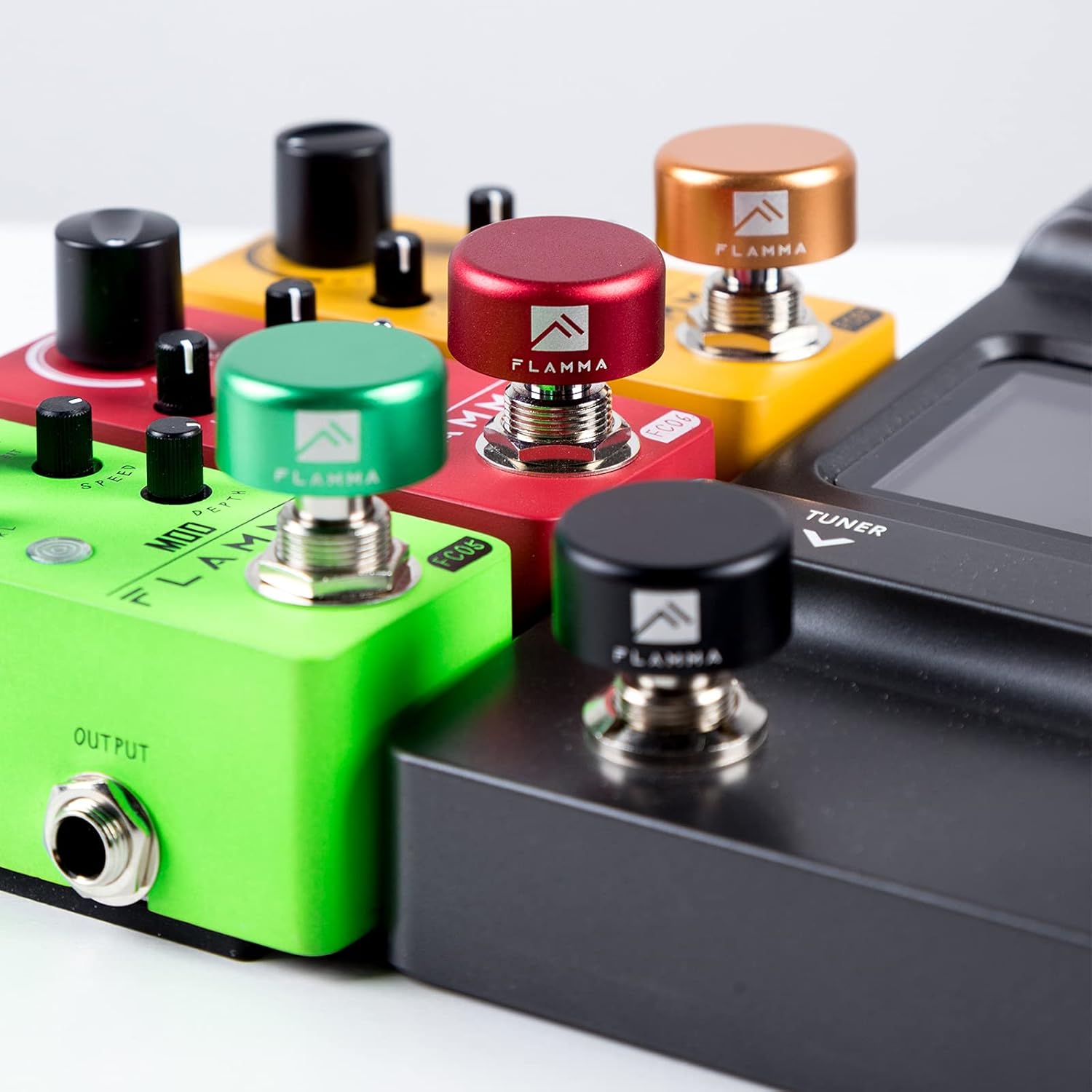
Image: A close-up view of several guitar pedals with colorful FLAMMA footswitch toppers installed on their switches, demonstrating their appearance when in use.
Operating Instructions
Basic Operation:
- Power On/Off: The unit powers on automatically when connected to a power supply. Disconnect power to turn off.
- STOP/PLAY Footswitch: Press to start or stop the drum pattern playback.
- FILL/TAP Footswitch:
- Single Press: Triggers a drum fill during playback.
- Tap Tempo: Tap this footswitch two or more times in rhythm to set the BPM of the current drum pattern.

Image: The FLAMMA FF02 Drum Machine with its screen showing "Tap" and a BPM value of "120", illustrating the Tap Tempo function.
Selecting Drum Styles and Grooves:
The FF02 offers 121 drum grooves across 11 styles. Use the 'GROUP/SAVE' and 'SETTING/VOLUME' knobs to navigate and select.

Image: The FLAMMA FF02 Drum Machine displaying "Group 01" and "Slot 1" with "Country 4/4" selected, indicating the interface for choosing drum styles and patterns.
- GROUP/SAVE Knob: Rotate to select different drum style groups (e.g., Rock, Jazz, Blues). Press to enter save mode for custom loops.
- SETTING/VOLUME Knob: Rotate to select specific drum grooves within the chosen group. Press to adjust the overall volume of the drum machine.
Saving Custom Rhythms:
The FF02 allows you to save up to 66 customized drum loops across 11 groups.
- Adjust the desired drum groove, tempo, and other settings.
- Press and hold the 'GROUP/SAVE' knob until the display indicates save mode.
- Use the 'GROUP/SAVE' and 'SETTING/VOLUME' knobs to select the desired group and slot for saving.
- Press the 'GROUP/SAVE' knob again to confirm and save the rhythm.
Maintenance
- Cleaning: Use a soft, dry cloth to clean the exterior of the drum machine and footswitch toppers. Avoid abrasive cleaners or solvents.
- Storage: Store the unit in a dry environment, away from extreme temperatures, direct sunlight, and high humidity.
- Cable Management: Ensure all cables are connected securely and are not under undue strain to prevent damage to jacks and connectors.
- Footswitch Toppers: The aluminum alloy construction and internal plastic inlays are designed for durability. Periodically check for secure fit.

Image: A detailed view of a footswitch topper, highlighting its robust aluminum alloy shell and the protective rubber inlay designed to prevent scratches and ensure a secure fit.
Troubleshooting
| Problem | Possible Cause | Solution |
|---|---|---|
| No sound output. | Incorrect cable connection; Low volume setting; Power issue. | Check all audio cables are securely connected to INPUT and OUTPUT. Increase the 'SETTING/VOLUME' knob. Ensure the power adapter is correctly connected and functional. |
| Drum patterns do not change. | Incorrect knob operation. | Ensure you are rotating the 'GROUP/SAVE' knob to change groups and the 'SETTING/VOLUME' knob to change grooves within a group. |
| Footswitch topper is loose. | Improper installation; Incompatible footswitch size. | Re-press the topper firmly onto the footswitch. Ensure the footswitch diameter is compatible with the topper's internal grip. |
Specifications
| Feature | Detail |
|---|---|
| Model | FF02 |
| Drum Grooves | 121 (across 11 styles) |
| Custom Rhythm Slots | 66 (11 groups, 6 per group) |
| Input | 1/4-inch Mono Audio Jack |
| Output | 1/4-inch L (Mono) and R Audio Jacks |
| Power Supply | 9V DC (Center Negative, not included unless specified) |
| Footswitch Topper Material | Aluminum Alloy with Plastic Inlay |
| Footswitch Topper Dimensions | Approx. 24mm (0.94 inch) diameter, 12mm (0.47 inch) height (internal diameter approx. 10mm / 0.39 inch) |
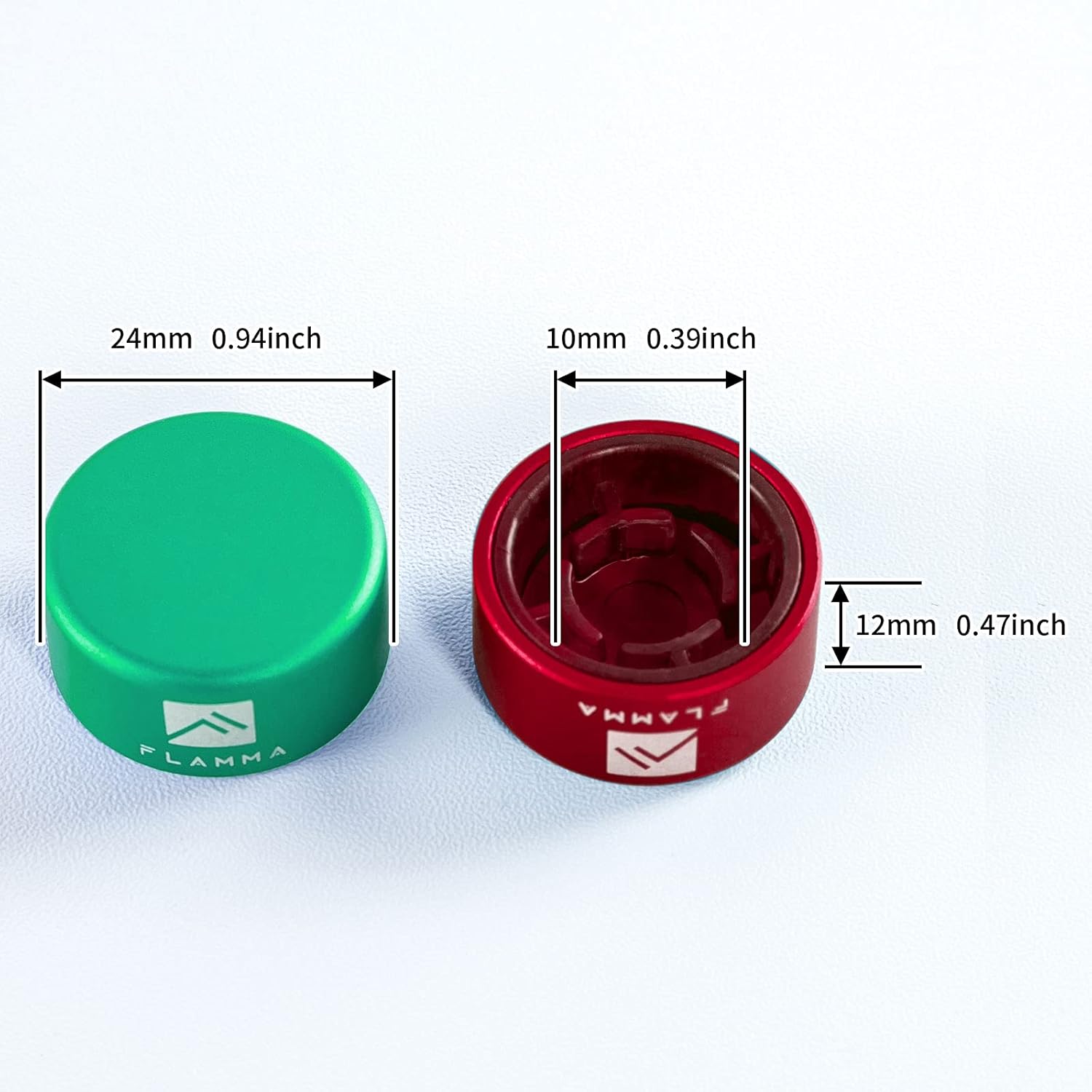
Image: A diagram illustrating the key dimensions of a footswitch topper, including its overall diameter (24mm / 0.94 inch), height (12mm / 0.47 inch), and internal diameter (10mm / 0.39 inch).
Warranty and Support
FLAMMA products are designed for reliability and performance. For warranty information and technical support, please refer to the official FLAMMA website or contact your local distributor.
Online Resources: For the latest updates, FAQs, and additional support, please visit the official FLAMMA website: www.flamma.com
Customer Service: If you encounter any issues not covered in this manual, please contact FLAMMA customer support through their official channels.
Related documentsFF02


Ask a question about this manual
Ask about setup, troubleshooting, compatibility, parts, safety, or missing instructions. Manuals+ will review the question and use this page’s manual context to help answer it.