
Introduction
Thank you for choosing the LEDIARY 24-inch Low Profile Ceiling Fan with Integrated LED Light. This manual provides essential information for the safe installation, operation, and maintenance of your new ceiling fan. Please read these instructions thoroughly before beginning installation or use, and retain this manual for future reference.
Safety Information
To reduce the risk of electric shock, fire, or personal injury, always follow these basic safety precautions:
- Power Disconnection: Always turn off power at the main circuit breaker or fuse box before beginning installation or performing any maintenance.
- Qualified Electrician: Installation should be performed by a qualified electrician or a person with experience in electrical wiring.
- Mounting Structure: Ensure the mounting structure can support the weight of the fan (approximately 7.41 pounds).
- Wiring: All wiring must be in accordance with national and local electrical codes.
- Blade Clearance: Ensure fan blades are at least 7 feet (2.1 meters) from the floor and have adequate clearance from walls or other obstructions.
- Indoor Use Only: This fan is designed for indoor use in dry locations.
Package Contents
Verify that all components are present before installation:
- Ceiling Fan Unit (with integrated LED light)
- Remote Control
- Mounting Bracket
- Fan Blades (8 pieces, require assembly)
- Hardware Pack (screws, wire nuts, etc.)
- Instruction Manual

Image: The LEDIARY 24-inch low profile ceiling fan, showcasing its design along with the included remote control and a smartphone displaying the control app interface.
Specifications
| Feature | Detail |
|---|---|
| Brand | LEDIARY |
| Model | B0F4KD2X39 |
| Color | Black |
| Fan Design | Ceiling Fan (Low Profile Fandelier) |
| Power Source | DC Motor |
| Style | Modern |
| Product Dimensions | 24"D x 24"W x 5.2"H |
| Room Type | Bedroom, Kids Room, Kitchen, Living Room, Study Room |
| Special Features | 3 CCT (Correlated Color Temperature), 6 Fan Speeds, Dimmable, Reversible DC Motor, Timer |
| Recommended Use | Indoor |
| Voltage | 120 Volts |
| Included Components | LED Lights, Remote Control |
| Control Method | Remote, Bluetooth App |
| Item Weight | 7.41 pounds |
| Light Output | 3200 Lumens |
| Noise Level | ≤30dB |

Image: A diagram illustrating the product dimensions (24 inches diameter, 5.2 inches height) and recommended room size for optimal performance (up to 8.5ft x 8.5ft, ceiling height 7ft-10ft).
Setup and Installation
Detailed installation steps are provided in the included installation guide. The following is a general overview:
- Power Off: Before starting, ensure the power supply to the installation area is completely turned off at the circuit breaker.
- Mounting Bracket: Securely attach the mounting bracket to a ceiling joist or an approved electrical junction box capable of supporting the fan's weight.
- Wiring: Connect the electrical wires from the ceiling to the fan's wiring according to the provided wiring diagram. Use the included hanging loop to temporarily support the fan during wiring for safety and ease of installation.
- Assemble Fan Blades: Attach the 8 fan blades to the central motor unit as instructed.
- Attach Fan Unit: Carefully lift the fan unit and secure it to the mounting bracket. Ensure all connections are tight and the fan is stable.
- Power On & Test: Restore power and test the fan and light functions.

Image: A close-up view highlighting the fan's construction, including the metal frame for solid installation, high-quality fan blades (requiring assembly), and the acrylic diamond face for aesthetic appeal.
Operating Instructions
Your LEDIARY ceiling fan offers versatile control options and features:
Dual Control: Remote & Bluetooth App
- Control the fan and light functions separately using the included remote control or a Bluetooth-enabled smartphone app.
- The app requires Bluetooth connectivity to operate.
Fan Speed Settings
The fan features 6 adjustable speeds:
- Speeds 1-2: Soft Wind for gentle air circulation.
- Speeds 3-4: Natural Wind for comfortable airflow.
- Speeds 5-6: Cool Wind for stronger air movement.

Image: A visual representation of the 6 fan speed settings, categorized into Soft Wind (1-2), Natural Wind (3-4), and Cool Wind (5-6), with corresponding icons.
Reversible All-Season Motor
The DC motor allows for reversible blade rotation, optimizing comfort year-round:
- Summer Mode (Downdraft): Blades rotate counter-clockwise to create a cooling breeze.
- Winter Mode (Updraft): Blades rotate clockwise to circulate warm air trapped near the ceiling.

Image: A diagram illustrating the reversible DC motor function, showing airflow patterns for Summer Mode (forward cool airflow) and Winter Mode (reverse warm airflow).
Stepless Dimming & Color Temperature Adjustment
The integrated LED light offers customizable illumination:
- Brightness: Smooth dimming from 10% to 100%.
- Color Temperature: Adjustable between 3000K (Warm White), 4500K (Natural White), and 6000K (Cool White).
- Memory Function: The light will recall the last used brightness and color temperature settings when turned on again.

Image: A visual guide demonstrating the adjustable color temperatures (3000K, 4500K, 6000K) and the smooth dimming range from 10% to 100% brightness.
Timer Setting
Set the fan to automatically turn off after 2 hours using the timer function. This feature operates with low noise and no audible beeps.

Image: A diagram illustrating the intelligent and simple 2-hour timer setting, emphasizing low noise and no beeps.
Quiet Operation
The fan is designed for quiet operation, with a noise level of 30dB or less, ensuring a comfortable environment.

Image: A graph comparing the low running noise of the LEDIARY ceiling fan (30dB) to other common sounds like breathing (10dB), library (20dB), chat (50dB), and meeting (70dB).
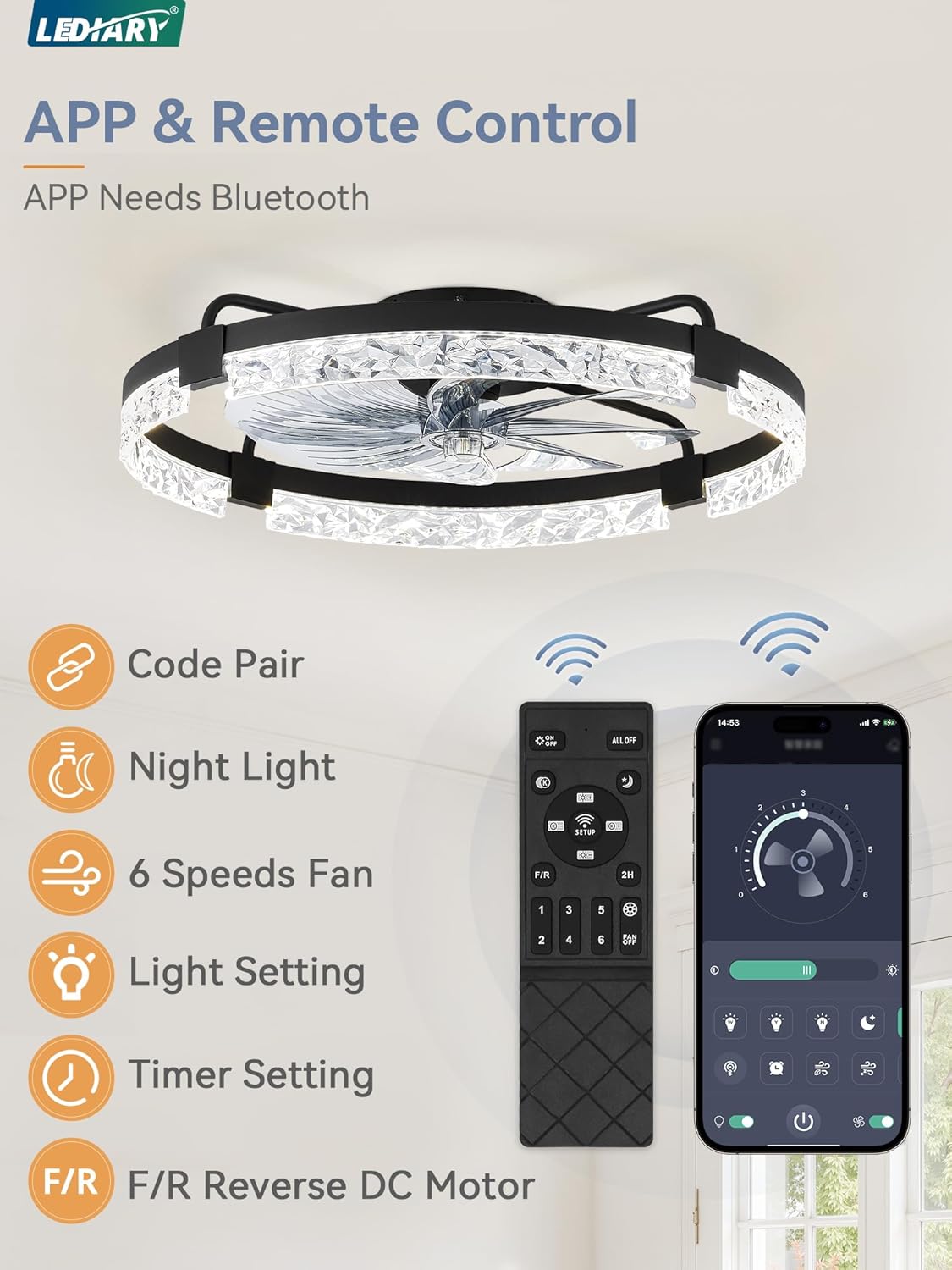
Image: The remote control and smartphone app interface for the LEDIARY ceiling fan, detailing functions such as code pairing, night light, 6 fan speeds, light settings, timer settings, and forward/reverse DC motor control.
Maintenance
Regular maintenance helps ensure the longevity and optimal performance of your ceiling fan:
- Cleaning: Turn off power before cleaning. Use a soft, damp cloth to wipe down the fan housing and blades. Avoid using abrasive cleaners or solvents that could damage the finish.
- Blade Inspection: Periodically check the fan blades for any dust buildup. Clean as necessary to maintain balanced operation.
- Tighten Fasteners: Annually, check all screws and fasteners on the fan and mounting bracket to ensure they are securely tightened.
- No Lubrication Needed: The DC motor is permanently lubricated and does not require additional oiling.
Troubleshooting
If you encounter issues with your fan, refer to the following common problems and solutions:
| Problem | Possible Cause | Solution |
|---|---|---|
| Fan does not start | No power to the fan; Loose wire connections; Remote control battery low or not paired. | Check circuit breaker/fuse; Verify all wire connections are secure; Replace remote battery or re-pair remote with fan. |
| Light does not work | No power to the light; Loose wire connections; LED driver issue. | Check power supply; Verify light wiring; Contact customer support if LED driver is suspected. |
| Remote control not working | Battery depleted; Remote not paired; Obstruction between remote and receiver. | Replace battery; Follow pairing instructions in the full manual; Ensure clear line of sight to fan receiver. |
| Excessive noise or wobbling | Loose mounting screws; Unbalanced blades; Fan not securely attached. | Ensure all mounting screws are tight; Check for balanced blade assembly; Re-secure fan to mounting bracket. |
If these steps do not resolve the issue, please contact LEDIARY customer support.
Warranty and Support
LEDIARY provides a 2-year after-sales service for this product. If you encounter any issues or have questions regarding your ceiling fan, please do not hesitate to contact us. Our customer support team is committed to responding within 24 hours to assist you.
For support, please refer to the contact information provided in your purchase documentation or visit the official LEDIARY website.

Image: An icon symbolizing friendly customer service, indicating available technical support and warranty assistance.


