
1. Welcome
Thank you for choosing the Auusda Student Laptop T141J. This manual provides essential information for setting up, operating, maintaining, and troubleshooting your new laptop. Please read this guide thoroughly to ensure optimal performance and longevity of your device.
2. Package Contents
Upon opening your Auusda T141J laptop package, please verify that all the following items are included:
- Auusda Student Laptop T141J
- Power Adapter
- User Manual (this document)
3. Physical Overview
3.1 Front and Top View
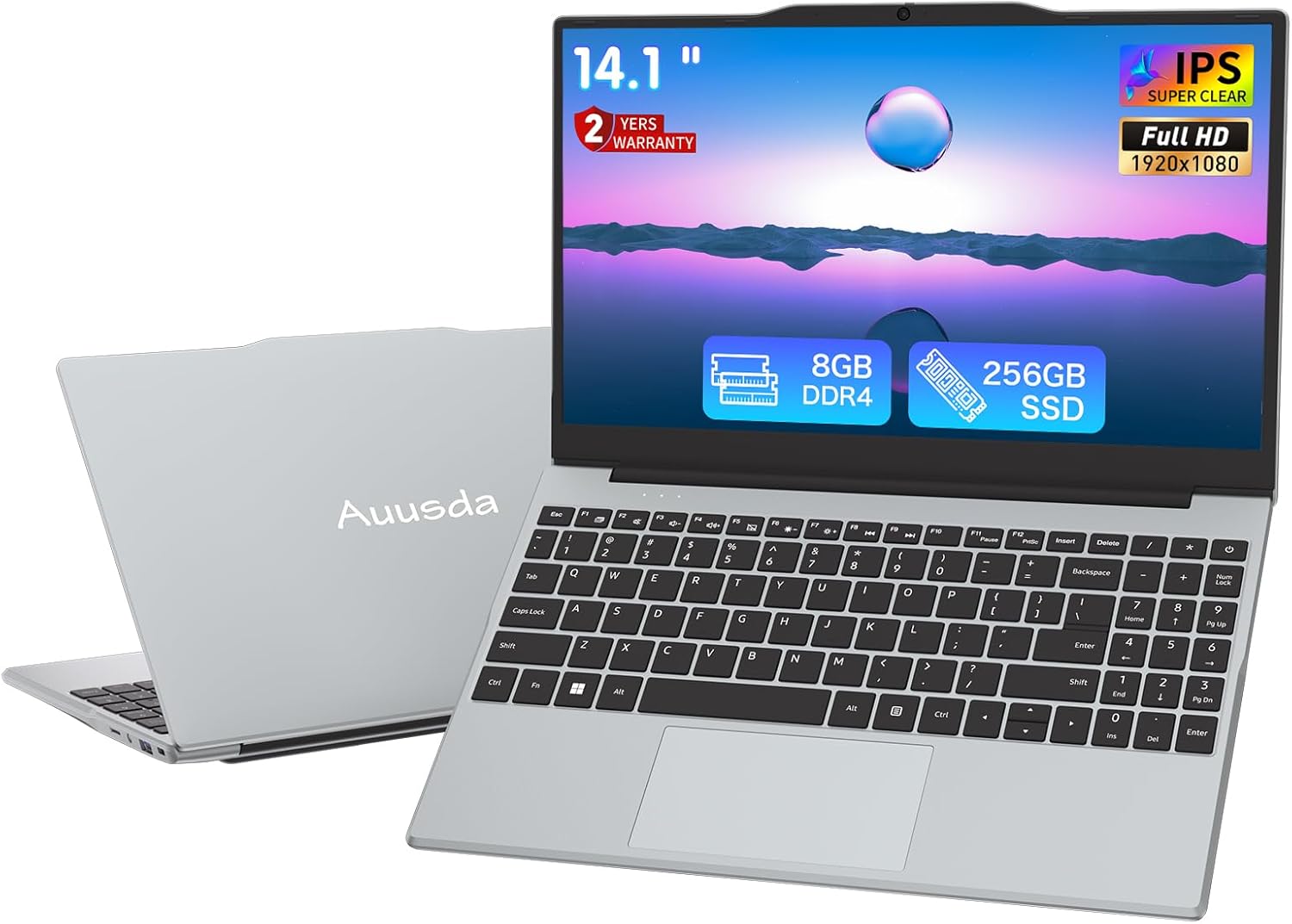
This image displays the Auusda T141J laptop from the front, showcasing its 14.1-inch Full HD display and full-size keyboard with a numeric keypad. The sleek silver design is visible, along with the Auusda branding on the lid. Key features like 8GB DDR4 RAM and 256GB SSD are highlighted on the screen.

This diagram provides an overview of the laptop's core components and features. It highlights the Quad-Core N5095 processor, 8GB DDR4 2666MHz RAM, 256GB PCIe 3.0 NVMe SSD, 14.1-inch IPS 1920x1080 display, Wi-Fi 5, Bluetooth 4.2, and a security camera with a privacy shutter.
3.2 Side View and Ports

This image illustrates the various ports available on the sides of the Auusda T141J laptop. On one side, you will find a miniSD card slot, a 3.5mm standard headphone jack, a USB 3.0 interface, and a security lock slot. On the other side, there is an HDMI port, a DC 3.5 port for power input, and another USB 3.0 port. These ports allow for versatile connectivity with external devices and displays.
4. Initial Setup
4.1 Powering On
- Connect the power adapter to the DC 3.5 port on the side of the laptop and plug it into a power outlet.
- Open the laptop lid.
- Press the power button, typically located on the top right of the keyboard, to turn on the device.
4.2 Operating System Configuration
Your Auusda T141J laptop comes pre-installed with Windows 11 Pro. Upon the first boot, you will be guided through the initial setup process, which includes:
- Selecting your region and language.
- Connecting to a Wi-Fi network.
- Accepting the Windows End User License Agreement.
- Creating or signing in with a Microsoft account.
- Setting up security features like a PIN or password.
Follow the on-screen prompts to complete the setup. An active internet connection is recommended for the best experience during this process.
5. Operating Your Laptop
5.1 Keyboard and Touchpad
The laptop features a full-size keyboard with a dedicated numeric keypad for efficient data entry. The touchpad supports multi-touch gestures for navigation and interaction with the operating system.
5.2 Display Features

The Auusda T141J is equipped with a 14.1-inch Full HD (1920x1080) IPS display, offering wide viewing angles and clear, vibrant visuals. The screen can be rotated up to 180 degrees, allowing for flexible viewing positions and easier collaboration.

This image demonstrates the laptop's 180-degree hinge, which allows the screen to lay flat. This feature is useful for sharing content with others around a table or adjusting the viewing angle for personal comfort.
5.3 Connectivity
The laptop supports Wi-Fi 5 (802.11ac) for high-speed wireless internet access and Bluetooth 4.2 for connecting wireless peripherals such as headphones or mice. Physical ports include two USB 3.0 ports for data transfer and peripheral connections, an HDMI port for external displays, and a miniSD card slot for expanded storage or data transfer from memory cards.
5.4 Battery Management

The Auusda T141J is powered by a 7.7V 5000mAh lithium-ion polymer battery. For optimal battery life, it is recommended to fully charge the laptop before first use. Avoid completely draining the battery frequently. When not in use for extended periods, store the laptop with a partial charge (around 50%).
6. Maintenance
6.1 Cleaning
- Screen: Use a soft, lint-free cloth lightly dampened with water or a screen-cleaning solution. Avoid harsh chemicals.
- Keyboard and Chassis: Use a soft, dry cloth. For stubborn dirt, a slightly damp cloth can be used, ensuring no liquid enters the device. Compressed air can help remove dust from between keys.
6.2 Software Updates
Regularly update your Windows 11 Pro operating system and device drivers to ensure optimal performance, security, and compatibility. You can check for updates via the Windows Settings menu.
7. Troubleshooting
If you encounter issues with your laptop, refer to the following common troubleshooting steps:
- Laptop not turning on: Ensure the power adapter is securely connected and the laptop has sufficient charge. Try holding the power button for 10-15 seconds to perform a hard reset.
- Slow performance: Close unnecessary applications, check for background processes, ensure sufficient free storage space, and run a system scan for malware.
- Wi-Fi connectivity issues: Restart your laptop and Wi-Fi router. Check if other devices can connect to the network. Update Wi-Fi drivers if necessary.
- Screen display problems: Ensure external monitors are properly connected if used. Adjust display settings in Windows. If the screen is black, try connecting to an external monitor to check if the laptop is functioning otherwise.
For more complex issues, please contact customer support.
8. Technical Specifications
| Feature | Specification |
|---|---|
| Model Name | T141J |
| Screen Size | 14.1 Inches |
| Screen Resolution | 1920 x 1080 Pixels (Full HD IPS) |
| Processor | Intel N5095 (4-Core, 2.0 GHz base, up to 2.9 GHz burst) |
| RAM | 8 GB DDR4 2666 MHz |
| Storage | 256 GB SSD (PCIE x 4) |
| Graphics Coprocessor | Intel UHD Graphics (Integrated) |
| Operating System | Windows 11 Pro |
| Wireless Type | 5 GHz Radio Frequency (Wi-Fi 5), Bluetooth 4.2 |
| USB Ports | 3 x USB 3.0 Ports |
| Other Ports | HDMI, 3.5mm Headphone Jack, Mini SD Card Slot, DC 3.5 Power Port |
| Battery | 7.7 Volts, 5000mAh Lithium-ion Polymer |
| Item Weight | 4.43 pounds (approx. 2.01 kg) |
| Product Dimensions | 12.6 x 8.3 x 0.7 inches (32 x 21.1 x 1.8 cm) |
9. Warranty and Support
Your Auusda T141J laptop comes with a 2-Year Warranty. During this 24-month warranty period, Auusda will provide free repair or return/exchange services for the computer, subject to the terms and conditions of the warranty.
9.1 Customer Support
For any questions, technical assistance, or warranty claims, please contact Auusda customer support:
- Email: Auusda.ltd@gmail.com
- Online: You can also log in to your Amazon account, navigate to 'Your Orders', and select 'Ask questions' for your purchase.

This image visually represents the after-sale service process, indicating contact methods via Amazon and direct email for support inquiries.
