
1. Introduction
This manual provides detailed instructions for the installation, operation, and maintenance of your FAHKNS Variable Frequency Drive (VFD) Inverter Converter. This device is designed to control the speed of 3-phase AC motors by adjusting the frequency and voltage of the power supplied to the motor. Please read this manual thoroughly before installation and operation to ensure safe and efficient use.
Key Features:
- Voltage: 220V
- Input Frequency: 50/60 Hz
- Output Frequency: 0-400 Hz
- Power: 1.5KW (2HP)
- Current: 8A
- Single-Phase Input, 3-Phase Output
- Digital display and intuitive button/knob control
- Multiple protection methods for safety
2. Safety Precautions
WARNING: Improper installation or operation can lead to serious injury or equipment damage. Always follow safety guidelines.
- Ensure the power supply is disconnected before wiring or performing any maintenance.
- Only qualified personnel should install, operate, and maintain this equipment.
- The VFD must be properly grounded to prevent electric shock.
- Do not touch the terminals of the VFD immediately after power-off, as residual voltage may be present.
- Install the VFD in a well-ventilated area, away from direct sunlight, moisture, and corrosive gases.
- Do not operate the VFD with wet hands.
- This VFD is designed for industrial applications. Do not use it for life-support systems or other applications where malfunction could cause serious injury or death.

Image: The VFD features multiple protection mechanisms including Overload Protection, Overheating Protection, Overvoltage/Overcurrent Protection, Ground Protection, Short Circuit Protection, and Low Phase Protection.
3. Product Overview
3.1 Dimensions

Image: The VFD measures approximately 6.45 inches (width) x 7.74 inches (depth) x 8.45 inches (height).
3.2 Control Panel Layout
The VFD features an intuitive control panel for easy operation and parameter adjustment.

Image: Detailed view of the VFD control panel, showing the 5-digit LED display, Speed Adjustment Knob, Forward/Reverse buttons, Shift Key, Numerical Modification Key, Enter or Exit Programming button, Function/Data Save Key, Start Key, and Stop/Reset Key.
3.3 Internal Components and Features
- DC Cooling Fan: Ensures low noise operation and efficient heat dissipation, crucial for maintaining optimal performance and longevity.
- Removable Control Panel: Allows for flexible installation and remote operation if desired.
- High Quality Circuit Board: Constructed with durable electronic components for reliability and resistance against shock.

Image: Close-up of the VFD's DC cooling fan, illustrating airflow for heat dissipation.

Image: The VFD showing its removable digital control panel.

Image: A view of the VFD's high-quality internal circuit board.
4. Specifications
| Feature | Specification |
|---|---|
| Brand | FAHKNS |
| Model Name | 160984-LTMHE-3 |
| Power Source | AC |
| Wattage | 1.5 KW |
| Voltage | 220 volts |
| Input Voltage | 220 volts AC |
| Output Power | 1500 watts |
| Output Voltage | 220 volts AC |
| Peak Output Power | 3000 watts |
| Electrical Output Waveform | Pure Sine Wave |
| Frequency | 50 hertz (Input: 50/60Hz, Output: 0-400Hz) |
| Item Dimensions (L x W x H) | 4.61" x 4.96" x 6.89" |
| Item Weight | 2.7 pounds |
| Color | White |
| UPC | 198519300343 |
5. Setup and Installation
5.1 Wiring Diagram
Follow the wiring diagram carefully to connect the VFD to your power supply and 3-phase AC motor. Ensure all connections are secure and correctly polarized.

Image: Wiring diagram showing connections for single-phase AC 220V input (L, N), 3-phase AC motor output (U, V, W), and grounding (GND).
Terminal Descriptions:
- L, N: Single-phase AC 220V (+/-15%) input terminals.
- U, V, W: Output terminals to connect to a 3-phase AC motor (Delta connection method).
- GND: Grounding terminal. Ensure proper grounding for safety.
5.2 Mounting
Mount the VFD in a vertical position on a stable, non-flammable surface. Allow sufficient clearance around the unit for proper ventilation and heat dissipation. Avoid mounting near heat sources or in areas with excessive vibration.
6. Operating Instructions
The VFD is designed for user-friendly operation with its digital display and control buttons.
6.1 Basic Operation
- Power On: Connect the VFD to the power supply as per the wiring diagram. The digital display will illuminate.
- Start Motor: Press the RUN button to start the motor.
- Adjust Speed: Rotate the Speed Adjustment Knob (labeled '7' in the control panel image) to increase or decrease the motor's operating frequency and speed.
- Change Direction: Use the FWD/REV buttons (labeled '4' in the control panel image) to change the motor's rotation direction.
- Stop Motor: Press the STOP/RESET button to stop the motor.
6.2 Programming and Parameter Adjustment
The VFD allows for advanced parameter settings to fine-tune its performance. Refer to the detailed parameter list in the full product manual for specific codes and values.
- Programming Mode: Press the PROG button (labeled '2') to enter programming mode.
- Navigate Parameters: Use the Numerical Modification Keys (Up/Down arrows, labeled '5' and '6') to scroll through parameters.
- Select/Modify: Press FUNC/DATA (labeled '3') to select a parameter or save a modified value.
- Shift Digits: Use the DISP (Shift) key (labeled '1') to shift between digits when entering numerical values.
- Exit Programming: Press PROG again to exit programming mode.
7. Maintenance
Regular maintenance ensures the longevity and reliable operation of your VFD.
- Cleaning: Periodically clean the VFD's exterior and cooling fan vents to prevent dust accumulation, which can hinder heat dissipation. Use a soft, dry cloth. Do not use liquid cleaners.
- Inspections: Regularly check all wiring connections for tightness and signs of wear or damage. Inspect the VFD for any visible damage or discoloration.
- Environment: Ensure the operating environment remains within the specified temperature and humidity ranges.
- Fan Check: Verify that the cooling fan is operating correctly and without obstruction.
CAUTION: Always disconnect power before performing any cleaning or inspection.
8. Troubleshooting
This section provides solutions to common issues you might encounter. For more complex problems, contact technical support.
| Problem | Possible Cause | Solution |
|---|---|---|
| VFD does not power on | No power supply; incorrect wiring; internal fault | Check power connections; verify input voltage; consult a technician if fault persists. |
| Motor does not start | Incorrect motor wiring; VFD in stop mode; parameter settings incorrect; motor overload | Check motor connections (U, V, W); press RUN; verify parameter settings; check motor load. |
| Motor speed unstable | Interference; improper parameter settings; motor load fluctuations | Ensure proper grounding; adjust acceleration/deceleration times; check motor and load. |
| Overcurrent/Overload error | Motor overload; short circuit in motor or wiring; VFD capacity too low | Reduce motor load; check motor and wiring for shorts; ensure VFD matches motor power. |
| Overheating error | Insufficient ventilation; blocked cooling fan; high ambient temperature | Clear vents; ensure fan is working; improve ventilation; reduce ambient temperature. |
9. Applications
The FAHKNS VFD is versatile and suitable for a wide range of applications requiring motor speed control.
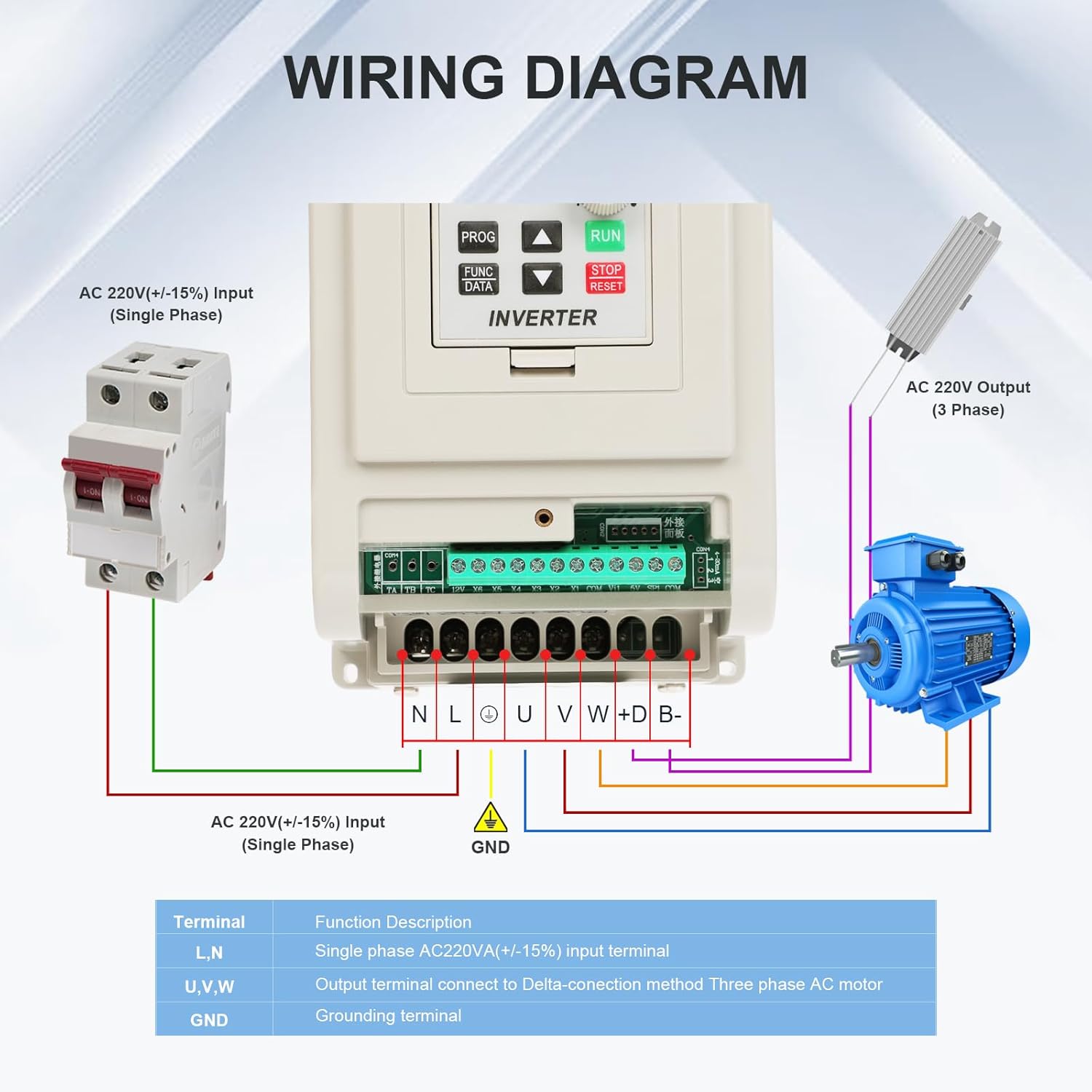
Image: Common applications for the VFD include fans, water pumps, compressors, and conveyor belts.
It is also suitable for:
- Injection Machines
- Roots Blowers
- Crushers
- Windlasses
- Ball Mills
- Rolling Mills
- Sewage Treatment equipment

Image: Visual representation of various industrial equipment compatible with the VFD, categorized by power type suitability.
10. Warranty and Support
Specific warranty information for the FAHKNS VFD Inverter Converter is not provided in this manual. Please refer to your purchase documentation or contact the retailer/manufacturer directly for warranty details and technical support.