1. Introduction
Thank you for choosing the realme Buds T200 Lite Wireless Earbuds. These earbuds are designed to provide a high-quality audio experience with features such as 4-microphone AI Environmental Noise Cancellation (ENC) for clear calls, up to 48 hours of total playback, fast charging capabilities, low latency gaming mode, and Google Fast Pair for seamless connectivity. This manual will guide you through the setup, operation, and maintenance of your new earbuds.
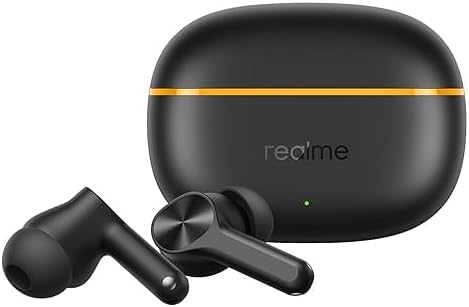
Image 1.1: realme Buds T200 Lite earbuds and their charging case.
2. What's in the Box
Please check the contents of your package. If any items are missing or damaged, contact customer support.
- realme Buds T200 Lite Earbuds (Left and Right)
- Charging Case
- USB Type-C Charging Cable
- Silicone Ear Tips (S, M, L sizes)
- User Manual
3. Setup
3.1 Charging the Earbuds and Case
Before first use, fully charge the earbuds and the charging case. Place the earbuds into the charging case and connect the USB Type-C cable to the charging port on the case and a power source. The indicator light on the case will show the charging status.
- Total Playback: Up to 48 hours with the charging case.
- Fast Charging: A 10-minute charge provides approximately 5 hours of playback.

Image 3.1: Illustration of 48 hours total playback and fast charging capability.
3.2 Pairing with Your Device
- First-time Pairing: Open the charging case. The earbuds will automatically enter pairing mode.
- Google Fast Pair: For Android devices, a pop-up notification will appear on your screen. Tap to connect.
- Manual Pairing: On your device, go to Bluetooth settings and select "realme Buds T200 Lite" from the list of available devices.
- Re-pairing: If the earbuds do not connect automatically, place them back in the case, close the lid, then open it again to re-enter pairing mode.
4. Operating the Earbuds
4.1 Touch Controls
The realme Buds T200 Lite feature intuitive touch controls on each earbud. Specific gestures can be customized via the realme Link app.
- Play/Pause: Single tap.
- Next Track: Double tap.
- Previous Track: Triple tap.
- Answer/End Call: Single tap.
- Reject Call: Press and hold.
- Activate Voice Assistant: Press and hold (customizable).
- Switch Modes (e.g., Gaming Mode): Press and hold both earbuds (customizable).
4.2 Calls with AI ENC
The earbuds are equipped with 4 microphones and AI Environmental Noise Cancellation (ENC) technology to ensure your voice is clear during calls, even in noisy environments.

Image 4.1: Visual representation of Dual-Mic AI Noise Cancellation for clear calls.
4.3 Music Experience
Enjoy rich audio with the 12.4mm Dynamic Bass Driver, delivering deep, punchy bass and crisp highs for an immersive listening experience.

Image 4.2: Diagram illustrating the 12.4mm Dynamic Bass Driver.
4.4 Low Latency Gaming Mode
Activate the dedicated low latency gaming mode for a synchronized audio-visual experience, reducing delay during gameplay.
5. Maintenance
5.1 Cleaning
Regularly clean the earbuds and charging case to maintain optimal performance and hygiene.
- Use a soft, dry, lint-free cloth to wipe the earbuds and case.
- Remove ear tips and clean them with mild soap and water, then dry thoroughly before reattaching.
- Gently clean the charging contacts on both the earbuds and the case with a dry cotton swab.
5.2 Water Resistance
The realme Buds T200 Lite are IPX4 water resistant, meaning they are protected against splashing water from any direction. This makes them suitable for workouts and light rain, but they are not designed for submersion in water.

Image 5.1: Illustration of IPX4 Water Resistance for the earbuds.
5.3 Storage
Store the earbuds in their charging case when not in use to protect them and keep them charged. Avoid extreme temperatures and direct sunlight.
6. Troubleshooting
If you encounter any issues with your realme Buds T200 Lite, try the following steps:
- No Sound/Connection Issues:
- Ensure earbuds are charged.
- Turn off and on Bluetooth on your device.
- Forget the device in your Bluetooth settings and re-pair.
- Reset the earbuds (refer to the realme Link app or product support for specific reset instructions).
- Charging Issues:
- Check the charging cable and adapter.
- Ensure charging contacts on earbuds and case are clean and dry.
- Poor Call Quality:
- Ensure microphones are not obstructed.
- Check network signal strength on your phone.
7. Specifications
| Feature | Description |
|---|---|
| Brand | realme |
| Model Name | Buds T200 Lite |
| Model Number | T310 |
| Color | Black |
| Ear Placement | In Ear |
| Noise Control | Environmental Noise Cancellation (AI ENC) |
| Audio Driver Type | 12.4mm Dynamic Bass Driver |
| Frequency Range | 20Hz - 20,000Hz |
| Connectivity Technology | Wireless (Bluetooth) |
| Bluetooth Version | 5.0 |
| Battery Life (Total) | Up to 48 Hours |
| Fast Charging | 10-minute charge = 5 hours playback |
| Water Resistance Level | IPX4 |
| Control Method | App (realme Link) |
| Compatible Devices | Cellphones |
8. Safety Information
Please read and follow these safety guidelines to prevent damage to your device or injury to yourself:
- Do not disassemble, repair, or modify the product.
- Keep the device dry and away from moisture.
- Avoid exposing the device to extreme temperatures.
- Do not use harsh chemicals or detergents to clean the device.
- Dispose of the device and its battery responsibly according to local regulations.
- Prolonged exposure to high volume levels may cause hearing damage. Adjust volume to a safe level.
9. Warranty and Support
For warranty information and customer support, please refer to the warranty card included in your package or visit the official realme website. You can also contact realme customer service for assistance with product inquiries, troubleshooting, or service requests.


