
Introduction
The AIWA IC-320DAB is a 1 DIN car multimedia player designed for versatility, powerful sound, and modern connectivity. This device features a detachable front panel for enhanced security, offering multiple playback options through its high-quality AM/FM and DAB+ tuner. Its LCD screen with dimmer function ensures optimal visibility in various lighting conditions. It also incorporates Bluetooth 5.1 technology for wireless music streaming and hands-free calls, along with an auxiliary input for connecting external devices. With 30 preset stations, a USB output for charging, and compatibility with steering wheel controls (SWC) in some vehicles, this player is an ideal choice for upgrading any car audio system.
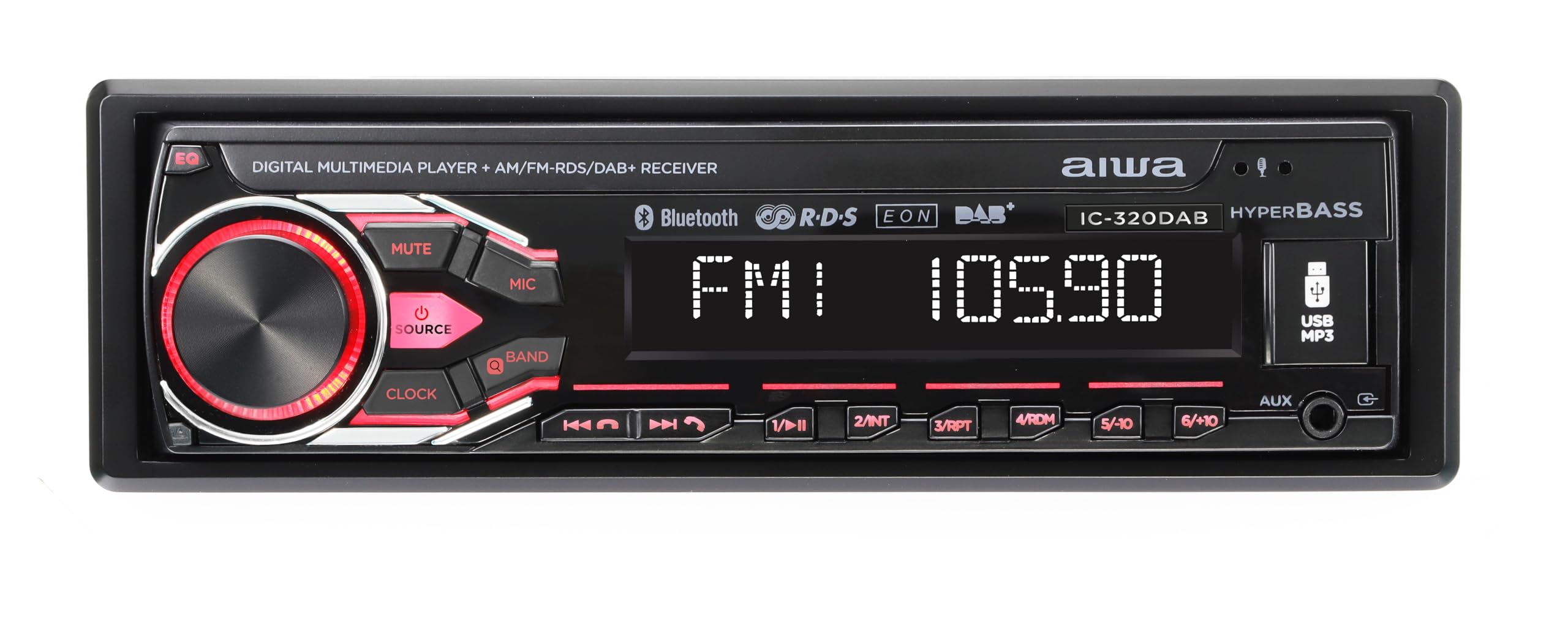
Image: AIWA IC-320DAB Car Multimedia Player. This image shows the front panel of the car multimedia player, highlighting its LCD screen and control buttons.
What's in the Box
- Plastic housing
- Fixing and extraction tools
- External microphone
Product Features
- Output Power: 4 channels of 40W each, ensuring powerful and clear audio.
- Detachable Panel: Enhanced security by allowing removal of the front panel to deter theft.
- Tuning Options: AM/FM tuner with 30 preset stations. DAB+ for clearer and more stable digital reception.
- LCD Display: Optimal readability, with a dimmer function to adjust to light conditions.
- Customizable Illumination: 7 colors to match the driver's preference or vehicle interior.
- Bluetooth 5.1 Connectivity: Ideal for streaming music from smartphones and making hands-free calls.
- Multiple Inputs and Outputs: USB for charging and playback, Aux In for external devices, L/R audio output, and subwoofer output.
- SWC (Steering Wheel Control) Support: Allows control of the player from the steering wheel in compatible vehicles.
- Equalization Options: Bass and Treble adjustments to customize the sound experience.
- External Microphone Included: For optimal hands-free calls with high voice quality.
Setup and Installation
Proper installation is crucial for optimal performance and safety. It is recommended that installation be performed by a qualified professional.
- Preparation: Disconnect the vehicle's negative battery terminal before starting any electrical work. Ensure you have all necessary tools and the included fixing/extraction tools.
- Mounting: Insert the metal mounting sleeve into the vehicle's dashboard opening. Bend the tabs to secure it. Slide the AIWA IC-320DAB unit into the sleeve until it clicks into place.
- Wiring:
- Connect the main power harness: Yellow wire to constant 12V, Red wire to accessory 12V (switched), Black wire to ground.
- Connect speaker wires: Ensure correct polarity for each speaker (front left, front right, rear left, rear right).
- Connect the antenna cable (AM/FM/DAB+).
- Connect the external microphone to the designated input for hands-free calling.
- If using, connect RCA outputs for external amplifiers or subwoofers.
- If your vehicle supports Steering Wheel Controls (SWC), connect the SWC wires according to your vehicle's wiring diagram and the player's instructions.
- Final Checks: Reconnect the vehicle's negative battery terminal. Turn on the ignition and test the unit's basic functions (power, radio, volume).
- Attach Front Panel: Carefully attach the detachable front panel to the main unit. Ensure it is securely latched.
Operating Instructions
Basic Operation
- Power On/Off: Press the POWER button (usually the volume knob) to turn the unit on or off.
- Volume Control: Rotate the VOLUME knob to adjust the sound level.
- Source Selection: Press the SRC or MODE button to cycle through available sources (FM, AM, DAB+, Bluetooth, USB, AUX).
- Detaching Front Panel: Press the RELEASE button and carefully pull the front panel off. Store it safely to prevent theft.
Radio (AM/FM/DAB+)
- Band Selection: In radio mode, press the BAND button to switch between FM1, FM2, FM3, AM1, AM2, and DAB+ (if available).
- Automatic Tuning: Press and hold the SEEK or TUNE buttons to automatically search for the next strong station.
- Manual Tuning: Briefly press the SEEK or TUNE buttons to manually adjust the frequency step by step.
- Preset Stations: To save a station, tune to the desired frequency, then press and hold one of the numeric preset buttons (1-6) until you hear a beep. To recall a preset, briefly press the corresponding numeric button.
Bluetooth Operation
- Pairing:
- Select Bluetooth as the source.
- On your mobile device, enable Bluetooth and search for available devices.
- Select "AIWA IC-320DAB" from the list. If prompted for a PIN, enter "0000".
- Once paired, the unit will display "Connected".
- Audio Streaming: Play music on your paired device, and it will stream through the car's speakers. Use the player's PLAY/PAUSE, NEXT, and PREVIOUS buttons to control playback.
- Hands-Free Calling:
- Answer Call: Press the CALL or ANSWER button when an incoming call rings.
- End Call: Press the END CALL button.
- Dialing: Use your phone to dial, and the audio will route through the player.
USB and AUX Input
- USB Playback: Insert a USB drive into the USB port. The unit will automatically switch to USB mode and begin playing compatible audio files. Use PLAY/PAUSE, NEXT, and PREVIOUS buttons for control. The USB port also provides charging for devices.
- AUX Input: Connect an external audio device (e.g., MP3 player) to the 3.5mm AUX input using an audio cable. Select AUX as the source. Control playback from the external device.
Sound Settings
- EQ (Equalizer): Press the EQ button to cycle through preset equalizer modes (e.g., Pop, Rock, Classic) or to access custom bass/treble adjustments.
- Bass/Treble: Use the menu or dedicated buttons to adjust bass and treble levels for personalized sound.
- Dimmer: Access the system settings to adjust the display brightness (dimmer function) for comfortable viewing day or night.
- Illumination Color: Navigate to the illumination settings to choose from 7 available colors for the button backlighting.
Maintenance
- Cleaning the Unit: Use a soft, dry cloth to wipe the unit's surface. For stubborn dirt, dampen the cloth lightly with water. Avoid using abrasive cleaners, solvents, or alcohol, as these can damage the finish.
- Cleaning the Front Panel: The detachable front panel should be handled with care. Clean it gently with a soft, dry cloth. Do not apply excessive pressure to the LCD screen.
- USB Port: Keep the USB port free from dust and debris. Avoid inserting foreign objects.
- Storage of Detachable Panel: When removed, store the front panel in its protective case (if provided) or a soft pouch to prevent scratches and damage.
- Temperature: Avoid exposing the unit to extreme temperatures, direct sunlight for prolonged periods, or high humidity.
Troubleshooting
| Problem | Possible Cause | Solution |
|---|---|---|
| No power |
|
|
| No sound |
|
|
| Bluetooth not connecting |
|
|
| Poor radio reception |
|
|
| USB not playing |
|
|
Specifications
| Feature | Detail |
|---|---|
| Product Type | 1 DIN Car Multimedia Player with LCD Screen, AM/FM and DAB+ |
| Brand | Aiwa |
| Model Number | B0F4DZWWBJ (Internal ASIN, product model is IC-320DAB) |
| Output Power | 4 x 40 Watts (RMS) / 160 Watts (Peak) |
| Connectivity Technology | Bluetooth 5.1 |
| Tuner Type | AM/FM, DAB+ |
| Display | LCD with Dimmer Function |
| Illumination | Multi-color (7 options) |
| Inputs | USB (for playback and charging), Aux In (3.5mm) |
| Outputs | L/R Audio Output, Subwoofer Output |
| Special Features | Detachable Front Panel, External Microphone, SWC Support, Bass/Treble EQ |
| Dimensions (Package) | 24.3 x 22.9 x 8.1 cm |
| Weight (Package) | 1.27 kg |
| Country of Origin | China |
Warranty and Support
This AIWA IC-320DAB Car Multimedia Player comes with a manufacturer's warranty.
- Warranty Period: Two years from the date of purchase.
- Coverage: The warranty covers defects in materials and workmanship under normal use. It does not cover damage caused by misuse, accident, unauthorized modification, or improper installation.
- Claiming Warranty: In case of a defect, please contact your retailer or the official Aiwa customer support with your proof of purchase.
- Customer Support: For technical assistance, troubleshooting, or warranty inquiries, please refer to the contact information provided with your purchase or visit the official Aiwa website.


