1. Introduction
This user manual provides essential information for the proper use, setup, and maintenance of your Braun Oral-B iO5 Replacement Power Handle, Type 3776. This handle is designed to be used with your existing Oral-B iO charger and brush heads. It is compatible with Oral-B iO3, iO4, iO5, and iO6 series toothbrushes.
Please read these instructions carefully before using the product and retain them for future reference.
2. Product Overview
The Braun Oral-B iO5 Replacement Power Handle (Type 3776) is a core component of the Oral-B iO electric toothbrush system. It features advanced technology for effective cleaning and supports multiple brushing modes. This package includes the power handle only; brush heads and charger are sold separately or are expected to be used from your existing Oral-B iO setup.
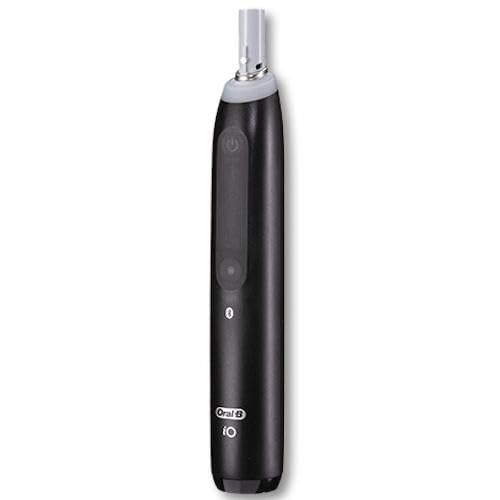
Image 1: Braun Oral-B iO5 Replacement Power Handle (Type 3776). This image shows the sleek black design of the power handle, highlighting its ergonomic grip and the power button.
3. Setup
- Charging the Handle: Place the iO5 power handle on your existing Oral-B iO magnetic charger. The handle will indicate charging status via its display or indicator lights. Ensure the handle is fully charged before first use. A full charge typically takes approximately 3 hours.
- Attaching a Brush Head: Align the brush head with the metal shaft on the power handle and push it down until it clicks into place. Do not twist the brush head.
- First Use: After charging and attaching a brush head, the toothbrush is ready for use.
4. Operating Instructions
- Power On/Off: Press the power button on the handle to turn the toothbrush on or off.
- Changing Brushing Modes: While the toothbrush is on, press the mode button (if available on your specific iO5 model) to cycle through the available brushing modes. The iO5 handle supports up to 5 distinct modes. Refer to your original iO manual for specific mode descriptions.
- Brushing Technique: Wet the brush head and apply a small amount of toothpaste. Place the brush head against your teeth at a slight angle, covering each tooth surface. Guide the brush head slowly from tooth to tooth. The iO technology provides micro-vibrations for effective cleaning. Do not scrub aggressively.
- Smart Pressure Sensor: Your iO5 handle is equipped with a smart pressure sensor. It will illuminate green when you are brushing with optimal pressure, red when you are brushing too hard, and white when you are brushing too softly. Adjust your pressure accordingly.
- Timer: The toothbrush features a built-in 2-minute timer, with a quadpacer that signals every 30 seconds to move to a different quadrant of your mouth.
5. Maintenance
- Cleaning the Handle: After each use, rinse the brush head thoroughly under running water with the handle switched on. Then, turn off the handle and remove the brush head. Rinse both the handle and brush head separately. Wipe the handle with a damp cloth. Do not immerse the handle in water.
- Cleaning the Charger: Unplug the charger before cleaning. Wipe the charger surface with a damp cloth. Ensure the charger is completely dry before plugging it back in.
- Replacing Brush Heads: Dentists recommend replacing your brush head every 3 months, or sooner if the bristles are splayed or worn.
- Storage: Store the toothbrush handle and brush heads in a clean, dry place when not in use.
6. Troubleshooting
- Toothbrush not turning on: Ensure the handle is fully charged. If the issue persists, try cleaning the charging contacts on both the handle and the charger.
- Toothbrush not charging: Verify that the charger is properly plugged into a working power outlet. Ensure the handle is correctly seated on the charger.
- Reduced brushing performance: Replace the brush head if it is old or worn. Ensure the handle is fully charged.
- Unusual noise or vibration: Remove the brush head and reattach it securely. If the noise persists, contact customer support.
If you encounter problems not listed here, please refer to the original Oral-B iO manual or contact Braun customer support for assistance.
7. Specifications
| Model Type | 3776 |
| Compatibility | Oral-B iO3, iO4, iO5, iO6 Toothbrushes |
| Power Source | Battery Powered |
| Item Weight | 8 ounces (approximately 227 grams) |
| Manufacturer | Braun |
8. Warranty and Support
For information regarding warranty coverage, please refer to the warranty card included with your original Oral-B iO product or visit the official Braun website. As this is a replacement power handle, its warranty may be subject to the terms of your original purchase.
For technical support, spare parts, or service, please contact Braun customer service. Contact details can typically be found on the Braun official website or on your original product packaging.


