
Czlife Z7
Contents
Czlife Z7 Steam Mop Instruction Manual
Model: Z7 (HD-QJ308)
Important Safety Instructions
Please read all instructions carefully before using your Czlife Z7 Steam Mop. Failure to follow these instructions may result in electric shock, fire, or serious injury.
- Always ensure the appliance is unplugged from the power outlet before filling or emptying the water tank, or when not in use.
- Do not leave the steam mop unattended while it is powered on.
- Use only clean tap water in the water tank. Do not add cleaning solutions, perfumes, or other chemicals, as this may damage the appliance or create unsafe steam.
- Keep the appliance out of reach of children and pets.
- Do not direct steam at people, animals, or electrical appliances. Steam is hot and can cause burns.
- Always allow the appliance to cool down completely before handling or changing accessories.
- Do not use the steam mop on unsealed hardwood floors, unglazed ceramic tiles, or any surface that is sensitive to heat or moisture. Test on an inconspicuous area first.
- Ensure the water tank is securely locked in place before operation.
- Do not immerse the appliance in water or any other liquid.
Package Contents
Your Czlife Z7 Steam Mop package includes the following items:
- 1 x Main Unit
- 1 x Water Tank
- 2 x Aluminum Tube Assembly (Extension Poles)
- 1 x Mop Head Assembly
- 2 x Microfiber Mop Pads
- 1 x Brush Connecting Pipe
- 1 x Ironing Brush
- 1 x Glass Door and Window Scraper
- 1 x Nylon Brush
- 1 x Stainless Steel Brush
- 1 x Jet Nozzle
- 1 x Sponge Head
- 1 x Steam Scraper
- 1 x Ironing Brush Sleeve
- 1 x Measuring Cup
- 1 x Narrow Brush
- 1 x Color Package Box
- 1 x Instruction Manual

Image: All accessories included with the Czlife Z7 Steam Mop, laid out for easy identification.
Video: A detailed overview of the 13-in-1 steam mop set and its various components.
Product Overview
The Czlife Z7 Steam Mop is a versatile 13-in-1 cleaning solution designed for deep cleaning various surfaces using powerful steam.
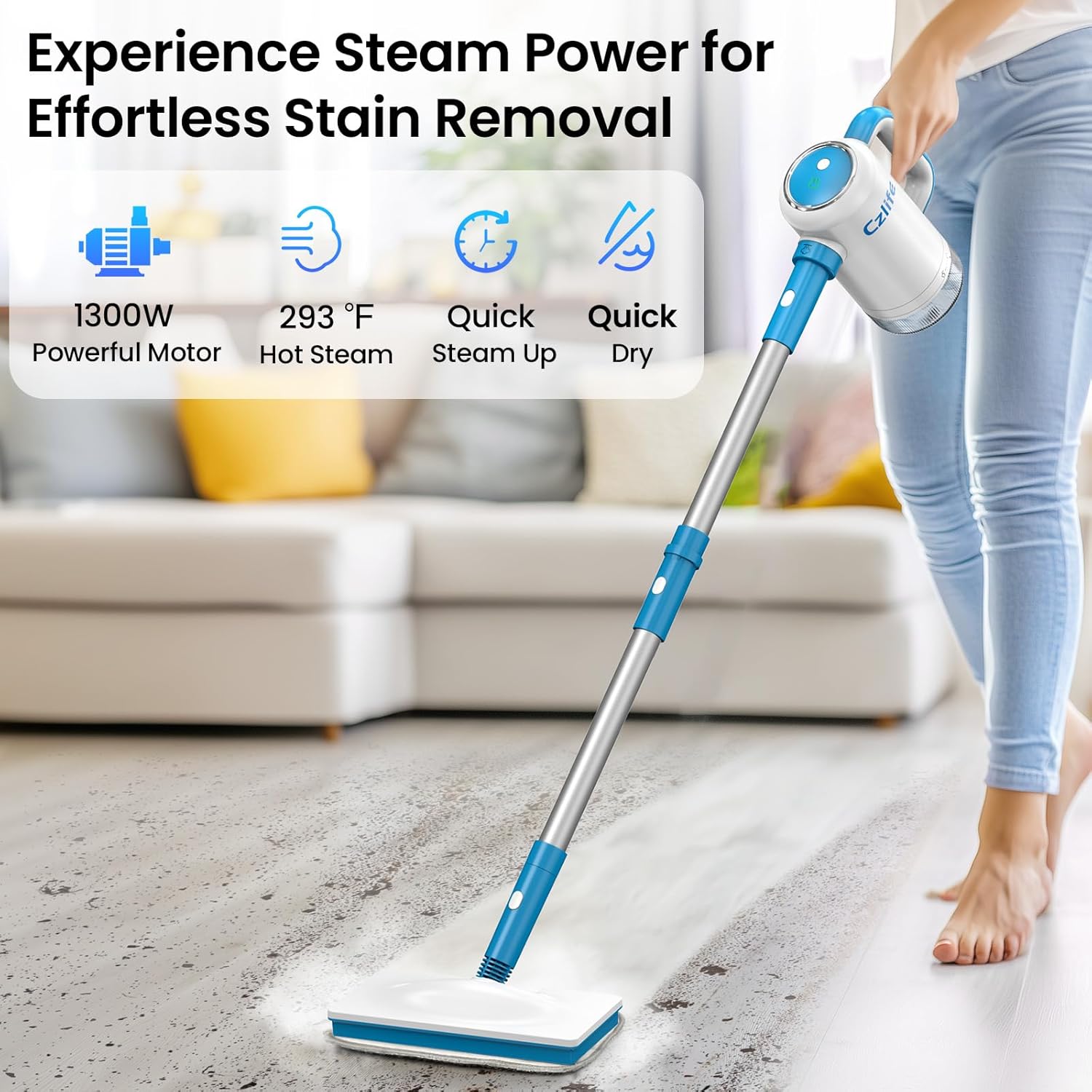
Image: The Czlife Z7 Steam Mop shown in both upright mop and handheld cleaner configurations, highlighting its versatility and included accessories.
Key Features:
- 1300W Powerful Motor: Ensures robust steam generation.
- 293°F (160°C) Hot Steam: Effectively removes stubborn stains and sanitizes surfaces.
- Quick Steam Up: Heats up in just 20 seconds.
- Quick Dry: Leaves surfaces dry quickly after cleaning.
- Detachable 13oz (370ml) Water Tank: Easy to refill, provides up to 25 minutes of continuous cleaning.
- Smart Water Level Detection & Anti-Dry Burn Protection: Ensures safe operation.
- Slim Rotating Mop Head: Designed for easy maneuverability in tight spaces and under furniture.
- 16.4ft (5m) Power Cord: Offers extended reach for cleaning larger areas.

Image: Close-up of the slim rotating mop head demonstrating its 120-degree left/right and 90-degree up/down flexibility for enhanced maneuverability.
Assembly
Assembling the Steam Mop:
- Step 1: Connect the aluminum tube assemblies to the main unit. Ensure they click securely into place.
- Step 2: Attach the mop head assembly to the bottom of the aluminum tube.
- Step 3: Secure a microfiber mop pad to the mop head.
- Step 4: Fill the water tank (see Setup section) and insert it into the main unit.
- Step 5: Plug in the power cord and press the power button to begin heating.

Image: Visual guide for assembling the Czlife Z7 Steam Mop into its upright configuration.
Assembling the Handheld Steam Cleaner:
- Step 1: Ensure the main unit is detached from the aluminum tube assemblies.
- Step 2: Attach the desired cleaning accessory (e.g., jet nozzle, brush) directly to the steam outlet of the main unit. For some accessories, a brush connecting pipe may be needed first.
- Step 3: Fill the water tank (see Setup section) and insert it into the main unit.
- Step 4: Plug in the power cord and press the power button to begin heating.

Image: Visual guide for assembling the Czlife Z7 into its handheld steam cleaner configuration with various attachments.
Video: Demonstrates the assembly of the steam mop and handheld cleaner, including attaching extension poles and various nozzles.
Setup
Filling the Water Tank:
- Ensure the steam mop is unplugged.
- Press the water tank release button and carefully remove the detachable water tank from the main unit.
- Open the water tank cap.
- Using the provided measuring cup, fill the water tank with clean tap water up to the "MAX" line (370ml / 13oz). Do not overfill.
- Close the water tank cap securely.
- Reinsert the water tank into the main unit until it clicks into place.

Image: The detachable 13oz water tank being removed and refilled with water, showing the "MAX" fill line.
Powering On:
- Plug the power cord into a suitable electrical outlet (AC 120V).
- Press the power button on the main unit. The indicator light will illuminate, signaling that the unit is heating up.
- The steam mop will heat up in approximately 20 seconds. Once ready, the indicator light will change (refer to your manual for specific light indicators).
Operating Instructions
The Czlife Z7 Steam Mop offers 2 adjustable steam modes for various cleaning needs.
General Operation:
- Ensure the water tank is filled and the unit is powered on and heated.
- Select the desired steam mode (refer to your manual for specific controls).
- For floor cleaning, gently glide the mop head over the surface. The slim rotating head allows for easy maneuvering around obstacles.
- For handheld cleaning, direct the steam nozzle towards the area to be cleaned.
- The 13oz water tank provides up to 25 minutes of continuous steam.

Image: The steam mop effectively cleaning different floor types such as hardwood, tile, laminate, vinyl, stone, carpet, and marble.
Recommended Surfaces:
This steam mop is safe for a variety of sealed surfaces, including:
- Hardwood
- Marble
- Tile
- Stone
- Laminate
- Vinyl
- Carpet (with carpet glider attachment)
- Windows, Upholstery, Sink, Fabric, Furniture, Grout, Kitchen, Bathroom, Bedroom, Living room, Car, Sofa (with appropriate attachments)
Video: Demonstrates the 13-in-1 steam cleaning capabilities for various surfaces around the home.
Using Attachments
The Czlife Z7 comes with a wide array of attachments to tackle different cleaning tasks:

Image: A visual representation of the diverse cleaning attachments for the Czlife Z7, showcasing their application in different areas like grout, windows, and kitchen surfaces.
- Microfiber Mop Pads: For general floor cleaning.
- Carpet Glider: Attach over the mop head for refreshing carpets.
- Brush Connecting Pipe: Extends reach for brushes and nozzles.
- Ironing Brush & Sleeve: For steaming garments and fabrics.
- Glass Door and Window Scraper: For streak-free cleaning of glass surfaces.
- Nylon Brush: For general scrubbing of dirt and grime on various surfaces.
- Stainless Steel Brush: For tough, baked-on messes on durable surfaces like grills or oven racks.
- Jet Nozzle: For concentrated steam cleaning in tight corners or stubborn spots.
- Sponge Head: For gentle scrubbing and absorption.
- Steam Scraper: For removing dried-on residue.
- Narrow Brush: For precise cleaning in small gaps and crevices.
Video: Showcases the versatility of the steam cleaner, including its use for clothes steaming.
Maintenance
Cleaning Microfiber Mop Pads:
- Remove the microfiber mop pads from the mop head.
- Machine wash the pads with warm water and mild detergent. Do not use bleach or fabric softener.
- Air dry or tumble dry on low heat.
Emptying the Water Tank:
- Always unplug the appliance and allow it to cool down before emptying.
- Remove the water tank and empty any remaining water.
- Wipe the tank dry with a clean cloth.
Storage:
- Ensure the appliance is completely cool and dry before storing.
- Store the steam mop and all accessories in a cool, dry place, preferably in the provided carrying bag.
Troubleshooting
| Problem | Possible Cause | Solution |
|---|---|---|
| No steam or low steam output | Water tank is empty or low. Appliance not heated sufficiently. Steam nozzle/attachment clogged. | Refill water tank. Wait 20 seconds for heating. Clean nozzle/attachment. |
| Water leaking from unit | Water tank not properly installed. Water tank cap not closed securely. | Reinstall water tank until it clicks. Ensure cap is tightly closed. |
| Appliance not turning on | Not plugged in. Power button not pressed. | Check power connection. Press the power button firmly. |
| Streaks on floor after cleaning | Mop pad is dirty. Too much water/steam. | Replace or clean mop pad. Adjust steam mode to lower setting. |
Specifications
- Model Name: Z7
- Item Model Number: HD-QJ308
- Wattage: 1300 watts
- Voltage: 120V
- Power Source: AC
- Item Weight: 4.4 Pounds
- Tank Volume: 370 Milliliters (13 ounces)
- Heat Time: 20 Seconds
- Maximum Temperature: 293 Degrees Fahrenheit (160°C)
- Product Dimensions: 9.17"D x 11.51"W x 45.27"H
- Cord Length: 16.4ft (5m)
- Color: Blue
- Form Factor: Upright & Handheld
- Special Feature: Detachable water tank
Warranty & Support
For warranty information or technical support, please contact Czlife customer service. Our team is available to assist you with any questions or concerns regarding your Z7 Steam Mop.

Image: A customer service representative ready to assist with product inquiries.
You can also visit the official Czlife Store for more product information and accessories.
Ask a question about this manual
Ask about setup, troubleshooting, compatibility, parts, safety, or missing instructions. Manuals+ will review the question and use this page’s manual context to help answer it.