1. Introduction
This manual provides detailed instructions for the installation, operation, and maintenance of your SriHome 8MP PTZ Surveillance Camera (Model SH055B). This advanced security camera features multi-lens technology, dual-band Wi-Fi connectivity, powerful AI detection capabilities, and versatile night vision modes to ensure comprehensive monitoring of your property.
The camera combines images from three lenses to provide an ultra-wide 180° field of view, with a dedicated PTZ lens for detailed zoom and tracking. It supports intelligent detection of people, vehicles, pets, and even flame identification, sending timely alerts to your mobile device. With two-way audio, you can communicate remotely, and multiple night vision modes ensure clear imaging in various lighting conditions.
2. Product Components
Please ensure all components are present and in good condition before proceeding with installation:
- SriHome SH055B Surveillance Camera
- Power Adapter
- User Manual (this document)
- Mounting Screws
3. Setup Guide
3.1. Unboxing and Initial Inspection
Carefully remove the camera and all accessories from the packaging. Inspect for any signs of damage. If any components are missing or damaged, please contact customer support.
3.2. Mounting the Camera
The camera is designed for wall mounting. Choose a location that provides the desired field of view and is within range of your Wi-Fi network and a power outlet. Use the provided screws to securely mount the camera.
3.3. Powering On
Connect the power adapter to the camera's power input port and then plug the adapter into a standard electrical outlet. The camera will initiate its self-test sequence, indicated by LED lights.
3.4. App Installation and Connection
- Download the SriHome APP from your device's app store (iOS/Android).
- Open the app and create a new account or log in if you already have one.
- Follow the in-app instructions to add your new camera. This typically involves scanning a QR code on the camera or manually entering its ID.
- Connect the camera to your 2.4GHz or 5GHz Wi-Fi network as prompted by the app. Ensure your mobile device is connected to the same network during the initial setup.
- Once connected, you will be able to view the live feed and access camera settings.

The SriHome SH055B camera with its multi-lens design, alongside a smartphone displaying the live feed and control interface of the SriHome app.
4. Operating Instructions
4.1. Panoramic View and PTZ Control
The camera features a unique multi-lens system providing an ultra-wide 180° panoramic view from the upper lenses and a controllable PTZ (Pan-Tilt-Zoom) view from the lower lens. The app allows you to switch between these views or display them simultaneously.

A visual representation of the camera's dual monitoring capability, showing a wide panoramic view from the upper lens and a detailed, tracked view from the lower PTZ lens focusing on a person.
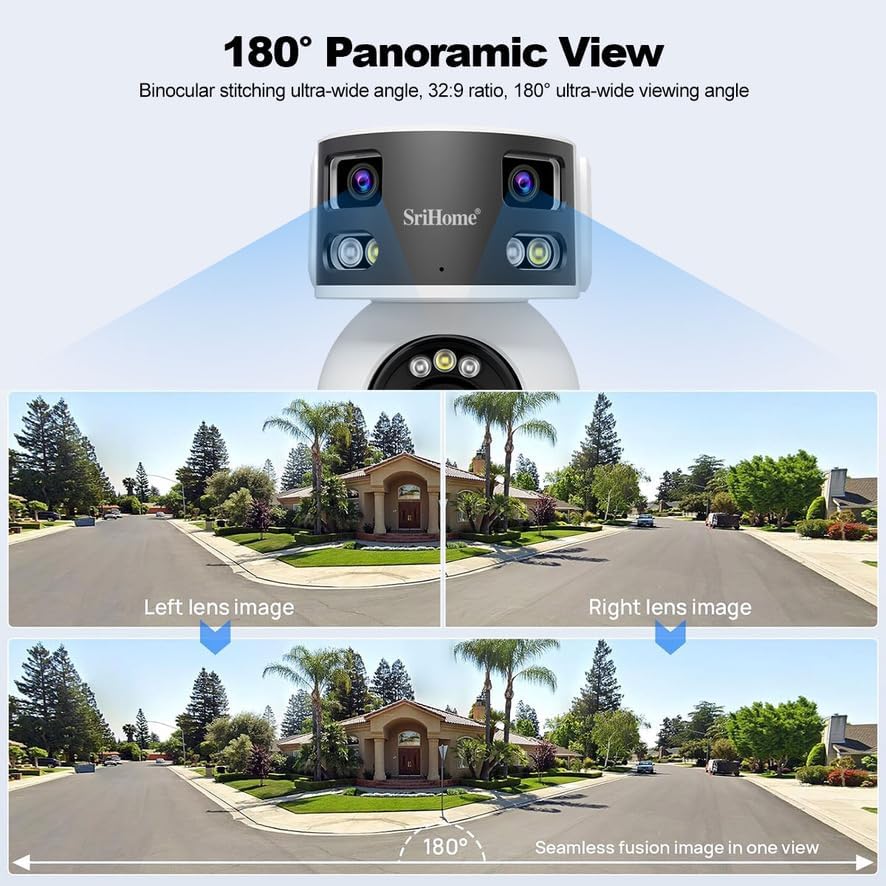
An illustration demonstrating how the camera achieves a seamless 180-degree panoramic view by stitching together images from its multiple lenses, providing a comprehensive wide-angle perspective.

A diagram explaining the camera's 'Three lenses, Two screens' design, featuring a fixed panoramic lens for a wide overview and a PTZ lens for detailed, controllable monitoring, each displayed on a separate screen within the app.
4.2. AI Detection Features
The camera incorporates powerful AI algorithms for intelligent detection and alerts:
- Human Detection: Accurately identifies human figures, reducing false alarms from other movements.
- Vehicle Detection: Recognizes vehicles, useful for monitoring driveways or parking areas.
- Pet Detection: Distinguishes pets from humans, preventing unnecessary alerts.
- Flame Identification: Detects flames and sends immediate warnings, enhancing safety.
- Human Tracking: The PTZ lens can automatically follow detected human movement.
When an event is detected, the camera can trigger sound and light warnings and send real-time push notifications to your mobile phone.

An image illustrating the camera's flame identification feature, showing a detected flame and a mobile phone receiving a real-time alarm notification from the SriHome app.

A scenario demonstrating the camera's sound and light warning system, where the camera activates a siren and flashing lights upon detecting a person, simultaneously sending an alarm push notification to a mobile device.
4.3. Night Vision Modes
The camera offers three distinct night vision modes for clear visibility in low-light conditions:
- IR Night Vision: Standard black and white infrared vision, effective up to 15 meters.
- Color Night Vision: Utilizes built-in spotlights to provide full-color images at night.
- Smart Night Vision: Operates in IR mode normally, but switches to color night vision and activates spotlights upon detection of motion.

A comparison of the camera's three night vision modes: traditional infrared (IR) night vision, full-color night vision, and smart night vision which activates spotlights for color imaging upon detection.
4.4. Two-Way Audio
Equipped with an integrated high-fidelity microphone and speaker, the camera supports real-time two-way audio communication. This allows you to speak to visitors, deter intruders, or interact with family and pets remotely via the SriHome app.
4.5. Dual-Band Wi-Fi Connectivity
The camera supports both 2.4GHz and 5GHz Wi-Fi bands, providing a more stable and faster connection with reduced signal interference. This ensures reliable video streaming and remote access.

An illustration emphasizing the camera's support for both 2.4GHz and 5GHz dual-band Wi-Fi, indicating improved signal stability and faster transmission speeds.
4.6. Privacy Protection
The system designates the first added user as the administrator, requiring authorization for other users to access the camera feed. You can also configure up to 4 privacy zones within the camera's view, which will be excluded from recording and live viewing.
4.7. Remote Access and Storage
Access live video feeds and review recorded footage anytime, anywhere via the SriHome app on your iOS or Android device. The camera supports local storage on a Micro SD card (up to 128GB, not included) for 24/7 recording and playback. No subscription fees are required for basic remote access and local storage features.
5. Maintenance
- Cleaning: Gently wipe the camera lens and body with a soft, dry cloth. Do not use harsh chemicals or abrasive cleaners.
- Firmware Updates: Regularly check the SriHome app for available firmware updates to ensure optimal performance and security.
- SD Card Management: If using a Micro SD card, periodically check its status and format it if necessary to maintain recording efficiency. Back up important footage before formatting.
- Power Supply: Ensure the camera is connected to a stable power supply. Avoid frequent power interruptions.
6. Troubleshooting
| Problem | Possible Cause | Solution |
|---|---|---|
| Camera offline/Cannot connect to Wi-Fi | Incorrect Wi-Fi password; Camera too far from router; Router issues; Incorrect Wi-Fi band selected. | Verify Wi-Fi password; Move camera closer to router; Restart router; Ensure you are connecting to the correct 2.4GHz or 5GHz band. |
| No video feed | Camera not powered on; Network connection issue; App glitch. | Check power connection; Verify Wi-Fi status; Restart camera and app. |
| Poor image quality at night | Lens obstruction; Incorrect night vision mode; Insufficient ambient light for color mode. | Clean the lens; Switch between IR, Color, and Smart Night Vision modes in the app; Ensure sufficient lighting for Color Night Vision. |
| Frequent false alarms | Motion sensitivity too high; Environmental factors (e.g., moving branches, shadows). | Adjust motion detection sensitivity in the app; Define specific detection zones; Utilize AI detection features (human/vehicle/pet detection). |
| SD card not recording | SD card full or corrupted; SD card not inserted correctly; Incorrect recording settings. | Check SD card insertion; Format SD card via app (backup data first); Verify recording schedule and settings. |
7. Specifications
| Feature | Detail |
|---|---|
| Model Number | SH055B |
| Brand | SriHome |
| Connectivity Technology | Wireless (Wi-Fi) |
| Wi-Fi Frequency | 2.4GHz / 5GHz Dual-Band |
| Video Recording Resolution | 1080p, 1440p |
| Frame Rate | 15 frames per second |
| Special Features | Two-way Audio, HD Resolution, PTZ Technology, AI Detection (Human, Vehicle, Pet, Flame) |
| Night Vision Range | 15 Meters |
| Usage Environment | Outdoor |
| Mounting Type | Wall Mount |
| Material | Plastic |
| Color | White |
| Voltage | 5 Volts |
| Water Resistance Level | Water Repellent |
| Product Dimensions (L x W x H) | 17 x 10 x 14.5 cm |
| Item Weight | 1 Kilogram |
| Recommended Uses | Indoor Security (Note: Product description states outdoor use, but recommended uses state indoor. Please verify with manufacturer if outdoor use is critical.) |
8. Warranty and Support
For warranty information and technical support, please refer to the documentation included with your purchase or visit the official SriHome website. You can also contact the seller directly through the platform where you purchased the product.


