
Introduction
Thank you for choosing the E-LekTech 36V 100Ah LiFePO4 Lithium Golf Cart Battery. This advanced battery is designed for superior performance and longevity in various applications, including golf carts, trolling motors, and marine systems. This manual provides essential information for safe installation, operation, and maintenance to ensure optimal performance and extend the lifespan of your battery.
Safety Information
- Always wear appropriate personal protective equipment (PPE), including safety glasses and gloves, when handling batteries.
- Ensure the battery is turned off and disconnected from all loads and charging sources before installation or maintenance.
- Avoid short-circuiting the battery terminals. Use insulated tools.
- Do not expose the battery to open flames, excessive heat, or direct sunlight for prolonged periods.
- Do not disassemble, puncture, or modify the battery.
- Keep the battery away from children and pets.
- In case of fire, use a Class D fire extinguisher. Water can exacerbate lithium battery fires.
- Dispose of batteries according to local regulations.
Package Contents
The E-LekTech 36V 100Ah LiFePO4 Lithium Golf Cart Battery package includes:
- 1 x E-LekTech 36V 100Ah LiFePO4 Lithium Battery
- 1 x Dedicated 36V Charger
- User Manual (this document)
- Necessary connection cables and hardware (may vary by package)
Note: The 36V lithium battery and 36V charger may be shipped in two separate packages.

Image: E-LekTech 36V 100Ah LiFePO4 Lithium Battery, accompanying charger, and a smartphone displaying the battery monitoring app.
Specifications
| Attribute | Value |
|---|---|
| Model Number | GC-BT-36-100 |
| Nominal Voltage | 36V |
| Capacity | 100Ah |
| Battery Type | LiFePO4 (Lithium Iron Phosphate) |
| Built-in BMS | 200A (Continuous Discharge), 500A (Peak Discharge) |
| Maximum Load Power | 7.68 kW |
| Lifespan | Up to 10 years / 10,000+ cycles |
| Charging Temperature | 32°F ~ 131°F (0°C ~ 55°C) |
| Discharge Temperature | -22°F ~ 131°F (-30°C ~ 55°C) |
| Item Weight | 59 lbs |
| Product Dimensions (L x W x H) | 19.52 x 10.6 x 8.8 inches |
| Number of Cells | 12 |
| Terminal Type | M8 |
| Automotive Fit Type | Universal Fit |
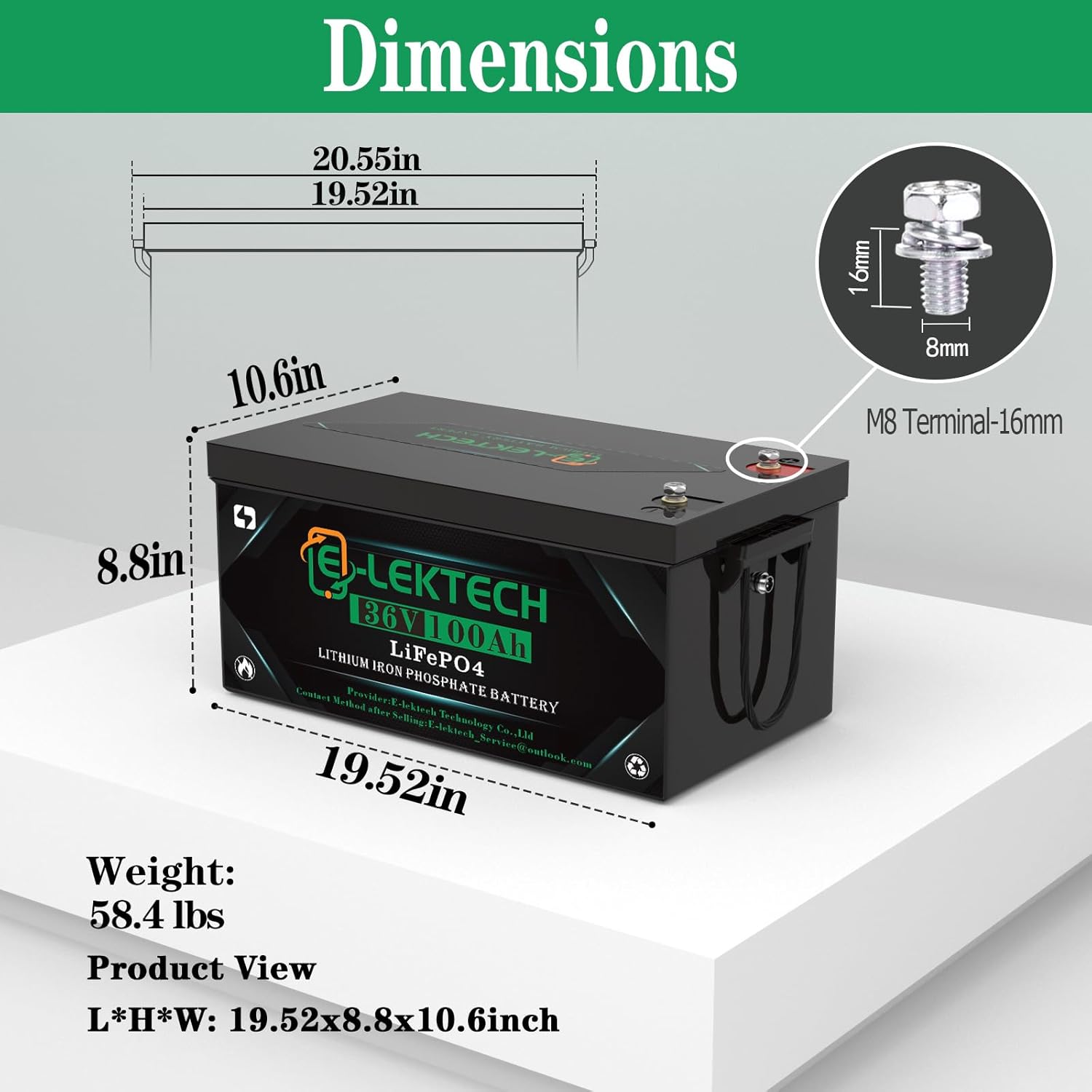
Image: Detailed diagram illustrating the length, width, and height of the battery, along with its weight and M8 terminal size.
Key Features
- Intelligent 200A Battery Management System (BMS): The upgraded 200A BMS provides continuous discharge current up to 200A and a peak current of 500A, supporting a maximum load power of 7.68kW. It offers comprehensive protection against overcharging, over-discharging, over-current, and short-circuiting, ensuring safe and reliable operation. The BMS also features a very low self-discharge rate.
- Convenient APP Monitoring: Monitor your battery's status in real-time via a dedicated smartphone application. The app displays battery percentage, voltage, current, capacity, and other vital information, offering smart and easy battery management. Refer to the product manual for app download and connection instructions.

Image: A golf cart with a smartphone mounted, showing the battery monitoring application interface.
- High Energy Density & Extended Cycle Life: Utilizing upgraded A-grade cells, this LiFePO4 battery offers high capacity, a low self-discharge rate, and minimal capacity loss. It is designed for over 10,000 charge cycles, providing a service life of up to 10 years.

Image: An exploded view of the battery highlighting the internal Grade A cells and the seven protection measures provided by the BMS.
- Portable and Expandable Capacity: Weighing only 59lbs and with compact dimensions (19.52 x 8.8 x 10.6 inches), the battery is portable and easy to install. It supports up to 6 units in parallel for increased capacity, making it suitable for various off-grid solar systems, home backup power, motorhomes, golf carts, and camping applications. When connecting batteries in series or parallel, ensure all batteries are fully charged to the same voltage level before connecting them. This prevents current imbalances and potential damage.
Setup and Installation
Proper installation is crucial for the safety and performance of your E-LekTech battery. If you are unsure about any steps, consult a qualified technician.
- Preparation:
- Ensure the golf cart's power is completely off.
- Remove any existing batteries. Clean the battery compartment thoroughly.
- Verify that the battery compartment dimensions accommodate the E-LekTech battery (19.52 x 10.6 x 8.8 inches).
- Battery Placement:
Carefully place the E-LekTech battery into the designated compartment. Secure it using appropriate straps or mounting hardware to prevent movement during operation.

Image: The E-LekTech 36V 100Ah battery securely placed within a golf cart's battery compartment, demonstrating its compact fit.
Video: A detailed installation guide for a similar Temgo golf cart battery, showing unboxing, battery placement, and accessory connections.
- Wiring Connections:
- Connect the positive (+) terminal of the battery to the positive terminal of your golf cart's electrical system.
- Connect the negative (-) terminal of the battery to the negative terminal of your golf cart's electrical system.
- Ensure all connections are tight and secure to prevent arcing or loose contacts.
Video: Demonstrates the steps for connecting the charger to the battery and initiating the charging process, including monitoring via a Bluetooth app.
- Charger Connection:
Connect the provided E-LekTech 36V charger to the battery's charging port. Ensure the charger is connected to a suitable power outlet. The charger is designed for optimal performance with this battery.

Image: Illustration of various charging options for the battery, including the dedicated charger, solar panels, and a generator, highlighting the 38.4V 12A dedicated LiFePO4 charger.
Operating Instructions
- Initial Charge: Fully charge the battery before its first use.
- Regular Charging: For optimal battery health, charge the battery after each significant use. The dedicated charger ensures efficient and safe charging.
- App Monitoring: Download the E-LekTech battery monitoring app from your smartphone's app store (refer to the included manual for QR codes or links). Connect via Bluetooth to view real-time battery data.
Video: A brief overview of the E-LekTech 36V/48V Golf Cart Battery, showcasing its installation in a golf cart and the real-time monitoring app.
- Parallel Connection: If using multiple batteries in parallel for increased capacity, ensure all batteries are fully charged to the same voltage level before connecting them. This prevents current imbalances and potential damage.
Maintenance
- Cleaning: Keep the battery terminals and casing clean and free from dirt, dust, and moisture. Use a dry cloth for cleaning.
- Temperature Management:
- Charging Temperature: 32°F ~ 131°F (0°C ~ 55°C). Avoid charging outside this range.
- Discharge Temperature: -22°F ~ 131°F (-30°C ~ 55°C).
- Extreme cold temperatures below -22°F (-30°C) will stop discharging to protect the battery.
- Storage: If storing the battery for an extended period, ensure it is charged to approximately 50-70% of its capacity. Store in a cool, dry place away from direct sunlight and extreme temperatures.
- Regular Inspection: Periodically inspect the battery and its connections for any signs of damage, corrosion, or loose wiring.
Troubleshooting
| Problem | Possible Cause | Solution |
|---|---|---|
| Battery not charging | Loose charger connection, faulty charger, battery BMS protection activated. | Check all connections. Ensure charger is working. Check app for BMS fault codes. Ensure charging temperature is within range. |
| Battery not discharging / No power output | Loose battery connections, battery BMS protection activated (over-discharge, over-current, low temperature). | Check all connections. Check app for BMS fault codes. Ensure discharge temperature is within range. Recharge battery if deeply discharged. |
| Reduced range or performance | Partial charge, aging battery, extreme operating temperatures, excessive load. | Ensure full charge. Monitor battery health via app. Operate within recommended temperature limits. Reduce load if possible. |
| App not connecting to battery | Bluetooth off, battery off, app issue, distance too far. | Ensure Bluetooth is enabled on phone. Verify battery is powered on. Restart app. Move closer to battery. |
Warranty and Support
E-LekTech products are designed for durability and performance. For specific warranty details, please refer to the warranty card included with your purchase or visit the official E-LekTech website. For technical support, troubleshooting assistance, or replacement parts, please contact E-LekTech customer service.
Contact Method after Selling: E-lektech_Service@outlook.com


