
1. Product Overview
The WILLED 5W LED Light Bar is a versatile, rechargeable lighting solution designed for various indoor applications. It features eye-caring illumination, adjustable color temperatures, multiple brightness levels, and convenient control options including a remote control and on-device buttons. Its magnetic and stick-on installation allows for flexible placement.
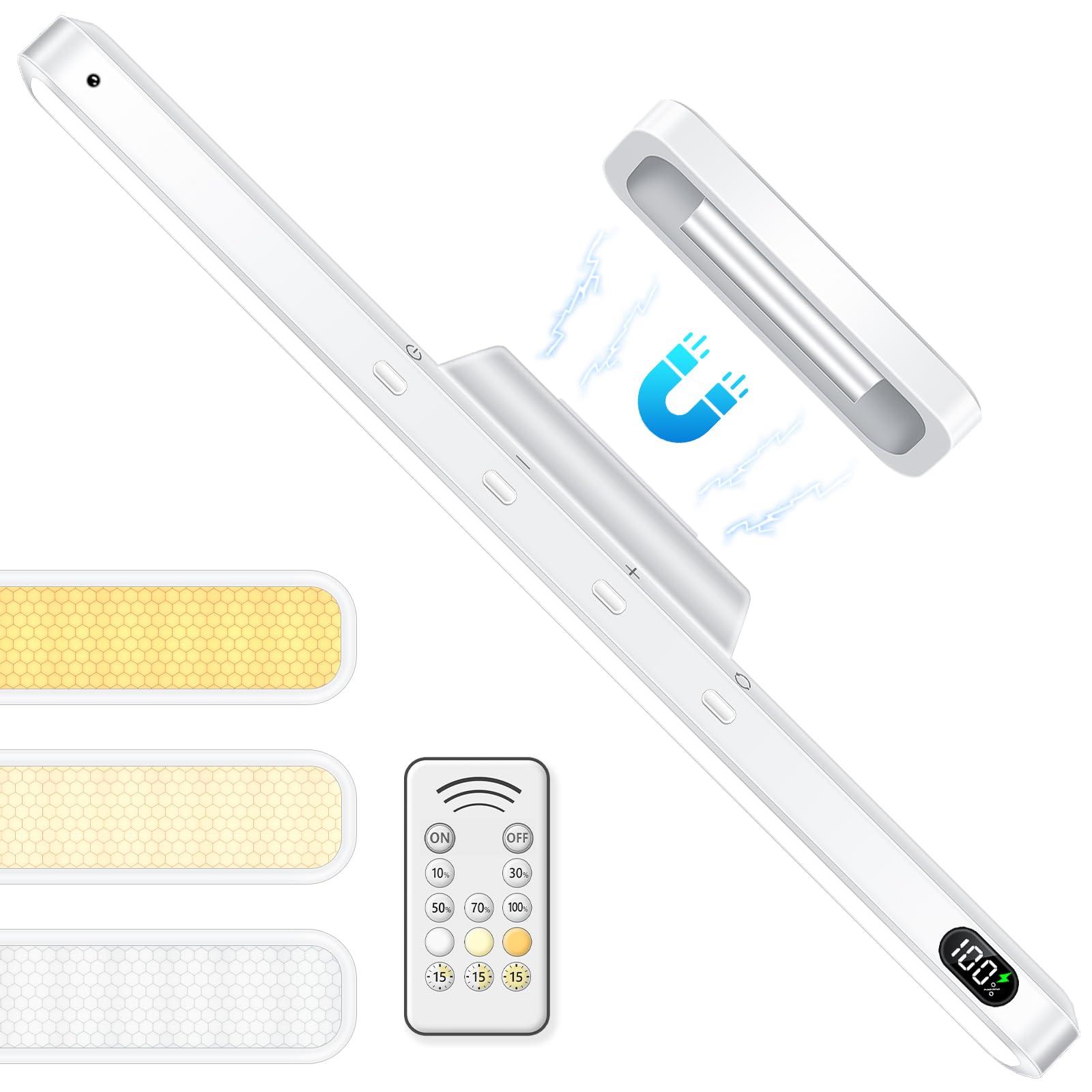
Image 1: The WILLED 5W LED Light Bar, showcasing its sleek design and integrated controls.
2. Package Contents
- 1 x WILLED 5W LED Light Bar
- 1 x Remote Control
- 2 x Magnetic Mounting Bases with Adhesive
- 1 x Type-C Fast Charging Cable
- 1 x User Manual
3. Setup and Installation
The light bar offers flexible installation options using its magnetic bases. Ensure the mounting surface is clean and dry before application.
- Prepare the Surface: Clean the desired mounting surface thoroughly to ensure optimal adhesion.
- Attach Magnetic Base: Peel off the adhesive backing from one of the magnetic mounting bases. Firmly press the base onto the cleaned surface for several seconds.
- Mount the Light Bar: Align the light bar with the installed magnetic base. The strong magnets will securely hold the light bar in place.
- Adjust Angle: The light bar can be adjusted up to 135 degrees on its magnetic base, allowing you to direct light precisely where needed.

Image 2: Visual guide for magnetic installation, showing peeling adhesive and attaching the light bar.
Video 1: This video demonstrates the magnetic attachment and installation process of the WILLED Rechargeable Light Bar.
4. Operating Instructions
The light bar can be operated using the integrated buttons or the included remote control.
4.1 On-Device Button Control
- Power Button: Press to turn the light ON/OFF.
- Brightness Adjustment: Use the '+' and '-' buttons to increase or decrease brightness through 5 levels.
- Color Temperature Change: Press the mode button (often indicated by a circular arrow or similar icon) to cycle through 3 color temperatures: 3000K (warm white), 4500K (natural light), and 6000K (cool white).
4.2 Remote Control Operation
The remote control provides additional functionality and convenience.
- ON/OFF: Dedicated buttons to turn the light on or off.
- Brightness Levels: Direct buttons for 10%, 30%, 50%, 70%, and 100% brightness.
- Color Temperatures: Dedicated buttons for 3000K, 4500K, and 6000K.
- Timing Function: Set the light bar to automatically turn off after 15, 30, or 60 minutes using the timer buttons.

Image 3: Illustration of the 5 brightness levels and 3 color temperatures available.
Video 2: This video demonstrates the various light settings and remote control functions of the WILLED LED Light Bar.
5. Key Features
- Eye-Caring Lighting: Designed with an anti-glare cover and 120 energy-saving LEDs for soft, flicker-free illumination.
- Battery Level Display: A precise digital display shows the remaining battery percentage, indicating when recharging is needed.
- Long Battery Life: Equipped with a 2500mAh battery, providing up to 4 hours of continuous illumination at highest brightness and up to 30 hours at lowest brightness. Fully charges in 2-3 hours via Type-C cable.
- Adjustable Angle: The light bar can be rotated up to 135 degrees on its magnetic base to direct light as desired.
- Versatile Application: Ideal for makeup vanity, mirrors, under cabinets, closets, bathrooms, and desks.

Image 4: Close-up of the light bar showing the digital battery level display.

Image 5: Demonstration of the light bar's 135-degree adjustable angle.

Image 6: Examples of the light bar used in a bedroom, cabinet, mirror, and closet.
6. Maintenance
- Cleaning: Wipe the light bar with a soft, dry cloth. Do not use abrasive cleaners or immerse in water.
- Charging: Recharge the device using the provided Type-C cable when the battery level is low. Avoid overcharging for extended periods.
- Storage: Store the light bar in a cool, dry place when not in use for prolonged periods.
7. Troubleshooting
- Light not turning on:
- Check battery level and recharge if necessary.
- Ensure the power button is pressed correctly.
- Remote control not working:
- Ensure there are no obstructions between the remote and the light bar.
- Check the remote control's battery and replace if needed.
- Light bar falling from surface:
- Ensure the mounting surface was clean and dry before applying the adhesive magnetic base.
- Re-apply the magnetic base with new adhesive if the original has lost its stickiness.
8. Specifications
| Feature | Detail |
|---|---|
| Brand | WILLED |
| Model Number | B0F4D736DF |
| Power Source | Battery Powered (2500mAh Lithium Ion) |
| Wattage | 5 Watts |
| Brightness | Up to 800 Lumens |
| Color Temperatures | 3000K (Warm White), 4500K (Natural Light), 6000K (Cool White) |
| Control Method | Push Button, Remote Control |
| Installation Type | Stick-On/Magnetic |
| Product Dimensions | 11.8"L x 1.25"W x 1.57"H |
| Material | Acrylonitrile Butadiene Styrene |
| Special Features | Adjustable Color Temperature, Dimmable, Eye Caring, Rechargeable, Timer, Battery Level Display |
9. Warranty and Support
WILLED provides 12-month free replacement services for this product. If you encounter any issues or have questions, please feel free to contact customer support for assistance.