
Introduction
Thank you for choosing the DUMOS Ergonomic Mesh Office Chair. This high-back executive chair is designed to provide optimal comfort and support for extended periods of sitting, whether for home office work or gaming. It features a 2D adjustable headrest, up-and-down lumbar support, and adjustable flip-up arms to cater to various user needs and preferences. This manual provides detailed instructions for assembly, operation, maintenance, and troubleshooting to ensure you get the most out of your new chair.
Safety Information
- Ensure all bolts and screws are securely tightened before using the chair. Periodically check and re-tighten as necessary.
- Do not stand on the chair. Use it only for sitting.
- Do not use the chair if any parts are missing, damaged, or broken. Contact customer support for replacement parts.
- This chair is designed to support users up to 330 lbs (approximately 150 kg). Exceeding this weight limit may cause damage to the chair or personal injury.
- Keep children away from the chair during assembly. Small parts may pose a choking hazard.
- Avoid placing the chair in direct sunlight or near heat sources to prevent material degradation.
Package Contents
Please verify that all components listed below are present in your package before beginning assembly. If any parts are missing or damaged, please contact DUMOS customer support.
| Item | Description | Quantity |
|---|---|---|
| A | Backrest | 1 |
| B | Lumbar Support | 1 |
| C | Head Rest | 1 |
| D | Cushion | 1 |
| E | Mechanism | 1 |
| F | Armrests (Left & Right) | 2 |
| G | Gas Lift | 1 |
| H | Base (5-star) | 1 |
| I | Casters | 5 |
| K | Bolts M8x20mm | 8 |
| L | Bolts M8x35mm | 6 |
| M | Bolts M6x16mm | 5 |
| N | Bolts M6x20mm | 2 |
| O | Wrench | 1 |
Setup and Assembly
Follow these steps carefully to assemble your DUMOS Ergonomic Mesh Office Chair. An assembly video is provided below for visual guidance.
Video: DUMOS Office Chair Assembly Guide. This video demonstrates the complete assembly process for the DUMOS Ergonomic Mesh Office Chair, from unboxing to final adjustments.
- Assemble the Chair Base:
- Insert the five legs (J) into the central hub of the base (H).
- Secure each leg using the M8x20mm bolts (K) and the provided wrench (O). Ensure they are firmly tightened.
- Push the five casters (I) into the holes at the end of each leg until they click into place.
- Insert the gas lift (G) into the center hole of the assembled base (H).
- Prepare the Backrest and Lumbar Support:
- Attach the lumbar support (B) to the backrest (A) by aligning the pegs and rotating the knob to secure it.
- Attach Armrests to the Cushion:
- Position the cushion (D) upside down.
- Align the left and right armrests (F) with the pre-drilled holes on the underside of the cushion.
- Secure the armrests using the M8x35mm bolts (L) and the provided wrench (O).
- Install the Mechanism:
- Place the mechanism (E) onto the underside of the cushion (D), ensuring the "FRONT" label on the mechanism faces the front of the cushion.
- Secure the mechanism using the M6x16mm bolts (M) and the provided wrench (O).
- Connect Cushion Assembly to Base:
- Carefully place the assembled cushion (D) onto the gas lift (G) in the base (H), ensuring the gas lift is properly seated in the mechanism.
- Attach the Backrest:
- Align the backrest (A) with the armrests (F).
- Insert the M6x20mm bolts (N) through the armrest brackets into the backrest. Initially, tighten these bolts only 50% to allow for adjustment.
- Install the Headrest:
- Insert the headrest (C) into the top of the backrest (A).
- Secure the headrest using the remaining M6x16mm bolts (M) and the provided wrench (O). Tighten these bolts 100%.
- Final Tightening:
- Once all components are in place, go back and fully tighten the M6x20mm bolts (N) that connect the backrest to the armrests (100% tightened).
Operating Instructions
Your DUMOS Ergonomic Mesh Office Chair offers several adjustable features to customize your seating experience for maximum comfort and ergonomic support.
- Seat Height Adjustment:
To adjust the seat height, pull the lever located on the right side of the seat mechanism upwards. While holding the lever, stand up to raise the seat or remain seated to lower it. Release the lever to lock the height in place.
- Adjustable Lumbar Support:
The mesh lumbar support can be adjusted vertically to fit the natural curve of your lower back. Locate the knob on the backrest and rotate it to move the lumbar support up or down, providing personalized comfort and fatigue relief.

Image: Close-up view of the adjustable lumbar support mechanism on the DUMOS office chair, highlighting its vertical adjustment capability.
- Adjustable and Rotatable Headrest:
The headrest can be adjusted in both height and angle. Gently pull the headrest up or push it down to find your preferred height. You can also rotate the headrest up to 42 degrees to support your neck and head comfortably during work or relaxation.

Image: Illustration of the DUMOS office chair's headrest, demonstrating its ability to be adjusted vertically and rotated for optimal neck and head support.
- Flip-Up Armrests:
The armrests are designed to flip up 90 degrees, allowing you to push the chair directly under your desk. This feature helps save valuable space in your office or room when the chair is not in use.

Image: The DUMOS office chair showcasing its flip-up armrests, which can be raised to a 90-degree angle for space-saving storage under a desk.
- Tilt/Rocking Mode:
The chair features a rocking mode that allows the backrest to tilt between 90 and 120 degrees. This function enables you to recline and relax your body during breaks or while contemplating. Use the tension knob under the seat to adjust the resistance of the tilt mechanism.

Image: A user demonstrating the 90-120 degree rocking mode of the DUMOS Ergonomic Office Chair, illustrating its relaxation feature.
Maintenance
Proper care and maintenance will extend the life of your DUMOS office chair.
- Cleaning: Wipe the chair with a damp cloth to remove dust and spills. For tougher stains on the mesh or fabric, use a mild soap solution and a soft brush, then wipe clean with a damp cloth and allow to air dry. Avoid harsh chemicals or abrasive cleaners.
- Inspection: Periodically inspect all bolts, screws, and moving parts to ensure they are secure. Re-tighten any loose fasteners.
- Caster Care: Keep the casters clean and free of debris (hair, lint, etc.) to ensure smooth rolling.
- Avoid Overloading: Do not exceed the recommended weight capacity of 330 lbs.
Troubleshooting
If you encounter any issues with your DUMOS office chair, refer to the following common problems and solutions:
- Chair does not adjust height:
Ensure the gas lift lever is fully engaged. If the issue persists, the gas lift cylinder may need replacement. Contact customer support.
- Chair is wobbly or unstable:
Check all assembly bolts, especially those connecting the base, armrests, and backrest. Tighten any loose bolts. Ensure the casters are fully inserted into the base legs.
- Squeaking noises:
Apply a small amount of silicone-based lubricant to moving parts, such as the mechanism, gas lift, and armrest pivots. Avoid oil-based lubricants which can attract dust.
- Casters not rolling smoothly:
Inspect the casters for trapped hair, dust, or debris. Clean them thoroughly. If damaged, replacement casters may be needed.
Specifications
| Feature | Detail |
|---|---|
| Brand | DUMOS |
| Model Name | Ergonomic Mesh Office Chair |
| Model Number | DU3789FBK410 |
| Color | Inky |
| Product Dimensions | 20"D x 20.2"W x 50.3"H |
| Item Weight | 30.4 pounds |
| Weight Capacity | Up to 330 lbs |
| Back Style | Mesh Back |
| Arm Style | Flip-Up |
| Special Features | Adjustable Height, Adjustable Lumbar, Arm Rest, Ergonomic |
| Fill Material | Sponge |
| Assembly Required | Yes |

Image: The DUMOS Ergonomic Mesh Office Chair in its full assembled form, showcasing its design and features.

Image: Side view of the DUMOS Ergonomic Mesh Office Chair, highlighting its profile and ergonomic contours.

Image: Front view of the DUMOS Ergonomic Mesh Office Chair, showing the mesh back and padded seat.
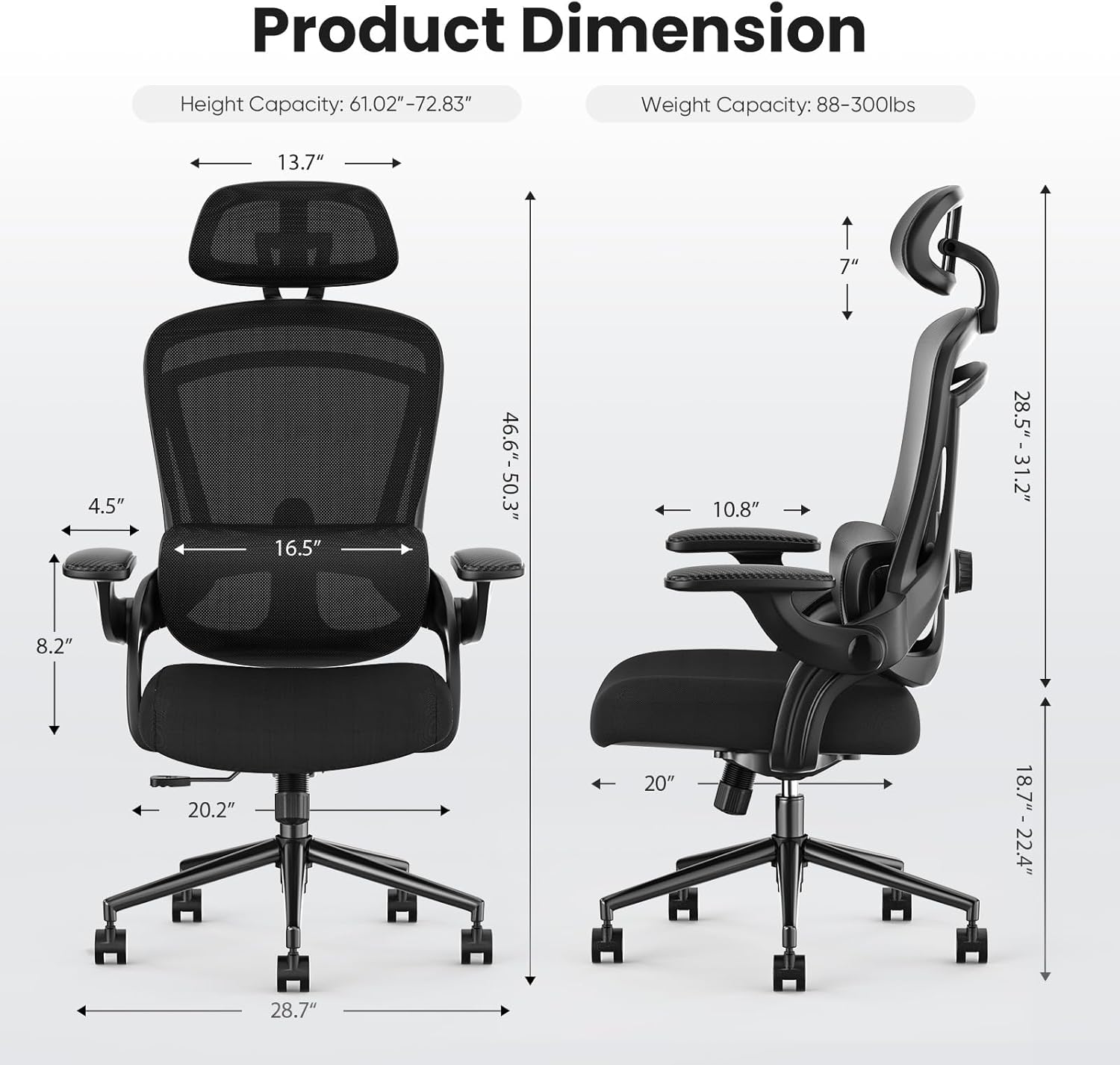
Image: Back view of the DUMOS Ergonomic Mesh Office Chair, illustrating the mesh backrest and lumbar support design.

Image: An overview diagram highlighting the ergonomic features of the DUMOS office chair, including adjustable headrest, 120° tilt, adjustable lumbar pillow, flip-up armrest, and thickened seat cushion.
Image: Front view of the DUMOS Ergonomic Mesh Office Chair, showing the mesh back and padded seat.
Image: Back view of the DUMOS Ergonomic Mesh Office Chair, illustrating the mesh backrest and lumbar support design.
Warranty and Support
DUMOS stands behind the quality of its products. This chair comes with a standard manufacturer's warranty covering defects in materials and workmanship under normal use. For specific warranty terms and conditions, please refer to the warranty card included in your package or visit the official DUMOS website.
For technical support, replacement parts, or any inquiries regarding your DUMOS Ergonomic Mesh Office Chair, please contact our customer service team through the following channels:
- Online Support: Visit the DUMOS store on Amazon: DUMOS Store
- Additional Resources: A PDF version of the user manual is available for download: User Manual (PDF)
Please have your model number (DU3789FBK410) and purchase date ready when contacting support.