
1. Introduction
Thank you for choosing the USMATEK X5 GPS Sports Smart Watch. This manual provides essential information for setting up, operating, and maintaining your device. Please read it carefully to ensure optimal performance and a complete understanding of its features.
2. What's in the Box
- USMATEK X5 Smart Watch
- Magnetic Charging Cable
- User Manual (this document)
- Watch Band
3. Product Overview
The USMATEK X5 is a robust GPS sports smart watch designed for active individuals. It features a large AMOLED display, dual-band GPS for accurate tracking, comprehensive health monitoring, and a durable, water-resistant design.

This image displays the USMATEK X5 GPS Sports Smart Watch in black, showcasing its square face with a digital time display, compass, step counter, and heart rate monitor on the screen. The watch features a rugged design with prominent side buttons.

This image shows two USMATEK X5 smart watches, one black and one silver, emphasizing their robust construction suitable for outdoor activities. Text overlays mention "GPS Smart Watch" and "Indestructible Fearless Exploration."
4. Setup
4.1 Initial Charging
Before first use, fully charge your USMATEK X5 Smart Watch. Connect the magnetic charging cable to the charging contacts on the back of the watch and plug the USB end into a standard USB power adapter (not included).
4.2 Powering On/Off
- To Power On: Press and hold the 'Power' button located on the side of the watch until the screen illuminates.
- To Power Off: Press and hold the 'Power' button, then select 'Power Off' on the screen.
4.3 App Installation and Pairing
To unlock the full potential of your smart watch, download the companion app on your smartphone. The app is compatible with both Android and iOS devices.
- Scan the QR code in the quick start guide or search for the app name (usually mentioned in the packaging or quick start guide) in your phone's app store.
- Install the app and create an account.
- Enable Bluetooth on your smartphone.
- Open the app and follow the on-screen instructions to pair your USMATEK X5 Smart Watch. Ensure the watch is powered on and near your phone during the pairing process.
5. Operating Your Smart Watch
5.1 1.96" AMOLED HD Display
The watch features a large 1.96-inch AMOLED screen with a 410x502 resolution, providing clear visuals and easy touch control. You can customize watch faces and view data clearly even in bright sunlight.

This image provides a close-up of the USMATEK X5's 1.96-inch AMOLED HD display, showing a vibrant watch face with time, heart rate, and step count. The text highlights the display size and its wide, clear view.
5.2 Dual-Band GPS for Accurate Tracking
Equipped with an advanced Icoe L1+L5 Dual-Band GPS chip, the watch offers precise outdoor tracking for various activities. It supports a 6-satellite positioning system and includes a route return function to guide you back to your starting point.
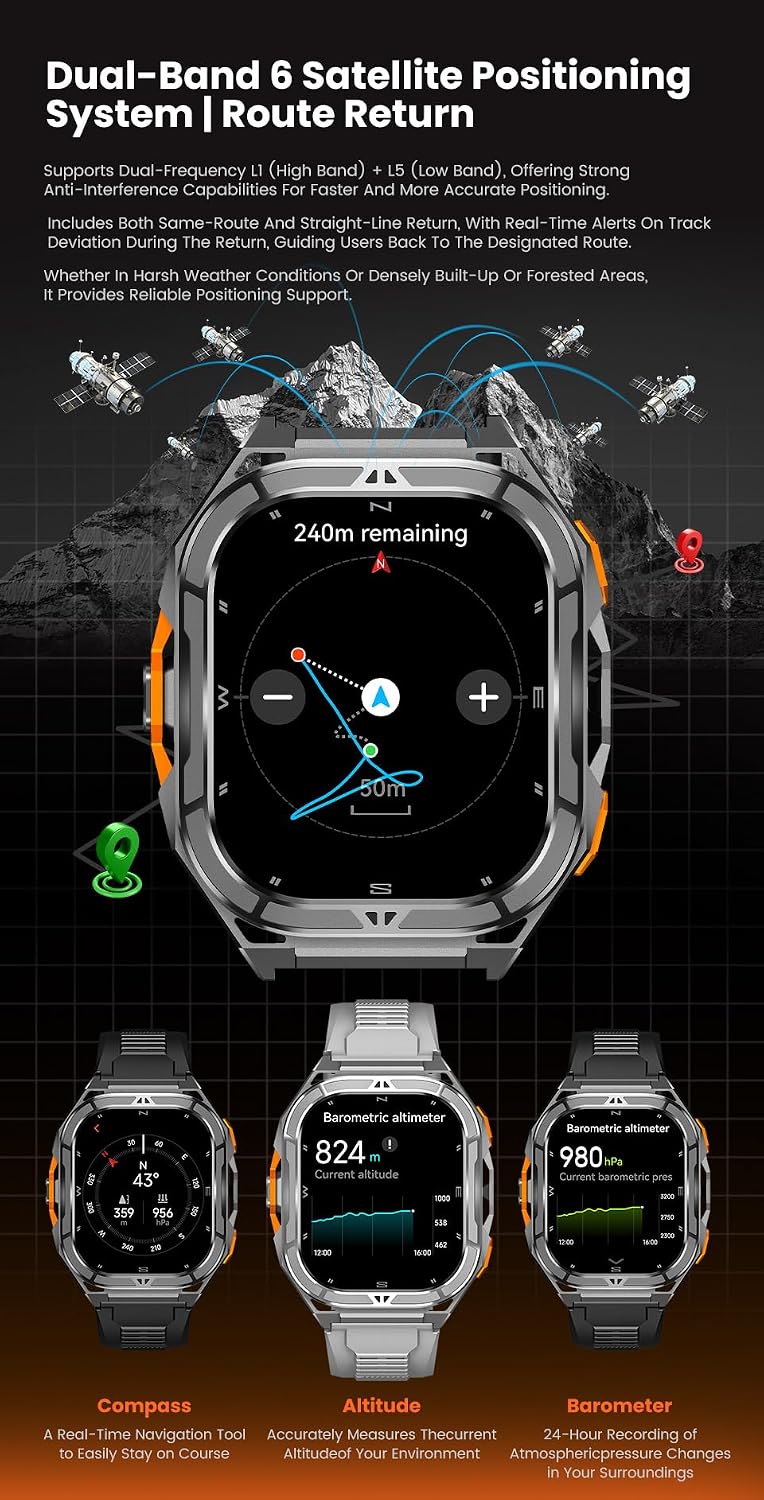
This image illustrates the watch's dual-band 6-satellite positioning system and route return function, showing a GPS track on a mountain landscape. The watch face displays navigation information, including remaining distance.
5.3 24/7 Health Monitoring
The USMATEK X5 continuously monitors key health metrics:
- Heart Rate Monitoring: Tracks your heart rate throughout the day.
- Blood Oxygen (SpO2) Monitoring: Measures blood oxygen saturation levels.
- Stress Detection: Provides insights into your stress levels.
- Sleep Analysis: Monitors sleep stages (deep, light, REM) and provides sleep quality insights.
- Breathing Training: Guided breathing exercises for relaxation.
- Women's Health Tracking: Supports tracking of menstrual cycles and related data.

This image shows the biometric optical sensor on the back of the watch, emitting green light for health tracking. Below it, a user is shown sleeping with the watch, and the watch display illustrates sleep analysis data, including sleep stages and duration.
5.4 Bluetooth Call & Smart Notification Alerts
Stay connected with Bluetooth 5.3 technology. You can make and receive calls directly from your watch and get instant alerts for messages, WhatsApp, Facebook, Instagram, and other applications.
5.5 100+ Sports Modes
The watch supports over 100 sports modes, including outdoor walking, running, cycling, swimming, yoga, basketball, and more. It features a professional sports algorithm for automatic workout recognition and accurate tracking.

This image features the USMATEK X5 watch displaying a list of suggested workouts, such as indoor run, outdoor cycle, and pool swim. In the background, a person is cycling, and various sports icons are shown, representing the watch's extensive sports mode capabilities.
5.6 5ATM Water Resistance
The USMATEK X5 is water-resistant up to 50 meters (5ATM), making it suitable for swimming and other water-based activities. It includes a water drainage function to expel water from the speaker and microphone holes.

This image shows two USMATEK X5 watches partially submerged in water, with bubbles around them, illustrating their 5ATM water resistance. One watch displays swimming metrics, while the other shows the water drainage function being activated.
5.7 Long Battery Life
The watch is powered by a 530mAh battery, offering extended usage. Expect up to 15 days of daily use and 30 days in long-lasting mode.

This image highlights the impressive battery life of the USMATEK X5, with a large "15 DAYS" graphic overlaying the watch. It also specifies the 530mAh battery capacity, 30 days of long-lasting mode, and 15 days of daily use.
5.8 Additional Features
- Compass, Altimeter, Barometer: Essential tools for outdoor navigation and environmental monitoring.
- AI Voice Assistant: For convenient hands-free control.
- Music Control: Manage your smartphone's music playback directly from the watch.
- Remote Photography: Use your watch as a remote shutter for your phone's camera.
- Find Mobile Phone: Helps locate your paired smartphone.
- Anti-Scratch and Anti-Dusting: Designed for durability in challenging environments.

This image focuses on the USMATEK X5's stainless steel build and timeless design, showcasing the full metal frame crafted for durability and a sleek appearance.
This video provides a comprehensive overview of the USMATEK X5 GPS Smart Watch, demonstrating its rugged design, 1.96" AMOLED display, heart rate monitoring, military-grade construction, 100+ sports modes, dual-band GPS with trackback function, 5ATM water resistance, and anti-scratch/anti-dusting capabilities during various outdoor activities like skiing, diving, and hiking. It also highlights the altimeter and barometer functions.
6. Maintenance
6.1 Cleaning Your Watch
Regularly clean your watch and watch band to prevent skin irritation and maintain functionality. Use a soft, lint-free cloth. For stubborn dirt, slightly dampen the cloth with water. Avoid harsh chemicals or abrasive materials.
6.2 Charging Best Practices
- Use only the provided magnetic charging cable.
- Ensure the charging contacts on the watch and cable are clean and dry before charging.
- Avoid exposing the watch to extreme temperatures during charging.
6.3 Storage
When not in use for extended periods, store the watch in a cool, dry place away from direct sunlight. It is recommended to charge the watch to about 50% before long-term storage.
7. Troubleshooting
7.1 Watch Not Turning On
- Ensure the watch is fully charged. Connect it to the charger for at least 30 minutes.
- Try pressing and holding the 'Power' button for 10-15 seconds to force a restart.
7.2 Pairing Issues
- Make sure Bluetooth is enabled on your smartphone and the watch is within range.
- Restart both your watch and smartphone.
- Forget the device in your phone's Bluetooth settings and try pairing again through the app.
- Ensure the companion app is up to date.
7.3 Inaccurate Health Data/GPS
- Ensure the watch is worn snugly on your wrist, not too tight or too loose.
- Clean the optical sensor on the back of the watch.
- For GPS, ensure you are in an open outdoor area with a clear view of the sky. Allow the watch a few moments to acquire a signal.
- Calibrate GPS if an option is available in the watch settings or companion app.
7.4 Water Drainage Function
After exposure to water, especially after swimming, activate the water drainage function from the watch's menu to expel any water from the speaker and microphone holes. This helps maintain sound quality and device longevity.
8. Specifications
| Feature | Detail |
|---|---|
| Model Number | X5 |
| Display Size | 1.96 Inches |
| Display Type | AMOLED (410x502 resolution) |
| GPS | Dual Band Built-in GPS, Icoe L1+L5:CC0258B |
| Water Resistance | 5ATM (up to 50 meters) |
| Battery Capacity | 530 Milliamp Hours |
| Battery Life (Daily Use) | Up to 15 Days |
| Battery Life (Long-lasting Mode) | Up to 30 Days |
| Connectivity | Bluetooth 5.4 |
| Operating System | Android (compatible with Android & iOS) |
| Memory Storage Capacity | 256 MB |
| Item Weight | 78 Grams (2.75 ounces) |
| Special Features | 100+ sports modes, Activity center, Sleep detection, Heart rate detection, Blood oxygen detection, Stress detection, Weather, Bluetooth calls, Messages, Remote photography, Advance Savi Algorithm, Barometer, Compass, AI Voice, All-day dynamic heart rate trend and data analysis, Control center customization, World clock, Smart drainage, Lock screen off the wrist, One-key measurement, Exercise recognition, Cover lock, Screen off display, Time and date, Silent mode, SOS function, Music control, Breathing training, Voice assistant, Timer, Alarm clock, Stopwatch, Women's health, Find mobile phone, Calculator, DND mode, Power saving mode, Raise hand to wake up, Brightness adjustment, Sound and vibration, Dial switching, Menu style switching, Exercise goal setting. |
9. Warranty and Support
For warranty information and customer support, please refer to the documentation included with your purchase or visit the official USMATEK website. Specific warranty terms and conditions may vary by region and retailer.
If you encounter any issues not covered in this manual, please contact USMATEK customer service for assistance.