
Introduction and Overview
This manual provides comprehensive instructions for the safe and effective use of your eKids Spiderman Walkie Talkies (Model SM-207). Designed for clear, static-free communication, these walkie talkies offer extended range and kid-friendly controls, making them suitable for various indoor and outdoor activities. Please read this manual thoroughly before operating the device.
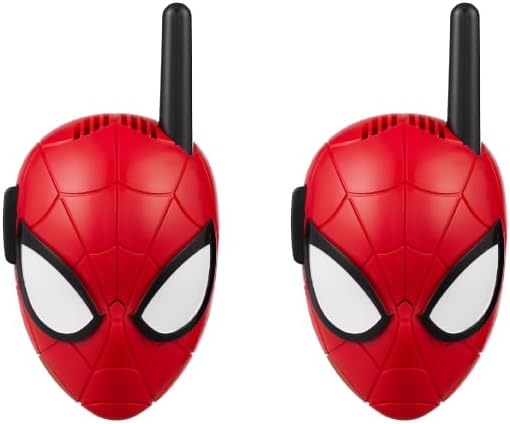
Image: A pair of eKids Spiderman Walkie Talkies, showcasing their design.
What's in the Box
Your eKids Spiderman Walkie Talkies package includes the following items:
- Two (2) Spiderman-themed walkie talkie units
- Integrated belt clips for portability
- Wrist straps for secure handling
Setup: Battery Installation
Each walkie talkie unit requires 4 AAA batteries (not included). Follow these steps to install the batteries:
- Locate the battery compartment on the back of each walkie talkie unit.
- Using a small Phillips head screwdriver, unscrew the battery compartment cover.
- Insert 4 fresh AAA batteries into each compartment, ensuring correct polarity (+/-).
- Replace the battery compartment cover and secure it with the screw.
Note: Always use new batteries of the same type and brand. Do not mix old and new batteries.
Video: A demonstration of battery installation for walkie talkies.
Operating Instructions
Power On/Off
- To turn on a walkie talkie, locate the On/Off switch on the back of the unit and slide it to the 'On' position.
- To turn off a walkie talkie, slide the On/Off switch to the 'Off' position to conserve battery life.
Talking and Listening
- Ensure both walkie talkies are powered on.
- To transmit your voice, press and hold the 'Push-to-Talk' button located on the side of the unit. Speak clearly into the microphone at the top of the unit.
- Release the 'Push-to-Talk' button to stop transmitting and listen for a response.
- The other unit will receive your message automatically when you transmit.

Image: A child using an eKids Spiderman Walkie Talkie to communicate.
Extended Range Communication
These walkie talkies offer an extended communication range of up to 500 feet under ideal conditions. Factors such as terrain, obstacles (buildings, trees), and electromagnetic interference can affect the actual range.

Image: A child demonstrating the use of the walkie talkie, highlighting its range and static-free feature.
Features
- Static-Free Communication: Enjoy clear audio transmission without interference, ensuring messages are heard distinctly.
- Extended Range: Communicate across distances of up to 500 feet in optimal environments.
- Kid-Friendly Controls: Simple push-to-talk button operation is designed for ease of use by children aged 3 and up.
- Durable and Lightweight Design: Constructed from robust materials, these walkie talkies are built to withstand active play, both indoors and outdoors. Their lightweight nature makes them easy for small hands to hold.
- Portability: Each unit includes a convenient belt clip and wrist strap, allowing children to carry their walkie talkies securely during play.

Image: A child demonstrating the portability of the walkie talkie with its belt clip and wrist strap.
Maintenance
- Cleaning: Wipe the units with a soft, dry cloth. Do not use abrasive cleaners or immerse in water.
- Storage: When not in use for extended periods, remove the batteries to prevent leakage and store the walkie talkies in a cool, dry place.
- Battery Care: Replace batteries promptly when performance diminishes. Dispose of used batteries responsibly according to local regulations.
Troubleshooting
- No Power: Ensure batteries are correctly installed and are not depleted. Replace with fresh batteries if necessary.
- No Sound/Poor Sound Quality: Check that both units are powered on and within range. Ensure the 'Push-to-Talk' button is fully pressed when transmitting and released when listening. Verify that the microphone and speaker are not obstructed.
- Short Range: Environmental factors such as buildings, dense foliage, or other electronic devices can reduce range. Try moving to an open area.
Specifications
| Specification | Detail |
|---|---|
| Model Number | SM-207 |
| Brand | eKids |
| Item Weight | 8.1 ounces |
| Product Dimensions | 2.67 x 1.45 x 5.04 inches |
| Batteries Required | 4 AAA batteries per unit (8 total for a pair) |
| Talking Range Maximum | 500 Feet (in ideal conditions) |
| Number of Channels | 1 |
| Water Resistance Level | Not Water Resistant |

Image: Visual representation of the walkie talkie dimensions.
Warranty and Support
This product is covered by a 1-year limited warranty. For detailed warranty information, product support, or to explore additional eKids products, please visit the official eKids brand store or contact customer service.
Official Product Video:
Video: An official product overview of the eKids Spiderman Walkie Talkies.


