1. Introduction
The Cloudpower AK1016 Audio Spectrum Analyzer is a high-resolution display device designed to visualize audio signals. It features a 10x16 display that accurately represents frequency bands from 50Hz to 20KHz, providing real-time visual feedback of music levels. With dual input options (3.5mm AUX and microphone), it is compatible with various audio sources, making it suitable for desktop decoration and audio analysis.
This manual provides detailed instructions for setting up, operating, and maintaining your AK1016 Audio Spectrum Analyzer to ensure optimal performance and enjoyment.
2. Package Contents
Please verify that all items listed below are included in your package:
- 1x AK1016 Audio Spectrum Analyzer
- 1x USB Cable (Type-C)
- 1x 3.5mm Audio Cable
- 1x 1:2 3.5mm Cable
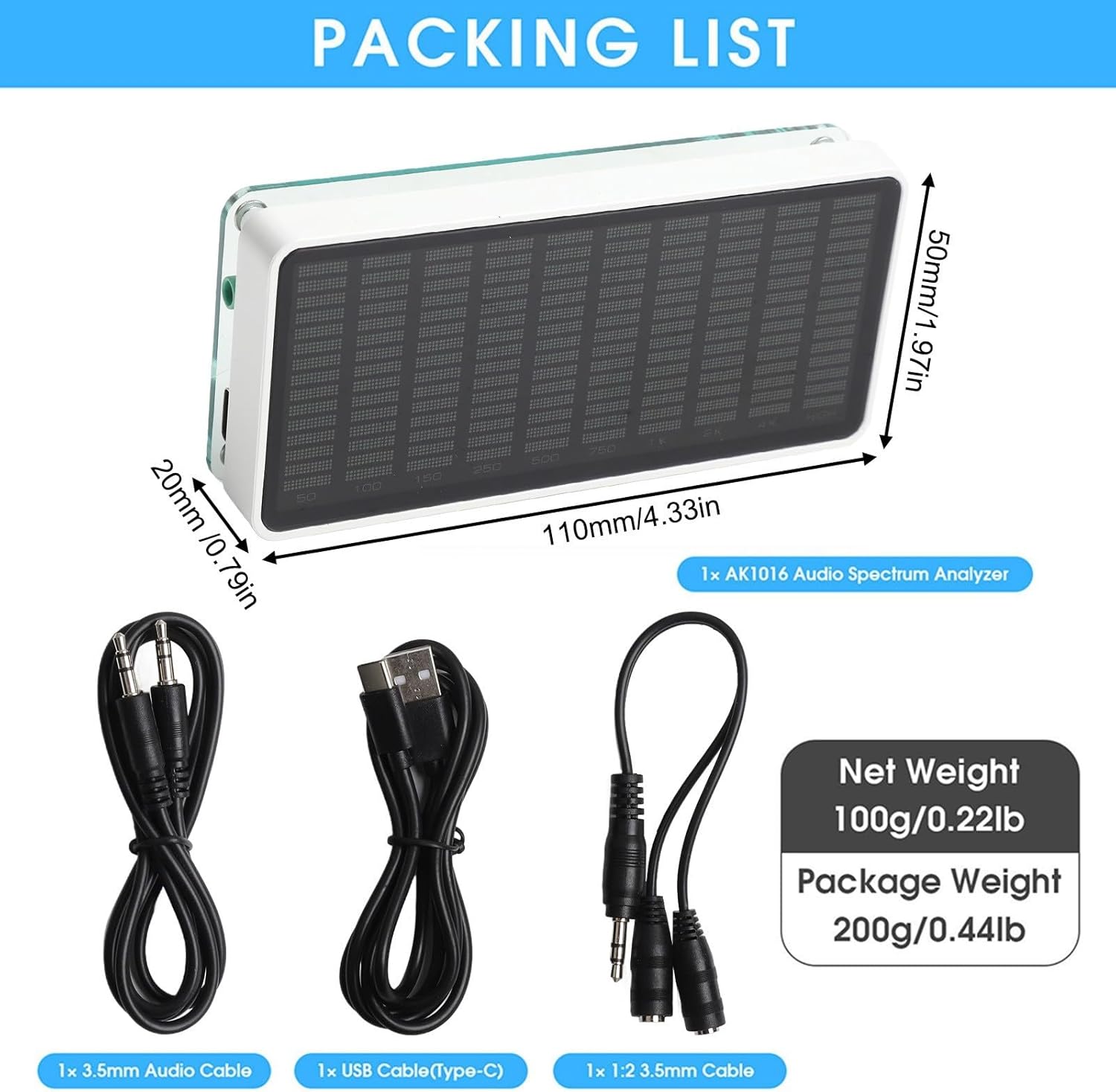
Figure 2.1: Package Contents
The image above illustrates the AK1016 Audio Spectrum Analyzer along with its standard accessories, including the USB-C power cable, a 3.5mm audio input cable, and a 3.5mm splitter cable for versatile audio connections.
3. Product Overview
The AK1016 features a compact design with essential controls and input ports. Understanding these components is key to proper operation.
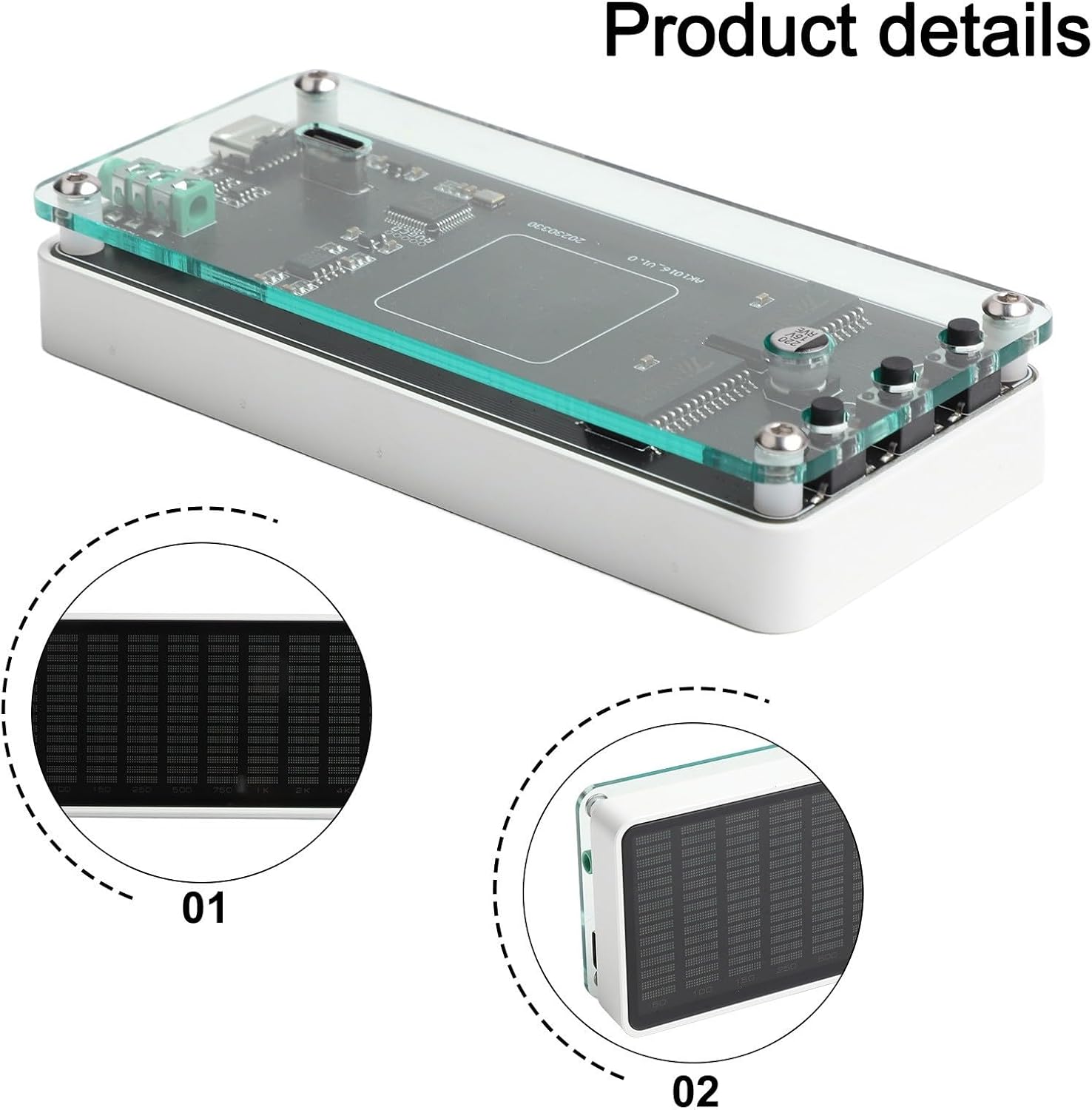
Figure 3.1: AK1016 Component Layout
Figure 3.1 shows the internal layout and external connections. Key components include:
- Up Button (Δ): Used for navigating menus and increasing values.
- OK Button: Used for confirming selections.
- Down Button (∇): Used for navigating menus and decreasing values.
- 3.5mm AUX Input: For connecting external audio sources (low-level signal).
- Microphone Pickup Hole: For ambient sound detection.
- 2x DC 5V IN (Type-C): Dual Type-C ports for power input, offering flexible placement.

Figure 3.2: Display Detail
Figure 3.2 provides a closer look at the display, indicating the frequency bands it visualizes, ranging from 50Hz to 20KHz (labeled as HIGH).
4. Setup
- Power Connection: Connect the provided USB Type-C cable to either of the DC 5V IN ports on the analyzer and to a 5V/1A USB power adapter (not included).
- Audio Input Selection:
- Microphone Pickup: For ambient sound visualization, no external audio cable is needed. The device will use its built-in microphone.
- 3.5mm AUX Input: For direct audio source connection, plug one end of the 3.5mm audio cable into the 3.5mm AUX Input port on the analyzer and the other end into your audio source (e.g., phone, PC, game console). Use the 1:2 3.5mm cable if you need to split the audio signal to another device.
- Placement: Position the analyzer on a stable surface. Ensure the microphone pickup hole is unobstructed if using microphone input.

Figure 4.1: Desktop Setup Example
Figure 4.1 shows the AK1016 in a typical desktop environment, connected and ready for use alongside a laptop.
5. Operating Instructions
Once powered on, the AK1016 will automatically begin displaying audio spectrum data based on the selected input. Use the control buttons to adjust settings.
5.1 Basic Operation
- The display will show the real-time audio spectrum.
- Press the OK button to enter the settings menu.
- Use the Up (Δ) and Down (∇) buttons to navigate through menu options or adjust values.
- Press OK again to confirm a selection or exit a submenu.
5.2 Gain Selection
The device supports gain selection to optimize the display for different input signal strengths. Available gain settings are -20dB, -15dB, -10dB, -5dB, and 0dB. Adjust the gain to prevent the display from being too low (no display) or too high (full-screen saturation).
6. Settings and Modes
The AK1016 offers various customizable settings and display modes to enhance your audio visualization experience. All settings are saved automatically upon power-off.
6.1 Adjustable Items
- Brightness: 8 levels of brightness adjustment.
- Main Light Column Descent Speed: Controls how quickly the main bars fall.
- Peak Hold Time: Adjusts how long peak indicators remain visible.
- Peak Descent Speed: Controls how quickly peak indicators fall.
6.2 Music Spectrum Modes
The analyzer supports several display modes:
- Normal Mode
- Inverted Mode
- Reverse Mode
- Amplification Curve Mode
- True Output
- Smooth Output
6.3 Amplification Curve Settings
Five modes are available to adjust how different frequency ranges are amplified or compressed:
- Compress low frequency
- Compress low frequency and enhance high frequency
- Do not amplify (default setting)
- Slightly compress low frequency and enhance high frequency
- Enhance high frequency
6.4 Automatic Gain Control (AGC)
The unique AGC algorithm ensures optimal visual effects across a wide range of input signal strengths. This prevents the display from being blank with small signals or fully saturated with large signals, maintaining a dynamic and clear visualization.
6.5 Key Noise Filtering
The device includes a key noise filtering function to adapt to various environments and audio equipment, ensuring a cleaner visual representation of the sound.
Video 6.1: Demonstration of AK1016 Display Modes and Settings
Video 6.1 showcases the various display modes and adjustable settings of the AK1016 Audio Spectrum Analyzer, including different visual patterns and the silent automatic sleep mode. This video provides a visual guide to customizing your device's appearance and behavior.
7. Maintenance
- Cleaning: Use a soft, dry cloth to clean the display and exterior surfaces. Avoid abrasive cleaners or solvents.
- Storage: Store the device in a cool, dry place away from direct sunlight and extreme temperatures.
- Handling: Handle the device with care to prevent damage to the display or internal components.
8. Troubleshooting
| Problem | Possible Cause | Solution |
|---|---|---|
| No display when powered on. | No power or faulty power connection. | Ensure the USB Type-C cable is securely connected to a 5V/1A power adapter and the device. Try a different cable or adapter. |
| No audio visualization. | Incorrect audio input selected or no audio signal. |
|
| Display is too low or too high. | Gain setting is not optimized for the input signal. | Adjust the gain setting (Section 5.2) to match the input signal strength. |
| Settings are not saving. | This should not occur as settings have power-off memory. | Ensure settings are confirmed with the OK button. If the issue persists, contact customer support. |
9. Specifications
| Feature | Detail |
|---|---|
| Part Name | Audio Spectrum Analyzer |
| Model | AK1016 |
| Material | Metal, Glass |
| Display Color | White light |
| Resolution | 10 × 16 |
| Supported Frequency Range | 50Hz-20KHz |
| Audio Signal Input | 3.5mm AUX / MIC |
| Amplification Curve Settings | 5 modes |
| Music Spectrum Modes | Normal, Inverted, Reverse, Amplification Curve, True Output, Smooth Output |
| Adjustable Items | Main light column descent speed, Peak hold time, Peak descent speed |
| Brightness Adjustment | 8 levels |
| Working Voltage | DC 5V / 1A |
| Size (W*D*H) | 110*20*50mm / 4.33*0.79*1.97in |
| Net Weight | 100g / 0.22lb |