1. Introduction
This manual provides essential information for the safe and efficient use of your Reality Leuchten Munoz R54891165 LED Table Lamp. Please read these instructions carefully before first use and retain them for future reference.
Product Overview
The Munoz LED Table Lamp is a modern, portable lighting solution featuring a durable metal construction and a sophisticated design. It incorporates an energy-efficient LED light source and offers convenient touch control for adjustable brightness. Its battery-powered design allows for flexible placement without the need for a constant power outlet.
Package Contents
- Munoz LED Table Lamp (Model R54891165)
- USB Charging Cable
- Instruction Manual (this document)
2. Setup
Follow these steps to prepare your lamp for first use.
Unpacking
Carefully remove all components from the packaging. Inspect the lamp and accessories for any signs of damage. If any damage is found, do not proceed with setup and contact customer support.
Initial Charging
Before initial use, fully charge the lamp's internal battery. Connect the provided USB charging cable to the lamp's charging port and to a suitable USB power source (e.g., computer USB port, USB wall adapter). The charging time is approximately 7 to 9 hours for a full charge.

Image: Underside view of the lamp, highlighting the USB charging port for battery replenishment.

Image: Informative graphic illustrating key features: 4-level touch control, battery operation, USB charging, typical charging duration (7-9 hours), and approximate operating time (8-10 hours).
3. Operating Instructions
The Munoz LED Table Lamp features intuitive touch control for power and brightness adjustment.
Power On/Off and Brightness Adjustment
The lamp is equipped with a 4-level touch function. To operate:
- To Turn On: Lightly touch the sensor located on the top of the lamp shade. The lamp will illuminate at its lowest brightness setting.
- To Adjust Brightness: Continue to lightly touch the sensor to cycle through the three available brightness levels.
- To Turn Off: After cycling through all brightness levels, a subsequent touch will turn the lamp off.

Image: Close-up of the lamp's top, indicating the location of the touch sensor for control.
4. Charging Instructions
To ensure optimal performance and battery longevity, follow these charging guidelines.
Recharging the Battery
- Connect the lamp to a USB power source using the provided USB cable.
- A full charge typically takes 7 to 9 hours.
- When fully charged, the lamp provides approximately 8 hours of illumination at maximum brightness.
- Avoid overcharging the battery for extended periods.
The lamp can be used while charging, but it is recommended to charge it fully before portable use.
5. Maintenance
Proper care will help maintain the appearance and functionality of your lamp.
Cleaning
- Ensure the lamp is turned off and disconnected from any charging source before cleaning.
- Wipe the lamp with a soft, dry cloth.
- For stubborn marks, a slightly damp cloth can be used, followed by immediate drying.
- Do not use abrasive cleaners, solvents, or harsh chemicals, as these can damage the finish.
Storage
If storing the lamp for an extended period, ensure the battery is partially charged (around 50%) to preserve battery health. Store in a cool, dry place away from direct sunlight and extreme temperatures.
6. Troubleshooting
If you encounter issues with your lamp, refer to the following common problems and solutions.
| Problem | Possible Cause | Solution |
|---|---|---|
| Lamp does not turn on. | Battery is depleted. | Charge the lamp fully using the provided USB cable. |
| Lamp does not turn on. | Touch sensor not responding. | Ensure your finger makes full contact with the touch sensor. Try cleaning the sensor area. |
| Lamp does not charge. | USB cable or power source issue. | Check if the USB cable is securely connected. Try a different USB port or power adapter. Ensure the power source is active. |
| Short operating time after full charge. | Battery degradation or high brightness setting. | Battery life naturally decreases over time. Using lower brightness settings will extend operating time. |
If the problem persists after attempting these solutions, please contact customer support.
7. Specifications
Detailed technical specifications for the Munoz LED Table Lamp.
| Brand | RL LIVE YOUR LIGHT |
| Model Number | R54891165 |
| Manufacturer | Reality Leuchten |
| Dimensions (L x W x H) | 13 x 13 x 21 cm |
| Weight | 385 g |
| Material | Metal |
| Power Consumption | 1.3 Watts |
| Luminous Flux | 120 lumens |
| Color Temperature | 3000 Kelvin |
| Light Source Type | Integrated LED |
| Switch Type | Touch Control (4 levels) |
| Power Source | Battery Powered (USB rechargeable) |
| Charging Time | Approx. 7-9 hours |
| Operating Time (Max Brightness) | Approx. 8 hours |
| Energy Efficiency Class | E |

Image: Technical drawing with precise dimensions of the lamp, including height, shade diameter, and base diameter.
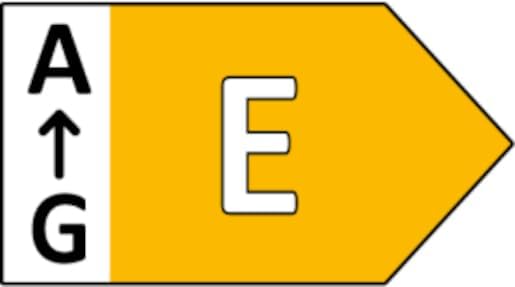
Image: Energy efficiency label indicating the product's energy class as E.
8. Safety Information
Please observe the following safety precautions to prevent injury or damage to the product.
- This product is designed for indoor use only. Do not expose to rain or moisture.
- Do not attempt to disassemble or modify the lamp. This may void the warranty and pose safety risks.
- Keep the lamp away from heat sources, direct sunlight, and flammable materials.
- Use only the provided USB cable for charging.
- Do not immerse the lamp in water or any other liquid.
- The integrated LED light source is not replaceable. If the LED fails, the entire luminaire must be replaced.
- This product contains a light source of energy efficiency class E.
- Keep out of reach of children and pets.
9. Warranty and Support
For warranty information and customer support, please refer to the retailer or manufacturer's official website where the product was purchased. Specific warranty terms may vary by region and retailer.
For technical assistance or inquiries not covered in this manual, please contact the manufacturer, Reality Leuchten, or your point of purchase.