
ooni UU-P2D900
Ooni Koda 2 Pro Gas Pizza Oven Instruction Manual
Model: UU-P2D900
Introduction
This manual provides essential information for the safe and efficient operation, maintenance, and troubleshooting of your Ooni Koda 2 Pro Gas Pizza Oven. Please read this manual thoroughly before using the appliance and retain it for future reference.
The Ooni Koda 2 Pro is an advanced outdoor gas-powered pizza oven designed for superior heat distribution and versatile cooking. It features G2 Gas Technology for consistent temperatures and an Ooni Connect Digital Temperature Hub for smart monitoring.
Product Overview
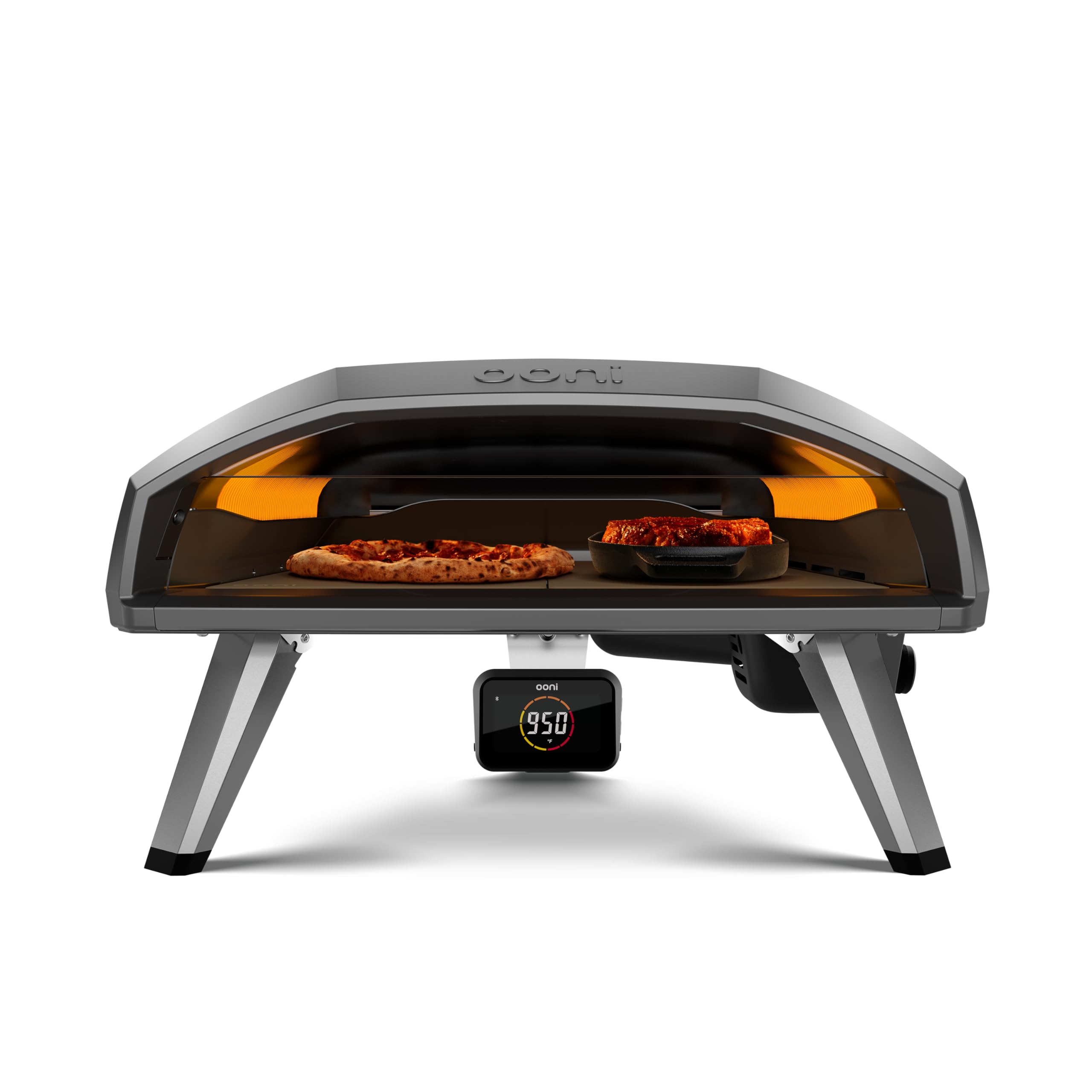
Image: The Ooni Koda 2 Pro Gas Pizza Oven, showcasing its wide opening with a pizza on one side and a cast iron pan with food on the other. The digital temperature display is visible below the oven opening.
The Ooni Koda 2 Pro is engineered for convenience and performance, offering a spacious 18"+ cooking area and a wide temperature range for various culinary applications.
Key Features:
- G2 Gas Technology: Patent-pending tapered flame gas burner system for enhanced heat distribution and reduced temperature fluctuations.
- Wide Temperature Range: Capable of temperatures from 160 °C to 500 °C, suitable for pizzas, steaks, and roasted dishes.
- Ooni Connect Digital Temperature Hub: Bluetooth-enabled hub providing real-time ambient and food probe temperature readings to your smartphone.
- Spacious Cooking Area: 18"+ cooking stone, offering ample space for larger pizzas and cookware.
- Easy Setup and Cleaning: Designed for quick plug-and-play setup and pyrolytic self-cleaning.
Setup
Unpacking and Assembly:
- Carefully remove all components from the packaging.
- Ensure all parts are present: Pizza Oven, Pizza Stone, Gas Hose, and Regulator.
- Unfold the oven legs and ensure they are securely locked into place.
- Insert the pizza stone into the oven. Ensure it is seated correctly and flat.
Gas Connection:
- Connect the gas hose to the oven's gas inlet. Tighten securely.
- Connect the regulator end of the hose to your propane gas tank.
- Ensure all connections are tight before opening the gas supply.
- Perform a leak test using a soapy water solution on all connections. Bubbles indicate a leak. Do not operate if a leak is detected.
Placement:
Place the Ooni Koda 2 Pro on a stable, non-combustible surface outdoors. Maintain adequate clearance from combustible materials (walls, fences, etc.) as specified in local regulations and the safety instructions.
Operating Instructions
Ignition:
- Ensure the gas tank valve is fully open.
- Turn the control knob on the oven to the ignition position (usually indicated by a spark symbol or 'MAX').
- Press and hold the control knob while listening for the igniter click and observing the flame.
- Once ignited, continue to hold the knob for a few seconds before releasing. If the flame extinguishes, repeat the process.
Preheating:
Allow the oven to preheat for at least 15-20 minutes on maximum setting to ensure the pizza stone reaches optimal temperature (typically 400-500 °C for pizza). The Ooni Connect Digital Temperature Hub can assist in monitoring the stone temperature.
Cooking:
- Pizzas: Launch your pizza onto the hot stone using a pizza peel. Rotate the pizza every 20-30 seconds for even cooking. Cooking times vary but are typically 60-90 seconds for Neapolitan-style pizza.
- Other Dishes: For items like steaks or roasted chicken, use appropriate cast iron or oven-safe pans. Adjust the flame setting to achieve desired cooking temperatures (160 °C to 500 °C). Utilize the Ooni Connect food probe for precise internal temperature monitoring.
Shutting Down:
- Turn the control knob to the 'OFF' position.
- Close the valve on the propane gas tank.
- Allow the oven to cool completely before moving or cleaning.
Maintenance
Cleaning the Pizza Stone:
The pizza stone is designed to self-clean through pyrolytic action at high temperatures. After use, any burnt-on food residue will typically turn to ash. Once the oven is cool, simply brush off any loose ash. Do not use soap or water on the pizza stone.
Exterior Cleaning:
Wipe down the exterior of the oven with a damp cloth and mild detergent when cool. Avoid abrasive cleaners or scouring pads.
Storage:
Store the Ooni Koda 2 Pro in a dry, protected area when not in use, especially during prolonged periods of inactivity or adverse weather conditions. Consider using a protective cover.
Troubleshooting
| Problem | Possible Cause | Solution |
|---|---|---|
| Oven not igniting. | Gas tank empty or valve closed; igniter not sparking; gas line kinked. | Check gas level and open valve; ensure igniter is clicking; check gas hose for kinks. |
| Low flame or inconsistent heat. | Low gas pressure; partially closed gas valve; burner ports clogged. | Ensure gas valve is fully open; check regulator; clean burner ports if necessary (when cool). |
| Pizza stone not getting hot enough. | Insufficient preheating time; low flame setting. | Allow longer preheating time (20+ minutes); ensure oven is on maximum setting during preheat. |
For further assistance, please refer to the Ooni support website or contact customer service.
Specifications
- Model: UU-P2D900
- Brand: Ooni
- Fuel Type: Propane Gas
- Cooking Area: 18"+ (stone is 21” at front, 18” at rear)
- Temperature Range: 160 °C to 500 °C (320 °F to 932 °F)
- Product Dimensions: 26.85"D x 15.47"W x 25.67"H
- Item Weight: 59.7 pounds
- Included Components: Pizza Oven, Pizza Stone, Gas Hose, Regulator
- Control Type: Touch (for Ooni Connect Digital Temperature Hub)
Warranty and Support
Ooni products come with a standard warranty. For specific warranty terms and conditions, please visit the official Ooni website or refer to the warranty card included with your product. Keep your proof of purchase for warranty claims.
For technical support, spare parts, or any inquiries regarding your Ooni Koda 2 Pro, please visit the Ooni Store on Amazon or the official Ooni support page.
Related documentsUU-P2D900


Ask a question about this manual
Ask about setup, troubleshooting, compatibility, parts, safety, or missing instructions. Manuals+ will review the question and use this page’s manual context to help answer it.