
1. Introduction
Thank you for choosing the HYTOBP P17 GPS Drone with 4K Camera. This manual provides essential information for the safe operation, setup, and maintenance of your drone. Please read it thoroughly before first use to ensure proper functionality and to prevent damage.
Important Safety Notice: Always fully charge the battery before each use. Operate the drone in GPS mode outdoors for optimal performance and safety.
2. Setup
2.1 Package Contents
Verify that all components are present in your package:
- Portable storage bag
- 3 x Batteries
- Remote control
- Charging cable
- Drone blades (propellers)
- GPS module
- Brushless motor (integrated)
- Other accessories
2.2 Battery Charging
Before first flight and after each use, ensure all drone batteries are fully charged using the provided charging cable. Connect the charging cable to a suitable USB power source. The indicator light on the battery will show charging status (refer to battery specific instructions for details).
2.3 Drone Assembly
The P17 drone features a foldable design for portability. Unfold the drone arms carefully until they lock into position. Attach the propellers if they are not pre-installed, ensuring they are correctly oriented according to the markings (A and B).
2.4 App Installation and Connection
Download the official HYTOBP drone application from your mobile device's app store. Power on the drone and your remote control. Connect your mobile device to the drone's Wi-Fi network (SSID usually starts with 'HYTOBP-P17'). Open the app to establish a connection and view the live feed.
3. Operating Instructions
3.1 Intelligent GPS Flight
The P17 drone is equipped with intelligent GPS for precise flight and safe return functions. Always activate GPS mode when flying outdoors. The maximum flight distance is 1 km.

Image: Intelligent GPS Function ensures safe return in various scenarios.
- Automatic Return: The drone will automatically return to its takeoff point if the battery level is low, the signal is lost, or the automatic return button is pressed.
- Flight Path Tracking: The application records the flight path, assisting in locating the drone if it goes out of sight.
3.2 Brushless Motor Performance
The P17 features an upgraded brushless motor, providing more stable rotation, lower noise levels, and extended lifespan. This motor allows the drone to withstand winds up to Level 5, offering precise control even in moderate wind conditions.

Image: The brushless motor provides stable flight and wind resistance.
3.3 4K HD Camera and Transmission
Capture stunning aerial footage with the integrated 4K camera. The camera offers a 120° Field of View (FOV) and a 90° adjustable lens for versatile shooting angles. Video recording resolution is 4K (3840x2160) in MP4 format.

Image: Details of the 4K HD Camera with adjustable lens.
Utilize 5G Wi-Fi for real-time video transmission to your mobile device. The remote control features an LCD digital screen to display drone flight distance and battery status.

Image: 5G WiFi real-time transmission to a connected smartphone.
3.4 Obstacle Avoidance
The drone is equipped with 360° obstacle avoidance sensors that can detect obstacles up to 10 meters ahead, enhancing flight safety.

Image: 360° Obstacle Avoidance for safer flights.
3.5 Various Flight Functions
The P17 drone supports several intelligent flight modes:

Image: Waypoint Flight, Follow Me, and Point of Interest functions.
- Waypoint Flight: Plan a custom flight path by tapping points on the map in the app.
- Follow Me: The drone will automatically follow the remote controller or mobile device, keeping you in the frame.
- Point of Interest: The drone will circle around a designated point, capturing footage from all angles.
4. Maintenance
4.1 Cleaning
Regularly clean the drone body, propellers, and camera lens with a soft, dry cloth. Avoid using harsh chemicals or solvents. Ensure no dust or debris obstructs the motors or sensors.
4.2 Storage
When not in use, store the drone in its portable storage bag in a cool, dry place, away from direct sunlight and extreme temperatures. Remove batteries if storing for extended periods.
4.3 Battery Care
To prolong battery life, avoid overcharging or completely draining the batteries. Store batteries with a partial charge (around 50-60%) if not used for a long time.
5. Troubleshooting
| Problem | Possible Cause | Solution |
|---|---|---|
| Drone does not power on | Battery not charged or improperly inserted | Ensure battery is fully charged and correctly inserted. |
| No GPS signal | Operating indoors or in an area with signal interference | Move to an open outdoor area with a clear view of the sky. Wait for GPS lock. |
| Unstable flight | Propellers damaged or improperly installed; drone not calibrated | Check propellers for damage and correct installation. Perform drone calibration as per app instructions. |
| No real-time video feed | Wi-Fi not connected; app not open | Ensure your mobile device is connected to the drone's Wi-Fi network and the app is running. |
| Remote control not connecting | Remote control battery low; pairing issue | Replace or charge remote control batteries. Follow pairing instructions in the app or manual. |
6. Specifications
| Feature | Detail |
|---|---|
| Brand | HYTOBP |
| Model Name | P17 |
| Special Feature | Intelligent GPS flight with safe return |
| Age Range (Description) | Adult |
| Color | Red |
| Video Recording Resolution | 4K |
| Connectivity Technology | Wi-Fi |
| Included Components | Portable storage bag, 3 batteries, remote control, charging cable, drone blades, GPS module, brushless motor, other accessories |
| Product Weight | 243 Grams |
| Video Capture Format | MP4 |
| Control Type | Remote Control |
| Maximum Range | 1000 Meters |
| Wireless Communication Technology | Wi-Fi |
| Battery Cell Composition | Lithium-Ion |
| Batteries Included | Yes |
| Remote Control Included | Yes |
| Optical Sensor Technology | CMOS |
| Rechargeable Battery Included | Yes |
| Item Dimensions L x W x H | 14d x 21w x 14h cm |
| Manufacturer | HYTOBP |
| Part Number | P17 |
| ASIN | B0F485W3TC |
The drone weighs less than 249g, making it suitable for travel and camping without requiring FAA registration in some regions. Please check local regulations.
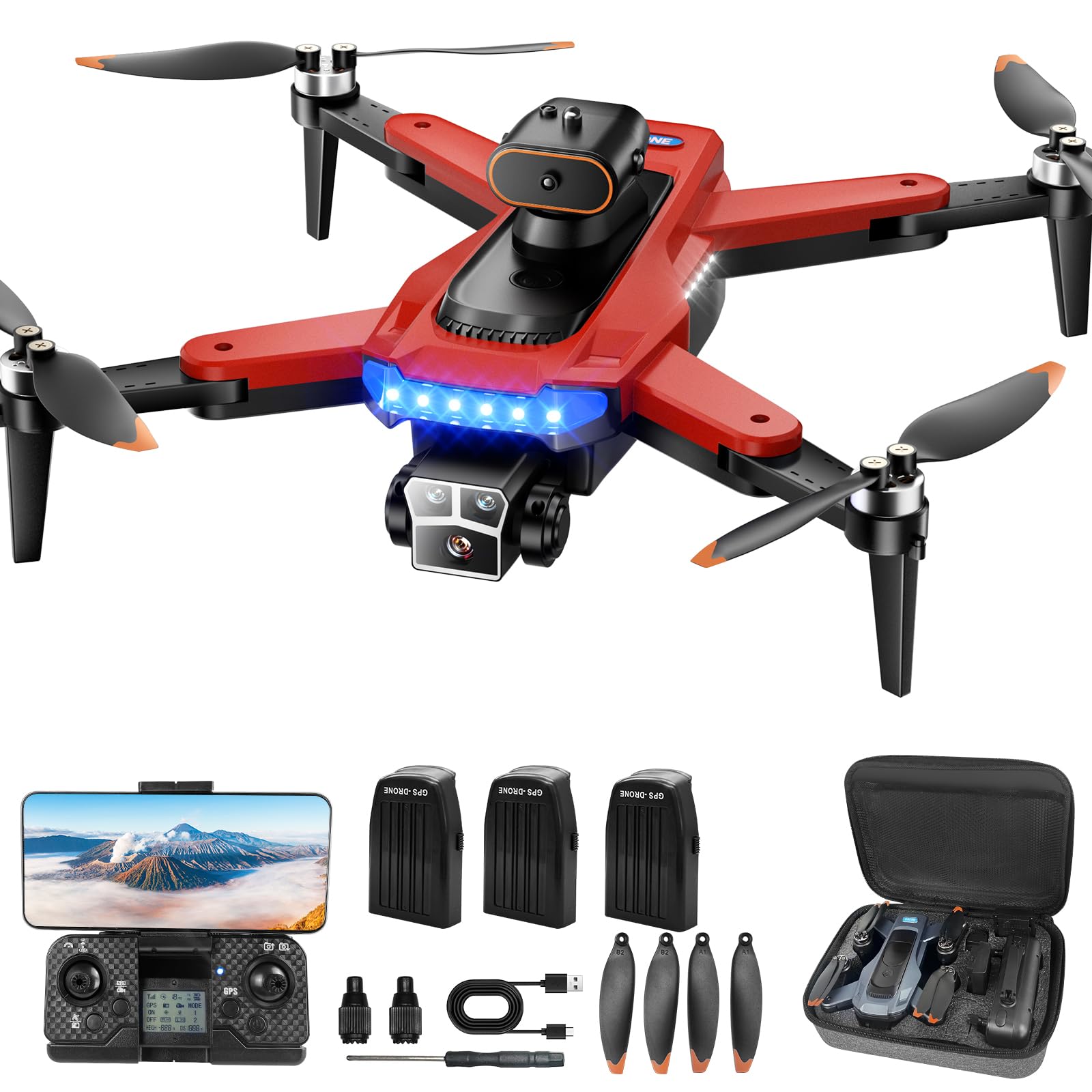
Image: The HYTOBP P17 Drone is lightweight and portable.
7. Warranty Information
Specific warranty details for the HYTOBP P17 GPS Drone are not provided in this manual. Please refer to the product packaging, the manufacturer's official website, or your point of purchase for comprehensive warranty terms and conditions.
8. Support
For technical assistance, spare parts, or further inquiries regarding your HYTOBP P17 GPS Drone, please contact the manufacturer directly through their official website or the customer service channels provided with your purchase. Keep your purchase receipt and product serial number handy when contacting support.


