
1. Important Safety Information
Please read and understand all instructions before beginning installation. Improper installation may result in electric shock, fire, or personal injury.
- Always turn off power at the circuit breaker before installation or maintenance.
- Ensure all electrical connections comply with local codes and ordinances.
- Use only the parts supplied by the manufacturer.
- The ceiling fan must be mounted to a ceiling joist or support structure capable of supporting a minimum of 35 lbs (15.9 kg).
- DC Motor Protection Notice: This ceiling fan uses a DC motor with built-in protection. If the fan blades are not installed (no load), the motor will automatically stop running. This is a normal safety feature designed to prevent overheating or damage. The DC motor will only operate correctly under proper load conditions.
2. Package Contents
Verify all components are present and undamaged before proceeding with installation.
- Fan Motor Assembly
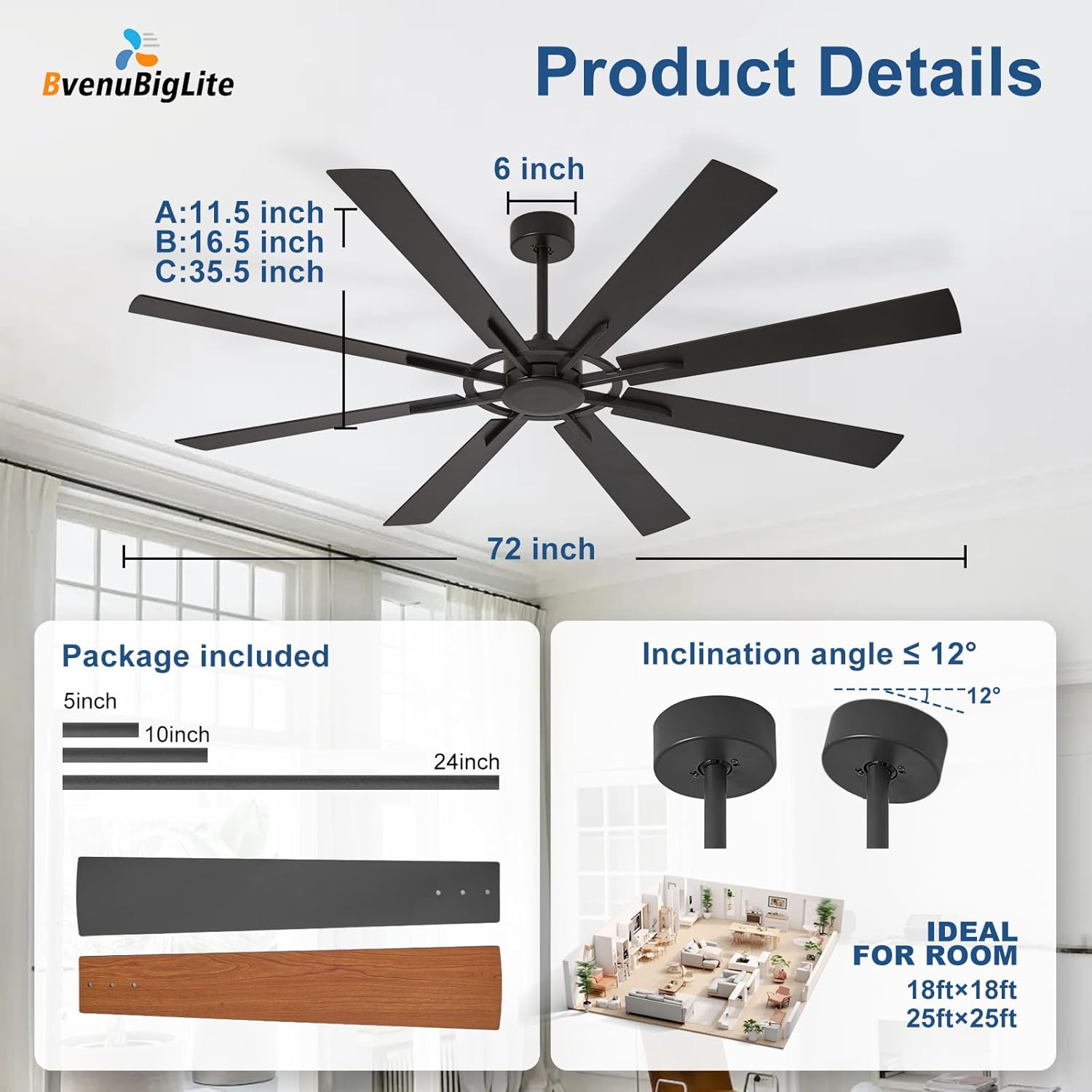
- 8 Fan Blades (dual-finish: black and rustic walnut)
- Downrods (5", 10", and 24" included for various ceiling heights)
- Mounting Bracket
- Remote Control with Wall Mount
- Receiver for Remote Control
- LED Light Kit (if applicable to your model)
- Hardware Pack (screws, washers, wire nuts)
- User Manual
- White Gloves (for handling to prevent fingerprints)

3. Product Overview & Features
The BvenuBigLite 72-inch ceiling fan is designed for optimal air circulation in large spaces, combining modern aesthetics with advanced functionality.
- Large Diameter: 72-inch span ideal for rooms larger than 18ft x 18ft, including living rooms, great rooms, and covered outdoor areas.
- 8 Dual-Finish Blades: Reversible blades offer a choice of classic black or rustic walnut finish.
- Ultra Quiet DC Motor: Operates at a low noise level of 30dB, ensuring a peaceful environment.
- 6-Speed Reversible Function: Provides gentle breeze to strong airflow. Reversible mode enhances air circulation for both summer cooling and winter warmth.
- Smart Control: Conveniently adjust settings via the included remote control, a dedicated mobile APP, or a wall switch.
- Memory Function: Retains your last fan setting for ease of use.
- Flexible Mounting: Includes 5", 10", and 24" downrods to accommodate ceiling heights from 12 to 32 inches, suitable for flat or vaulted ceilings (max 15°).


4. Installation
Follow these steps carefully for proper installation. It is recommended to have two people for installation due to the fan's size.
- Prepare the Mounting Location: Ensure power is off at the circuit breaker. Install the mounting bracket securely to a ceiling joist or suitable support.
- Assemble Fan Blades: Attach each of the 8 fan blades to the motor assembly using the provided screws and washers. Ensure they are tightened securely.
- Attach Downrod: Select the appropriate downrod length (5", 10", or 24") for your ceiling height. Feed the motor wires through the downrod and secure the downrod to the motor assembly.
- Hang the Fan: Carefully lift the assembled fan and hang it onto the mounting bracket. Ensure the downrod ball is properly seated in the bracket.
- Make Electrical Connections: Connect the fan's electrical wires to the household wiring according to the wiring diagram in the manual. Ensure all connections are secure with wire nuts.
- Install Receiver: Place the remote control receiver inside the canopy.
- Secure Canopy: Slide the canopy up and secure it to the mounting bracket with screws, covering all wiring.
- Install LED Light Kit (if applicable): Connect the LED light kit wires and attach the light kit to the bottom of the fan motor assembly.

5. Operating Instructions
Your BvenuBigLite ceiling fan can be operated using the included remote control or a dedicated mobile application.
Remote Control Functions

- ON/OFF: Turns the fan or light on/off.
- ALL OFF: Turns both the fan and light off simultaneously.
- Fan Speed (1-6): Adjusts fan speed from gentle breeze (1) to maximum airflow (6).
- F/R (Forward/Reverse): Changes the direction of blade rotation for summer (cooling) or winter (air circulation) modes.
- Light Brightness: Adjusts the intensity of the LED light.
- Light Color Temperature: Changes the light color from cool to warm (if applicable to your model).
- Timer (2H/4H): Sets the fan to automatically turn off after 2 or 4 hours.
- Memory Function: The fan remembers your last settings when turned off and on.
APP Control
For enhanced control, download the dedicated mobile application. Scan the QR code in your manual or visit http://www.jasonghost.com/fanlamppro/ to download the app. The app allows for remote operation, speed adjustment, light control, and timer settings directly from your smartphone.

6. Maintenance
Regular maintenance ensures optimal performance and longevity of your ceiling fan.
- Cleaning: Use a soft, damp cloth to clean the fan blades and motor housing. Do not use abrasive cleaners or solvents.
- Blade Balancing: If the fan wobbles, ensure all blade screws are tight. A dynamic blade balancing kit is included to correct any imbalance. Follow the instructions provided with the balancing kit.
- Electrical Connections: Periodically check all electrical connections for tightness.
7. Troubleshooting
If you encounter any issues, refer to the following common problems and solutions:
| Problem | Possible Cause | Solution |
|---|---|---|
| Fan does not start | No power to the fan; Loose wiring; Remote control not paired; DC motor protection activated (blades not installed). | Check circuit breaker; Verify all wire connections; Pair remote control (refer to manual); Ensure all blades are securely installed. |
| Fan wobbles excessively | Loose blade screws; Unbalanced blades; Loose mounting bracket. | Tighten all blade screws; Use the balancing kit to balance blades; Ensure mounting bracket is securely fastened to the ceiling. |
| Light does not work | Loose light kit wiring; Faulty LED driver; Remote control issue. | Check light kit connections; Contact customer support if LED driver is suspected; Ensure remote batteries are fresh and remote is paired. |
| Remote control not responding | Dead batteries; Remote not paired with receiver. | Replace remote batteries; Follow pairing instructions in the manual to re-pair the remote with the receiver. |
8. Specifications
| Feature | Detail |
|---|---|
| Model Name | 72 Inch 8 Blade Ceiling Fan |
| Model Number | WS-FPZ190-18B-BR |
| Brand | BvenuBigLite |
| Size | 72 inches (Diameter) |
| Number of Blades | 8 |
| Blade Finish | Dual-sided (Black / Rustic Walnut) |
| Motor Type | DC Motor |
| Speed Settings | 6 |
| Noise Level | ≤ 30 Decibels |
| Control Method | Remote, APP, Wall Switch |
| Power Source | DC |
| Wattage | 40 watts |
| Voltage | 120 Volts |
| Included Downrods | 5", 10", 24" |
| Max Vaulted Ceiling Angle | 15° |
| Indoor/Outdoor Usage | Indoor, Outdoor (covered patios/porches) |
9. Warranty and Support
BvenuBigLite is committed to providing quality products and customer satisfaction.
- Motor Warranty: Up to 5 years.
- Fan Components Warranty: 2 years on the rest of the ceiling fan.
- Customer Support: We offer 24-hour customer support. Please feel free to contact us with any questions you may have during installation or use.
- Contact Information: Refer to your product manual for specific contact details or visit the BvenuBigLite store on Amazon.
