
Introduction
Thank you for choosing the Brifit Digital Refrigerator Thermometer. This device is designed to accurately monitor temperature and humidity in various environments, including refrigerators, freezers, aquariums, greenhouses, and laboratories. Featuring a large LCD, a high-precision waterproof probe, and multiple installation options, it provides reliable data to help maintain optimal conditions.
Package Contents
Please check the package contents upon opening to ensure all items are present:
- 1 x Brifit Digital Refrigerator Thermometer (Model EU-WA157)
- 1 x Waterproof Temperature Probe (1.5 meters)
- 1 x Suction Cup for Probe
- 1 x AAA Battery
- 1 x User Manual

Image: Contents of the Brifit Digital Refrigerator Thermometer package.
Product Features
- High-Precision Waterproof Probe: Equipped with a 1.5-meter long waterproof probe for accurate temperature measurements in various environments.
- Large LCD Display: Clear, high-resolution screen for easy reading of temperature and humidity values.
- MIN/MAX Record: Displays the maximum and minimum recorded temperature and humidity values over a 24-hour period.
- Comfort Icon: Indicates the comfort level based on indoor humidity.
- Multiple Applications: Suitable for refrigerators, freezers, aquariums, greenhouses, laboratories, and general indoor use.
- Compact and Durable Design: Small footprint (9.8 x 6 x 1.5 cm) and robust construction.
- Versatile Installation: Features magnetic attachment, a foldable stand, and a hanging hole for flexible placement.

Image: Brifit thermometer displaying temperature and humidity ranges, and accuracy.
Device Layout
Familiarize yourself with the main components and display elements of your thermometer:

Image: Front display of the thermometer with key indicators labeled.
- Indoor Temperature: Displays the temperature measured by the internal sensor.
- Probe Temperature: Displays the temperature measured by the external waterproof probe.
- Comfort Icon: A visual indicator of the indoor humidity level (Dry, Comfort, Wet).
- Indoor Humidity: Displays the humidity measured by the internal sensor.
- MEMORY Button: Used to view maximum and minimum recorded values.
- °C/°F Button: Toggles between Celsius and Fahrenheit temperature units.
- CLEAR Button: Clears the recorded maximum and minimum values.
Installation & Setup
1. Battery Installation
- Locate the battery compartment on the back of the device.
- Open the battery cover.
- Insert one AAA battery, ensuring correct polarity (+/-).
- Close the battery cover securely.
2. Mounting Options
The thermometer offers three convenient mounting methods:
- Magnetic Attachment: The device has magnets on its back, allowing it to be attached directly to metallic surfaces like refrigerator doors.
- Foldable Stand: A built-in stand allows the thermometer to be placed upright on any flat surface.
- Hanging Hole: Use the integrated hanging hole to mount the device on a hook or nail.
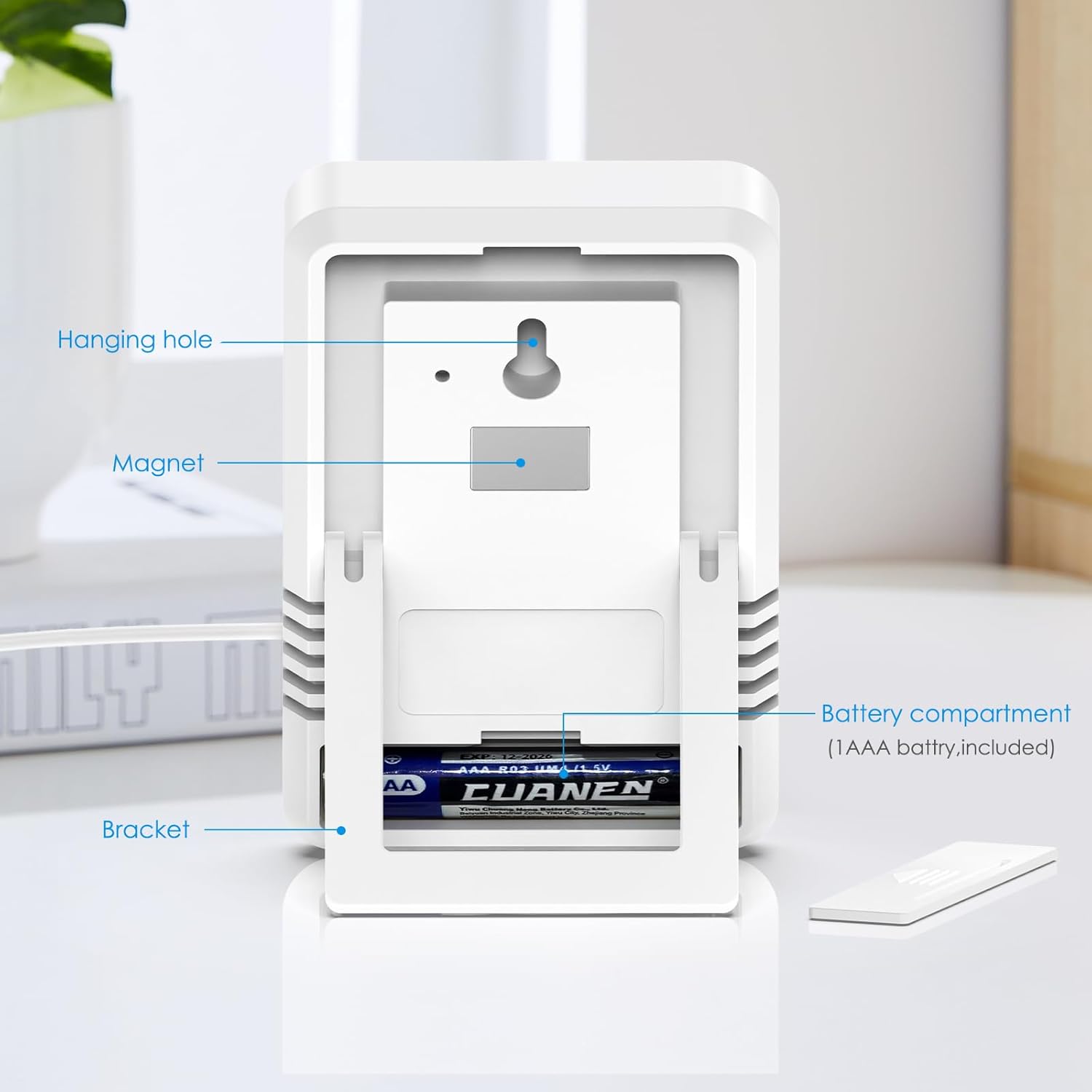
Image: Rear view of the thermometer highlighting battery compartment, magnet, and hanging hole.
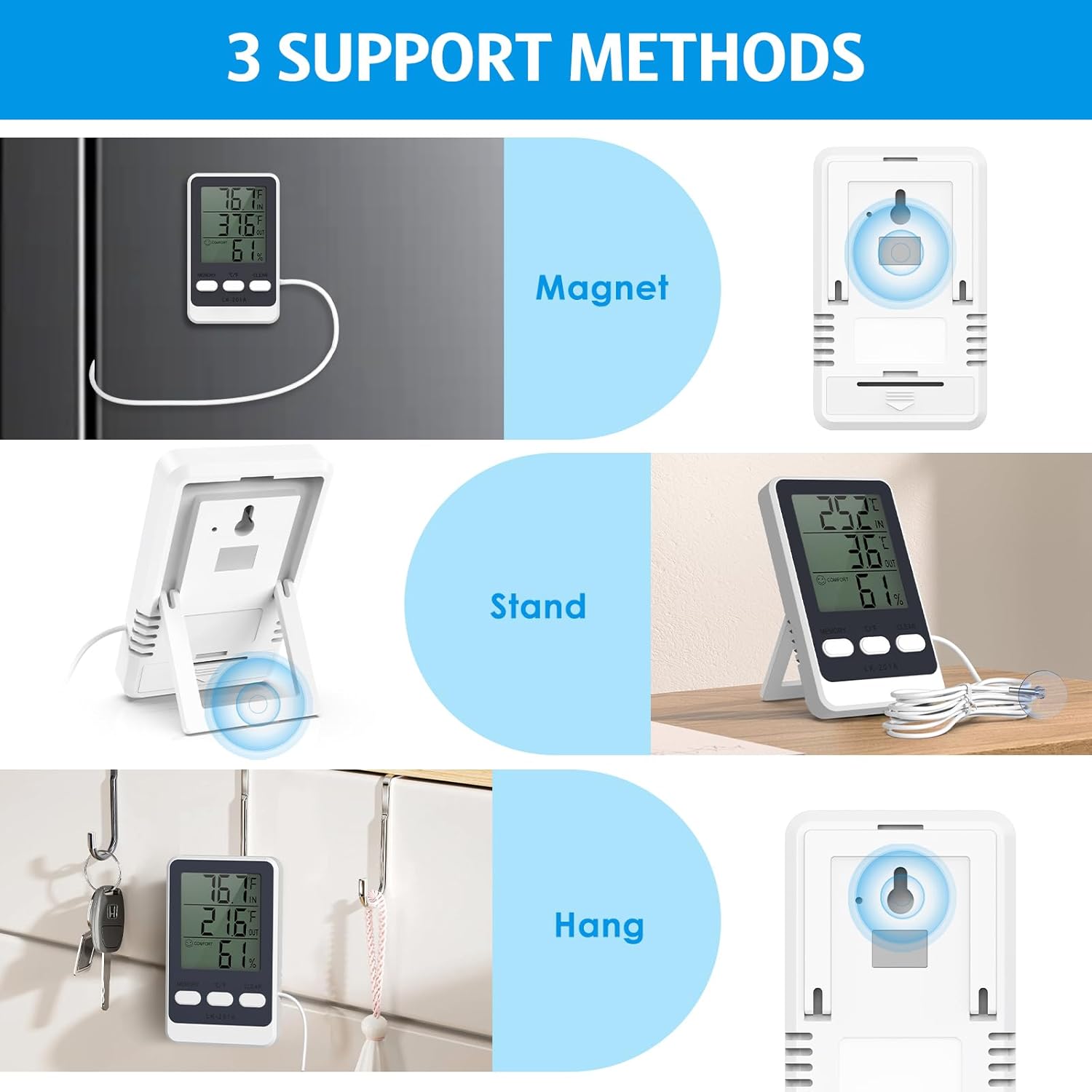
Image: Visual representation of the three support methods: magnetic, stand, and hanging.
3. Probe Placement
Place the waterproof probe in the area where you wish to measure the external temperature (e.g., inside a refrigerator, freezer, or aquarium). Use the provided suction cup to secure the probe if needed.
Operating Instructions
1. Power On/Off
The device automatically powers on once the battery is installed. There is no manual power on/off button. It will continuously display readings.
2. Temperature Unit Selection (°C/°F)
Press the "°C/°F" button once to switch the temperature display between Celsius and Fahrenheit.
3. Viewing MIN/MAX Records
Press the "MEMORY" button to view the maximum and minimum temperature and humidity values recorded since the last reset. Press again to cycle through MAX, MIN, and current readings.
4. Clearing MIN/MAX Records
To clear the recorded maximum and minimum values, press the "CLEAR" button. The device automatically clears records every 24 hours at 0:00 (midnight).

Image: Thermometer displaying indoor and probe temperatures, humidity, and memory functions.
Applications
The Brifit Digital Refrigerator Thermometer is versatile and can be used in various settings:
- Refrigerators & Freezers: Monitor food storage temperatures to ensure freshness and safety.
- Aquariums: Keep track of water temperature for aquatic life.
- Greenhouses: Monitor ambient temperature and humidity for optimal plant growth.
- Laboratories: For general temperature and humidity monitoring where precise conditions are required.
- Indoor Rooms: Track room temperature and humidity for comfort and health.

Image: Various application scenarios for the Brifit thermometer.
Specifications
| Model Number | EU-WA157 |
| Indoor Temperature Range | -10°C to 50°C (14°F to 122°F) |
| Probe Temperature Range | -40°C to 70°C (-40°F to 158°F) |
| Humidity Range | 10% to 99% RH |
| Temperature Accuracy | ±1°C (±1.8°F) |
| Humidity Accuracy | ±5% RH |
| Refresh Rate | Every 10 seconds |
| Probe Cable Length | 1.5 meters (59 inches) |
| Dimensions | 9.8 x 6 x 1.5 cm (3.86 x 2.36 x 0.6 inches) |
| Power Source | 1 x AAA Battery |
| Display Type | Digital LCD |

Image: Device dimensions.

Image: Precision and refresh rate details.
Maintenance
- Cleaning: Wipe the device with a soft, damp cloth. Do not immerse the unit in water.
- Battery Replacement: Replace the AAA battery when the display becomes dim or unresponsive.
- Storage: If storing for an extended period, remove the battery to prevent leakage. Store in a cool, dry place.
Troubleshooting
- No Display: Ensure the AAA battery is correctly installed with the correct polarity. Replace the battery if it is depleted.
- Inaccurate Readings: Ensure the probe is properly placed and not obstructed. Allow sufficient time for the sensor to stabilize in a new environment. Compare readings with another calibrated thermometer if possible.
- MIN/MAX Not Resetting: The device automatically resets MIN/MAX values at midnight. To manually clear, press the "CLEAR" button.
Warranty & Support
Brifit products are designed for reliability and performance. For any questions, technical support, or warranty claims, please refer to the contact information provided with your purchase or visit the official Brifit website. Please retain your proof of purchase for warranty purposes.