
Introduction
This manual provides instructions for the assembly, operation, and maintenance of the Science Can Electronic Guitar Keyboard. This STEM kit is designed to introduce users to basic circuit principles, music, and electronics through hands-on building.

Image: An assembled Science Can Electronic Guitar Keyboard being played by a child, demonstrating the product in use.
Setup Instructions
Follow these steps to assemble your Science Can Electronic Guitar Keyboard:
- Remove all components from the packaging.
- Refer to the detailed instruction manual included in the kit for step-by-step assembly. The wooden puzzle pieces are designed for easy interlocking.
- Once assembly is complete, locate the battery compartment. Insert 3 AAA batteries (not included) into the compartment, ensuring correct polarity.
- Secure the battery compartment cover.

Image: An exploded view illustrating the various components of the Science Can Electronic Guitar Keyboard, such as the PCB board, key module, and volume module, prior to assembly.
Assembly Video Guide
Video: An official Science Can video demonstrating the assembly process of the DIY Electric Guitar Kit. This video provides visual guidance for each step of construction.
Operating Instructions
The Electronic Guitar Keyboard features three distinct play modes and adjustable volume for varied musical experiences.
Play Modes
- Music Mode: This mode allows the instrument to function as a 3-in-1 musical instrument, simulating guitar, piano, and bass sounds.
- Practice Mode: Designed for learning, this mode includes a light guide to assist users in playing notes.
- Accompaniment Mode: Features auto-play with 10 pre-programmed songs for users to play along with.
To play, first press a note key, then press the pick mechanism to produce sound. The volume can be adjusted to three different levels using the designated control.

Image: The Science Can Electronic Guitar Keyboard showcasing its three operational modes: Music Mode (3-in-1 instrument), Practice Mode (with light guide), and Accompaniment Mode (auto-play with 10 songs).

Image: A close-up of hands interacting with the Science Can Electronic Guitar Keyboard, with accompanying sheet music cards illustrating note sequences for easy playing.
Maintenance
- Cleaning: Wipe the surface of the guitar with a soft, dry cloth. Avoid using abrasive cleaners or excessive moisture, as this can damage the wooden components and electronics.
- Storage: Store the instrument in a dry place away from direct sunlight and extreme temperatures to prevent warping of the wood or damage to electronic parts.
- Battery Replacement: When the sound quality diminishes or the instrument stops functioning, replace the 3 AAA batteries. Ensure the instrument is turned off before replacing batteries.
Troubleshooting
- No Sound or Intermittent Sound:
- Check if the batteries are correctly inserted and not depleted. Replace if necessary.
- Ensure all internal connections made during assembly are secure.
- Verify that the volume is not set to the lowest level.
- Buttons Not Responding:
- Confirm that the note key is pressed firmly before pressing the pick mechanism.
- Inspect for any obstructions under the keys or pick mechanism.
- Difficulty Assembling:
- Refer to the detailed instruction manual and the assembly video for visual guidance.
- Ensure all pieces are oriented correctly before attempting to connect them.
Specifications
| Feature | Detail |
|---|---|
| Brand Name | Science Can |
| Model Number | 1602812024ig0001 |
| Age Range | 8-15 years (Manufacturer Minimum Age: 96 months, Maximum Age: 180 months) |
| Educational Objective | Creative Skills, Patience Skill, Problem Solving Skills |
| Set Name | DIY Guitar and Musical Instruments Kit |
| Number of Items | 1 |
| Included Components | DIY Guitar Kit |
| Theme | Music |
| Battery Requirement | 3 AAA batteries (not included) |
| Material Type | Wood |
| Item Dimensions (L x W x H) | 15.35 x 7.48 x 0.94 inches |
| Item Weight | 0.33 kg |
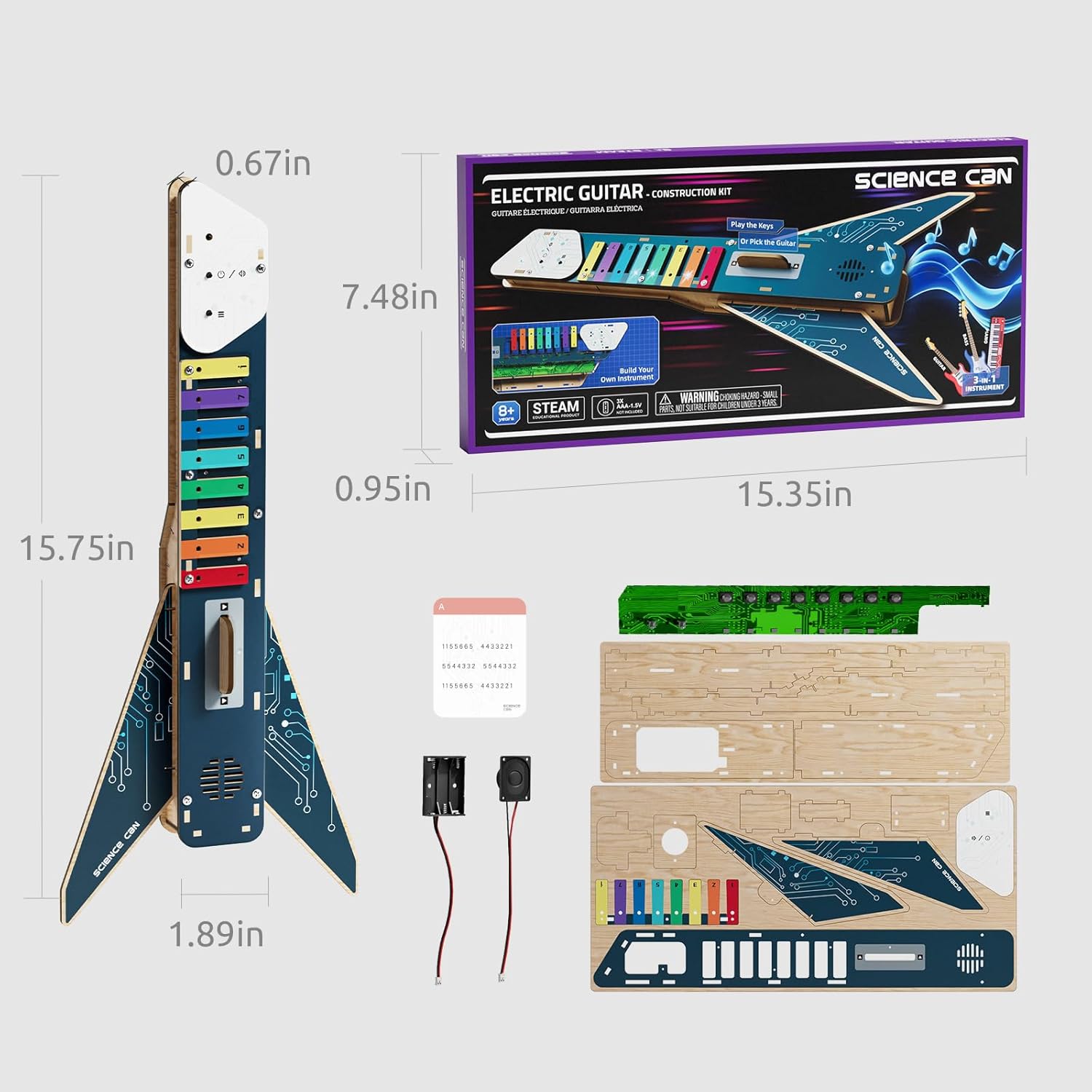
Image: A visual representation of the Science Can Electronic Guitar Keyboard's dimensions and the various parts included in the kit.
Warranty and Support
For product support, inquiries, or to report any issues, please contact Science Can directly. While specific warranty details are not provided in this manual, Science Can is committed to customer satisfaction.
You can find more information and contact details on the official Science Can store page: Science Can Store