
HomeTro HM3
Contents
HomeTro 3.0HP Walking Pad Treadmill User Manual
Model: HM3
Brand: HomeTro
1. Introduction
The HomeTro 2-in-1 Walking Pad Treadmill is designed to provide a versatile and convenient fitness solution for both home and office environments. This compact and portable unit allows for various activities, from light walking during work to more intense jogging or running workouts. It features adjustable speeds ranging from 0.6 to 5 MPH and a manual incline capability of up to 9%, catering to different fitness levels and exercise goals. The quiet 3.0HP motor ensures smooth operation while supporting users up to 265 lbs.

Image: The HomeTro 3.0HP Walking Pad Treadmill, showcasing its compact design and remote control.
2. Safety Information
Please read all safety instructions carefully before operating the treadmill to ensure safe and effective use.
- Always place the treadmill on a flat, stable surface.
- Ensure adequate clear space around the treadmill (at least 2 feet on sides and 6 feet behind).
- Wear appropriate athletic footwear during use.
- Do not allow children or pets near the treadmill while it is in operation.
- The maximum user weight capacity is 265 lbs. Do not exceed this limit.
- In case of emergency, use the remote control to stop the treadmill immediately.
- Unplug the treadmill from the power outlet when not in use or before cleaning/maintenance.
3. Package Contents
Verify that all components are present in the package:
- Treadmill Unit
- Remote Control
- 5mm Hex Wrench
- Front Foot Pads (x2)
- Silicone Oil (20ml)
- User Manual
- Power Cord

Image: Contents of the HomeTro Walking Pad package, including the treadmill, remote, tools, and manual.
4. Setup and Assembly
The HomeTro Walking Pad Treadmill comes pre-assembled, requiring minimal setup before first use.
- Unpacking: Carefully remove the treadmill and all accessories from the packaging.
- Placement: Place the treadmill on a firm, level surface. Ensure there is sufficient space around the unit for safe operation.
- Power Connection: Connect the power cord to the treadmill's power input and then plug it into a standard electrical outlet.
- Incline Adjustment (Optional): For an inclined workout, manually adjust the incline feet located at the front of the treadmill. Lift the treadmill slightly and flip down the support legs to engage the incline. The treadmill offers up to a 9% manual incline.

Image: Illustration of how to manually adjust the incline of the HomeTro Walking Pad Treadmill.
5. Operating Instructions
5.1 Power On/Off
To power on the treadmill, press the power button located on the unit. The display will illuminate. To power off, press the power button again or use the remote control.
5.2 Speed Adjustment
The treadmill offers a speed range from 0.6 MPH to 5 MPH.
- Remote Control: Use the '+' and '-' buttons on the included magnetic remote control to increase or decrease the speed.
- Smart APP Control: Download the dedicated smart APP (refer to the manual for QR code or search instructions). Connect the treadmill via Bluetooth. The APP allows for remote speed control, tracking workout progress, and accessing various training programs.

Image: The HomeTro Walking Pad's remote control and a smartphone screen showing the companion app for workout tracking and control.
5.3 Incline Operation
The treadmill features a manual incline adjustment up to 9%. To change the incline, power off the unit and adjust the support legs as described in the Setup section.

Image: Visual representation of the benefits of 4% and 9% incline settings on the HomeTro Walking Pad, showing increased calorie burn.
5.4 Workout Modes
The 2-in-1 design allows for different usage modes:
- Walking Mode: Ideal for light exercise or walking while working.
- Running Mode: For more intense cardio workouts.
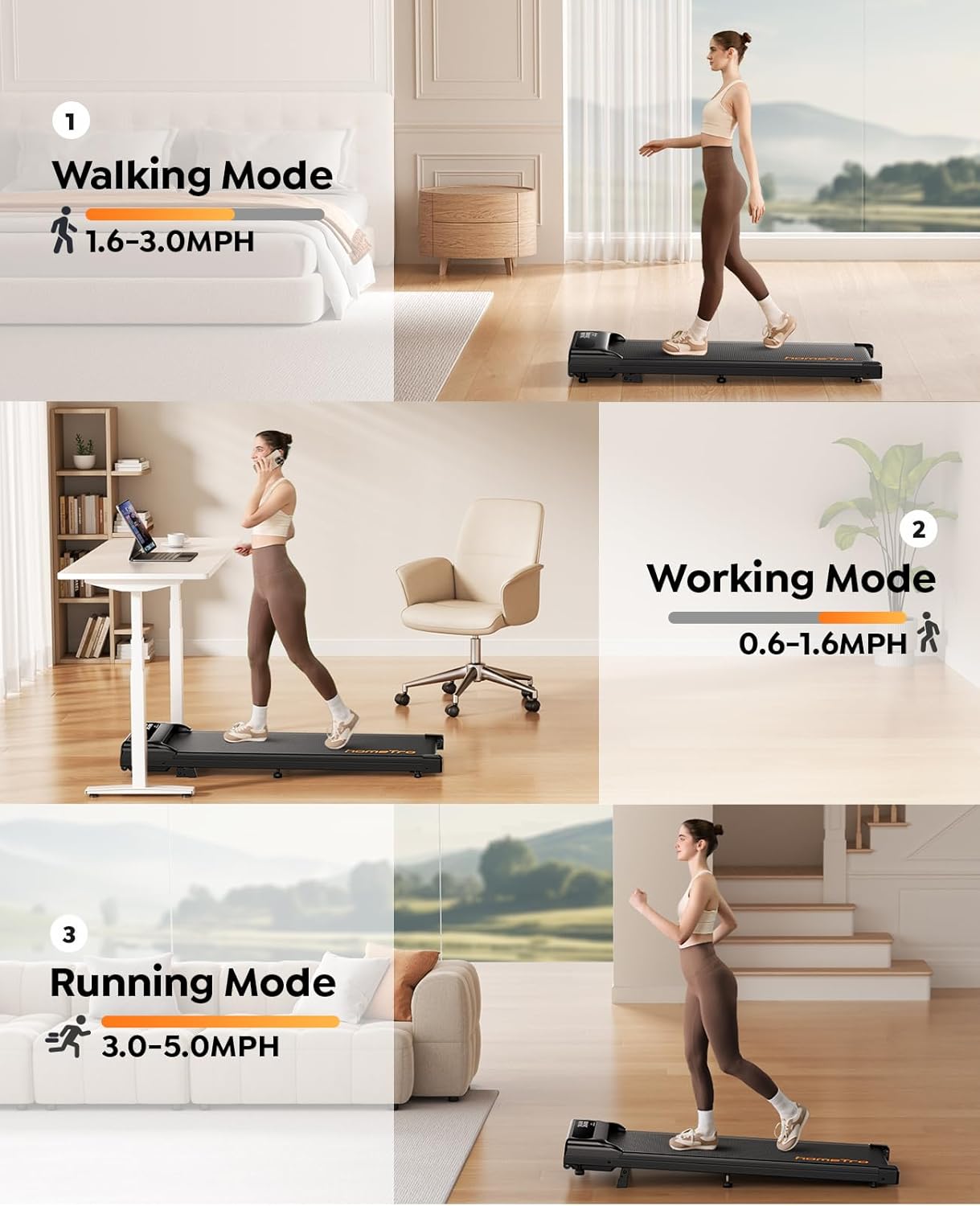
Image: Depicts three modes of use for the HomeTro Walking Pad: Walking Mode, Working Mode (under a desk), and Running Mode.
6. Key Features
- 2-in-1 Dual Function Design: Seamlessly switch between walking and running modes, suitable for home or under-desk use.
- Adjustable Incline (4%/9%): Manually adjust the incline to increase workout intensity, burn more calories, and target different muscle groups.
- Powerful, Stable & Quiet Motor: Equipped with a 3.0 HP motor, supporting up to 265 lbs, providing strong and quiet operation for undisturbed workouts.
- 2-in-1 Control Options: Control speed with the magnetic remote control or via the smart APP, which also tracks progress and offers group run features.
- Enhanced Safety & Comfort: Features a 5-layer non-slip shock-absorbing belt designed to cushion joints and muscles, ensuring a safe and comfortable exercise experience.

Image: Comparison highlighting the HomeTro's 3.0HP motor, 265lbs capacity, 5.0MPH speed, and low noise level against other models.
7. Maintenance
Regular maintenance ensures the longevity and optimal performance of your treadmill.
- Lubrication: Apply the provided silicone lubricant to the running belt every 3-6 months, or after approximately 50 hours of use, to reduce friction and extend belt life. Refer to the user manual for specific lubrication points and instructions.
- Cleaning: Wipe down the treadmill surface with a damp cloth after each use to remove sweat and dust. Do not use abrasive cleaners.
- Belt Adjustment: Periodically check the running belt for proper alignment and tension. If the belt shifts or slips, adjust it according to the instructions in the detailed user manual using the provided hex wrench.
8. Troubleshooting
If you encounter issues with your treadmill, try the following common troubleshooting steps:
- Treadmill not powering on: Check if the power cord is securely plugged into both the treadmill and the wall outlet. Ensure the power switch on the treadmill is in the 'ON' position.
- Remote control not working: Check the battery in the remote control and replace if necessary. Ensure there are no obstructions between the remote and the treadmill's receiver.
- Belt slipping or uneven: This may indicate the belt needs lubrication or adjustment. Refer to the Maintenance section and the detailed user manual for specific instructions on belt lubrication and alignment.
- Unusual noises: Stop the treadmill immediately and inspect for any foreign objects caught in the belt or motor area. If the noise persists, contact customer support.
9. Specifications
| Specification | Value |
|---|---|
| Brand | HomeTro |
| Model Name | HM3 |
| Product Dimensions (LxWxH) | 45.67"D x 19.1"W x 7.09"H |
| Maximum Speed | 5 Miles per Hour |
| Minimum Speed | 0.6 Miles per Hour |
| Maximum Horsepower | 3 Horsepower |
| Maximum Incline Percentage | 9% |
| Maximum Weight Recommendation | 265 Pounds |
| Frame Material | Aluminum |
| Power Source | Corded Electric |
| Assembly Required | No |
| Metrics Measured | Calories Burned, Distance, Speed, Time |
| Included Components | Lubricant, Remote Control, Tool Kit, User Manual |
10. Warranty and Support
HomeTro products are manufactured to high-quality standards. For specific warranty details, please refer to the warranty card included with your product or visit the official HomeTro website. If you require technical support, have questions about operation, or need assistance with parts, please contact HomeTro customer service through the contact information provided in your product packaging or on the official website.
For further assistance, please visit: HomeTro Store on Amazon
Documents and downloads
Ask a question about this manual
Ask about setup, troubleshooting, compatibility, parts, safety, or missing instructions. Manuals+ will review the question and use this page’s manual context to help answer it.