
Introduction
This manual provides comprehensive instructions for the installation, operation, and maintenance of your Kairiyard Dual RV Backup Camera System. This system includes a 7-inch AHD 1080P monitor and two high-definition cameras, designed to enhance visibility and safety for various vehicles such as RVs, trucks, trailers, cars, and tractors. Please read this manual thoroughly before using the product to ensure correct setup and optimal performance.
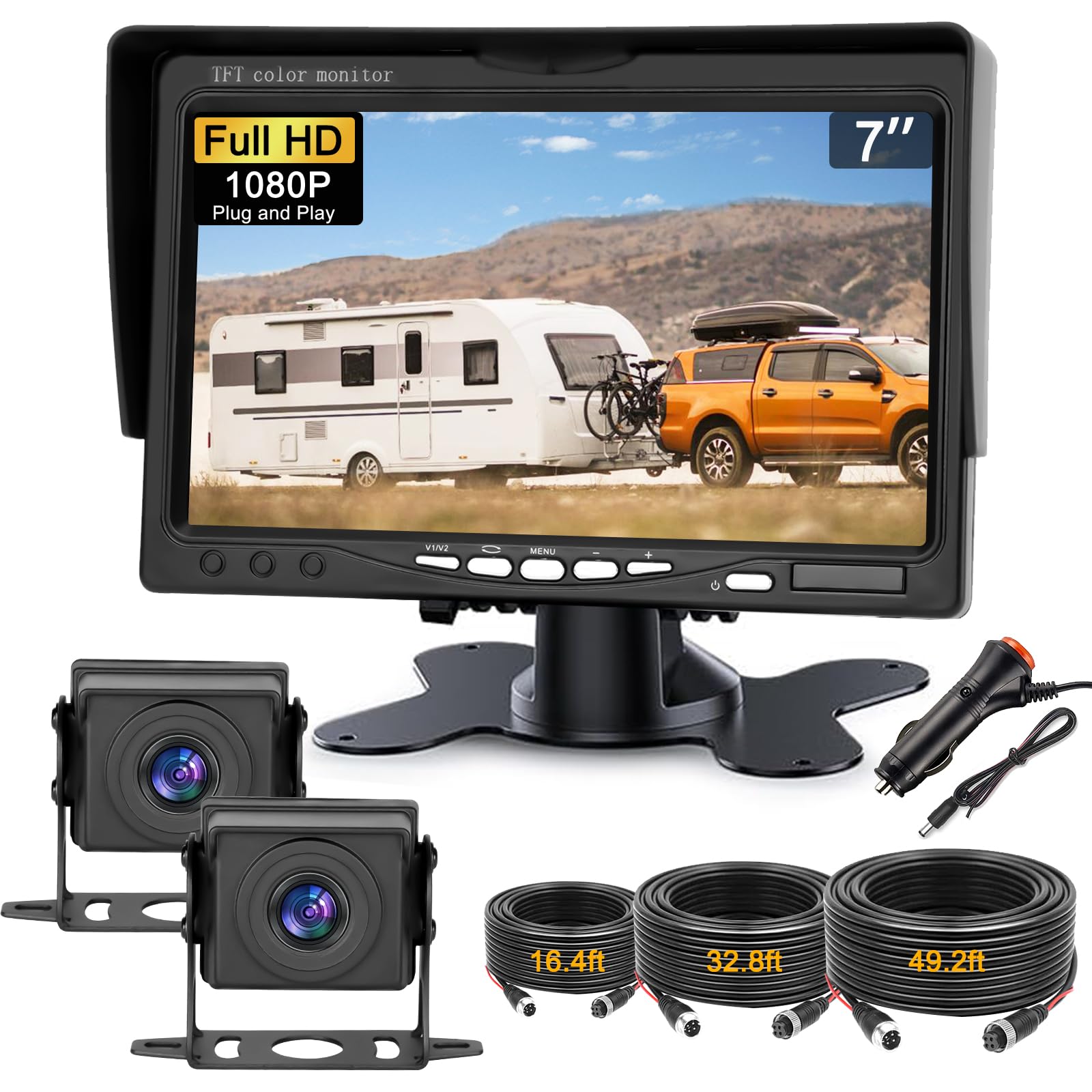
Image: The Kairiyard 7-inch monitor installed on a dashboard, showing a clear view of an RV.
What's in the Box
Verify that all components listed below are included in your package:
- 7-inch Monitor (x1)
- 1080P Cameras (x2)
- Monitor Bracket (x1)
- Cigarette Lighter Power Adapter (x1)
- Power Cable (for direct wiring) (x1)
- Video Cables (16ft, 33ft, 49ft) (x3)
- Mounting Screws (x4)
- Sunshade for Monitor (x1)
- User Manual (x1)

Image: All components included in the Kairiyard dual RV backup camera system kit.
Product Features
- 7-inch AHD 1080P Monitor: The monitor features advanced optics and image processing, providing a 1920*1080 pixel resolution with 100% true color reproduction for clear, detailed visuals.
- Dual Camera System: Includes two 1080p cameras, allowing simultaneous monitoring of the rear and side views. Cameras feature a 150-degree wide viewing angle with non-fisheye distortion, a high-quality CCD imaging sensor, and anti-fog glass for vivid, high-resolution images.
- Stable Wired Transmission: The wired connection ensures superior signal stability, eliminating delays, interference, or fluctuations common with wireless systems, providing consistent 1080P color images.
- Multiple Functions: Offers 5 types of adjustable parking lines that can be enabled or disabled. The system also supports image flip and allows adjustment of brightness and contrast.
- IP69 Waterproof Cameras: Camera housings are constructed from high-quality ABS material and feature a fully sealed glue filling craft, ensuring IP69 waterproof protection against water, fog, and mist.
- Flexible Installation: The system can be powered by the vehicle's reverse light, automatically activating the display when reversing, or directly connected to the cigarette lighter. Various video cable lengths (16ft, 33ft, 49ft) are provided for customized installation.

Image: Overview of the system's key features including 1080P HD, 7-inch display, parking lines, image flip, and 150-degree wide view.

Image: The 7-inch monitor displaying a clear 1080P HD resolution image.
Video: This video provides an overview of the Kairiyard 7-inch HD 1080P Dual Backup Camera System, highlighting its features and components.
Setup and Installation
1. Mounting the Monitor
Choose a suitable location on your dashboard or windshield that does not obstruct your view or interfere with airbags. Secure the monitor using the provided bracket.
2. Mounting the Cameras
Install the cameras at the desired locations on your vehicle (e.g., rear, side). Ensure the camera has a clear, unobstructed view. The cameras are designed for surface mounting.

Image: Example of a Kairiyard backup camera mounted on the rear of a truck.
3. Wiring the System
Connect the cameras to the monitor using the appropriate video cables. The system offers two power supply methods:
- Cigarette Lighter Connection: Plug the provided cigarette lighter adapter into your vehicle's 12V power outlet. This method provides continuous power to the monitor and cameras.
- Reverse Light Connection: Connect the power cable to your vehicle's reverse light circuit. This setup will automatically power on the monitor and display the camera feed when the vehicle is put into reverse.

Image: Wiring diagram illustrating the 'Plug and Play' installation with options for cigarette lighter or reverse light power.

Image: A truck towing an RV, showcasing the installed backup camera system.
Operating Instructions
1. Powering On/Off
If connected to the cigarette lighter, the monitor will power on when the vehicle's ignition is on. If connected to the reverse light, the monitor will activate automatically when reverse gear is engaged.
2. Switching Camera Channels
Use the 'V1/V2' button on the monitor to switch between Camera 1 and Camera 2 views. This allows you to monitor different angles as needed.
3. Adjusting Settings
Access the monitor's menu to adjust various settings:
- Parking Lines: Enable or disable parking guidelines. You can also select from 5 different types of guidelines to match your preference.
- Image Flip: Adjust the image orientation (horizontal, vertical, or both) to correct for camera mounting position.
- Brightness/Contrast: Fine-tune the display's brightness and contrast for optimal visibility in different lighting conditions.

Image: The monitor screen showing various customizable parking guideline options.

Image: Illustration of the image flip function on the monitor.
Maintenance
Regular maintenance ensures the longevity and optimal performance of your backup camera system.
- Cleaning Cameras: Periodically clean the camera lenses with a soft, damp cloth to remove dirt, dust, or water spots. Avoid abrasive cleaners.
- Cleaning Monitor: Wipe the monitor screen with a soft, dry cloth. Do not use liquid cleaners directly on the screen.
- Cable Inspection: Regularly check all cables and connections for any signs of wear, damage, or loose connections. Ensure cables are securely routed and protected from pinching or abrasion.
- Waterproofing: The cameras are IP69 waterproof. However, avoid directing high-pressure water jets directly at the camera housing during cleaning.

Image: The camera demonstrating its IP69 waterproof capability.
Troubleshooting
If you encounter issues with your Kairiyard backup camera system, refer to the following common problems and solutions:
| Problem | Possible Cause | Solution |
|---|---|---|
| No image on monitor / Black screen | Loose power connection; Camera cable disconnected; Incorrect power source. | Check all power connections to the monitor and cameras. Ensure video cables are securely plugged in. Verify the power source (cigarette lighter or reverse light) is functioning. |
| Blurry or distorted image | Dirty camera lens; Damaged video cable; Incorrect monitor settings. | Clean the camera lens. Inspect video cables for damage. Check monitor settings for brightness/contrast. |
| No parking lines displayed | Parking lines feature is disabled in settings. | Access the monitor menu and enable the parking lines feature. |
| Image is upside down or mirrored | Image flip setting is incorrect. | Use the image flip function in the monitor settings to adjust the orientation. |
Specifications
| Feature | Detail |
|---|---|
| Brand | Kairiyard |
| Screen Size | 7 inches |
| Product Dimensions (Monitor) | 6.5"L x 4.4"W x 0.78"H |
| Compatible Devices | Most DC 12V vehicles (trailer, truck, car, tractor, RV, van, SUV) |
| Installation Type | Surface Mount |
| Voltage | 12 volts DC |
| Optical Sensor Technology | CCD |
| Lens Type | Wide Angle |
| Real Angle of View | 150 degrees |
| Connector Type | Wired |
| Video Capture Resolution | 1080p |
| Manufacturer | Kairiyard |
Warranty
This Kairiyard Dual RV Backup Camera System is covered by a 12-month warranty from the date of purchase. This warranty covers manufacturing defects and malfunctions under normal use. Please retain your proof of purchase for warranty claims.
Support
For further assistance, technical support, or warranty inquiries, please contact the seller or manufacturer directly through the platform where the product was purchased. Provide your product model number (B0F47MMJVT) and a detailed description of your issue for efficient support.