1. Introduction
Welcome to the user manual for your new Segway Ninebot F3 Electric Scooter. This guide provides essential information to help you assemble, operate, maintain, and troubleshoot your scooter safely and effectively. Please read this manual thoroughly before your first ride to ensure optimal performance and safety.
The Segway Ninebot F3 Electric Scooter is designed for urban commuting and recreational use, offering a blend of performance, comfort, and convenience. It features a robust design, advanced suspension, and smart functionalities to enhance your riding experience.
2. Product Overview
The Segway Ninebot F3 Electric Scooter bundle includes the F3 Electric Scooter and a universal storage bag. Below are the key features of the F3 Electric Scooter:
- 20 mph Max Speed: Capable of reaching speeds up to 20 miles per hour for efficient commuting.
- 44 Miles Max Range: Extended battery life allows for long-distance rides, up to 44 miles in Eco Mode.
- 10-Inch Self-Sealing Tubeless Tires: Provides a smoother ride and reduces the risk of flats.
- Front Hydraulic & Rear Elastomer Suspension: Dual shock absorption system for enhanced comfort on various terrains.
- UL2271 & UL2272 Certified: Meets industry-leading safety standards for electrical and fire safety.
- Intuitive Control: Features a smart TFT display and ergonomic design for easy navigation and operation.
- Rugged Durability: Built with a high-grade magnesium alloy frame for long-lasting performance.
- Bright Lighting System: Ensures visibility and safety during night rides.
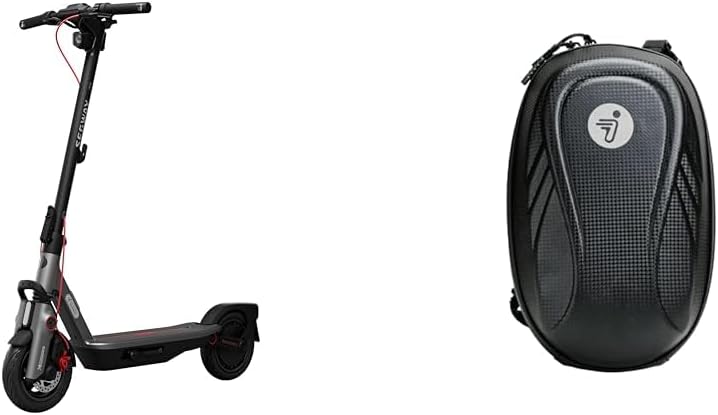
Image: The Segway Ninebot F3 Electric Scooter shown alongside its universal storage bag.
3. Components and Parts
Familiarize yourself with the main components of your Segway Ninebot F3 Electric Scooter:
- Handlebar: Includes grips, brake levers, throttle, and the Smart TFT Display.
- Stem: The vertical shaft connecting the handlebar to the front wheel.
- Folding Mechanism: Allows for compact storage and transport.
- Front Wheel: Equipped with a 10-inch self-sealing tubeless tire and hydraulic suspension.
- Rear Wheel: Equipped with a 10-inch self-sealing tubeless tire and elastomer suspension.
- Deck/Footboard: The platform where you stand, housing the battery.
- Kickstand: For parking the scooter upright.
- Charging Port: Location for connecting the power adapter.
- Headlight & Taillight: Integrated lighting system for visibility.

Image: Front view of the Segway Ninebot F3 Electric Scooter, highlighting the handlebar and front wheel.

Image: Side view of the Segway Ninebot F3 Electric Scooter, showing the full profile.

Image: Rear view of the Segway Ninebot F3 Electric Scooter, displaying the taillight and rear wheel.

Image: Detailed view of the 10-inch self-sealing tubeless tires and the front hydraulic and rear elastomer suspension system.

Image: Close-up of the Smart TFT Display on the handlebar, showing various ride metrics.

Image: The bright front lighting system of the Segway Ninebot F3 Electric Scooter.
4. Setup and Assembly
Your Segway Ninebot F3 Electric Scooter comes partially assembled. Follow these steps for initial setup:
- Unfold the Scooter: Carefully lift the stem until it locks into place. Ensure the folding mechanism is securely latched.
- Attach the Handlebar: If detached, align the handlebar with the stem and secure it using the provided screws and tools. Ensure all connections are tight.
- Initial Charge: Before your first ride, fully charge the scooter's battery. Connect the charger to the charging port and then to a power outlet. The indicator light on the charger will change when fully charged.
- Tire Check: Verify that the tire pressure is within the recommended range. Although self-sealing, proper inflation is crucial for performance and safety.

Image: Close-up of the charging port on the Segway Ninebot F3 Electric Scooter.
5. Operating Instructions
Operating your Segway Ninebot F3 is intuitive. Follow these guidelines for a safe and enjoyable ride:
- Power On/Off: Press and hold the power button on the display to turn the scooter on or off.
- Acceleration: Gently press the throttle lever with your right thumb to accelerate.
- Braking: Use the brake levers on the handlebar to slow down or stop. The scooter is equipped with effective braking systems.
- Speed Modes: The F3 offers multiple speed modes to suit different riding conditions and preferences. You can switch between modes using the button on the display.
| Mode | Max Speed | Approximate Range |
|---|---|---|
| Eco Mode | Up to 9 mph | Up to 44 miles |
| Drive Mode | Up to 15 mph | Up to 31 miles |
| Sport Mode | Up to 20 mph | Up to 25 miles |
Note: Actual range may vary based on rider weight, terrain, temperature, and riding style. An optional 460Wh external battery can extend the range up to 81.5 miles in Eco Mode.

Image: A person riding the Segway Ninebot F3 Electric Scooter on a paved surface.
6. Safety Guidelines
Your safety is paramount. Always adhere to the following safety guidelines:
- Always wear a helmet and other protective gear (knee pads, elbow pads) when riding.
- Familiarize yourself with local laws and regulations regarding electric scooter use.
- Do not ride under the influence of alcohol or drugs.
- Avoid riding in heavy rain, snow, or on icy surfaces. The scooter has an IPX6 water resistance rating, but it is not designed for submersion.
- Maintain a safe distance from other vehicles and pedestrians.
- Do not perform stunts or sudden maneuvers.
- Ensure the scooter is in good working condition before each ride.
- The Segway Ninebot F3 is certified to UL2271 and UL2272 safety standards, ensuring a high level of safety for its electrical system and overall design.
7. Maintenance and Care
Regular maintenance will prolong the life of your scooter and ensure safe operation:
- Cleaning: Wipe down the scooter with a damp cloth after use. Do not use high-pressure water jets or corrosive cleaners.
- Tires: Regularly check the 10-inch self-sealing tubeless tires for wear and tear. While self-sealing, punctures can still occur. Maintain recommended tire pressure for optimal performance and range.
- Battery Care: Charge the battery regularly, even if not in use, to maintain its health. Avoid fully discharging the battery. Store the scooter in a cool, dry place.
- Brakes: Periodically inspect brake levers and cables for proper function and adjustment.
- Folding Mechanism: Ensure the folding mechanism is clean and operates smoothly. Lubricate if necessary.
- General Inspection: Before each ride, check all screws and bolts to ensure they are tight. Inspect for any visible damage or loose parts.
8. Troubleshooting
If you encounter issues with your Segway Ninebot F3, refer to the table below for common problems and solutions:
| Problem | Possible Cause | Solution |
|---|---|---|
| Scooter does not turn on | Low battery; Loose connection; Power button malfunction | Charge the battery fully; Check all cable connections; Contact customer support if issue persists |
| Reduced range or speed | Low tire pressure; Overloaded; Riding uphill frequently; Cold weather | Inflate tires to recommended pressure; Reduce load; Adjust riding style; Battery performance may be reduced in cold temperatures |
| Brakes feel weak | Brake cable loose; Worn brake pads | Adjust brake cable tension; Inspect and replace brake pads if worn |
| Unusual noises during ride | Loose components; Debris in wheels; Worn bearings | Check all fasteners; Inspect wheels for obstructions; Contact customer support for inspection |
For issues not listed here or if solutions do not resolve the problem, please contact Segway customer support.
9. Technical Specifications
Detailed specifications for the Segway Ninebot F3 Electric Scooter:
| Feature | Specification |
|---|---|
| Brand | Segway |
| Model | F3 |
| Max Speed | 20 mph (32 km/h) |
| Max Range | Up to 44 miles (70 km) in Eco Mode (up to 81.5 miles with optional external battery) |
| Tires | 10-inch Self-Sealing Tubeless Tires |
| Suspension | Front Hydraulic & Rear Elastomer Suspension |
| Motor Power | 1000W Max Power |
| Max Climbing Slope | 20% |
| Water Resistance Rating | IPX6 |
| Certifications | UL2271, UL2272 |
| Charging Time | Approx. 8 hours |
10. Warranty Information and Customer Support
Segway provides a limited warranty for the Ninebot F3 Electric Scooter. Please refer to the official Segway website or your purchase documentation for specific warranty terms and conditions, including coverage duration and what is covered.
For technical support, warranty claims, or general inquiries, please contact Segway customer support through their official channels. You can typically find contact information on the Segway website or within the product packaging.
Online Resources: Visit the official Segway website for FAQs, updated manuals, and support articles.