
Levoit LPF-R432S-WEU
Levoit Smart Stand Fan User Manual
Model: LPF-R432S-WEU | Brand: Levoit
Introduction
Thank you for purchasing the Levoit Smart Stand Fan. This fan is designed to provide powerful yet quiet air circulation for large rooms, featuring smart control options via app and voice assistants, multiple modes, and adjustable oscillation. Please read this manual thoroughly before use and keep it for future reference.

Image: The Levoit Smart Stand Fan, showcasing its sleek design, accompanying remote control, and a smartphone displaying the VeSync app interface for smart control.
Safety Information
To reduce the risk of fire, electric shock, or injury, please observe the following safety precautions:
- Always unplug the fan before cleaning or performing any maintenance.
- Do not insert fingers or foreign objects into the fan grille.
- Keep the fan away from water and moisture. Do not use in wet environments.
- Ensure the fan is placed on a stable, level surface to prevent tipping.
- Do not block air openings.
- The fan housing may become warm during use; this is normal and within safe temperature standards.
Package Contents
- Levoit Smart Stand Fan
- Remote Control
- Power Cord
- User Manual (this document)
Setup
The Levoit Smart Stand Fan is designed for easy assembly. Follow these steps to set up your fan:
- Carefully remove all components from the packaging.
- Attach the fan head to the stand, ensuring it clicks securely into place.
- Connect the power cord to the fan and then plug it into a standard electrical outlet.
- Place the fan on a firm, level surface.
For optimal performance, ensure the fan is positioned where airflow is not obstructed.
Operating Instructions
Control Methods
The Levoit Smart Stand Fan offers versatile control options:
- On-Device Display: Use the buttons on the fan's main body to adjust settings.
- Remote Control: The included remote allows convenient control from a distance. The remote is magnetic and can be stored on the back of the fan.
- VeSync App: Download the VeSync app from the App Store or Google Play to control your fan from your smartphone. This enables advanced features and scheduling.
- Voice Control (Alexa): Integrate with Amazon Alexa for hands-free operation.

Image: A woman relaxing in bed, demonstrating voice control of the Levoit Smart Stand Fan via an Amazon Alexa device.
Fan Modes
Choose from four distinct modes to suit your comfort needs:
- Normal Mode: Standard continuous airflow.
- Turbo Mode: Provides maximum airflow for rapid cooling.
- Eco Mode: Energy-efficient mode that adjusts fan speed based on ambient temperature.
- Sleep Mode: Operates at a very low noise level (as low as 20 dB) for undisturbed sleep. The display can be turned off in this mode.

Image: A smartphone screen displaying the VeSync app with "Sleep Mode" activated, illustrating the fan's quiet operation at 20 dB for a peaceful night's sleep.
Speed Settings
The fan features 12 adjustable speed levels, offering precise control over airflow intensity. Airflow can reach up to 7.5 m/s.

Image: A woman smiling, enjoying the powerful and fast airflow (7.5 m/s) from the Levoit Smart Stand Fan, illustrating its effectiveness in providing quick relief from heat.
Oscillation
Distribute cool air throughout your entire room with adjustable oscillation:
- Vertical Oscillation: Up to 120°
- Horizontal Oscillation: Up to 90°
Control oscillation angles via the display, remote, or VeSync app. The fan can circulate air up to 30 meters, ensuring comfort even in large spaces.
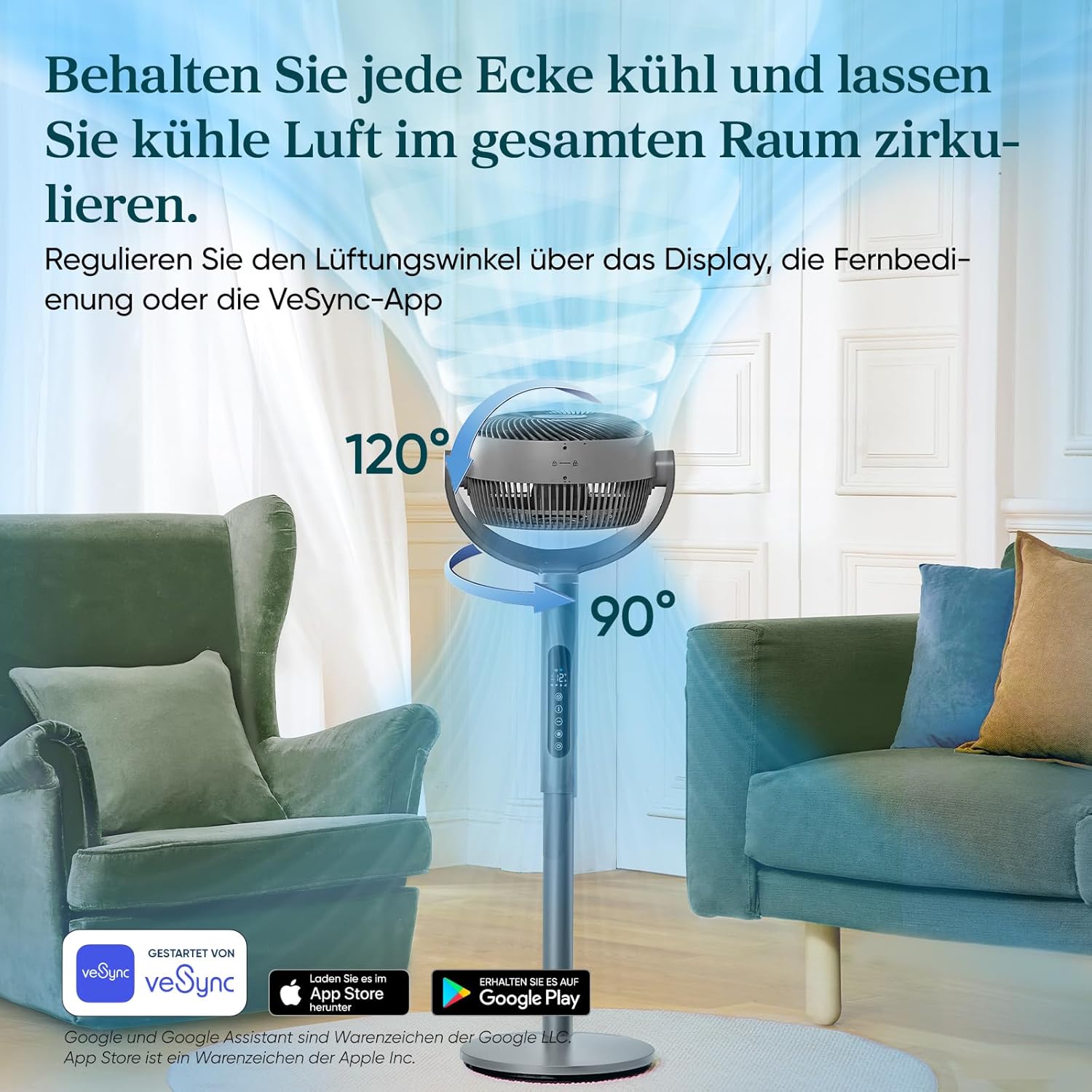
Image: A visual representation of the Levoit Smart Stand Fan's adjustable oscillation, showing its ability to move air vertically up to 120 degrees and horizontally up to 90 degrees, ensuring comprehensive room coverage.

Image: The Levoit Smart Stand Fan effectively circulating cool air across a large living space, demonstrating its impressive 30-meter air throw capability to keep distant areas comfortable.
Timer Function
Set a timer for up to 12 hours for automatic fan shut-off, ideal for energy saving or nighttime use.
Energy Efficiency
The Levoit Smart Stand Fan is highly energy-efficient, consuming a maximum of 30 Watts.

Image: A visual representation of the fan's low power consumption, showing a lightbulb plugged into an outlet with "30 Watt, Max." indicating its energy efficiency.
Maintenance
Regular maintenance ensures optimal performance and longevity of your fan.
- Cleaning:
- Always unplug the fan before cleaning.
- Wipe the exterior surfaces with a soft, damp cloth.
- To clean the fan blades, carefully remove the front grille (refer to assembly instructions for reverse steps if needed). Use a soft brush or cloth to remove dust. Ensure all parts are dry before reassembling and operating.
- Storage: When not in use for extended periods, store the fan in a cool, dry place, preferably in its original packaging.
Troubleshooting
If you encounter issues with your Levoit Smart Stand Fan, please refer to the following common problems and solutions:
| Problem | Possible Cause | Solution |
|---|---|---|
| Fan does not turn on. | Not plugged in; Power outlet malfunction; Remote control battery low. | Ensure the power cord is securely plugged into a working outlet. Check remote control batteries and replace if necessary. |
| Weak airflow. | Fan speed too low; Obstruction in front/back of fan; Dirty blades. | Increase fan speed. Remove any obstructions. Clean fan blades and grille. |
| Fan is noisy. | Fan not on a level surface; Loose parts; Obstruction. | Place fan on a stable, level surface. Check for any loose components and secure them. Ensure no foreign objects are in the fan. Note: Oscillation motors may produce a slight sound, which is normal. |
| Remote control not working. | Batteries dead or incorrectly inserted; Obstruction between remote and fan. | Replace batteries, ensuring correct polarity. Ensure a clear line of sight between the remote and the fan's receiver. |
| App connectivity issues. | Wi-Fi signal weak; Incorrect network settings; App outdated. | Ensure your Wi-Fi network is stable. Restart your router and the fan. Update the VeSync app to the latest version. Re-pair the device if necessary. |
Specifications
| Feature | Detail |
|---|---|
| Brand | Levoit |
| Model Number | LPF-R432S-WEU |
| Color | Grey |
| Dimensions (Product) | 32D x 36.6W x 110H cm |
| Weight | 7.4 Kilograms |
| Power | 30 Watts (Max) |
| Voltage | 120V |
| Noise Level | 20 dB (minimum) |
| Air Throw Distance | Up to 30 meters |
| Air Speed | Up to 7.5 m/s |
| Oscillation | 120° Vertical, 90° Horizontal |
| Modes | Turbo, Normal, Eco, Sleep |
| Speed Levels | 12 |
| Timer | Up to 12 hours |
Warranty and Support
The Levoit Smart Stand Fan comes with a 2-year warranty. For warranty claims, technical support, or any questions regarding your product, please contact Levoit customer service. You can find contact information on the official Levoit website or through the VeSync app.
For the latest updates and support resources, visit the official Levoit website: www.levoit.com
Related documentsLPF-R432S-WEU

Ask a question about this manual
Ask about setup, troubleshooting, compatibility, parts, safety, or missing instructions. Manuals+ will review the question and use this page’s manual context to help answer it.