
1. Introduction
This manual provides essential instructions for the setup, operation, and maintenance of your HOgardenME Multifunctional Rowing Machine Counter Speedometer. This device is designed to track key workout metrics, enhancing your rowing experience. Please read this manual thoroughly before use to ensure proper function and longevity of the product.
2. Safety Information
- Ensure the counter is securely attached to your rowing machine before starting any exercise.
- Keep the device away from water and excessive moisture to prevent damage.
- Do not attempt to disassemble or repair the unit yourself. Contact customer support if issues arise.
- Use only the specified battery type (2 AA batteries). Incorrect battery usage may cause damage or malfunction.
- Keep batteries out of reach of children.
3. Package Contents
Upon opening your package, you should find the following item:
- 1 x HOgardenME Rowing Machine Counter Speedometer
4. Product Overview and Features
The HOgardenME Rowing Machine Counter is a compact, multifunctional device designed to provide real-time feedback on your rowing performance. It features an LCD display and wireless connectivity for ease of use.
4.1 Key Features
- Multifunctional LCD Display: Tracks various workout metrics.
- Wireless Connection: For convenient data transmission.
- SM# Connector Compatibility: Designed for wind resistance rowing machines with an SM# connector.
- Battery Powered: Operates on 2 AA batteries (not included).
4.2 Display Functions
The LCD display provides the following metrics:
- Time: 00:00-99:59 minutes (Workout duration)
- Paddle Frequency (SPM): 000-999 (Strokes Per Minute)
- Power: 000-999
- Number of Paddle Strokes: 0000-9999
- Distance (DISTANCEMETER): 0000-9999 meters
- Calorie (CALORIE): 000-999 (Estimated calories burned)
- Total Strokes (TOTALSTROKES): 0000-9999 (Cumulative strokes)
The display also supports various sports modes including disengaged mode, target mode, and interval mode.
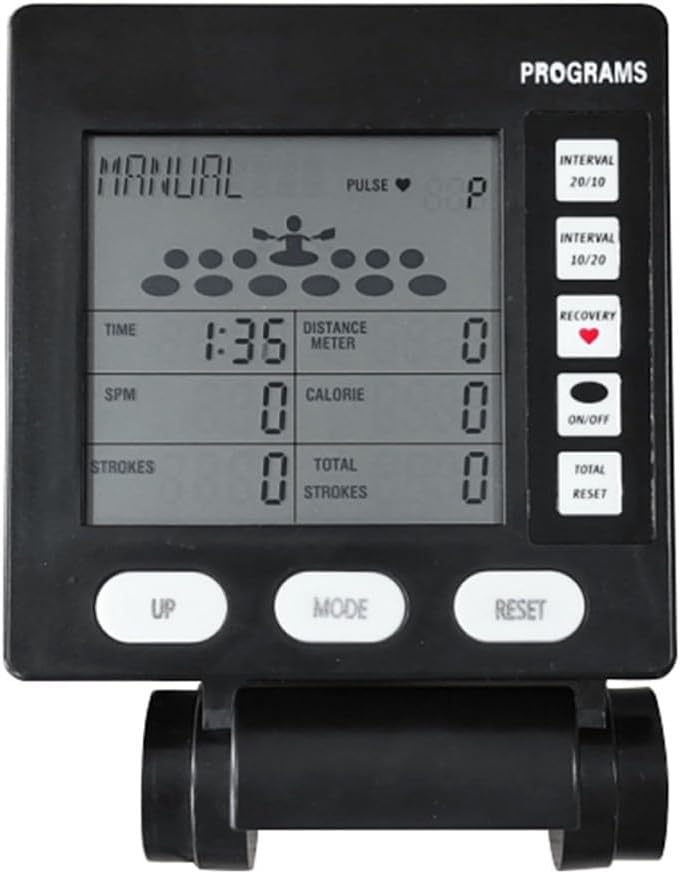
Figure 1: Front view of the HOgardenME Rowing Machine Counter, showing the LCD display with various metrics and the control buttons (UP, MODE, RESET, ON/OFF, INTERVAL, RECOVERY).
5. Setup
5.1 Battery Installation
- Locate the battery compartment on the back of the rowing machine counter.
- Open the battery compartment cover.
- Insert 2 AA batteries (not included), ensuring correct polarity (+/-).
- Close the battery compartment cover securely.

Figure 2: Rear view of the HOgardenME Rowing Machine Counter, highlighting the battery compartment and wired connections.
5.2 Connecting to Rowing Machine
This counter is designed for wind resistance rowing machines equipped with an SM# connector.
- Identify the SM# connector cable on your rowing machine.
- Locate the corresponding port on the back or side of the HOgardenME counter.
- Carefully plug the rowing machine's connector into the counter's port. Ensure a snug fit.
- The counter supports wireless connection for data transmission. Once connected, the counter should automatically detect the rowing machine's signals.

Figure 3: Detailed view of the connection points on the HOgardenME Rowing Machine Counter, including the SM# connector port.
5.3 Mounting the Counter
The counter typically mounts onto a designated bracket on your rowing machine. Ensure it is stable and visible during your workout.
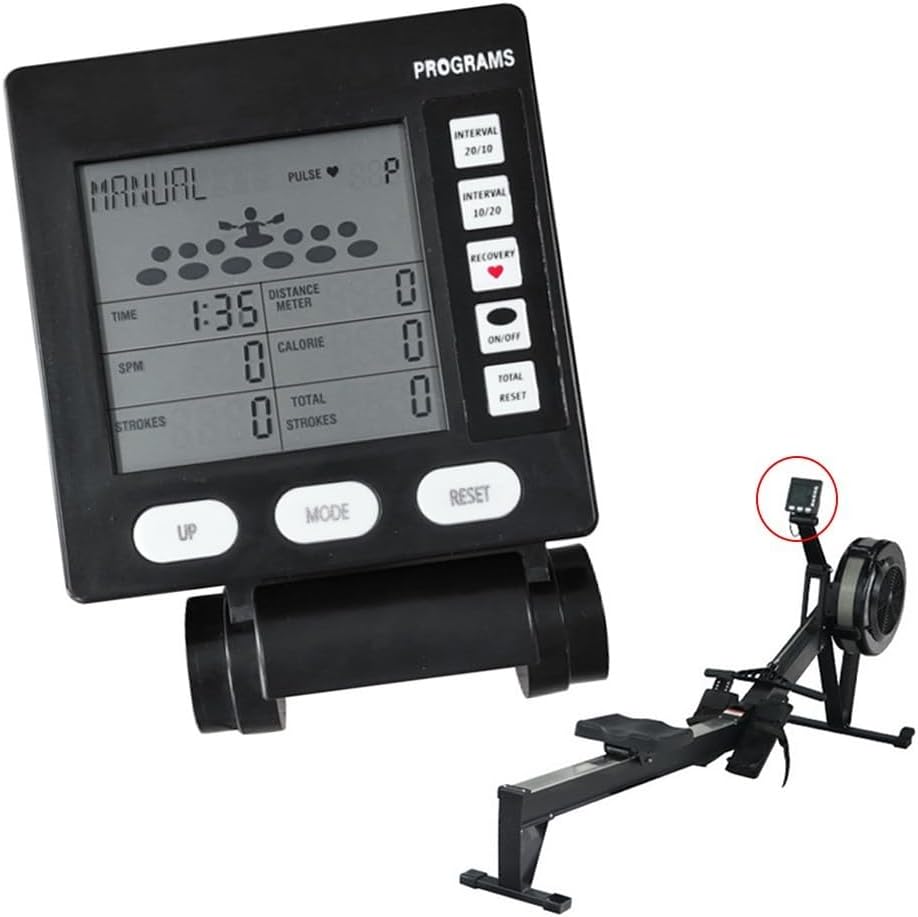
Figure 4: The HOgardenME Rowing Machine Counter shown installed on a compatible rowing machine, indicating its typical placement for optimal viewing during exercise.
6. Operating Instructions
6.1 Power On/Off
- Press the ON/OFF button to power on the device.
- To power off, press and hold the ON/OFF button, or the device may automatically shut down after a period of inactivity.
6.2 Button Functions
The counter features several control buttons:
- UP: Used to navigate menus or increase values in setting modes.
- MODE: Cycles through different display metrics (Time, SPM, Power, Strokes, Distance, Calorie, Total Strokes) or confirms selections.
- RESET: Resets current workout data. Press and hold to clear all current session data.
- ON/OFF: Powers the unit on or off.
- INTERVAL: Accesses interval training settings (e.g., 20/10, 10/20).
- RECOVERY: Initiates a recovery heart rate test (if pulse sensor is connected and supported).
- TOTAL: Displays cumulative total strokes.
6.3 Using Sports Modes
The counter supports various sports modes to customize your workout:
- Disengaged Mode: Standard tracking without specific targets.
- Target Mode: Set specific targets for time, distance, or calories. The counter will alert you upon reaching the target.
- Interval Mode: Utilize pre-set or custom interval programs (e.g., 20 seconds work, 10 seconds rest). Use the INTERVAL button to select.
To switch between modes or set targets, use the MODE and UP buttons as indicated on the display.
7. Maintenance
7.1 Cleaning
- Wipe the display and casing with a soft, damp cloth.
- Do not use abrasive cleaners or solvents, as these can damage the display or plastic components.
- Ensure no liquid enters the device.
7.2 Battery Replacement
When the display becomes dim or the unit stops responding, it is time to replace the batteries.
- Follow the steps in Section 5.1 for battery installation.
- Always replace both AA batteries at the same time.
- Dispose of used batteries according to local regulations.
8. Troubleshooting
| Problem | Possible Cause | Solution |
|---|---|---|
| Display is blank or dim. | Low or dead batteries. Incorrect battery installation. | Replace batteries with new AA batteries, ensuring correct polarity. |
| Buttons do not respond. | Software glitch. Physical damage to buttons. | Remove and reinsert batteries to perform a hard reset. If problem persists, contact customer support. |
| No data displayed during workout. | Incorrect connection to rowing machine. Rowing machine not compatible. | Ensure the SM# connector is securely plugged in. Verify your rowing machine uses an SM# connector. |
| Inaccurate readings. | Loose connection. Interference. | Check all connections. Ensure no strong electromagnetic interference sources are nearby. |
9. Specifications
- Product Name: Rowing Machine Counter Speedometer
- Brand: HOgardenME
- Model Number: 49N9NKT9UF12758600X5440WV90E69
- Material: Plastic
- Color: Black
- Size: Approximately 123mm x 126mm
- Item Weight: Approximately 260 Grams
- Power Source: 2 x AA Batteries (not included)
- Display Type: LCD
- Special Features: Multifunctional LCD Display, Wireless Connection, Tracks Multiple Metrics
- Compatibility: Wind resistance rowing machines with SM# connector
10. Warranty and Support
For any questions, technical support, or warranty inquiries regarding your HOgardenME Multifunctional Rowing Machine Counter Speedometer, please contact the manufacturer directly. Please refer to your purchase documentation for specific warranty terms and contact information.