
homeTro HM4
Contents
HOMETRO Foldable Walking Pad Treadmill User Manual
Model: HM4 | Brand: homeTro
1. Safety Information
Parental supervision is required for children under 12. Please read the user manual carefully before using this product. Always ensure the treadmill is placed on a flat, stable surface. Keep children and pets away from the treadmill during operation. Do not operate the treadmill if it is damaged or malfunctioning. Disconnect power before cleaning or maintenance.
2. Package Contents
Before beginning assembly or setup, please verify that all components listed below are present in your package:
- User Manual
- Safety Lock
- Remote Control
- Power Cord (1.8m)
- Foot Pad (x2)
- Pad Holder (x1)
- L-type Wrench (x2)
- Lubricant (30ml)

Figure 2.1: Overview of all items included in the HOMETRO Foldable Walking Pad Treadmill package.
3. Setup
3.1 Unboxing and Initial Placement
Your HOMETRO treadmill is designed for installation-free setup. Simply remove it from the packaging and place it on a flat, stable surface. Ensure there is adequate clear space around the treadmill for safe operation, approximately 2 meters (6.5 feet) behind and 1 meter (3.3 feet) on each side.
3.2 Folding and Unfolding
The treadmill features a foldable design for easy storage. To unfold, gently lift the handle until it locks into place. To fold, release the locking mechanism and carefully lower the handle towards the deck. The built-in wheels allow for easy movement and storage under furniture or in a corner.

Figure 3.1: The treadmill's compact design allows for easy folding and storage.

Figure 3.2: The treadmill can be easily moved and stored using its built-in wheels.
3.3 Adjusting the Incline
The HOMETRO treadmill offers a 9% manual incline to enhance your workout intensity. Follow these steps to adjust the incline:
- Unfold the footpad at the rear of the treadmill.
- Insert the provided pin into the designated hole to secure the footpad in the inclined position.
- Screw the footpad firmly to ensure stability.
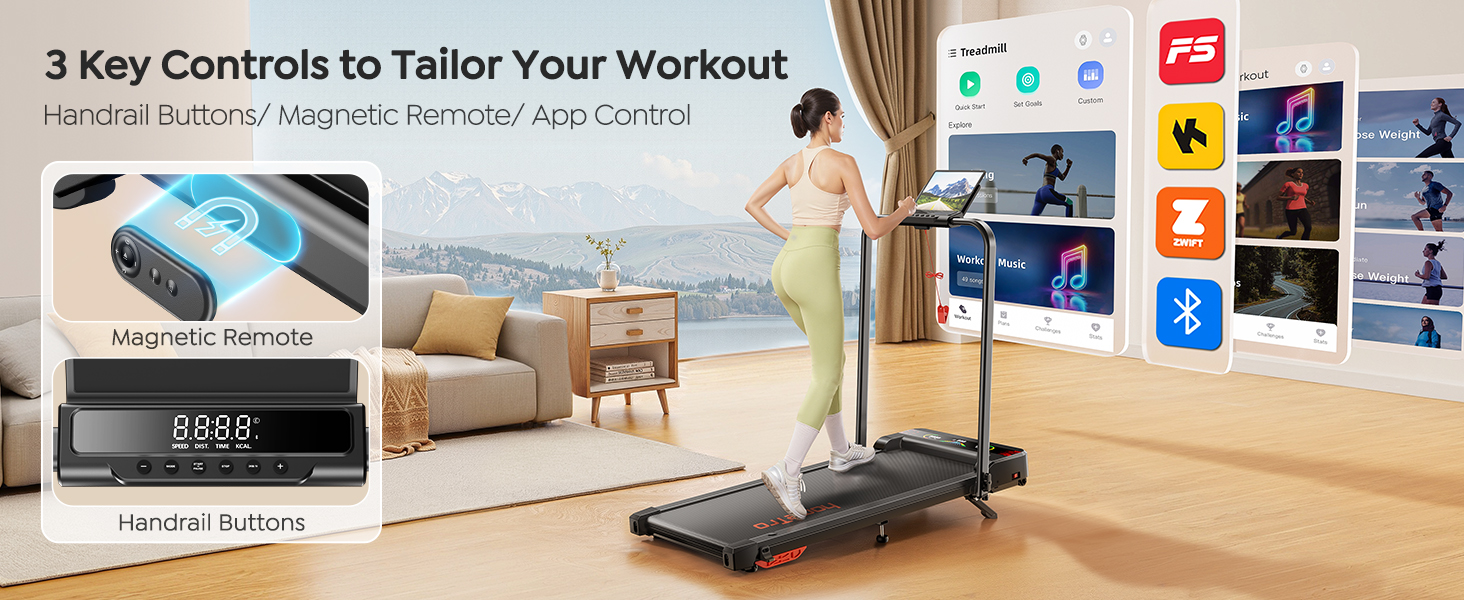
Figure 3.3: Steps for adjusting the treadmill's manual incline.
4. Operating Instructions
4.1 Powering On/Off
Connect the power cord to a grounded electrical outlet and to the treadmill's power port. Press the power button, usually located near the front of the treadmill, to turn it on. To turn off, press the power button again or disconnect the power cord.
4.2 Control Methods
Your treadmill can be controlled via the handrail buttons, the magnetic remote control, or a dedicated smart application.
- Handrail Buttons: Integrated buttons on the handrail allow for quick adjustments to speed and mode.
- Magnetic Remote Control: Use the included remote to control speed, pause/resume, and switch modes. The remote features a noiseless button design for quiet operation.
- Smart App Control: Connect your treadmill to the smart app via Bluetooth to sync exercise data, access personalized training plans, track progress, and participate in running challenges.

Figure 4.1: Control your workout using handrail buttons, the magnetic remote, or the smart app.

Figure 4.2: The silent remote control and powerful 2.5HP motor ensure a quiet workout experience.
4.3 Understanding the LED Display
The integrated LED display provides real-time workout data, including:
- Time: Duration of your workout.
- Speed: Current speed in miles per hour (MPH).
- Distance: Total distance covered during the workout.
- Calories: Estimated calories burned.

Figure 4.3: The LED display provides essential workout metrics at a glance.
4.4 Speed and Mode Adjustments
The treadmill supports various modes to suit your fitness needs:
- Working Mode: 0.6-2.0 MPH, ideal for light activity while working or standing.
- Walking Mode: 2.0-4.0 MPH, suitable for brisk walking.
- Running Mode: 4.0-7.6 MPH, for jogging and running.
Adjust the speed using the remote control or handrail buttons. The considerate pause and resume function allows you to temporarily stop your workout and retain data.

Figure 4.4: Different modes cater to various exercise intensities.
5. Maintenance
5.1 Lubrication
Regular lubrication of the running belt is crucial for optimal performance and longevity of your treadmill. The unique lubrication hole design makes this process convenient. Apply the provided lubricant to the area beneath the running belt as indicated in the diagram below. Lubricate every 3-6 months depending on usage frequency.
5.2 Belt Adjustment
If the running belt feels loose or is slipping, it may need adjustment. Use the provided L-type wrench to adjust the tension bolts at the rear of the treadmill. Turn the bolts clockwise to tighten the belt and counter-clockwise to loosen it. Adjust gradually, ensuring the belt remains centered and taut.

Figure 5.1: Proper lubrication and belt adjustment are essential for treadmill maintenance.
5.3 Cleaning
Regularly clean the treadmill to prevent dust and debris buildup. Use a soft, damp cloth to wipe down the display, frame, and running belt. Avoid using abrasive cleaners or solvents that could damage the surfaces. Ensure the treadmill is unplugged before cleaning.
6. Troubleshooting
This section addresses common issues you might encounter with your HOMETRO treadmill. If the problem persists after attempting these solutions, please contact customer support.
| Problem | Possible Cause | Solution |
|---|---|---|
| Treadmill does not power on. | Power cord not connected; Power switch off; Circuit breaker tripped. | Ensure power cord is securely plugged in. Check the power switch on the treadmill. Reset the household circuit breaker if necessary. |
| Running belt slips or hesitates. | Belt too loose; Belt needs lubrication. | Adjust belt tension using the L-type wrench (refer to Section 5.2). Apply lubricant under the belt (refer to Section 5.1). |
| Unusual noise during operation. | Loose components; Belt friction; Motor issue. | Check for any loose screws or parts and tighten them. Lubricate the running belt. If noise persists, contact customer support. |
| Display not showing data correctly. | Loose connection; Sensor issue. | Ensure all connections are secure. Restart the treadmill. If the problem continues, contact customer support. |
7. Specifications
Detailed technical specifications for the HOMETRO Foldable Walking Pad Treadmill (Model HM4):
| Feature | Detail |
|---|---|
| Model Number | HM4 |
| Product Dimensions | 110 x 48.5 x 12 cm (43.3D x 19.1W x 4.7H inches) |
| Item Weight | 22 kg (48.5 lbs) |
| Colour | Black |
| Style | Foldable Treadmill with Incline |
| Display Type | LED |
| Material | Alloy Steel, Plastic |
| Horsepower | 2.5 HP |
| Metrics Displayed | Speed, Calories Burned, Time, Distance |
| Power Source | Corded Electric |
| Special Features | Shock Absorbent, Timer, Manual Incline, Compact Design, Wheeled |
| Maximum Speed | 7.6 Miles per Hour |
8. Warranty and Support
For reliable and professional service, or if you encounter any issues not covered in this manual, please contact homeTro customer support. To do so, log in to your Amazon account, navigate to "Your orders," find the order ID for your treadmill, and click "Contact Seller."
Please retain your purchase receipt for warranty purposes. Specific warranty terms and conditions may apply and are typically outlined at the point of purchase or on the product's official listing.
9. Product Videos
No official product videos from the seller were found in the provided data to embed in this manual.
Documents and downloads
Ask a question about this manual
Ask about setup, troubleshooting, compatibility, parts, safety, or missing instructions. Manuals+ will review the question and use this page’s manual context to help answer it.