
1. Introduction
The ACwO Dwots 333 True Wireless Earbuds are designed to provide a superior audio experience with advanced features such as Hybrid Active Noise Cancellation (ANC), AI-Enhanced Noise Cancellation (AI-ENC) for calls, and dual device connectivity. This manual provides detailed instructions for setting up, operating, and maintaining your earbuds.
2. What's in the Box
Please check the contents of your package. If any items are missing or damaged, contact customer support.
- ACwO Dwots 333 Earbuds and Charging Case
- USB Charging Cable
- Multiple Sizes of Eartips
- Warranty Card

Image: ACwO Dwots 333 earbuds inside their charging case.
3. Setup and First Use
3.1 Charging the Earbuds and Case
Before first use, fully charge the earbuds and the charging case.
- Place the earbuds into the charging case. Ensure they are correctly seated.
- Connect the USB charging cable to the charging port on the case and to a power source.
- The LED indicator on the case will show charging status. A full charge for the case typically takes 1 hour.
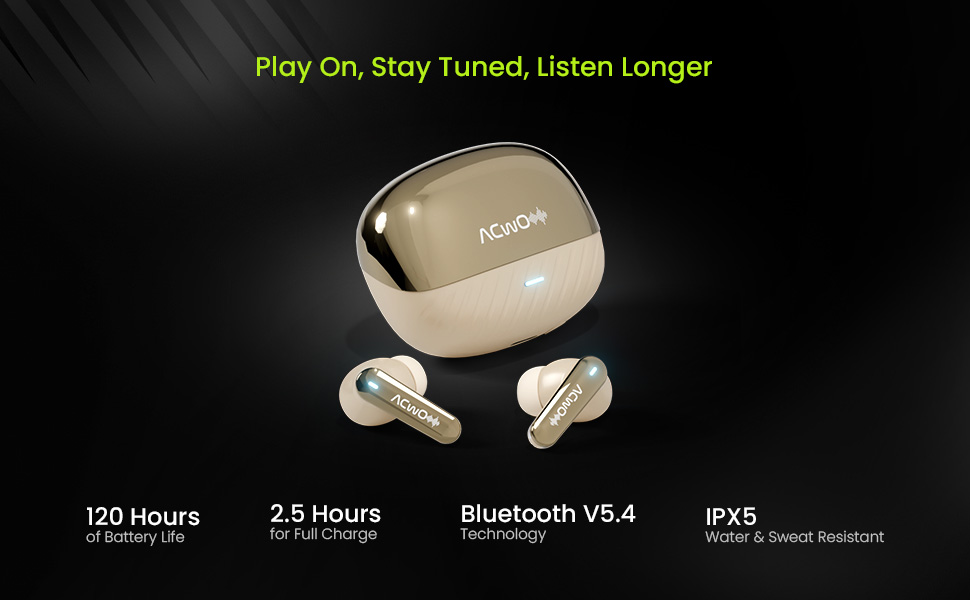
Image: The ACwO Dwots 333 earbuds and charging case, highlighting the 120 hours of music playtime.
3.2 Pairing with a Device
The earbuds support Bluetooth V5.4 for stable and efficient connection.
- Open the charging case. The earbuds will automatically enter pairing mode (LED indicators will flash).
- On your device (smartphone, tablet, laptop), enable Bluetooth and search for available devices.
- Select "ACwO Dwots 333" from the list of devices.
- Once connected, the LED indicators on the earbuds will stop flashing.
3.3 Dual Device Connectivity
The Dwots 333 allows seamless switching between two paired devices.
- Pair the earbuds with your first device (e.g., smartphone) as described above.
- Disconnect the earbuds from the first device's Bluetooth settings. The earbuds will re-enter pairing mode.
- Pair the earbuds with your second device (e.g., laptop).
- Reconnect the earbuds to the first device from its Bluetooth settings. The earbuds are now connected to both devices.
- To switch between devices, simply pause audio on one device and play on the other. For calls, the earbuds will automatically switch to the active call.

Image: ACwO Dwots 333 earbuds wirelessly connected to both a smartphone and a laptop, demonstrating dual device connectivity.
4. Operating Instructions
The ACwO Dwots 333 earbuds feature intuitive touch controls.
4.1 Basic Controls
| Function | Action |
|---|---|
| Power On | Open charging case or long press touch area (if off and out of case) |
| Power Off | Place earbuds in charging case and close lid, or long press touch area (if out of case) |
| Play/Pause Music | Single tap on either earbud |
| Next Track | Double tap right earbud |
| Previous Track | Double tap left earbud |
| Answer/End Call | Single tap on either earbud |
| Reject Call | Long press on either earbud |
| Activate Voice Assistant | Triple tap on either earbud |
4.2 Noise Control Modes (Hybrid ANC)
The Dwots 333 features Hybrid Active Noise Cancellation up to 48dB to reduce ambient noise.
- Active Noise Cancellation (ANC) Mode: Blocks out external noise for immersive listening.
- Transparency Mode: Allows you to hear your surroundings while still enjoying your audio.
- Normal Mode: Standard audio playback without noise cancellation or transparency.
To switch between modes: Long press the touch area on the left earbud for approximately 2 seconds.
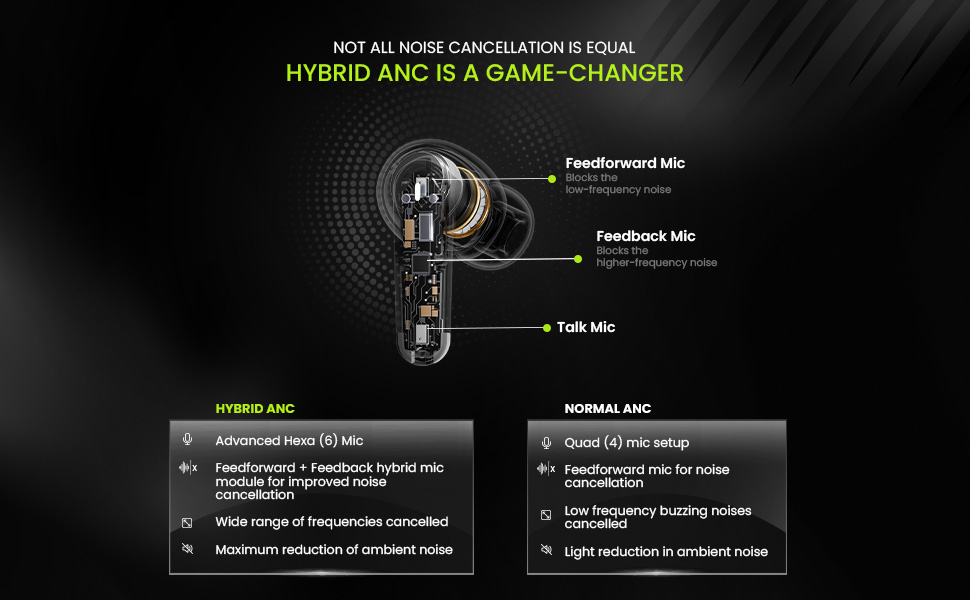
Image: A detailed diagram showing the internal components of an earbud, highlighting the Feedforward, Feedback, and Talk microphones used in Hybrid ANC technology.
4.3 Gaming Mode (Low Latency)
Activate Gaming Mode for a low latency experience (50ms) ideal for gaming.
To activate/deactivate Gaming Mode: Long press the touch area on the right earbud for approximately 2 seconds.
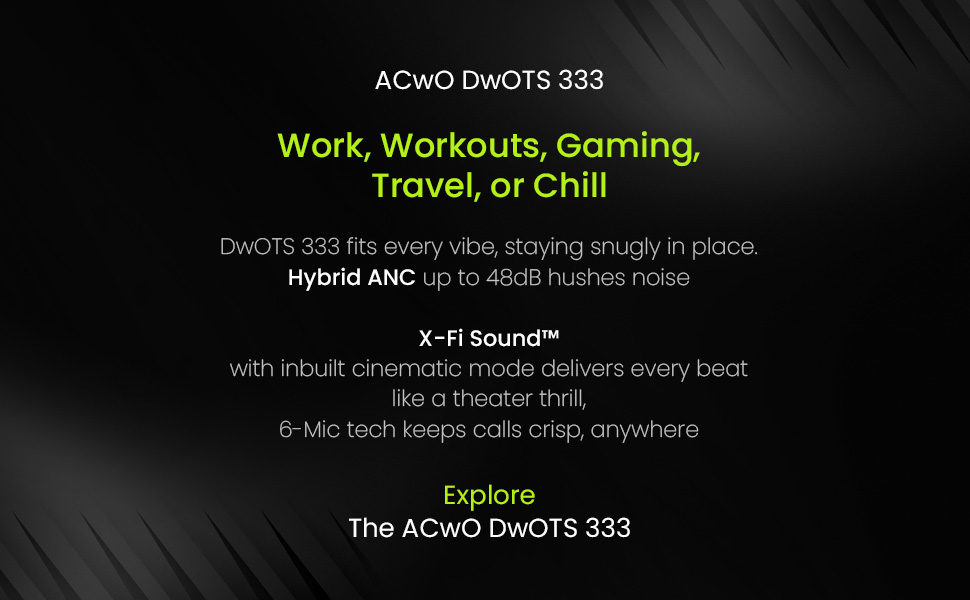
Image: ACwO Dwots 333 earbuds with a futuristic gaming robot in the background, illustrating the Gaming Mode feature.
4.4 Theatre Mode
Engage Theatre Mode for an enhanced cinematic audio experience.
To activate/deactivate Theatre Mode: Refer to the product's specific touch control guide for this feature, as it may vary.

Image: A person wearing ACwO Dwots 333 earbuds, with visual cues for Theatre Mode and Gaming Mode, suggesting different audio profiles.
5. Call Management (Hexa Mic with AI-ENC)
The Hexa Mic setup with AI-ENC ensures crystal-clear voice pickup during calls by intelligently distinguishing your voice from background noise.
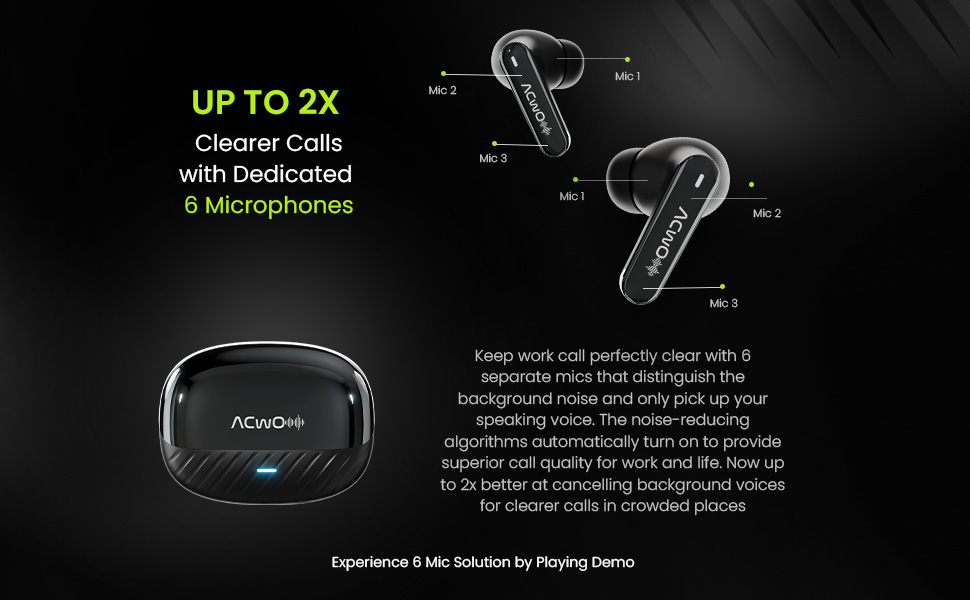
Image: A diagram illustrating the placement of six dedicated microphones on the ACwO Dwots 333 earbuds, designed for clearer call quality.
6. Maintenance
6.1 Cleaning
- Regularly clean the earbuds and charging case with a soft, dry, lint-free cloth.
- Remove eartips and clean any earwax or debris from the earbud nozzles using a small brush or cotton swab.
- Ensure charging contacts on both earbuds and case are clean and dry.
6.2 Water Resistance (IPX5)
The earbuds are rated IPX5 water and sweat resistant, meaning they can withstand splashes and sweat. They are not designed for submersion in water. Avoid exposing them to heavy rain or showering.
6.3 Storage
When not in use, store the earbuds in their charging case to protect them and keep them charged. Store in a cool, dry place away from extreme temperatures.
7. Troubleshooting
If you encounter issues with your ACwO Dwots 333 earbuds, refer to the following common solutions:
| Problem | Solution |
|---|---|
| Earbuds not pairing | Ensure earbuds are charged. Turn off and on Bluetooth on your device. Forget the device in Bluetooth settings and re-pair. |
| Only one earbud working | Place both earbuds back in the case, close the lid, then open again. Ensure both earbuds are charged. |
| No sound | Check device volume. Ensure earbuds are connected. Try playing audio from a different app or device. |
| Charging issues | Ensure charging cable is securely connected. Clean charging contacts. Try a different USB port or charger. |
| ANC not effective | Ensure earbuds are properly seated in your ears. Try different sized eartips for a better seal. Confirm ANC mode is active. |
8. Specifications
| Feature | Detail |
|---|---|
| Brand | ACwO |
| Model Number | DwOTS 333 |
| Ear Placement | In Ear |
| Form Factor | True Wireless |
| Impedance | 32 Ohms |
| Noise Control | Active Noise Cancellation (Hybrid ANC up to 48dB) |
| Audio Driver Type | 10mm Dynamic Driver |
| Microphones | Hexa Mic Setup with AI-ENC |
| Control Method | Touch |
| Connectivity Technology | Wireless (Bluetooth V5.4) |
| Bluetooth Range | 10 Metres |
| Battery Life (Earbuds + Case) | Up to 120 Hours |
| Case Charging Time | 1 Hour |
| Water Resistance Level | IPX5 |
| Low Latency | 50ms (Gaming Mode) |
| Compatible Devices | Cellphones, Laptops, Tablets |
| Item Weight | 38 Grams |
| Country of Origin | India |
9. Warranty and Support
ACwO provides a 365-day warranty from the date of purchase, ensuring peace of mind regarding product quality.
For further assistance, troubleshooting, or warranty claims, please refer to the contact information provided on your warranty card or visit the official ACwO support website.
10. Product Overview Video
Watch this official product video for a visual guide to the ACwO Dwots 333 earbuds' features and functionality.
Video: An overview of the ACwO Dwots 333 True Wireless Earbuds, showcasing their design, key features like 120 hours playtime, Hybrid ANC, Hexa Mics, and dual device connectivity.