1. Introduction
This manual provides comprehensive instructions for the SEHMUA Dual Lens Linkage Security Camera. This device is a 4G cellular trail camera designed for outdoor surveillance, featuring dual lenses, 2K live video, night vision, motion activation, and solar power capabilities. It is suitable for monitoring wildlife, property, or remote locations where Wi-Fi is unavailable.

Image: The SEHMUA Dual Lens Linkage Security Camera, featuring a solar panel for continuous power and a smartphone displaying its live feed interface.
2. Key Features
- Dual Lenses & Dual Screen Linkage: The camera integrates two lenses to provide both a wide-angle view and a detailed zoom view simultaneously on a single screen within the application. This design aims to eliminate blind spots and enhance surveillance coverage.
- 2K HD Live Video & Remote PTZ Control: Access real-time 2K high-definition footage via the Ucon app. The dome camera offers 355° pan and 100° tilt functionality, allowing remote adjustment and target tracking.
- 4G LTE Cellular Connectivity: Operates on Verizon, AT&T, and T-Mobile 4G networks, enabling remote monitoring in areas without Wi-Fi. Includes a SIM card with a 300 MB trial data plan for new users.
- Solar Powered & IP66 Waterproof: Equipped with a 15000mAh rechargeable battery and a 6W solar panel for continuous power. The IP66 rating ensures protection against dust and water, making it suitable for various outdoor conditions.
- PIR Motion Detection & No-Glow Night Vision: Dual PIR sensors provide rapid wake-up (0.2s) and precise motion detection, reducing false alarms. Advanced 850nm low-light infrared technology captures clear images in darkness without visible light.
- Two-Way Communication: Allows users to communicate remotely through the camera, useful for interacting with visitors or deterring intruders.
- Cloud & SD Card Storage: Supports both cloud storage (30-day trial included) and local storage via a Micro SD card (up to 128GB, not included).
- Multi-User Sharing & Customizable Alerts: Share camera access with family or friends. Configure alert schedules to receive notifications only during desired times.
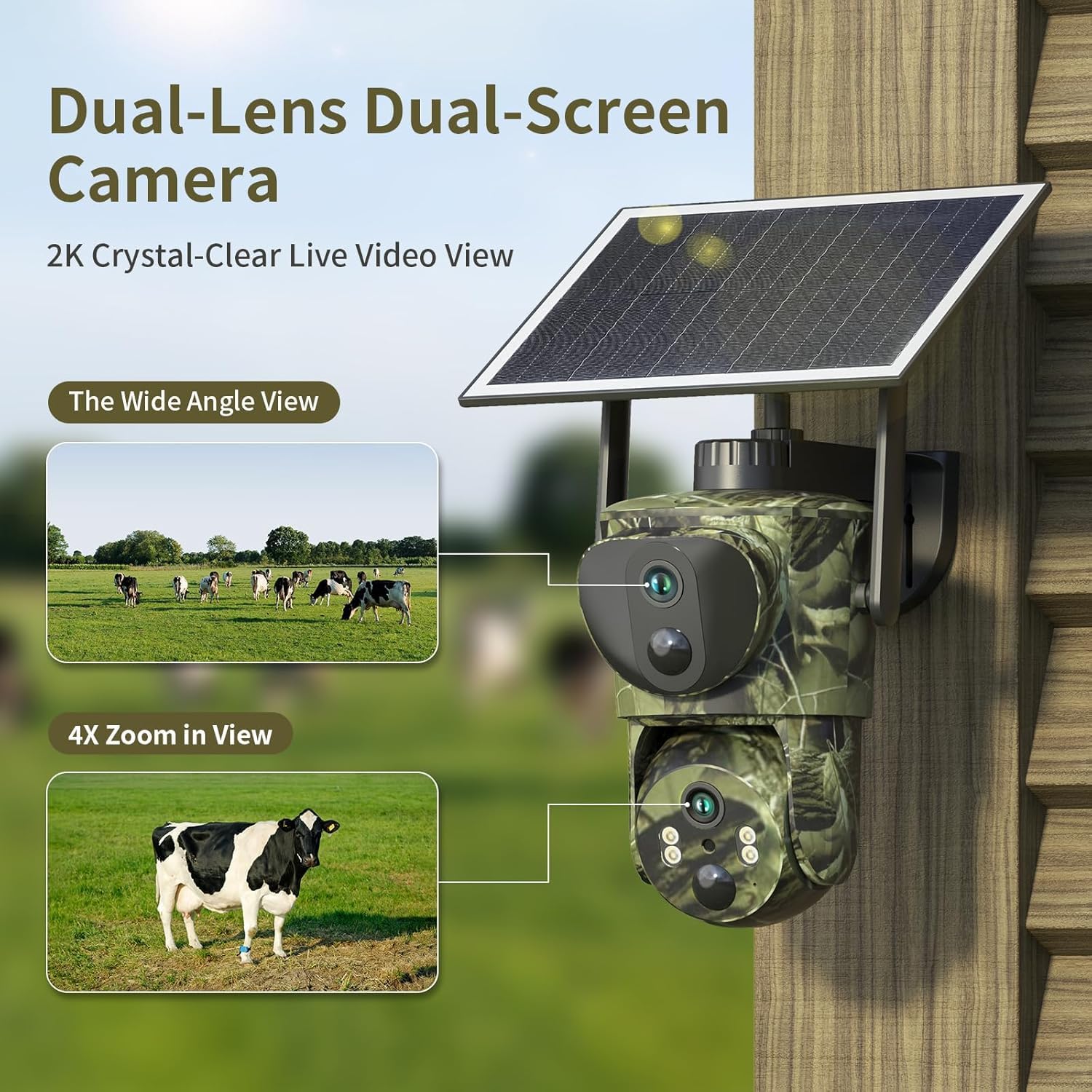
Image: Illustration of the dual-lens, dual-screen functionality, displaying both a wide-angle view and a 4x zoom view simultaneously.

Image: A diagram illustrating the synergy between the 2.8mm wide-angle bullet camera lens and the 6mm dome camera lens for comprehensive surveillance.

Image: The camera mounted on a tree, highlighting its solar power capabilities (6W solar, 15000mAh battery) and IP66 waterproof rating for all-weather operation.

Image: A visual comparison demonstrating the clarity of Infrared Night Vision in low light and full-color Daytime Vision, both capturing a deer.
3. Package Contents
Verify that all items listed below are included in your package:
- SEHMUA Dual Lens Linkage Security Camera
- Solar Panel (6W)
- Mounting Bracket and Screws
- USB-C Charging Cable
- Instruction Manual (this document)
- SIM Card (pre-installed with 300 MB trial data)
- Tweezers (for SIM card handling, if needed)
- Mounting Strap

Image: All components included in the SEHMUA camera package, neatly arranged, showing the camera, solar panel, instruction manual, charging cable, and mounting accessories.
4. Setup Guide
4.1 Physical Installation
- Choose a Location: Select a location with good 4G signal reception and sufficient sunlight exposure for the solar panel. Ensure the camera has a clear view of the area you wish to monitor.
- Mount the Camera: Use the provided mounting bracket and screws to securely attach the camera to a tree, wall, or other stable surface. Alternatively, use the mounting strap for tree installation. Position the solar panel to receive maximum direct sunlight throughout the day.
- Adjust Angle: Once mounted, adjust the camera's physical angle to cover the desired area. Fine-tuning can be done remotely via the app later.
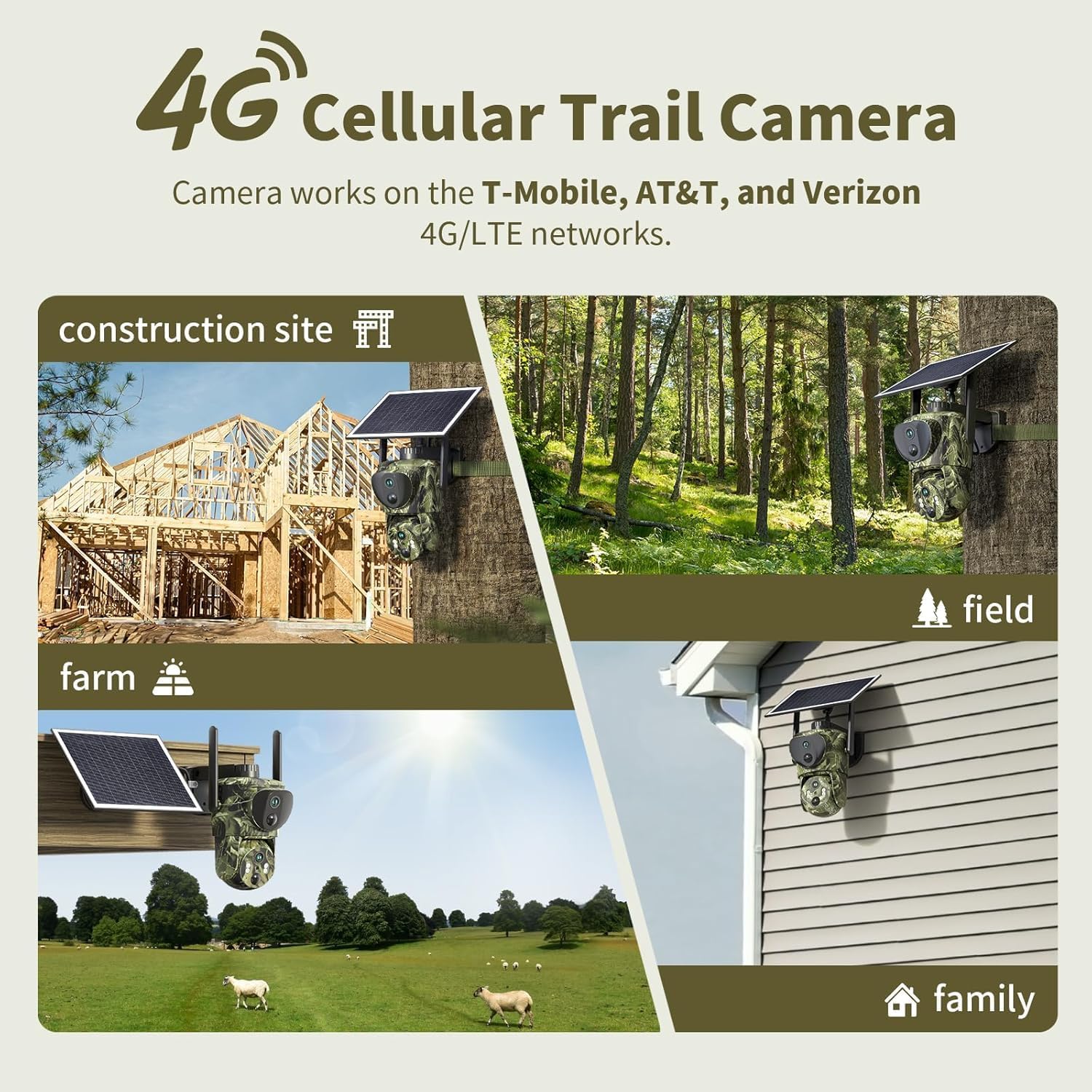
Image: Examples of the 4G cellular trail camera mounted in diverse outdoor settings, including a construction site, a forest, a farm, and a residential area, demonstrating its versatility.
4.2 SIM Card & Data Plan Activation
The camera comes with a pre-installed SIM card and a 300 MB complimentary trial data plan, valid for 30 days. This SIM card supports Verizon, AT&T, and T-Mobile 4G networks in North America. Cross-border use is not supported.
- Initial Activation: The SIM card will activate automatically once the camera connects to a 4G network.
- Renewing Data Plan: After the trial period, you can renew an unlimited cellular plan directly through the Ucon app. Various subscription options are available (e.g., 1 month, 6 months, 12 months, 24 months).
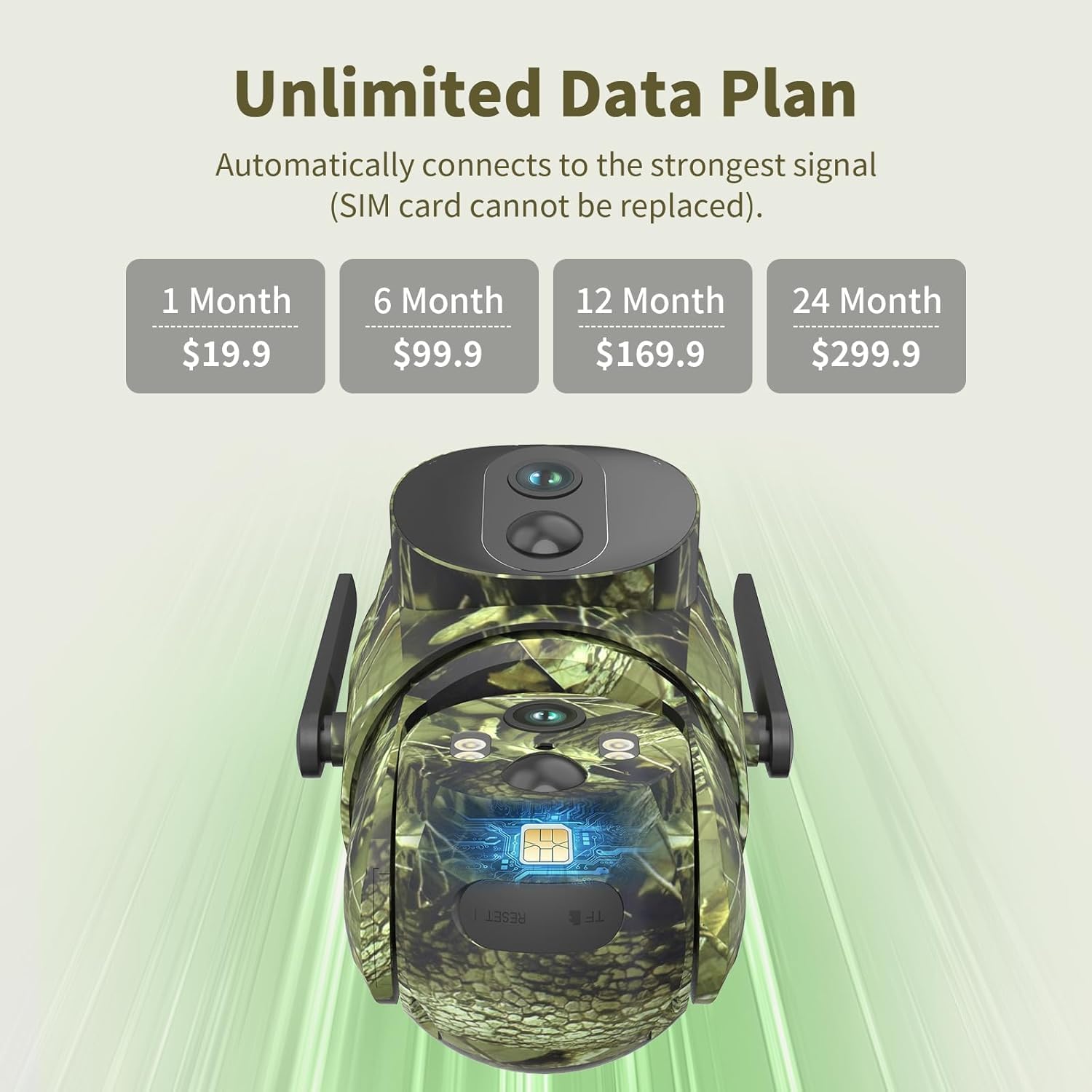
Image: The camera's internal SIM card slot and a display of available unlimited data plan options with their respective costs and durations.

Image: Detailed information regarding the unlimited data plan, including the 300MB trial, regional support for North America, and a note on cross-border usage restrictions.
4.3 App Installation & Pairing
- Download the Ucon App: Scan the QR code in the included quick start guide or search for "Ucon" in your smartphone's app store (iOS or Android).
- Create an Account: Follow the in-app instructions to register a new user account.
- Add Device: In the Ucon app, select 'Add Device' and follow the prompts to pair your camera. This typically involves scanning a QR code on the camera or manually entering its ID.
4.4 Initial Power On
Ensure the camera's battery is sufficiently charged before initial use. The solar panel will maintain the charge once installed.
5. Operating Instructions
5.1 Live View & Remote Control
Open the Ucon app and select your camera to access the live video feed. From here, you can:
- View real-time 2K HD footage.
- Use the on-screen controls to pan (355°) and tilt (100°) the dome camera.
- Digitally zoom in on specific areas of interest.

Image: A smartphone screen showing the live video feed from the camera, capturing a construction site and a person walking, demonstrating remote viewing capabilities.

Image: The smartphone application interface displaying PTZ (Pan-Tilt-Zoom) controls, allowing users to remotely adjust the camera's 355° pan and 100° tilt to cover a wide landscape.
5.2 Dual-Screen Monitoring
The Ucon app presents both the wide-angle view from the bullet camera and the adjustable view from the dome camera on a single screen. Tap on the bullet screen to activate the cooperative function, allowing the dome camera to automatically position and track targets detected by the wide-angle lens.

Image: A comparison showing the SEHMUA Dual Lens Trail Camera's app interface with its dual-screen display versus a regular single-lens trail camera's interface, highlighting the enhanced coverage.
5.3 Motion Detection & Alerts
The camera utilizes dual PIR sensors for accurate motion detection. When motion is detected, the camera will:
- Wake up within 0.2 seconds.
- Begin recording video.
- Send an alert notification to your smartphone via the Ucon app.

Image: A smartphone displaying a Ubox app notification indicating motion detection, with the camera's view showing a wild boar in a snowy forest environment.
5.4 Two-Way Audio
Utilize the two-way audio feature in the Ucon app to speak through the camera's speaker and listen through its microphone. This can be used for communication or as a deterrent.
5.5 Recording & Storage
Recordings are stored in two ways:
- Cloud Storage: A 30-day trial is included. Subscription plans are available for extended cloud storage.
- Micro SD Card: Insert a Micro SD card (up to 128GB, not included) into the designated slot for local storage.

Image: The SEHMUA camera highlighting its storage options: cloud storage with a 30-day trial and support for a Micro SD card up to 128GB.
5.6 Sharing Access
The Ucon app allows you to create multiple user accounts and share access to your camera's live feed and recordings with family or friends.

Image: A world map illustrating the multi-user sharing feature, where various individuals across different locations can access the camera's live view on their smartphones.
5.7 Customizing Alert Schedules
Within the Ucon app settings, you can set specific alert times for each day of the week. This allows you to receive notifications only when needed, preventing unnecessary alerts during periods of expected activity.

Image: A smartphone screen displaying the app's customized alert time settings, allowing users to define specific periods for receiving motion detection notifications.
6. Maintenance
- Solar Panel Cleaning: Regularly clean the surface of the solar panel to ensure optimal sunlight absorption. Dust, dirt, or debris can reduce charging efficiency. Use a soft, damp cloth.
- Battery Longevity: The integrated 15000mAh battery is designed for long-term use. While solar power keeps it charged, avoid prolonged periods of complete discharge to maximize battery life.
- Weather Resistance: The IP66 waterproof rating protects the camera from rain and dust. However, avoid submerging the camera in water or exposing it to extreme weather conditions beyond its rating.
- Firmware Updates: Check the Ucon app periodically for firmware updates. Keeping the camera's firmware updated ensures optimal performance and access to new features.
7. Troubleshooting
7.1 Connectivity Issues
- No 4G Signal: Ensure the camera is installed in an area with adequate 4G coverage from Verizon, AT&T, or T-Mobile. Check your phone's signal strength at the camera's location.
- App Cannot Connect to Camera: Verify that the camera is powered on and the SIM card has an active data plan. Restart both the camera and the Ucon app. Ensure your smartphone has a stable internet connection.
- Slow Live View/Lag: This may indicate a weak 4G signal or network congestion. Try repositioning the camera or checking network conditions.
7.2 Motion Detection Problems
- Too Many False Alarms: Adjust the PIR sensitivity settings in the Ucon app. Ensure there are no moving branches or objects directly in front of the sensor that could trigger false alerts.
- No Motion Detected: Check the PIR sensitivity settings. Ensure the camera's view is clear and not obstructed. Verify that the camera is powered on and actively monitoring.
7.3 Power Issues
- Camera Not Charging: Ensure the solar panel is clean and receiving direct sunlight. Check the connection between the solar panel and the camera. If in a low-light environment, consider manually charging the camera via its USB-C port.
- Short Battery Life: If the camera is in a location with insufficient sunlight, the solar panel may not be able to keep the battery fully charged. Reduce recording frequency or motion detection sensitivity if possible, or relocate the camera.
7.4 App Functionality
- App Crashing/Freezing: Ensure your Ucon app is updated to the latest version. Clear the app's cache or reinstall the app if issues persist.
- Cannot Access Recordings: Verify that a Micro SD card is inserted correctly (if using local storage) or that your cloud storage subscription is active.
8. Specifications
| Feature | Specification |
|---|---|
| Model Name | RBX-SD0200 |
| Indoor/Outdoor Usage | Outdoor |
| Power Source | Solar Powered |
| Connectivity Protocol | Cellular (4G LTE) |
| Supported Networks | Verizon, AT&T, T-Mobile (North America) |
| Controller Type | APP (Ucon) |
| Mounting Type | Tree Mount |
| Video Capture Resolution | 2K |
| Video Capture Format | MP4 |
| Color | Green |
| Battery Capacity | 15000mAh (Rechargeable) |
| Solar Panel Power | 6W |
| Waterproof Rating | IP66 |
| Item Weight | 3.1 pounds |
| Product Dimensions | 1 x 1 x 1 inches (Note: This appears to be a placeholder, actual dimensions from image are 4.8 x 6.3 inches for camera, 7.2 x 6.2 inches for solar panel) |
| Storage Options | Cloud Storage, Micro SD Card (up to 128GB) |
| Special Feature | Portable, Dual Lens, PTZ Control, Night Vision, Motion Activated |
9. Warranty and Support
For warranty information and technical support, please refer to the official SEHMUA website or contact their customer service directly. Details are typically provided on the product packaging or within the Ucon application's help section.


