
1. Introduction
The ALIENTEK DM40B is a versatile 3-in-1 handheld device combining a high-performance digital multimeter, a digital oscilloscope, and a programmable signal generator. This compact instrument is designed for electronics, automotive, and DIY applications, offering precise measurements and signal visualization capabilities. This manual provides essential information for the safe and effective operation of your DM40B device.
2. Safety Information
Always adhere to the following safety precautions to prevent personal injury or damage to the instrument:
- Do not exceed the maximum input limits for voltage, current, or other parameters specified in the technical specifications.
- Ensure test leads are in good condition and properly connected before making any measurements.
- Avoid touching exposed wiring or circuit components while the device is connected to a power source.
- Use caution when working with high voltages or currents. Always disconnect power before connecting or disconnecting test leads.
- Do not operate the device in wet environments or if the device itself is wet.
- Refer to the CAT rating for appropriate measurement categories. The DM40B is rated for CAT IV 600V and CAT III 1000V.
3. Package Contents
Verify that all items listed below are included in your package:
- DM40B Multimeter Host
- MP01 Universal Multimeter Probes (one pair)
- Adjustable MCX Oscilloscope Probe Cable
- MCX Crocodile Clamp Probe Wire
- USB Type-C Cable (1.2m)
- Silicone Protective Sleeve (pre-installed or separate)

Image: The complete set of accessories included with the ALIENTEK DM40B, showing the main unit, multimeter probes, oscilloscope probe, crocodile clamp, and USB-C charging cable.
4. Product Features
The ALIENTEK DM40B integrates three essential functions into a single compact device:
- Multimeter: A 4½-digit true-RMS multimeter with up to 60,000 counts and a 5ppm reference for precise AC/AC+DC readings.
- Oscilloscope: A digital oscilloscope with 50MSa/s sampling rate, 10MHz bandwidth, 10-bit ADC, and 64Kpts memory for signal visualization and anomaly detection.
- Signal Generator: A programmable signal generator capable of producing sine, square, triangle, and sawtooth waveforms up to 10MHz (for certain types) with up to 3.0Vpp output.
Additional features include a 3.5-inch IPS capacitive touchscreen, a 3-jack design, One-Key AUTO range, 10+ hours battery life, and USB-C charging.
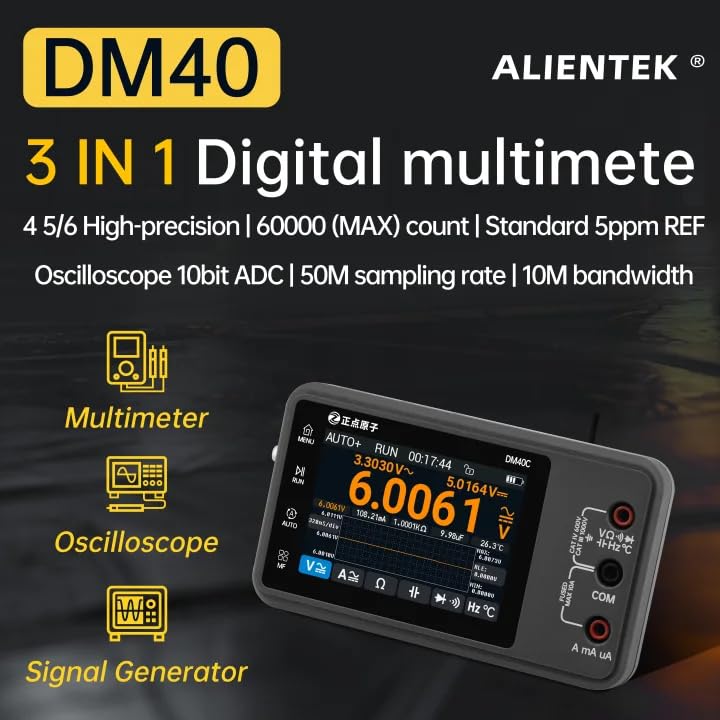
Image: Overview of the DM40's three primary functions: Multimeter, Oscilloscope, and Signal Generator.
5. Getting Started
5.1 Charging the Device
Before initial use, fully charge the DM40B using the provided USB Type-C cable and a compatible USB power adapter. The device features a rechargeable battery designed for over 10 hours of operation.

Image: Visual representation of the DM40B's high-capacity battery and safety features, indicating over 10 hours of battery life.
5.2 Installing the Protective Case
The DM40B comes with a silicone protective sleeve. To install or remove it:
- Gently slide the multimeter into the silicone case.
- Ensure the power button hole on the case aligns with the multimeter's power key.
- Adjust the case until it fits evenly around the device.

Image: Step-by-step guide for disassembling and assembling the silicone case with the DM40B multimeter.
5.3 Connecting Test Leads
Connect the appropriate test leads (multimeter probes, oscilloscope probe, or crocodile clamp) to the input jacks on the DM40B. The device features a 3-jack design for simplified connections.
6. Operating Instructions
6.1 General Operation
Power On/Off: Press and hold the power button to turn the device on or off.
Touch Screen Navigation: The 3.5-inch IPS capacitive touchscreen allows for intuitive navigation between functions and settings. Tap icons and swipe to access different modes and adjust parameters.

Image: The DM40B's 3.5-inch IPS multi-touch screen, highlighting its clear display and responsive interface.
6.2 Multimeter Functions
The DM40B offers automatic measurement for various parameters. Simply connect the probes to the circuit, and the device will automatically detect the measurement type and range.

Image: The DM40B displaying an automatic voltage measurement, demonstrating its one-click automatic measurement feature.
- Voltage Measurement (DC/AC): Measures DC voltage from 0.01mV to 1000V and AC voltage from 0.01mV to 750V.
- Current Measurement (DC/AC): Measures DC current from 0.01uA to 10A and AC current from 0.01uA to 10A.
- Resistance Measurement: Measures resistance up to 60MΩ.
- Capacitance Measurement: Measures capacitance up to 60mF.
- Diode Test: Performs 4-stage voltage drop measurements.
- Continuity Test: Tests for circuit continuity with a quick response time.
- Frequency Measurement: Measures frequency up to 10MHz.
- Temperature Measurement: Measures temperature (requires compatible probe, not included in all kits).
The DM40B supports True RMS (TRMS) measurement for accurate AC/AC+DC readings, even with distorted waveforms. It also features a trend chart to display measurement data periodically.

Image: The DM40B displaying True RMS, AC+DC measurements, and a real-time trend chart of a signal.

Image: The DM40B performing a diode test, showing voltage drop stages and details on resistor and continuity measurements.
6.3 Oscilloscope Functions
The built-in oscilloscope allows for real-time visualization of electrical signals. Connect the MCX oscilloscope probe cable to the device and the circuit under test. Use the touchscreen to adjust settings such as time base, vertical scale, and triggering.
The oscilloscope features a 50MSa/s sampling rate, 10MHz bandwidth, and 64Kpts memory, enabling observation of waveform rise times, ringing, and noise. FFT (Fast Fourier Transform) functionality is available to pinpoint harmonic issues.
6.4 Signal Generator Functions
The integrated signal generator can produce various waveforms for testing circuits. Select the desired waveform (sine, square, triangle, sawtooth) and adjust parameters like frequency (up to 10MHz for certain types) and amplitude (up to 3.0Vpp) via the touchscreen interface. Connect the output to the circuit you wish to stimulate.
Video: Demonstration of the ALIENTEK DM40 Digital Oscilloscope Multimeter's voltage measurement capabilities and automatic range switching. This video illustrates how to insert probes for measurement and highlights the device's ability to avoid repeated relay switching.
7. Maintenance and Care
7.1 Cleaning
Clean the device regularly with a soft, dry cloth. Do not use abrasive cleaners or solvents. Ensure the device is powered off and disconnected from any power source before cleaning.
7.2 Battery Management
To prolong battery life, avoid fully discharging the battery frequently. Recharge the device when the battery indicator is low. If storing the device for an extended period, charge it to approximately 50% and store in a cool, dry place.
7.3 Firmware Updates
ALIENTEK may release firmware updates to improve functionality or add new features. Check the official ALIENTEK website for the latest firmware and instructions on how to update your device via PC connectivity.
8. Troubleshooting
If you encounter issues with your DM40B, consider the following common troubleshooting steps:
- Device not powering on: Ensure the battery is charged. Connect the USB-C cable and attempt to power on while charging.
- Inaccurate readings: Check test lead connections. Ensure the correct measurement mode is selected (if not using auto-range). Verify that the input limits are not exceeded.
- Screen unresponsive: Try restarting the device. If the issue persists, ensure the screen is clean and dry.
- No signal on oscilloscope: Verify the oscilloscope probe is correctly connected and making good contact with the circuit. Check the time base and vertical scale settings.
For persistent issues, refer to the official ALIENTEK support resources.
9. Technical Specifications
Below are the key technical specifications for the ALIENTEK DM40B:

Image: Detailed table of product parameters for the DM40 series, including DM40B, covering general information, multimeter functions, and oscilloscope/signal generator technical parameters.

Image: Comparison of special features across DM40A, DM40B, and DM40C models, alongside signal generator waveform parameters.
| Feature | Specification |
|---|---|
| Model | DM40B |
| Brand | ALIENTEK |
| Power Source | Battery Powered |
| Display | 3.5-inch IPS Capacitive Touchscreen |
| Counts | 59999 (Max 60,000) |
| DC Voltage | 0.01mV to 1000V (Accuracy: ±(0.03%+5d)) |
| AC Voltage | 0.01mV to 750V (Accuracy: ±(0.15%+5d)) |
| DC Current | 0.01uA to 10A (Accuracy: ±(0.2%+5d)) |
| AC Current | 0.01uA to 10A (Accuracy: ±(0.5%+5d)) |
| Resistance | 0.1Ω to 60MΩ (Accuracy: ±(0.1%+5d)) |
| Capacitance | 0.001nF to 60mF (Accuracy: ±(2.5%+30d)) |
| Frequency | 1Hz to 10MHz (Accuracy: ±(0.01%+5d)) |
| Oscilloscope Sample Rate | 50MSa/s |
| Oscilloscope Bandwidth | 10MHz |
| Oscilloscope Memory Depth | 64Kpts |
| Signal Generator Waveforms | Sine, Square, Triangle, Sawtooth |
| Signal Generator Frequency | 1Hz to 10MHz (depending on waveform) |
| Item Dimensions | 142 x 83 x 28 mm (5.5 x 3 x 1 inches) |
| Item Weight | 260g (0.57 lbs) |
| Certifications | CE, FCC |
10. Warranty and Support
For warranty information and technical support, please refer to the documentation included with your product or visit the official ALIENTEK website. Keep your purchase receipt as proof of purchase for warranty claims.


