
1. Introduction
The Autel MaxiIM K-M100E is a professional diagnostic and key programming tool designed for automotive technicians and enthusiasts. It offers a wide range of functions including key generation, transponder services, vehicle identification, and advanced diagnostic capabilities for various vehicle makes and models. This manual provides essential information for the safe and effective use of your device.

Figure 1.1: Autel MaxiIM K-M100E Diagnostic Tool and Included Accessories
This image displays the Autel MaxiIM K-M100E main unit, the VCI (Vehicle Communication Interface) device, and a protective carrying case, illustrating the complete product package.
2. Safety Information
Please read and understand all safety instructions before operating the device. Failure to follow these instructions may result in electric shock, fire, or serious injury.
- Always operate the device in a well-ventilated area.
- Do not expose the device to moisture or extreme temperatures.
- Use only the power adapter and cables supplied by Autel.
- Avoid dropping or subjecting the device to severe impact.
- Keep the device away from children.
- Ensure the vehicle's ignition is off before connecting or disconnecting the VCI module.
3. Product Overview
The MaxiIM K-M100E is equipped with advanced hardware and software features to streamline automotive diagnostic and key programming tasks.
3.1 Key Features
- Fast Data Matching: Capable of secure vehicle data matching within 60 seconds, improving efficiency by 50%.
- Advanced EMMO Functions: Includes key learning, specific ECU reset/coding, and data backup via OBD2 for a wide range of vehicles.
- Smart Signal Compatibility: Processes vehicle identification module signals, displaying frequency information and signal types.
- Built-in APB112 Functions: Enhances capabilities for ignition module data gathering and signal issue detection, supporting secure system information reading for specific chip types in Toyota models.
- Specialized Functions: Over 10 specialized functions including data processing, key unlock, Toyota smart unlock, information detection, button adjustment, and ignition coil detection.
- Lifetime Free Updates: Ensures the device remains current with the latest software and vehicle coverage.
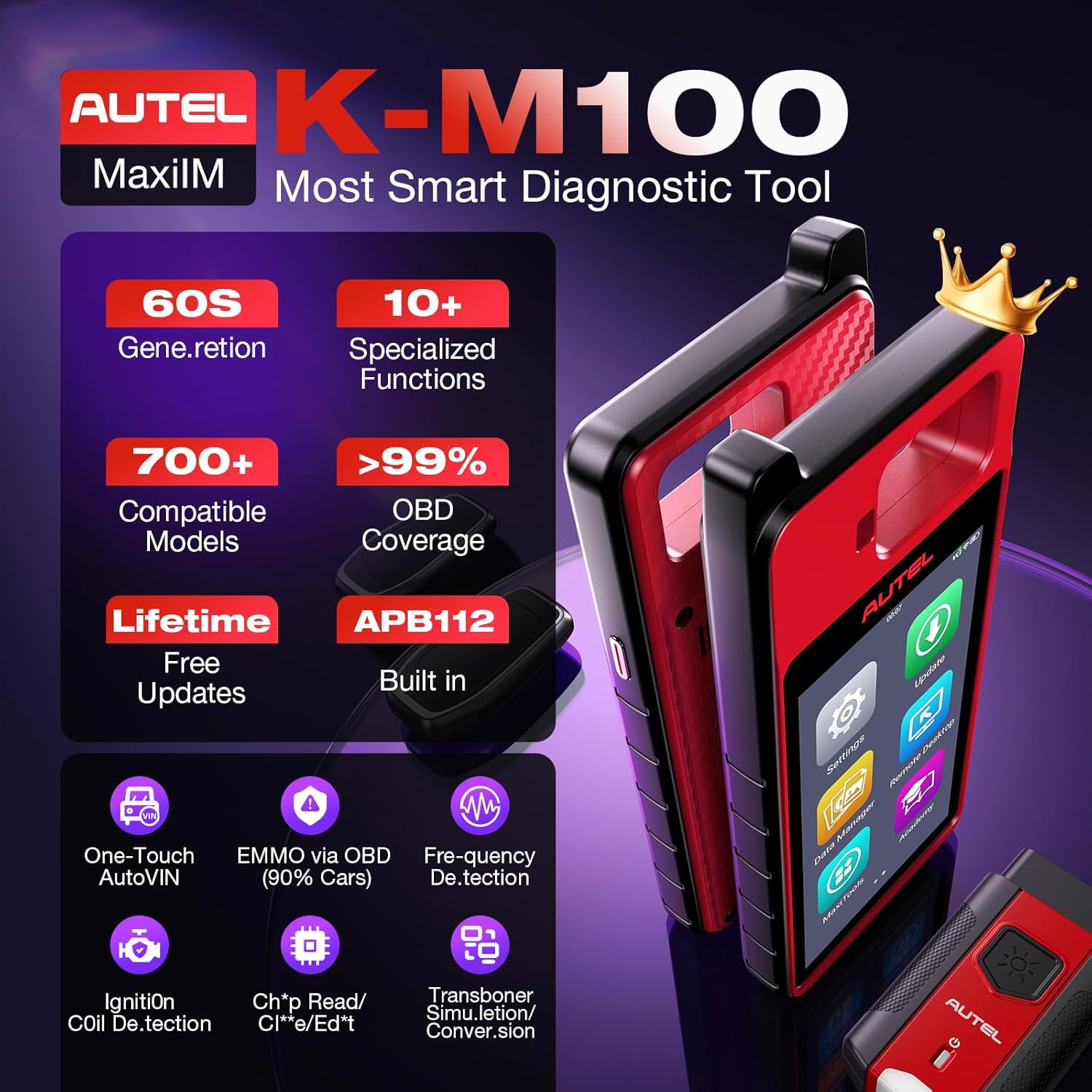
Figure 3.1: Overview of Autel MaxiIM K-M100E Key Features
This image highlights the core functionalities of the MaxiIM K-M100E, such as 60-second key generation, over 10 specialized functions, 700+ compatible models, and built-in APB112.

Figure 3.2: Autel MaxiIM K-M100E Displaying APB112 Integration
The image shows the MaxiIM K-M100E main unit alongside the APB112 module, emphasizing its integrated capabilities for enhanced key programming and diagnostic tasks.
4. Setup
Follow these steps to set up your Autel MaxiIM K-M100E for first-time use.
4.1 Unboxing and Initial Power-On
- Carefully unpack all components from the carrying case. Refer to the packing list below.
- Connect the power adapter to the MaxiIM K-M100E and a power outlet to charge the device.
- Press and hold the power button to turn on the device.
- Follow the on-screen instructions to complete the initial setup, including language selection and Wi-Fi connection.
- Register your device on the Autel website to activate warranty and access updates.
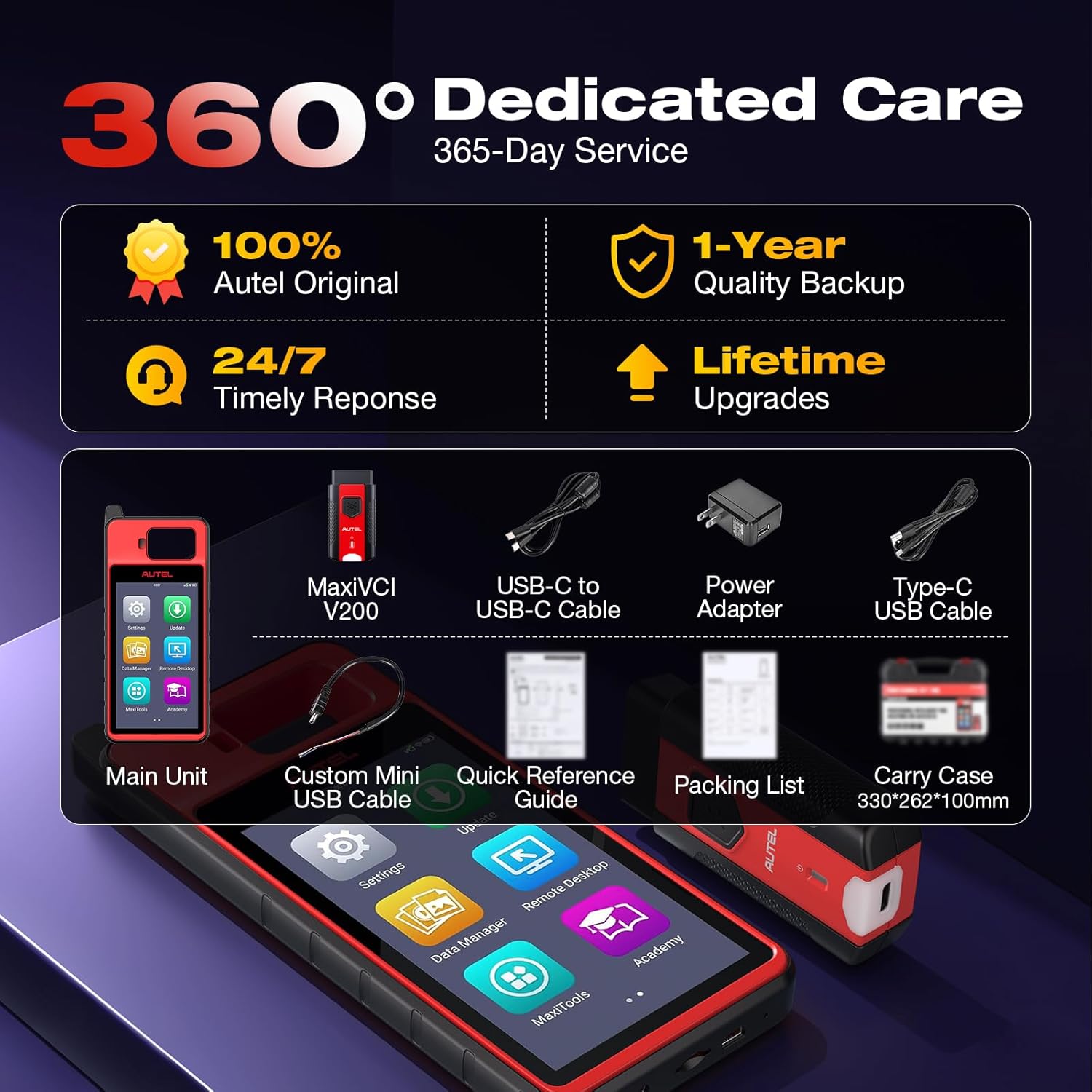
Figure 4.1: Autel MaxiIM K-M100E Packing List
This image illustrates the contents of the Autel MaxiIM K-M100E package, including the main unit, VCI, cables, power adapter, and documentation.
4.2 Connecting the VCI Module
The VCI (Vehicle Communication Interface) module connects the MaxiIM K-M100E to the vehicle's OBD2 port.
- Locate the vehicle's OBD2 port, usually under the dashboard on the driver's side.
- Plug the VCI module firmly into the OBD2 port. The VCI's indicator light should illuminate.
- Ensure the MaxiIM K-M100E is powered on and connected to the VCI via Bluetooth or USB cable.
5. Operating Instructions
This section details the primary functions and operations of the Autel MaxiIM K-M100E.
5.1 General Navigation
The device runs on Android 9.0 OS and features a 5.5-inch touchscreen. Navigate through menus and applications by tapping icons and swiping the screen.
5.2 Vehicle Identification (AutoVIN & VIN Scan)
The MaxiIM K-M100E offers multiple methods to quickly identify vehicle information.
- AutoVIN: Automatically detects the vehicle's VIN upon connection.
- Scan VIN: Use the device's camera to scan the VIN barcode.
- Scan License: Scan the vehicle's license plate to retrieve VIN data.
- Manual Input: Enter the VIN manually if automatic methods are not feasible.

Figure 5.1: Four Methods for VIN Data Retrieval
This image illustrates the four distinct methods available on the MaxiIM K-M100E for obtaining Vehicle Identification Number (VIN) data: Auto VIN, Scan VIN, Scan License, and Manual Input.
5.3 Key Generation and Matching (EMMO Functions)
The device excels in efficient key generation and EMMO (Engine Immobilizer) functions.
- 60-Second Key Generation: The tool can generate universal keys rapidly, significantly reducing programming time.
- EMMO via OBD: Perform advanced immobilizer functions directly through the OBD2 port for a wide range of vehicles. This includes reading EMMO ECU data, reading PIN codes, remote control learning, and adding new remote controls.
- Toyota Smart Unlock: A specialized function for unlocking Toyota smart keys.

Figure 5.2: Universal Key Generation Process
This image highlights the 60-second universal key generation capability of the Autel K-M100E, emphasizing its speed and efficiency compared to traditional manual methods.

Figure 5.3: EMMO Functions Accessible via OBD-II
The image details the various EMMO functions available through the OBD-II port, such as reading EMMO ECU, VIN, PIN codes, and performing remote control learning and additions for over 700 vehicle brands.
5.4 Transponder Functions
The MaxiIM K-M100E supports comprehensive transponder services.
- Generation: Create new transponder keys.
- Simulation: Emulate transponder signals for testing.
- Conversion: Convert between different transponder types, including ID63 and ID83.
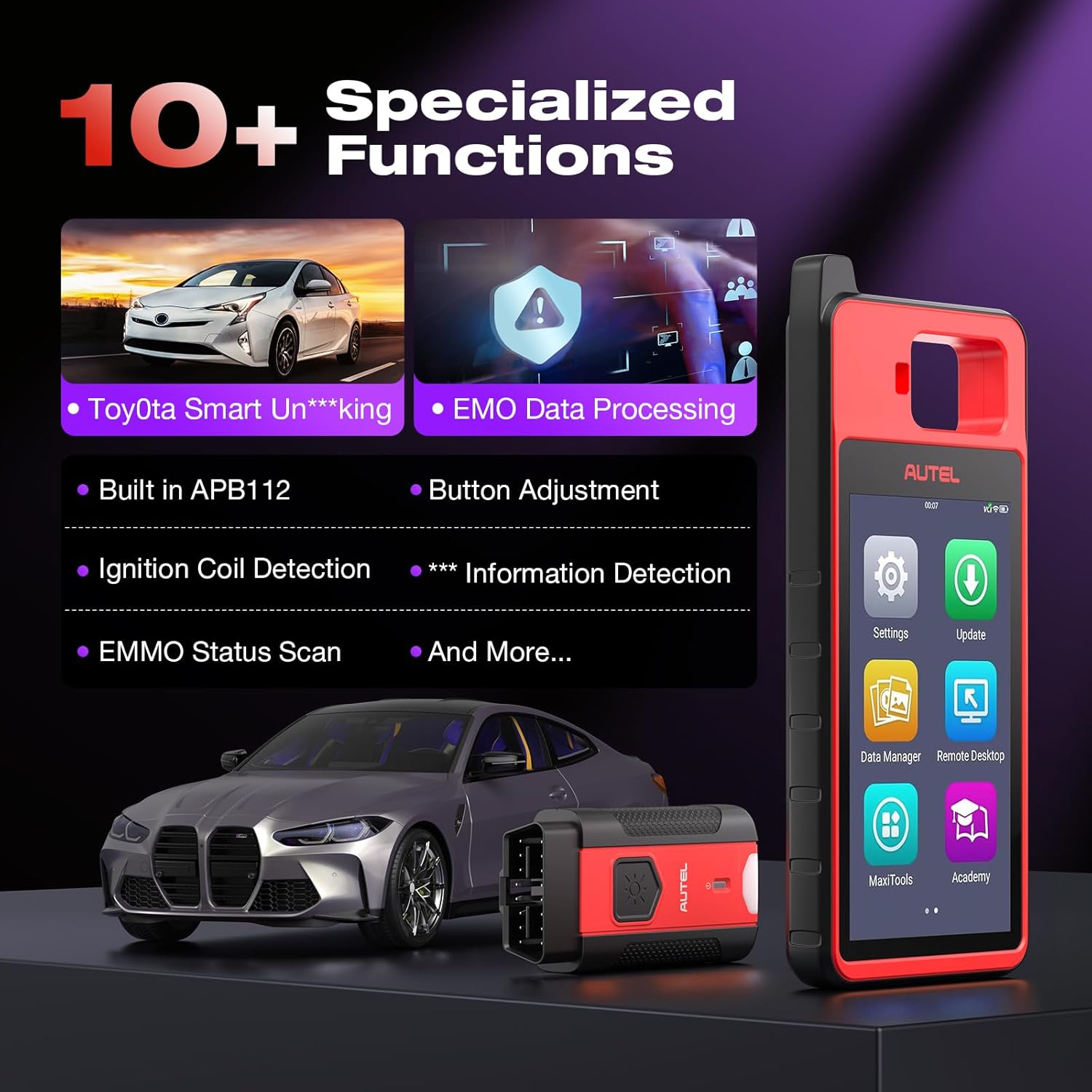
Figure 5.4: Transponder Functions Interface
This image displays the user interface for transponder functions, including options for generation, simulation, and conversion of various transponder types like ID46, ID47, ID48, ID49, ID4A, ID8A, ID63, and ID83.
5.5 Specialized Functions
Access a suite of specialized functions to address specific automotive needs.
- Data Processing
- Key Unlock
- Toyota Smart Unlock
- Information Detection
- Button Adjustment
- Ignition Coil Detection
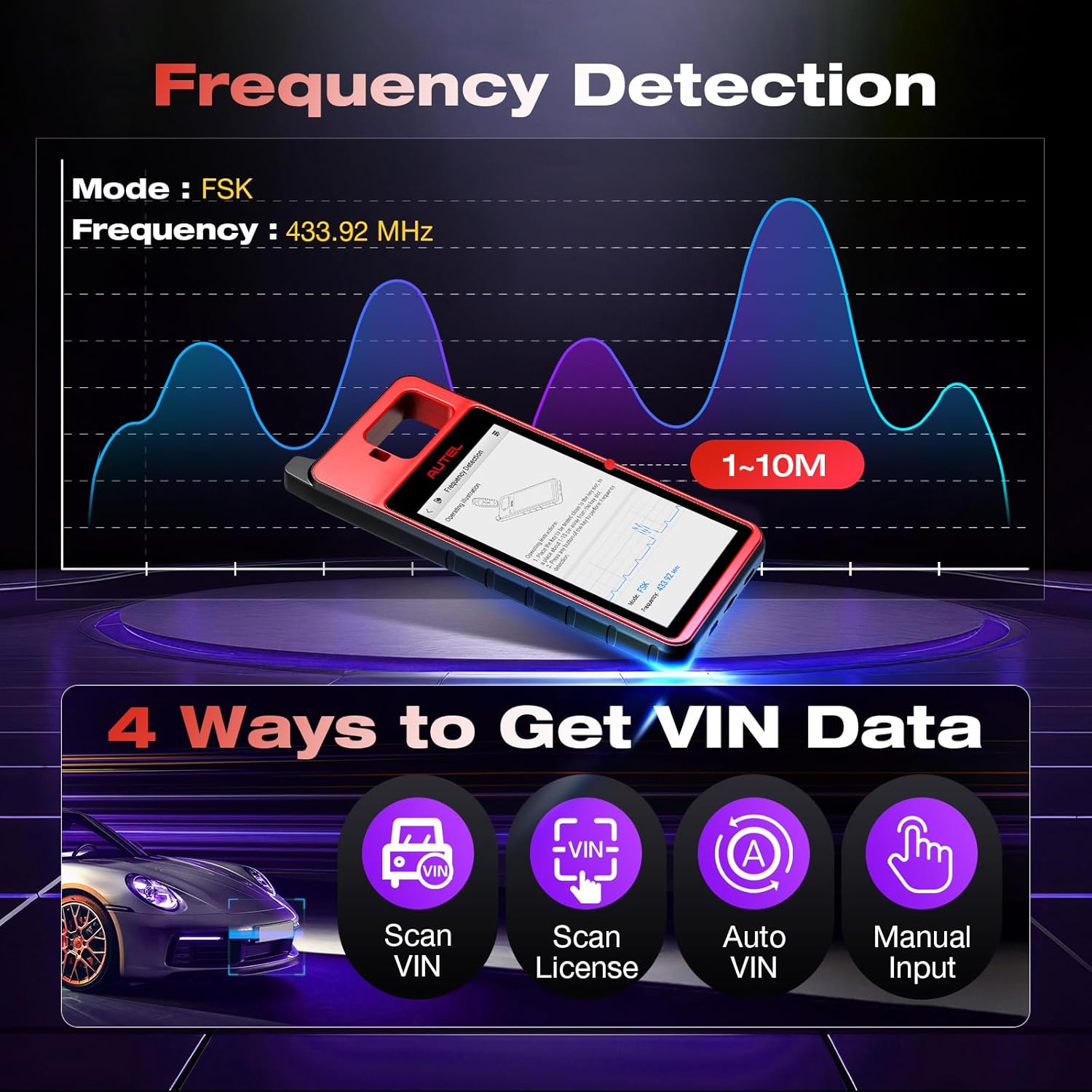
Figure 5.5: Specialized Functions Menu
The image showcases the variety of specialized functions available on the MaxiIM K-M100E, such as Toyota Smart Unlocking, EMMO Data Processing, Built-in APB112, Button Adjustment, Ignition Coil Detection, and Key Information Detection.
5.6 Frequency Detection
The device can detect and display key signal frequencies, useful for diagnosing remote control issues.

Figure 5.6: Frequency Detection Interface
This image illustrates the frequency detection feature of the Autel K-M100E, showing the device displaying a detected frequency (e.g., 433.92 MHz) and its signal pattern.
6. Maintenance
Proper maintenance ensures the longevity and optimal performance of your MaxiIM K-M100E.
- Software Updates: Regularly check for and install software updates to ensure the widest vehicle coverage and latest features. Updates are free for the lifetime of the device.
- Cleaning: Use a soft, dry cloth to clean the device. Avoid abrasive cleaners or solvents.
- Storage: Store the device in its protective case in a cool, dry place when not in use.
7. Troubleshooting
If you encounter issues with your MaxiIM K-M100E, refer to the following common troubleshooting tips:
- Device Not Powering On: Ensure the battery is charged. Connect the device to the power adapter and try again.
- VCI Not Connecting: Verify the VCI is securely plugged into the OBD2 port and that Bluetooth is enabled on the main unit.
- Vehicle Not Identified: Check the vehicle's ignition status. Ensure the VIN is clear if scanning, or enter it manually.
- Software Glitches: Restart the device. If the issue persists, perform a factory reset (note: this will erase user data).
- Compatibility Issues: Not all functions are compatible with all vehicles. Refer to the official Autel website or contact support with your vehicle's VIN for specific compatibility inquiries.
8. Specifications
| Feature | Specification |
|---|---|
| Operating System | Android 9.0 |
| Processor | Rockchip PX30 CPU |
| Memory | 2GB RAM + 64GB Storage |
| Display | 5.5-inch LCD Touchscreen |
| Battery | 4950mAh Lithium-polymer battery (8+ hours non-stop use) |
| Connectivity | Wi-Fi, Bluetooth |
| Dimensions | 13.78 x 12.8 x 4.13 inches (Package) |
| Item Weight | 3.67 pounds |
9. Warranty and Support
Autel provides comprehensive support for the MaxiIM K-M100E.
- Warranty: The device comes with a 1-year warranty.
- Software Updates: Enjoy lifetime free software updates to keep your tool current.
- Technical Support: 24/7 technical support is available. For assistance, contact autelcare@outlook.com.
- Return Policy: A 30-day return and replacement policy is offered.

Figure 9.1: Autel Customer Support Overview
This image highlights Autel's commitment to customer satisfaction, detailing features like 100% original product guarantee, 24/7 expert support, 12-month quality backup, lifetime upgrades, and a 30-day return/replace policy.


