
1. Introduction
This manual provides essential information for the safe and efficient installation and operation of your Lumary Smart Recessed Lighting 6 Inch. This smart LED downlight offers versatile lighting options, including 16 million colors, tunable white light, and smart control features.
Please read this manual thoroughly before installation and retain it for future reference.
2. What's in the Box
- 1 x Lumary Smart Recessed Light with J-Box
- Installation Kits
- 1 x Instruction Manual
3. Safety Information
Always turn off power at the circuit breaker before beginning any electrical installation. Ensure all wiring is performed by a qualified electrician or in accordance with local electrical codes. Do not attempt to modify the product. This product is designed for indoor use only and is not water-resistant.
4. Setup and Installation
The Lumary Smart Recessed Light features a slim design for easy installation in narrow ceilings and tight spaces. A junction box is included for direct wiring.
4.1 Installation Steps
- Prepare the Opening: Cut a 6.3-inch diameter hole in the ceiling at the desired location.
- Connect Wiring: Open the included J-Box. Connect the household electrical wires (live, neutral, ground) to the corresponding wires inside the J-Box using wire nuts. Ensure all connections are secure.
- Secure J-Box: Place the J-Box into the ceiling opening.
- Connect Light Fixture: Connect the cable from the recessed light fixture to the J-Box cable.
- Insert Fixture: Push the recessed light fixture into the ceiling opening. The spring clips will automatically secure the fixture in place.

Figure 1: Product Dimensions and Recommended Cutout Size

Figure 2: Ultra-thin design and spring clip mechanism for easy installation.
4.2 Video Installation Guide
Video 1: Recessed Lighting Installation & Smart Control Guide. This video demonstrates the physical installation process and initial smart control setup.
5. Operating Instructions
5.1 Lumary App Control
Download the Lumary App from your smartphone's app store. Ensure your Wi-Fi network is 2.4GHz for initial setup. Follow the in-app instructions to pair your lights. Typically, this involves turning the light switch ON-OFF-ON-OFF-ON to enter pairing mode.
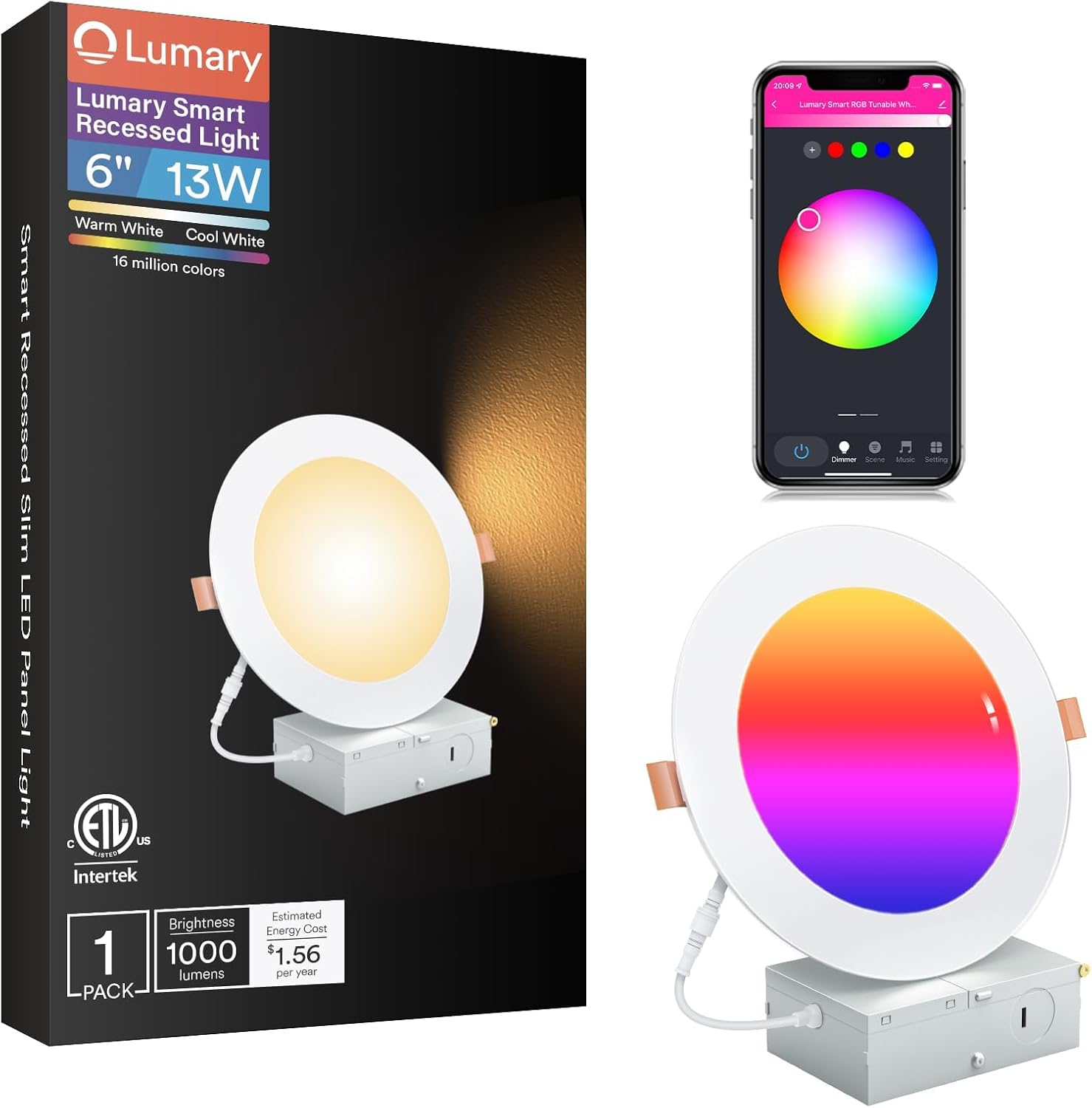
Figure 3: Lumary Smart Recessed Light with App Interface.
5.1.1 Color and Brightness Adjustment
The app allows you to select from 16 million colors and adjust brightness from 1% to 100%. You can also tune white light from warm white (2700K) to daylight (6500K).

Figure 4: Example of 16 Million Color Options.
Figure 5: Adjustable Brightness and Color Temperature.
5.1.2 Scene Modes and Music Sync
Choose from 8 preset scene modes or create custom scenes. The Music Sync feature allows lights to pulse and change color with music or in-game sound.
5.1.3 Scheduling and Group Control
Set schedules for automatic on/off times. Use Group Control to manage multiple lights simultaneously, even across different rooms.

Figure 6: Group Control for Multiple Rooms.
5.2 Voice Control
The lights are compatible with Amazon Alexa and Google Assistant. Link your Lumary account in the respective smart home app to enable voice commands for turning lights on/off, adjusting brightness, and changing colors.

Figure 7: Voice Control with Smart Assistants.
5.3 Remote Control (Sold Separately)
An optional Bluetooth remote control is available for quick access without a smartphone. This remote requires 2 AAA batteries (not included).

Figure 8: Optional Bluetooth Remote Control.
5.4 Video Demonstrations
Video 2: Lumary Smart Recessed Lighting 6 Inch Overview. This video demonstrates app control, color changing, music sync, and voice control features.
Video 3: Networking & Group Setting. This video explains how to set up and manage groups of lights within the Lumary app.
6. Maintenance
To clean the light fixture, ensure power is off at the circuit breaker. Use a soft, dry cloth to wipe the surface. Do not use abrasive cleaners or solvents. There are no user-serviceable parts inside the fixture.
7. Troubleshooting
- Light not pairing: Ensure your Wi-Fi network is 2.4GHz. Try the ON-OFF-ON-OFF-ON cycle on the light switch to re-enter pairing mode. Move closer to your Wi-Fi router or consider a Wi-Fi range extender if the signal is weak.
- Light not responding to app/voice commands: Check your Wi-Fi connection. Ensure the light is powered on and properly paired. Verify the Lumary app is updated and linked correctly to your smart assistant.
- Intermittent connectivity: This may indicate a weak Wi-Fi signal. Consider relocating your router or using a Wi-Fi range extender.
8. Specifications
| Feature | Specification |
|---|---|
| Brand | Lumary |
| Model Name | Recessed Lighting |
| Item Model Number | US-SD6F-1 |
| Size | 6 Inch |
| Wattage | 13 watts |
| Brightness | 1000 Lumens |
| Color Temperature | 2700K - 6500K (Tunable White) |
| Color Options | 16 Million Colors (RGB) |
| Connectivity | Wi-Fi (2.4GHz), Bluetooth |
| Control Methods | App, Voice (Alexa, Google Assistant), Remote (optional) |
| Voltage | 120 Volts |
| Material | Metal |
| Product Dimensions | 6.9"L x 6.9"W x 0.55"H |
| Item Weight | 1.19 pounds |
| Average Life | 25000 Hours |
| Certification | ETL Listed |
9. Warranty and Support
For warranty information or technical support, please refer to the contact details provided on the product packaging or visit the official Lumary website. Protection plans may be available for extended coverage.


