
Introduction
Thank you for choosing the Hovadova Height Adjustable Computer Tower Stand. This versatile 2-tier cart is designed to optimize your workspace by providing a mobile and organized solution for your PC tower and other accessories. Featuring a built-in charging station, adjustable height, and locking caster wheels, it offers both functionality and convenience.
Important Safety Information
- Weight Capacity: The maximum weight capacity for this stand is 80 lbs. Please ensure not to exceed this limit.
- Height Adjustment: As the height of the stand increases, its effective weight capacity may decrease. For large computer towers or heavy objects, it is recommended not to set the height to the maximum level to maintain stability.
- Secure Placement: Always ensure that the computer tower and any other items placed on the stand are stable and securely positioned to prevent tipping.
- Caster Brakes: Engage the brakes on the caster wheels when the stand is in its desired position to prevent unintended movement.
- Electrical Safety: Use the integrated charging station and USB ports responsibly. Do not overload the outlets. Ensure all cables are properly routed to avoid tripping hazards.
Package Contents
Please verify that all components are present before beginning assembly:
- Top Shelf (Engineered Wood)
- Bottom Shelf (Engineered Wood)
- Metal Frame Components
- 4 x 360° Swivel Caster Wheels with Brakes
- Built-in Charging Station (2 x 120V/12A AC Outlets, 2 x 5V/2A USB Ports) with 4.92-foot Power Cord
- 2 x Headphone Hooks
- Assembly Hardware (screws, nuts, tools)
- Instruction Manual
Setup and Assembly
Assembly of your Hovadova Computer Tower Stand is straightforward and typically takes about 30-40 minutes. All necessary tools and hardware are included. Follow these general steps:
- Unpack Components: Carefully remove all parts from the packaging and lay them out on a clean, soft surface to prevent scratches. Verify all components against the package contents list.
- Assemble Frame: Attach the metal frame components together using the provided screws and tools. Ensure all connections are secure.
- Install Shelves: Secure the bottom and top engineered wood shelves to the assembled metal frame. The bottom shelf is designed to hold the PC tower, while the top shelf provides additional surface area.
- Attach Charging Station: Mount the built-in charging station to the designated area on the stand. Ensure the power cord is accessible.
- Install Caster Wheels/Feet: Screw the four 360° swivel caster wheels into the bottom of the stand. Alternatively, if you prefer a stationary setup, install the provided adjustable feet.
- Attach Headphone Hooks: Secure the headphone hooks to the side of the top shelf as desired.
- Adjust Height: Loosen the adjustment knobs on both sides of the stand, raise or lower the top shelf to your preferred height, and then tighten the knobs securely to lock it in place.
For visual guidance, please refer to the included instruction manual diagrams.
Key Features

Integrated Charging Station: This mobile PC stand features dual 120V/12A outlets and dual USB ports, allowing you to power your laptop, smartphone, printer, tablet, or any electronic device directly from the stand. This helps maintain an organized workspace and can also serve as a side table with additional power for a desk lamp.

Height Adjustable Design: The stand offers a unique manual height adjustment range from 23.23 inches to 33.27 inches. This feature helps speed up heat dissipation and improve overall computer performance. Its overall dimensions are 25.19 inches long by 13.78 inches wide, accommodating most computer towers on the market, including full-tower ATX cases.

Enhanced Mobility: Equipped with four 360° noiseless rolling casters, this CPU holder cart allows for smooth movement across various surfaces, including carpeted floors, without causing scratches. The wheels include brakes for secure positioning.

Multifunctional 2-Tier Design: Our 2-tier computer CPU stand is designed to meet diverse storage needs. The bottom tier is ideal for storing your PC tower, while the top tier can hold books, documents, printers, or other office essentials.

Strong and Durable Construction: The stand features thickened wood boards for the shelves, which are anti-scratch and rot-resistant. The thickened steel frame enhances overall load-bearing capacity and stability, supporting up to 80 lbs. This robust construction ensures the product is stable, does not wobble, and resists damage or deformation.
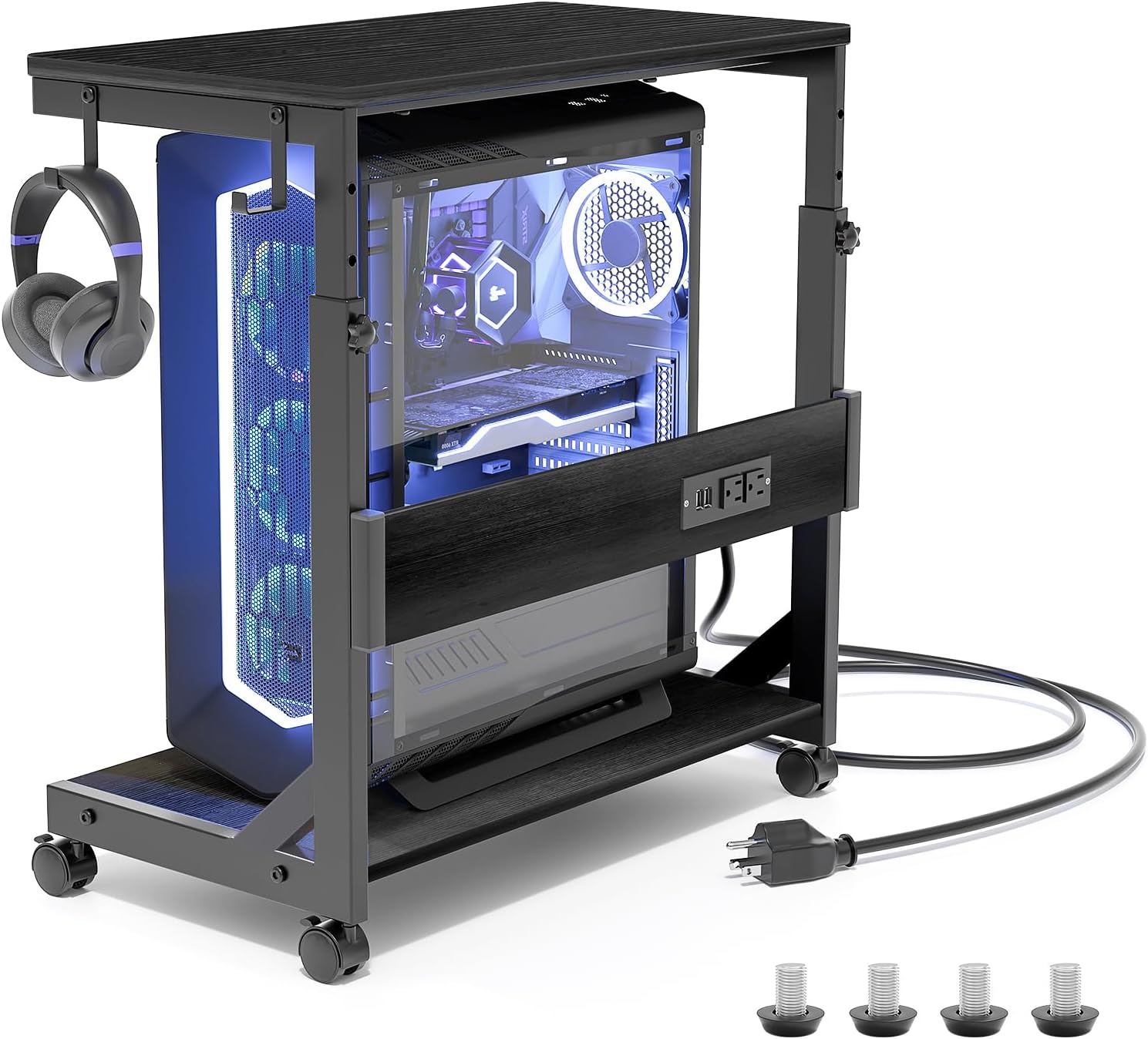
Convenient Headphone Hooks: Two integrated hooks provide a convenient place to hang headphones or manage cables, keeping your workspace tidy and organized.
Operating Instructions
Height Adjustment:
- Ensure no heavy objects are on the top shelf before adjusting height.
- Locate the adjustment knobs on both sides of the stand's vertical supports.
- Loosen both knobs by turning them counter-clockwise.
- Carefully raise or lower the top shelf to your desired height. Ensure both sides are adjusted evenly.
- Once the desired height is reached, tighten both knobs securely by turning them clockwise to lock the shelf in place.
Using the Charging Station:
- Plug the stand's integrated 4.92-foot power cord into a standard 120V/12A wall outlet.
- Connect your devices to the two 120V/12A AC outlets or the two 5V/2A USB ports as needed.
- Do not exceed the maximum electrical load of the charging station.
Mobility and Stability:
- To move the stand, ensure the caster wheel brakes are disengaged.
- Gently push the stand to its new location.
- Once in position, engage the brakes on all four caster wheels to prevent accidental rolling.
- If using the stationary feet, ensure they are securely tightened and the stand is level.
Maintenance
- Cleaning: Wipe down the wood surfaces with a soft, damp cloth. Avoid harsh chemicals that may damage the finish. For the metal frame, a mild cleaner can be used.
- Hardware Check: Periodically check all screws and fasteners to ensure they remain tight. Re-tighten if necessary to maintain stability.
- Caster Wheels: Keep caster wheels free of debris (hair, dust) to ensure smooth operation. Lubricate if needed.
- Electrical Components: Ensure the charging station and power cord are free from damage. Do not use if any part is frayed or broken.
Troubleshooting
- Stand is Wobbly:
- Check that all assembly screws are securely tightened.
- Ensure the height adjustment knobs are fully tightened after setting the desired height.
- Verify that the stand is placed on a level surface.
- Caster Wheels Not Rolling Smoothly:
- Check for any debris (hair, dust) caught in the wheels and remove it.
- Ensure the wheel brakes are fully disengaged.
- Charging Station Not Working:
- Verify that the stand's power cord is securely plugged into a functioning wall outlet.
- Check if the wall outlet itself is receiving power (test with another device).
- Ensure the devices connected to the charging station are properly plugged in and functioning.
- Avoid overloading the outlets.
Specifications
| Product Dimensions (D x W x H) | 13.39"D x 25.2"W x 33.27"H |
| Adjustable Height Range | 23.23" - 33.27" |
| Brand | Hovadova |
| Model Number | A-SCZJ |
| Material | Engineered Wood, Metal (Frame) |
| Color | Black |
| Weight Capacity (Maximum) | 80 Pounds |
| Number of Shelves | 2 |
| Number of Wheels | 4 (with brakes) |
| Charging Station | 2 x 120V/12A AC Outlets, 2 x 5V/2A USB Ports |
| Power Cord Length | 4.92 Feet |
| Included Components | Built-in Outlet, Headphone Hooks |
Product Overview Videos
Height Adjustable Computer Tower Stand with Charge Station
This video provides a comprehensive overview of the Hovadova Height Adjustable Computer Tower Stand, highlighting its integrated charging station, adjustable height feature, and overall design for an organized workspace.
Computer Tower Stand with Charge Station
Watch this video to see the Hovadova Computer Tower Stand in action, demonstrating its practical use with a computer setup and the convenience of its built-in charging capabilities.
Warranty and Support
Manufacturer Warranty: This product comes with a manufacturer warranty. For specific details regarding coverage and duration, please refer to the warranty information included in your product packaging or contact Hovadova customer support.
Customer Support: If you have any questions, concerns, or require assistance with your Hovadova Computer Tower Stand, please do not hesitate to contact the seller or Hovadova customer service. We are committed to solving your problems in a timely and efficient manner.