
AIPER Scuba SE
AIPER Scuba SE Robotic Pool Cleaner & Pilot X1 Handheld Pool Vacuums User Manual
Brand: AIPER | Model: Scuba SE & Pilot X1
1. Product Overview
The AIPER Scuba SE Robotic Pool Cleaner and Pilot X1 Handheld Pool Vacuums offer a comprehensive solution for pool maintenance. The Scuba SE provides automated cleaning for pool floors, while the Pilot X1 offers versatile handheld cleaning for various pool areas.

Figure 1: The AIPER Scuba SE robotic pool cleaner and Pilot X1 handheld pool vacuum, along with the telescoping pole.
Key Features:
- Optimized Hydrodynamic Design: The Scuba SE's innovative design reduces power consumption for propulsion, focusing on delivering superior cleaning results.
- Self-Parking Function: After completing its cleaning cycle, the Scuba SE automatically returns to its starting point for convenient retrieval.
- Long Battery Life: Equipped with a 90-minute battery, the Scuba SE can thoroughly clean pools up to 860 square feet (40 feet) on a single charge.
- Powerful Suction & Anti-Clogging: The Pilot X1 is armed with 1260 GPH (21GPM) suction and an anti-clogging function, cleaning pool floors effortlessly while capturing various debris.
- Dual Depth Cleaning: The Pilot X1 handheld pool vacuum cleans both deep (>20 inch) and shallow (≥0.6 feet) water, ideal for spas, above/in-ground pools, steps, and lounging areas.
2. Setup and Initial Use
2.1 Charging the Scuba SE
Before the first use, ensure your Scuba SE robotic pool cleaner is fully charged. Connect the charger to the device and a power outlet. A full charge typically takes 3 to 4 hours and provides approximately 90 minutes of cleaning time.

Figure 2: The Scuba SE offers up to 90 minutes of cleaning time on a single charge, covering pools up to 860 sq.ft.
2.2 Attaching Brushes (Scuba SE)
The Scuba SE comes with brushes that need to be clipped into place on its underside. No tools are required for this simple assembly. Ensure they are securely fastened before operation.

Figure 3: The underside of the Scuba SE, where cleaning brushes are easily attached, showcasing its efficient hydrodynamic design.
3. Operating Instructions
3.1 Activating and Launching the Scuba SE
The Scuba SE features one-click activation. Simply press the power button, and you will hear a beep indicating it's ready. Gently place the cleaner into the pool. It will gradually fill with water and sink to the bottom, then automatically begin its cleaning cycle.

Figure 4: The cordless design of the Scuba SE allows for easy placement and operation in the pool.
The Scuba SE is equipped with a self-parking function. Once its battery is low or the cleaning cycle is complete, it will automatically return to the edge of the pool for easy retrieval using a pool hook (not included).

Figure 5: The self-parking feature ensures the cleaner is easily accessible after its operation.
3.2 Cleaning Performance (Pilot X1)
The Pilot X1 handheld vacuum provides powerful suction for thorough cleaning. It is designed to effectively capture various debris from pool floors.

Figure 6: The Pilot X1's powerful 1260 GPH suction ensures efficient debris collection.
The Pilot X1 offers dual-depth cleaning capabilities, making it suitable for both deep and shallow areas of your pool, including steps, corners, and other hard-to-reach spots.
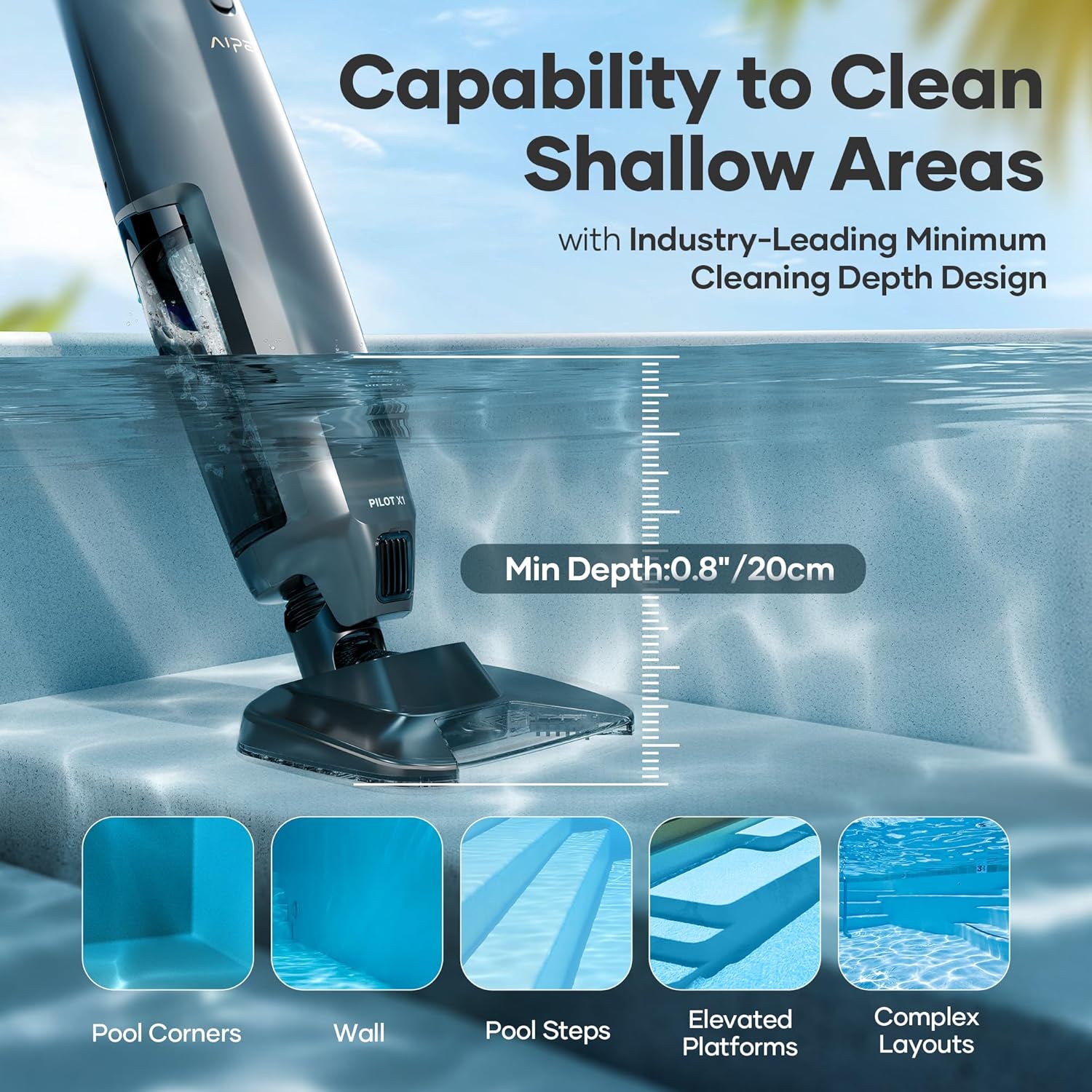
Figure 7: The Pilot X1 is effective in cleaning various pool areas, including shallow sections with a minimum depth of 0.8 inches (20cm).
Both the Scuba SE and Pilot X1 are designed for use in a variety of pool environments.

Figure 8: Ideal pool types for AIPER cleaners include inground pools, above-ground pools, spas, and hot tubs.
4. Maintenance
4.1 Filter Options and Cleaning
The cleaners offer two filter options to suit different pool conditions. Use the 360um filter screen for dirty water with larger debris (small twigs, coarse sand, leaves, general debris). For small or less noticeable debris (fine sand, dust, fine particles), add the 100um filter sleeve and screen. When cleaning very dirty water, it is not necessary to add the Option-2 filter, which helps extend its lifespan.

Figure 9: Choose between two filter options based on the type and amount of debris in your pool.
4.2 Cleaning the Cleaner
After each use, it is recommended to clean the filter basket and brushes to ensure optimal performance and longevity of your AIPER pool cleaner. Rinse thoroughly with fresh water and allow to dry before storing or recharging.
5. Troubleshooting
Common Issues and Solutions:
- Device Stops Mid-Cycle: This often indicates a low battery. The Scuba SE is designed to self-park at the pool edge when the battery is critically low. Recharge the device fully before next use.
- Device Not Collecting Large Debris or Floating Algae: The Scuba SE is designed for flat-floored pools and primarily collects settled debris. It is not suitable for pools with slopes or for collecting large floating debris or algae. For floating debris, use a pool skimmer.
- Device Not Moving or Stuck: Ensure the brushes are properly installed and free from obstructions. If the device gets stuck against a wall or obstacle, it may stop to conserve battery. Use a pool hook to reposition it.
6. Specifications
| Attribute | Value |
|---|---|
| ASIN | B0F43H8LPB |
| Brand | AIPER |
| Model Name | Scuba SE |
| Material | Plastic |
| Power Source | Battery Powered |
| Assembly Required | No |
7. Warranty and Support
The AIPER Scuba SE is covered by a 12-month warranty for the battery and motor from the date of original purchase. This warranty ensures your peace of mind regarding the core components of your device.
If you are not satisfied with your purchase or require assistance, please contact AIPER Customer Service immediately. They are dedicated to providing the best support to help you enjoy your AIPER product.
For further assistance, visit the official AIPER Store: AIPER Store on Amazon
Related documentsScuba SE


Ask a question about this manual
Ask about setup, troubleshooting, compatibility, parts, safety, or missing instructions. Manuals+ will review the question and use this page’s manual context to help answer it.