1. Important Safety Instructions
Please read all instructions carefully before using the Karinear 36L Air Fryer Oven. Failure to follow these safety guidelines may result in electric shock, fire, or serious injury.
- Always place the appliance on a stable, heat-resistant surface, away from walls and other appliances to ensure proper ventilation.
- Do not immerse the appliance, cord, or plug in water or other liquids.
- Supervise children closely when the appliance is in use.
- Unplug from outlet when not in use and before cleaning. Allow to cool before putting on or taking off parts.
- Do not operate any appliance with a damaged cord or plug, or after the appliance malfunctions or has been damaged in any manner.
- The oven features a safety microswitch that cuts power when the door is opened, reducing burn risk. Do not attempt to bypass this feature.
- The external temperature of the oven is approximately 50-60°C during operation. Exercise caution.
- Use only food-grade materials and accessories provided or recommended by the manufacturer.
- Do not place plastic containers or silicone molds not rated for high oven temperatures inside the appliance.
- Avoid using abrasive cleaners or scouring pads on the appliance.
- Do not block any ventilation openings.
- This appliance is for household use only.
2. Product Overview
The Karinear 36L Air Fryer Oven is a versatile kitchen appliance designed for air frying, baking, roasting, and more. It features a spacious interior and multiple functions to simplify your cooking process.

Figure 2.1: Front view of the Karinear 36L Air Fryer Oven, showcasing its sleek design and a roasted chicken cooking inside.
2.1 Key Features
- Large 36L Capacity: Accommodates 6-9 portions of fries, a 14-inch pizza, 22 wings, or a 3kg roasted chicken. Features a 3-level design for multi-dish cooking.
- 10-in-1 Multifunction: Replaces multiple appliances with 19 preset functions (e.g., fries, roast, fish, shrimp, chicken, rotisserie).
- Enhanced Safety: Double-layer insulated glass door and a safety microswitch that cuts power when the door is opened.
- User-Friendly Controls: LED display panel with knobs for temperature (0-230°C) and time (0-120 minutes) adjustment, plus 16 preset functions.
- Integrated Light: Allows for easy monitoring of food during cooking.
- Durable Construction: Made with integrated 430 stainless steel for durability and easy cleaning.
- VORTX Convection Technology: High-speed rotating convection technology for crispier, healthier results with less oil.
2.2 Included Accessories
Your Karinear Air Fryer Oven comes with a complete set of accessories to enhance your cooking experience:

Figure 2.2: Overview of included accessories: Rotisserie set, Bake Tray Handle, Wire Rack, Bake Tray, and Fry Basket.
- Rotisserie Set: For roasting whole chickens or other large cuts of meat.
- Bake Tray Handle: For safely inserting and removing hot trays.
- Wire Rack: For grilling, toasting, or placing dishes.
- Bake Tray: A solid tray for baking, roasting, or catching drips.
- Fry Basket: A mesh basket designed for air frying items like fries and wings, allowing hot air to circulate evenly.
3. Setup and First Use
3.1 Unpacking and Placement
- Carefully remove the appliance and all accessories from the packaging.
- Remove any protective films or stickers from the appliance.
- Place the oven on a flat, stable, heat-resistant surface. Ensure there is at least 10-15 cm (4-6 inches) of clear space on all sides and above the oven for proper ventilation.
- Do not place the oven near flammable materials or under cabinets.
3.2 Initial Cleaning
- Before first use, wipe the interior and exterior of the oven with a damp cloth.
- Wash all accessories (bake tray, wire rack, fry basket, rotisserie set) with warm, soapy water. Rinse thoroughly and dry completely.
- Ensure all parts are dry before plugging in the appliance.
3.3 First Use (Burn-Off)
It is recommended to run the oven empty for about 15-20 minutes on a high temperature setting during its first use. This helps to burn off any manufacturing residues and odors. A slight smoke or odor is normal during this process.
- Plug the oven into a grounded electrical outlet.
- Set the temperature to 200°C (390°F) and the timer to 15 minutes.
- Ensure the area is well-ventilated.
- After 15 minutes, turn off the oven and allow it to cool completely.
- The oven is now ready for use.
4. Operating Instructions
4.1 Control Panel Overview
The Karinear Air Fryer Oven features an intuitive LED display and control knobs for easy operation.
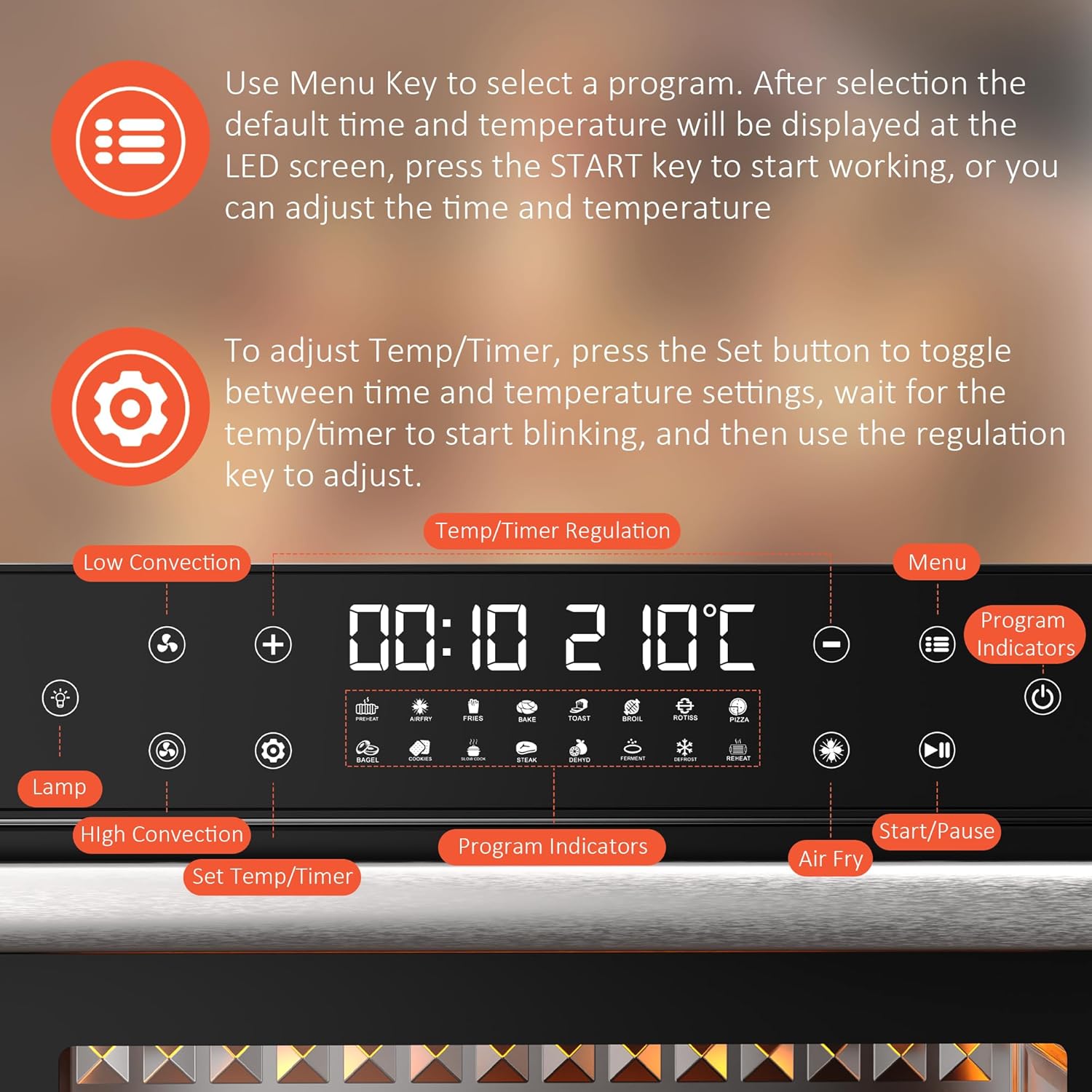
Figure 4.1: Detailed view of the control panel, showing the LED display, function icons, and control knobs.
- LED Display: Shows current time, temperature, and selected program.
- Menu Key: Press to cycle through available preset programs.
- Set Temp/Timer Button: Toggles between time and temperature adjustment modes.
- Regulation Keys (+/-): Used to adjust time and temperature values.
- Start/Pause Button: Initiates or pauses the cooking process.
- Light Button: Turns the interior oven light on or off.
- Convection Fan Buttons: Selects low or high convection fan speed.
- Power Button: Turns the appliance on/off and illuminates the screen from standby.
4.2 Basic Operation
- Power On: Plug in the oven. If the screen is black, gently touch the Power button to illuminate the display.
- Select Program: Press the Menu Key to choose a preset program. The default time and temperature for that program will appear on the LED screen.
- Adjust Time/Temperature (Optional):
- Press the Set Temp/Timer button. The time or temperature value will start blinking.
- Use the Regulation Keys (+/-) to adjust the desired time or temperature.
- Press Set Temp/Timer again to switch between adjusting time and temperature.
- Wait a few seconds for the blinking to stop, and the setting will be confirmed.
- Start Cooking: Press the Start/Pause button to begin the cooking process.
- Monitor Food: Press the Light Button to illuminate the interior and check on your food.
- Pause/Stop: Press the Start/Pause button to temporarily pause cooking. Press it again to resume. To stop cooking completely, press and hold the Power button.
- Screen Standby: The screen will automatically go black after 20 seconds of inactivity. Touch the Power button to reactivate.
4.3 Using Accessories
Different accessories are designed for specific cooking methods:
- Fry Basket: Ideal for air frying items like french fries, chicken wings, and vegetables. Place food in the basket and insert it into the oven.
- Bake Tray: Use for baking cookies, roasting vegetables, or as a drip tray when using the wire rack or rotisserie.
- Wire Rack: Suitable for grilling, toasting bread, or supporting baking dishes.
- Rotisserie Set: For roasting whole chickens or other meats. Secure the food onto the rotisserie spit and insert it into the designated slots in the oven. Ensure the rotisserie function is selected on the control panel.

Figure 4.2: The oven's versatility, demonstrating its use for air frying (left) and traditional oven cooking (right).
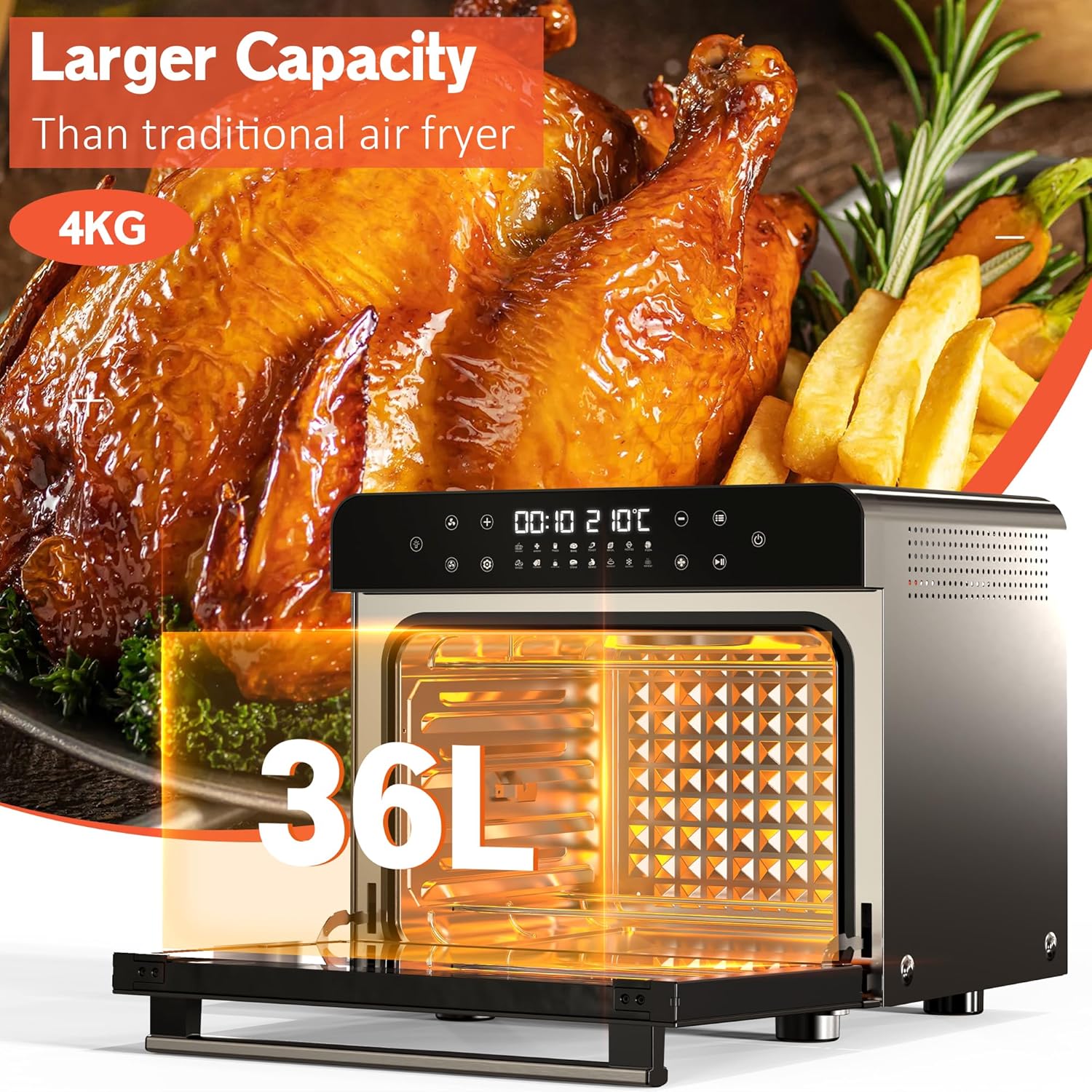
Figure 4.3: Visual representation of the 36L internal capacity, capable of cooking a large meal.
5. Cleaning and Maintenance
Regular cleaning and proper maintenance will ensure the longevity and optimal performance of your Karinear Air Fryer Oven.
5.1 General Cleaning
- Unplug and Cool: Always unplug the oven from the power outlet and allow it to cool completely before cleaning.
- Interior: Wipe the interior walls with a damp cloth and mild detergent. For stubborn stains, a non-abrasive sponge can be used. Avoid using metal scouring pads or harsh chemicals.
- Exterior: Wipe the exterior surface with a soft, damp cloth. Do not use abrasive cleaners or solvents.
- Glass Door: Clean the glass door with a glass cleaner or a damp cloth.
5.2 Accessory Care
- All removable accessories (bake tray, wire rack, fry basket, rotisserie set) can be washed by hand with warm, soapy water.
- For baked-on food, soak accessories in warm water before cleaning.
- Ensure all accessories are thoroughly dried before storing or re-inserting into the oven.
Note: The integrated 430 stainless steel is durable and easy to clean after daily use.
6. Troubleshooting
If you encounter any issues with your Karinear Air Fryer Oven, please refer to the following common problems and solutions:
| Problem | Possible Cause | Solution |
|---|---|---|
| Appliance does not turn on. | Not plugged in; power outlet malfunction; appliance malfunction. | Ensure the power cord is securely plugged into a working outlet. Check your circuit breaker. If the issue persists, contact customer support. |
| Screen is black/unresponsive. | Appliance is in standby mode. | Gently touch the Power button to illuminate the screen. The screen automatically goes black after 20 seconds of inactivity. |
| Food is not cooking evenly. | Overcrowding the basket/tray; incorrect temperature/time settings; food not rotated. | Avoid overcrowding; cook in smaller batches if necessary. Adjust temperature and time according to recipe. For best results, shake or flip food halfway through cooking. |
| Smoke coming from the oven. | Excess oil/grease on heating elements or accessories; food residue. | Unplug the oven and let it cool. Clean the interior and accessories thoroughly. Ensure no food particles are left on heating elements. A small amount of smoke during first use is normal. |
| Door does not close properly. | Obstruction; door hinge issue. | Check for any food debris or accessories blocking the door. Ensure the door is aligned correctly. Do not force the door. |
If the problem persists after trying these solutions, please contact Karinear customer support for assistance.
7. Specifications
Technical specifications for the Karinear 36L Air Fryer Oven (Model: GD36BRAL-K):
| Feature | Detail |
|---|---|
| Brand | Karinear |
| Model Number | GD36BRAL-K |
| Capacity | 36 Liters |
| Power | 1800 Watts |
| Dimensions (L x W x H) | 54 x 48 x 48 cm (approximately 21.3 x 18.9 x 18.9 inches) |
| Weight | 15.65 kg (approximately 34.5 lbs) |
| Material | Stainless Steel, Glass |
| Maximum Temperature | 230°C (446°F) |
8. Warranty and Support
For detailed warranty information, please refer to the warranty card included with your product or visit the official Karinear website. Keep your purchase receipt as proof of purchase.
If you have any questions, require technical assistance, or need to report a problem, please contact Karinear customer support through their official channels. Contact information can typically be found on the product packaging, the official website, or within the included documentation.


