
Montech Century II 1200W
MONTECH Century II 1200W ATX 3.1 Power Supply User Manual
Model: Century II 1200W
Introduction
Thank you for choosing the MONTECH Century II 1200W ATX 3.1 Fully Modular 80 Plus Gold Power Supply. This power supply unit (PSU) is designed to provide stable and efficient power to your computer system, featuring compatibility with the latest ATX 3.1 and PCIe 5.1 standards, including a native 12V-2x6 cable. Its compact 140mm design, Zero RPM mode, and 100% Japanese capacitors ensure reliable and quiet operation. This manual provides essential information for proper installation, operation, maintenance, and troubleshooting.

Image: The MONTECH Century II 1200W Power Supply, showcasing its design and key features.
Setup and Installation
Proper installation is crucial for the safety and optimal performance of your power supply. Please follow these steps carefully:
- Safety First: Before beginning installation, ensure your computer system is completely powered off and unplugged from the wall outlet.
- Mounting the PSU: Install the MONTECH Century II PSU into the designated power supply bay of your computer case. Secure it with the provided screws.
- Connecting Modular Cables: This is a fully modular power supply. Connect only the necessary cables for your components. Refer to the cable table below for connector types and lengths. Ensure all connections are firm and secure.
- Motherboard Power: Connect the 20+4 Pin ATX cable to your motherboard.
- CPU Power: Connect the 4+4 Pin CPU (EPS 12V) cables to your motherboard's CPU power connectors.
- Graphics Card Power (PCIe): For modern graphics cards, utilize the native 12V-2x6 cable for optimal power delivery. Connect additional 6+2 Pin PCIe cables as required by your GPU.
- Peripherals: Connect SATA power cables for storage drives (HDDs/SSDs) and Molex cables for other peripherals as needed.
- Cable Management: Utilize the flat and flexible cables to route them neatly within your case, improving airflow and aesthetics.
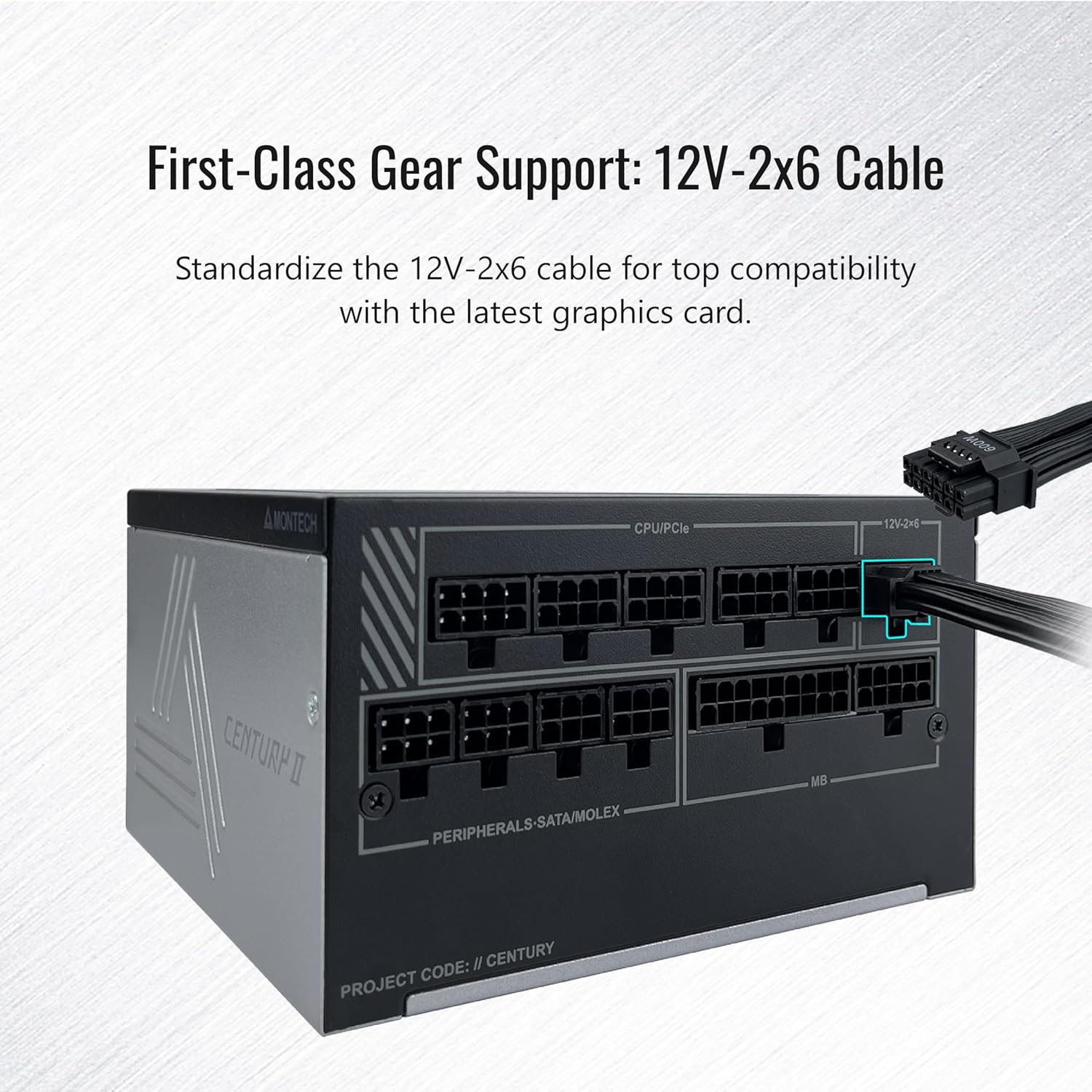
Image: Close-up view of the MONTECH Century II power supply showing the 12V-2x6 cable connection point for graphics cards.

Image: Illustration of the flat and flexible modular cables included with the MONTECH Century II, alongside a table detailing cable types, quantities, and lengths.
Operating Instructions
The MONTECH Century II power supply is designed for straightforward operation. After successful installation, ensure all connections are secure before powering on your system.
Smart Zero Fan Mode
The PSU features a 135mm FDB silent fan with a Smart Zero Fan mode. This mode allows the fan to remain off under low load conditions, providing silent operation. The fan will automatically activate when the system load increases to maintain optimal cooling.
- Activating/Deactivating Zero RPM Mode: A switch on the rear of the PSU allows you to toggle the Smart Zero Fan mode on or off. When the switch is in the 'ON' position, the fan will operate continuously. When in the 'OFF' position, the fan will only spin up under load.

Image: Rear view of the MONTECH Century II power supply, highlighting the Smart Zero Fan toggle switch.
Maintenance
Regular maintenance helps ensure the longevity and stable performance of your power supply.
- Dust Cleaning: Periodically clean the exterior of the PSU and the fan grille to prevent dust buildup, which can impede airflow and cooling efficiency. Use compressed air or a soft brush. Always power off and unplug the system before cleaning.
- Cable Inspection: Occasionally check all modular cable connections to ensure they remain securely seated. Loose connections can lead to instability or component damage.
- Environmental Conditions: Ensure the PSU operates in a well-ventilated environment with appropriate ambient temperatures. Avoid blocking the PSU's intake or exhaust vents.
Troubleshooting
If you encounter issues with your MONTECH Century II power supply, refer to the following common problems and solutions:
- System Does Not Power On:
- Ensure the power cable is securely plugged into both the PSU and the wall outlet.
- Check that the main power switch on the back of the PSU is in the 'ON' position.
- Verify all modular cables (20+4 Pin ATX, CPU, PCIe) are correctly and firmly connected to both the PSU and the respective components.
- Test the wall outlet with another device to confirm it has power.
- Loud Fan Noise or Clicking Sound:
- If the fan is loud, check if the Smart Zero Fan mode is enabled. If it is, the fan should only spin under load. If it's constantly loud at low loads, ensure the switch is in the correct position for your preference.
- A clicking sound, especially under load, might indicate an issue with the fan or internal components. If this persists, contact support.
- Ensure no cables or obstructions are interfering with the fan blades.
- System Instability or Random Shutdowns:
- Verify that your system's total power consumption does not exceed the PSU's 1200W capacity.
- Ensure all power connectors, especially for the CPU and GPU, are fully seated.
- Check for any signs of overheating in other components.
If these steps do not resolve the issue, please refer to the Warranty and Support section for further assistance.
Specifications
| Feature | Detail |
|---|---|
| Model Name | Century II |
| Brand | Montech |
| Output Wattage | 1200 watts |
| Form Factor | ATX |
| Efficiency Certification | 80 Plus Gold |
| ATX Standard | ATX 3.1 Ready |
| PCIe Standard | PCIe 5.1 Ready (Native 12V-2x6 Cable) |
| Capacitors | 100% Japanese Capacitors |
| Cooling Method | Air (135mm FDB Silent Fan with Zero RPM Mode) |
| Minimum Input Voltage | 100 volts AC |
| Maximum Input Voltage | 240 volts AC |
| System Bus Connector Type | 20+4 Pin |
| Item Dimensions (L x W x H) | 10 x 10 x 10 inches |
| Item Weight | 5.3 pounds |
| Protection Features | OCP, OVP, UVP, SCP, OTP, OPP |

Image: Graph illustrating the efficiency curve of the MONTECH Century II power supply across various load levels.

Image: Close-up view of the 100% Japanese capacitors used in the MONTECH Century II power supply, indicating high-quality internal components.
Warranty Information
The MONTECH Century II 1200W Power Supply comes with a 10-Year Manufacturer Warranty. This warranty covers defects in materials and workmanship under normal use. Please retain your proof of purchase for warranty claims.
For detailed terms and conditions of the warranty, please refer to the official MONTECH website or contact customer support.
Support
For technical assistance, product inquiries, or warranty claims, please contact MONTECH customer support through their official channels.
- MONTECH Official Website: Visit the Montech Store on Amazon or their global website for support resources, FAQs, and contact information.
- Contact Information: Refer to the product packaging or the official MONTECH website for specific customer service contact details.
Related documentsCentury II 1200W


Ask a question about this manual
Ask about setup, troubleshooting, compatibility, parts, safety, or missing instructions. Manuals+ will review the question and use this page’s manual context to help answer it.