
NIIMBOT N1
Contents
NIIMBOT N1 Label Maker User Manual
Model: N1
Introduction
The NIIMBOT N1 Label Maker is a portable Bluetooth label printer designed for versatile labeling needs in home, office, and small business environments. Utilizing thermal transfer technology, it produces clear, durable, and long-lasting labels. This manual provides essential information for setting up, operating, and maintaining your N1 label maker.
What's in the Box
- 1 × NIIMBOT B18 Label Maker
- 1 × One Roll Label Tape/14×50mm (inside the machine)
- 1 × Black Ribbon (inside the machine)
- 1 × Type-C Cable
- 1 × User Manual

Image: The NIIMBOT N1 Label Maker shown with a roll of label tape and a ribbon cartridge, along with some printed labels.
Setup
1. Download the NIIMBOT App
The NIIMBOT N1 Label Maker operates via the dedicated "NIIMBOT" mobile application. Download the app from your device's app store or by scanning the QR code provided in the product packaging or on the device itself.

Image: Instructions for downloading the NIIMBOT app from the App Store or Google Play, along with a QR code.
You can also visit the official download page: NIIMBOT App Download
2. Install Label Paper and Ribbon
Open the label maker's cover. Insert the label paper roll and the carbon ribbon cartridge into their designated slots. Ensure they are properly seated for correct feeding and printing.
Image: A visual guide demonstrating the correct placement of label paper and ribbon within the device.
3. Connect via Bluetooth
Turn on your NIIMBOT N1 Label Maker. Open the NIIMBOT app on your smartphone and follow the prompts to connect to the device via Bluetooth. Once connected, you can begin designing and printing your labels.
Image: A smartphone displaying the Bluetooth connection interface for the NIIMBOT N1, indicating a successful connection.
Operating Instructions
Label Design and Printing
The NIIMBOT app offers extensive customization options for your labels. You can input text, add icons, utilize various fonts and borders, and even integrate data from Excel. The app also provides numerous pre-designed templates for quick and easy label creation.
- Text Input: Type your desired text directly into the app.
- Fonts & Styles: Choose from over 180 fonts and customize text size, bolding, italics, and alignment.
- Icons & Borders: Access a library of over 3000 icons and 300 borders to enhance your labels.
- Templates: Utilize over 2000 pre-set templates for various applications, including price tags, cable labels, and storage organization.
- Special Features: The app supports barcodes, QR codes, images, time stamps, and voice recognition for added functionality.

Image: A visual representation of the NIIMBOT app's interface, highlighting the wide range of design elements available for label customization.
Color Printing and Ribbon Options
The N1 label maker supports color printing through various ribbon options. You can choose from 5 colors of ribbon and over 20 types of label paper to achieve desired printing results.

Image: Demonstrates labels printed with various ribbon colors, including black, white, red, blue, and green, showcasing the color printing capability.
Applications
The NIIMBOT N1 is suitable for a wide range of applications due to its durable thermal transfer labels and versatile design capabilities. Common uses include:
- Organizing home supplies and food refrigeration.
- Classifying cosmetics items.
- Creating price tags and jewelry tags.
- Labeling cables and outdoor potted plants.
- School and office file classification, storage, and marking.
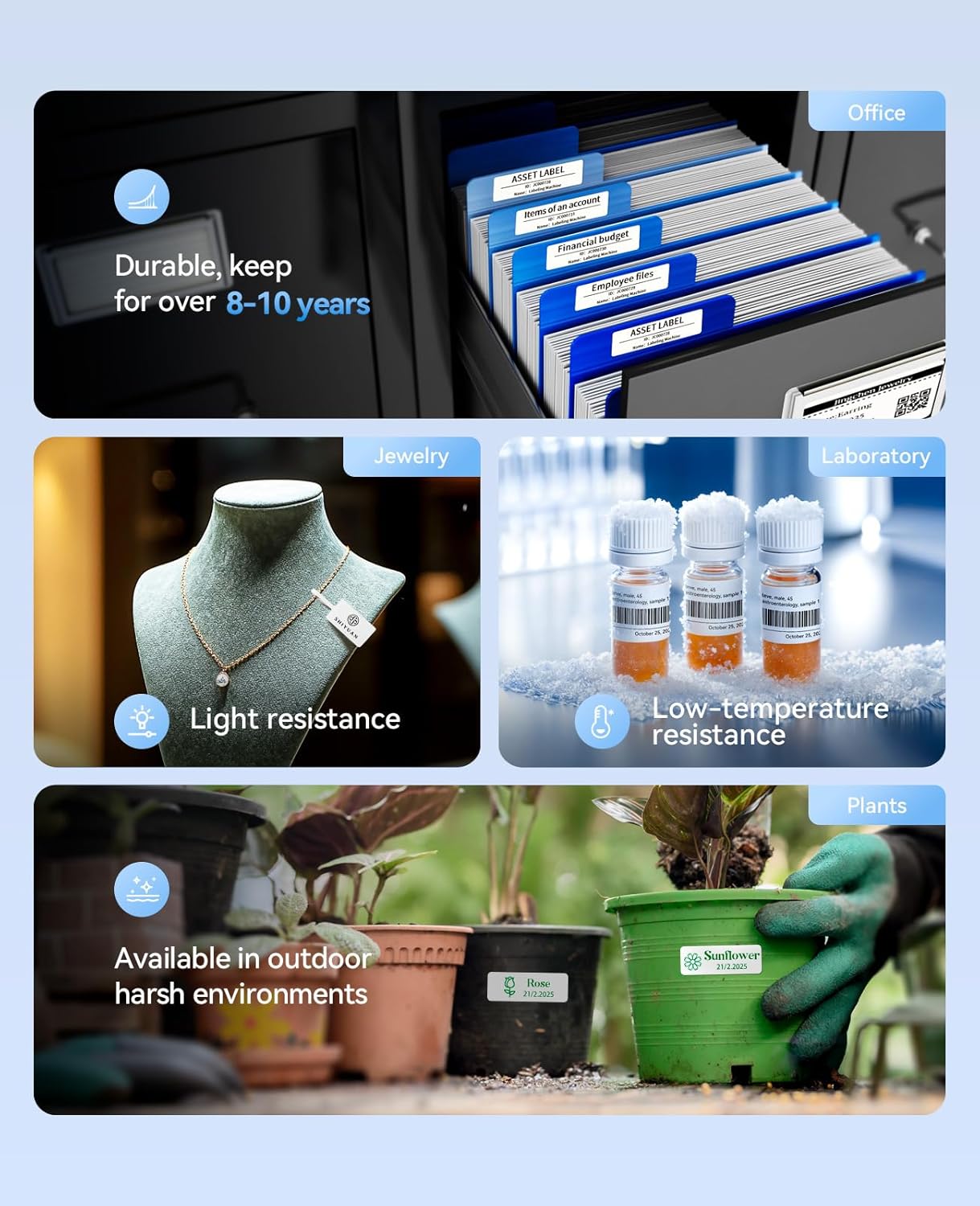
Image: Illustrates diverse applications of the N1 label maker, including office organization, jewelry tagging, laboratory sample identification, and plant labeling.

Image: Shows practical examples of labels on network cables, kitchen containers, travel accessories, baby bottles, and light switches, demonstrating everyday utility.

Image: A pegboard with tools clearly labeled, illustrating how the N1 can be used for tool organization.
Gift Decoration with Satin Ribbon
The NIIMBOT N1 can also print on satin ribbons, allowing for personalized gift decoration. This feature requires specific ribbon and carbon tape sets.
Video: Demonstrates the process of printing custom messages on satin ribbons using the NIIMBOT N1, and then using the printed ribbon to decorate a gift box and a flower bouquet. The video also shows the washability and wear-resistance of the printed ribbon.
Maintenance
Label Durability and Care
The N1 label maker utilizes thermal transfer technology, which produces labels that are more durable and long-lasting compared to standard thermal prints. These labels are designed to be wear-resistant, scratch-resistant, waterproof, and resistant to both high and low temperatures.
- Longevity: Content printed on thermal transfer labels can remain clear for over 8-10 years.
- Environmental Resistance: Labels are suitable for use in high and low-temperature conditions (-20°C to 50°C), and are waterproof and oil-proof.
- Physical Durability: Labels are tear-proof, wear-resistant, and scratch-resistant.

Image: A comparison illustrating the superior durability of thermal transfer labels against thermal labels, highlighting resistance to wear, scratches, and extreme temperatures.
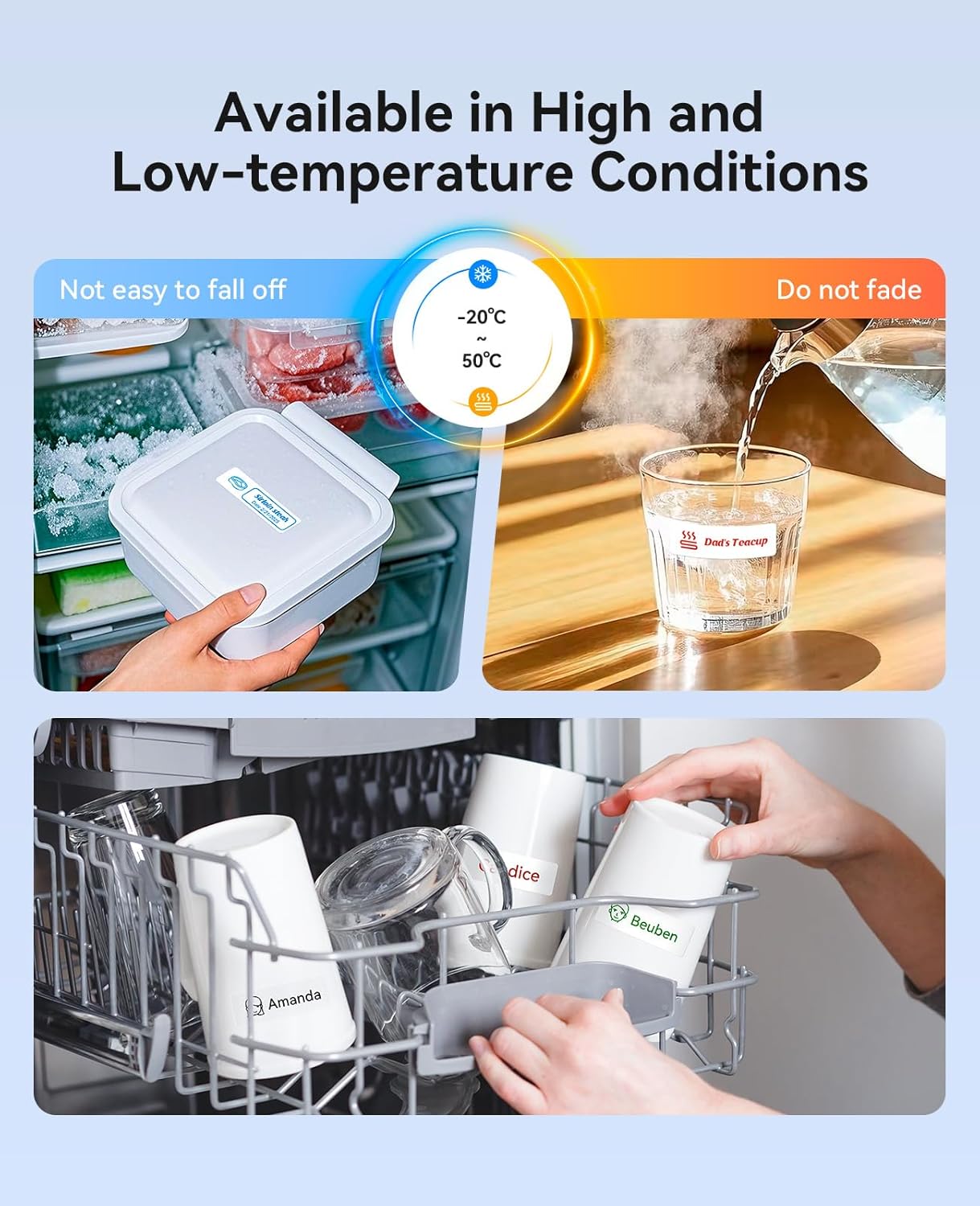
Image: Shows labels maintaining integrity on items in a freezer and on a hot cup, demonstrating their resilience to temperature variations.

Image: Demonstrates the suitability of labels for harsh environments, including outdoor exposure, industrial settings, and refrigerated storage.
To ensure the longevity of your labels, avoid exposing them to harsh chemicals or abrasive cleaning methods unless specifically designed for such conditions.
Troubleshooting
If you encounter issues with your NIIMBOT N1 Label Maker, consider the following general troubleshooting steps:
- Connection Issues: Ensure Bluetooth is enabled on your device and the label maker is powered on and within range. Try restarting both the app and the label maker.
- Printing Quality: Check if the label paper and ribbon are correctly installed and not jammed. Ensure the ribbon has sufficient ink.
- App Functionality: Make sure your NIIMBOT app is updated to the latest version.
- Power: Verify the device is charged. Connect it to the Type-C cable for charging if needed.
For persistent issues, refer to the detailed troubleshooting section within the NIIMBOT app or contact customer support.
Specifications
| Feature | Detail |
|---|---|
| Brand | NIIMBOT |
| Model Name | N1 |
| Printing Technology | Thermal Transfer |
| Maximum Color Print Resolution | 203 DPI |
| Connectivity Technology | Bluetooth |
| Compatible Devices | Smartphones (iPhone, iOS & Android) |
| Product Dimensions | 5.31 x 1.45 x 3.54 inches |
| Item Weight | 1.23 pounds |
| Batteries | 1 Lithium Ion battery (included) |
| Maximum Media Size | 0.55 x 4.7 inch |
| Ink Color | Black (with various ribbon colors available) |
| Special Feature | Color Printing, Portable, Easy to Use, Clear Printing, Rechargeable |
Warranty and Support
The NIIMBOT N1 Label Maker comes with a limited warranty. For detailed warranty information, please refer to the documentation included with your product or visit the official NIIMBOT website. For technical support, product inquiries, or assistance with the NIIMBOT app, please contact NIIMBOT customer service through their official channels.
Documents and downloads
Ask a question about this manual
Ask about setup, troubleshooting, compatibility, parts, safety, or missing instructions. Manuals+ will review the question and use this page’s manual context to help answer it.