Product Overview
The Breloom SM5-T is a rugged handheld terminal designed for demanding industrial environments. It features a 5.7-inch display, runs on Android 13, and is powered by an Octa-Core processor. This device is built for durability, offering IP68 certification for dust and water resistance, and meeting MIL-STD-810G military standards for drop protection.
It is equipped with 8GB RAM and 128GB internal storage, expandable via TF card, ensuring smooth operation for various applications such as inventory management, data logging, and field services. The SM5-T provides comprehensive connectivity options including 4G LTE, Wi-Fi 5, Bluetooth 5.0, and multi-system GPS for precise navigation and real-time data synchronization.
A 4000mAh battery supports extended operational shifts, complemented by rapid charging capabilities. The device also features 13MP rear and 5MP front cameras for imaging needs.

Figure 1: Front and rear view of the Breloom SM5-T Handheld Terminal, showcasing its rugged design and display.
What's in the Box
Verify that all items are present in the package:
- 1 x Breloom SM5-T Handheld Terminal
- 1 x Box (Packaging)
- 1 x Charger (5V 2A)
- 1 x Ejection Pin
Device Components and Layout
Familiarize yourself with the physical components and ports of the SM5-T terminal.
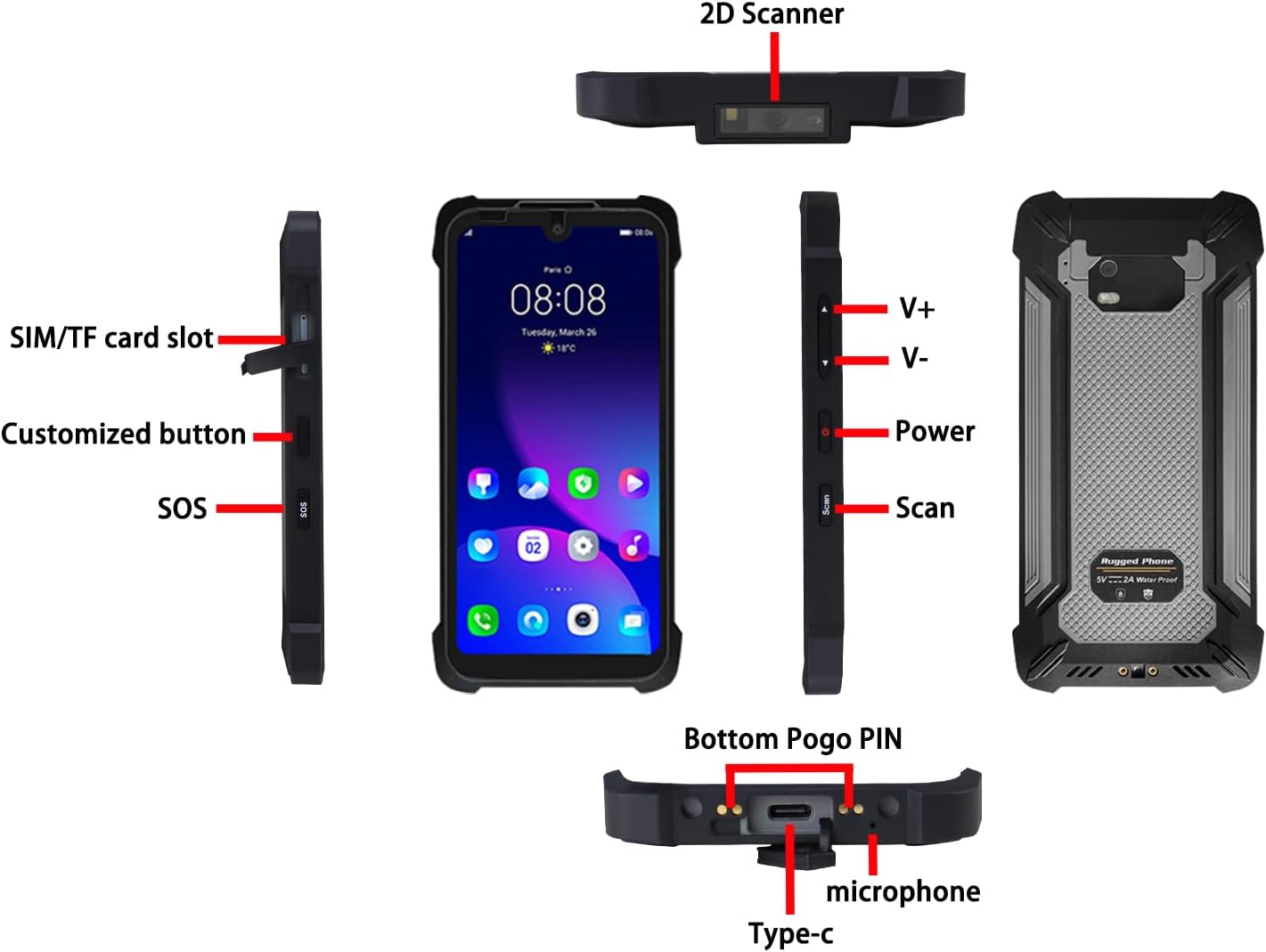
Figure 2: Diagram illustrating the various ports, buttons, and features of the SM5-T, including SIM/TF card slot, customized button, SOS button, volume controls, power button, scan button, Type-C port, microphone, and bottom Pogo PIN.
- SIM/TF Card Slot: Insert Nano-SIM cards and a TF (microSD) card for expanded storage.
- Customized Button: A programmable button for quick access to frequently used functions or applications.
- SOS Button: For emergency situations, can be configured to send alerts or make calls.
- V+/V- Buttons: Volume up and volume down controls.
- Power Button: Used to power on/off the device or wake/sleep the screen.
- Scan Button: Activates the integrated 1D/2D barcode scanner (if equipped).
- Type-C Port: For charging the device and data transfer.
- Microphone: For voice input during calls or recordings.
- Bottom Pogo PIN: For connecting to compatible charging docks or accessories.
- 2D Scanner: Integrated barcode scanner module (optional configuration).
Setup
1. Inserting SIM and TF Cards
- Locate the SIM/TF card slot on the side of the device (refer to Figure 2).
- Use the provided ejection pin to open the tray.
- Carefully place your Nano-SIM card(s) and/or TF card into the designated slots on the tray. Ensure correct orientation.
- Gently push the tray back into the device until it clicks into place.
2. Charging the Device
- Connect the provided charger to the Type-C port at the bottom of the device.
- Plug the charger into a power outlet.
- The device will indicate charging status on the screen. For optimal battery life, fully charge the device before first use.

Figure 3: Information regarding the 4000mAh battery, showing charging time of less than 3 hours and usage time of 12+ hours under specific conditions.
3. Powering On/Off
- To Power On: Press and hold the Power button until the Breloom logo appears.
- To Power Off: Press and hold the Power button until the power options menu appears, then select "Power off".
Operating the Device
Basic Navigation
The SM5-T runs on Android 13, providing a familiar user interface. Navigate using touch gestures: tap to select, swipe to scroll, pinch to zoom.
Connectivity
- Wi-Fi: Go to Settings > Network & internet > Wi-Fi to connect to available wireless networks. The device supports dual-band Wi-Fi 802.11ac.
- Bluetooth: Enable Bluetooth in Settings > Connected devices to pair with Bluetooth peripherals like headsets or scanners. The device features Bluetooth 5.0.
- Mobile Data (4G LTE): Ensure your SIM card is inserted correctly. Enable mobile data in Settings > Network & internet > Mobile network. The device supports 28 global 4G LTE bands.
- GPS/Navigation: The device supports BDS, GPS, and GLONASS for accurate location tracking. Location services can be managed in Settings > Location.

Figure 4: Visual representation of the SM5-T's global connectivity features, including Wi-Fi 5, Bluetooth 5.0, 4G LTE, and multi-system GPS (BDS, GPS, GLONASS).
Using the Barcode Scanner (Optional)
If your SM5-T model includes the 1D/2D barcode scanner, activate it by pressing the dedicated Scan button (refer to Figure 2). Point the scanner at the barcode to capture the data. Ensure adequate lighting for optimal performance.
Camera Functionality
The device is equipped with a 13MP rear camera and a 5MP front camera. Access the camera application from the home screen or app drawer to capture photos and videos. The cameras are suitable for documentation, asset verification, and video calls.

Figure 5: Details on the 5.7-inch HD display (720x1520 resolution, 400 nits brightness) and camera specifications (13MP rear + 5MP front).
Maintenance
Proper maintenance ensures the longevity and optimal performance of your Breloom SM5-T.
- Cleaning: Use a soft, damp cloth to clean the device. Avoid harsh chemicals or abrasive materials. For the screen, use a microfiber cloth.
- Water and Dust Resistance: The device is IP68 certified, meaning it is dust-tight and can withstand immersion in water up to 1.5 meters for 30 minutes. Ensure all port covers are securely closed before exposing the device to water or dusty environments.
- Temperature: Operate the device within the recommended temperature range of -25°C to 50°C. Avoid prolonged exposure to extreme heat or cold.
- Battery Care: To maximize battery lifespan, avoid fully discharging the battery frequently. Charge the device regularly using the provided charger.
- Software Updates: Regularly check for and install system updates to ensure optimal performance, security, and access to new features.

Figure 6: Visual demonstration of the SM5-T's IP68 waterproof and dustproof capabilities, and its ability to withstand 4.9ft (1.5m) drops, meeting military-grade durability standards.
Troubleshooting
This section addresses common issues you might encounter with your SM5-T terminal.
| Problem | Possible Cause | Solution |
|---|---|---|
| Device does not power on. | Low battery; software crash. | Charge the device for at least 30 minutes. Perform a forced restart by holding the Power button for 10-15 seconds. |
| Cannot connect to Wi-Fi. | Incorrect password; Wi-Fi disabled; router issue. | Verify Wi-Fi password. Ensure Wi-Fi is enabled in settings. Restart your Wi-Fi router. |
| Barcode scanner not working. | Scanner module not enabled; poor lighting; damaged barcode. | Ensure the scanner application is open and the scan button is pressed. Provide adequate lighting. Try scanning a different barcode. |
| Device is slow or unresponsive. | Too many apps running; low storage; software glitch. | Close unnecessary applications. Clear cache. Restart the device. Consider a factory reset if issues persist (backup data first). |
| No mobile data connection. | SIM card not inserted correctly; mobile data disabled; network issue. | Reinsert SIM card. Ensure mobile data is enabled in settings. Contact your service provider to check network status. |
Specifications
Key technical specifications for the Breloom SM5-T Handheld Terminal (8GB+128GB model):
| Feature | Detail |
|---|---|
| Model Name | Breloom SM5-T |
| Item Model Number | 8GB+128GB |
| Operating System | Android 13.0 |
| Processor | Unisoc T616 Octa-Core Processor (1.8GHz) or optional T606 |
| RAM Memory Installed Size | 8 GB |
| Memory Storage Capacity | 128 GB (expandable via TF card) |
| Screen Size | 5.68 Inches (5.7-inch HD display) |
| Display Type | LCD (720x1520 resolution, 400 nits brightness) |
| Rear Camera | 13 MP |
| Front Camera | 5 MP |
| Battery | 4000mAh Nonstandard Battery (included) |
| Cellular Technology | 4G (multi-band support) |
| Wireless Connectivity | Wi-Fi 802.11ac (dual-band), Bluetooth 5.0 |
| Navigation | BDS/GPS/GLONASS, NFC |
| Durability | IP68 Waterproof and Dustproof, MIL-STD-810G (1.5m drop resistance) |
| Operating Temperature | -25°C to 50°C |
| Product Dimensions | 6.1 x 3 x 0.52 inches |
| Item Weight | 15.8 ounces (230g) |

Figure 7: Illustration of the MediaTek Helio T616 Octa-Core Processor, 8GB RAM, and 128GB storage with 1TB TF card support, running Android 13.
Warranty and Support
Breloom provides comprehensive support for the SM5-T Handheld Terminal:
- Warranty: A 12-month warranty is provided from the date of purchase.
- Technical Support: Lifetime technical support is available for the product.
- Service: 24/7 enterprise-grade service is offered to assist with any operational or technical inquiries.
For support, please refer to the contact information provided with your purchase or visit the official Breloom website.