
CLEVAST CL-DH04
CLEVAST Small Dehumidifier User Manual
Model: CL-DH04
1. Introduction and Product Overview
Thank you for choosing the CLEVAST Small Dehumidifier. This compact and portable dehumidifier is designed to efficiently remove excess moisture from small spaces, creating a more comfortable and healthier environment. Utilizing advanced semiconductor condensation technology, it operates quietly and without chemical refrigerants, ensuring clean and pollution-free dehumidification.
This manual provides important information regarding the safe operation, setup, maintenance, and troubleshooting of your new dehumidifier. Please read it thoroughly before first use and retain it for future reference.

Image 1: Front view of the CLEVAST Small Dehumidifier, showcasing its compact white design with the brand logo and a visible water level indicator.
2. Important Safety Instructions
To reduce the risk of fire, electric shock, or injury, please observe the following safety precautions:
- Always place the dehumidifier on a stable, level surface.
- Ensure the power cord is not damaged, pinched, or placed under heavy objects.
- Do not operate the dehumidifier with a damaged cord or plug. Contact customer support for assistance.
- Keep the dehumidifier away from water or other liquids. Do not immerse it in water.
- Important: Do not block the air intake at the back or the air outlet on the top of the dehumidifier, as this may significantly affect its performance and lead to overheating. Maintain adequate clearance around the unit.
- Unplug the dehumidifier before cleaning, moving, or when not in use for extended periods.
- This appliance is not intended for use by persons (including children) with reduced physical, sensory or mental capabilities, or lack of experience and knowledge, unless they have been given supervision or instruction concerning use of the appliance by a person responsible for their safety.
- The unit features an automatic shut-off function when the water tank is full, preventing overflow. However, regular monitoring is recommended.
3. Product Components and Features
Your CLEVAST Small Dehumidifier comes with the following components:
- CLEVAST 30 oz Dehumidifier Unit
- Power Cord
- User Manual (this document)
Key features of your dehumidifier include:
- One-Touch Switch: Simple power button for easy operation.
- Built-in Handle: Conveniently located on the back for easy portability.
- Auto Shut-off: Automatically stops operation and changes indicator light when the water tank is full.
- Removable Water Tank: Easy to remove and empty.
- Quiet Operation: Operates at approximately 24 dB, ideal for bedrooms and quiet spaces.
- Energy-Efficient: Low power consumption, less than 0.55 kWh per day.
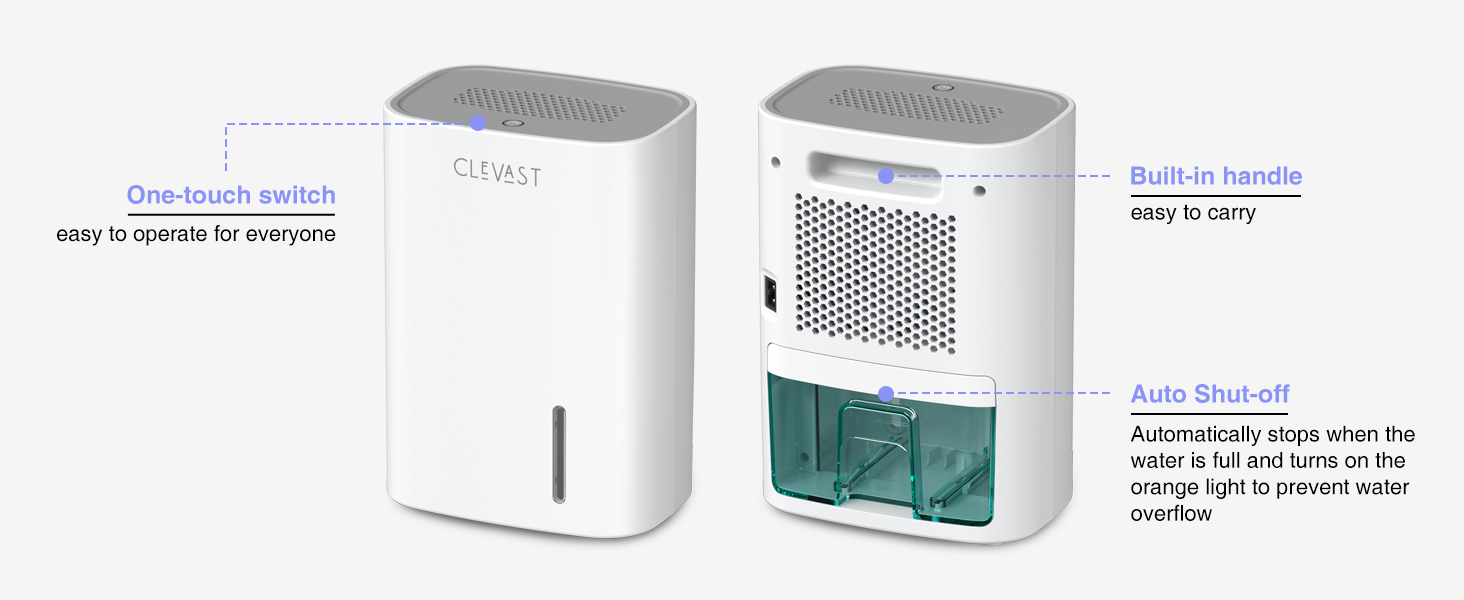
Image 2: Front and back views of the CLEVAST Dehumidifier, highlighting the one-touch switch, built-in handle, and auto shut-off water tank.
4. Setup
- Unpack: Carefully remove the dehumidifier and all packaging materials from the box. Retain the packaging for future storage or transport if needed.
- Placement: Place the dehumidifier on a firm, level surface in the desired location. Ensure there is at least 2 inches (5 cm) of space around the air intake (at the back) and air outlet (on the top) for optimal airflow. This dehumidifier is ideal for small spaces such as bedrooms, bathrooms, closets, RVs, offices, apartments, baby nurseries, and campers.
- Power Connection: Insert the power cord into the power port on the back of the dehumidifier, then plug the other end into a standard electrical outlet (100-240V AC, 50/60Hz).

Image 3: The CLEVAST Dehumidifier placed on a bedside table in a bedroom, demonstrating its suitability for small spaces.
5. Operating Instructions
- Power On: Simply press the power button located on the top of the unit. The power button will illuminate with a blue backlight, indicating the dehumidifier is operating.
- Automatic Shut-off: When the 30 oz (800 ml) water tank is full, the dehumidifier will automatically stop operating to prevent overflow. The blue backlight on the power button will change to orange, reminding you to empty the tank.
- Emptying the Water Tank:
- Gently pull out the water tank from the back of the unit.
- Carefully pour out the collected water.
- Slide the empty water tank back into the dehumidifier until it clicks into place. The unit will resume operation automatically if the power is still on.
- Power Off: Press the power button again to turn off the dehumidifier. The light will turn off.

Image 4: Illustration showing the different states of the power button: Off (gray), On (blue), and Auto Shut-off (orange).
6. Maintenance
Regular maintenance ensures optimal performance and extends the lifespan of your dehumidifier.
- Cleaning the Water Tank:
- Empty the water tank as described in the operating instructions.
- Rinse the tank with clean water. For stubborn residue, use a mild detergent and a soft brush, then rinse thoroughly.
- Dry the tank completely before reinserting it into the unit.
- Cleaning the Exterior: Wipe the exterior of the dehumidifier with a soft, damp cloth. Do not use abrasive cleaners or solvents.
- Cleaning Air Intake/Outlet: Periodically check the air intake (back) and air outlet (top) for dust or debris. Use a soft brush or vacuum cleaner attachment to gently remove any obstructions. Ensure the unit is unplugged before cleaning these areas.
- Storage: If storing the dehumidifier for an extended period, ensure the water tank is empty and clean. Store the unit in a cool, dry place, away from direct sunlight and extreme temperatures.
7. Troubleshooting
If you encounter issues with your dehumidifier, please refer to the following common problems and solutions:
| Problem | Possible Cause | Solution |
|---|---|---|
| Dehumidifier does not turn on. |
|
|
| Dehumidifier is running but not collecting water. |
|
|
| Power button light is orange. | Water tank is full. | Empty the water tank. The light will turn blue and operation will resume. |
| Unusual noise. |
|
|
8. Specifications
| Specification | Value |
|---|---|
| Brand | CLEVAST |
| Model Name | CL-DH04 (EF8897) |
| Dehumidification Capacity | 10 oz (295 ml) per day (at 86°F, 85% RH) |
| Water Tank Capacity | 30 oz (0.8 Liters / 800 ml) |
| Coverage Area | Up to 270 sq. ft |
| Product Dimensions (D x W x H) | 4.57" x 6.5" x 9.25" |
| Item Weight | 2.1 Pounds |
| Wattage | 27 watts |
| Noise Level | 24 dB |
| Material | Plastic |
| Special Features | Automatic Shutoff, Portable, Quiet Operation, Removable Tank |

Image 5: The CLEVAST Dehumidifier shown in an indoor setting, illustrating its energy-efficient operation with a visual cue of low power consumption (less than 0.55 kWh per 24 hours).
9. Warranty and Support
CLEVAST products are manufactured to high-quality standards. While specific warranty details are typically provided with your product packaging, general support is available from the manufacturer.
For any questions, technical assistance, or warranty claims, please contact CLEVAST customer support. Refer to the contact information provided on the product packaging or the official CLEVAST website.
You may also find additional information and support on the CLEVAST Brand Store on Amazon.
Related documentsCL-DH04

Ask a question about this manual
Ask about setup, troubleshooting, compatibility, parts, safety, or missing instructions. Manuals+ will review the question and use this page’s manual context to help answer it.