
1. Introduction and Overview
Thank you for purchasing the Fenge G04D108-MAIN Adjustable Monitor Stand. This manual provides detailed instructions for assembly, operation, and maintenance to ensure optimal use and longevity of your product. This monitor stand is designed to enhance your workspace by providing adjustable height and width, integrated storage, and ergonomic benefits.

Image 1: The Fenge G04D108-MAIN monitor stand integrated into a modern desk setup, showcasing its storage drawer and adjustable design.
2. Safety Information
- Ensure all components are securely fastened before placing any equipment on the stand.
- Do not exceed the maximum load capacity of 30kg.
- Keep small parts away from children to prevent choking hazards.
- Avoid placing the stand in direct sunlight or near heat sources to prevent material degradation.
- Use on a stable, flat surface to prevent tipping.
3. Package Contents
Please verify that all parts are present before beginning assembly. If any parts are missing or damaged, please contact customer support.
- Main wooden top panels (adjustable sections)
- Support legs/frames
- Fabric storage drawer(s)
- Assembly hardware (screws, bolts, screwdriver/wrench if included)
- Instruction manual (this document)
4. Setup and Assembly
Follow these steps carefully to assemble your Fenge G04D108-MAIN monitor stand.
Step 1: Prepare the Drawers
Unfold the fabric storage drawers and insert the bottom reinforcement panels to give them shape.

Image 2: The fabric drawer provides convenient storage for small office supplies.
Step 2: Attach Handles to Drawers (if applicable)
If your drawers come with separate handles, attach them using the provided screws and a screwdriver. Ensure they are firmly secured.
Step 3: Assemble the Main Frame
Connect the support legs/frames to the main wooden panels using the provided hardware. Ensure all connections are tight and stable. The design allows for flexible arrangement of the sections.

Image 3: The stand's modular design allows for width adjustment from 78.3cm to 113cm and flexible arrangement of sections.
Assembly Video Reference:
Video 1: This short video demonstrates the assembly process of a Fenge monitor stand, showing how the components fit together.
5. Operating Instructions
Adjusting Width and Configuration
The Fenge G04D108-MAIN monitor stand features an adjustable design. You can extend or retract the side panels to adjust the overall width from 78.3cm to 113cm, accommodating different desk sizes and monitor setups. The second tier can also be rotated to the left or right to suit your preference and workspace layout.
Utilizing Storage Drawers
The integrated fabric drawer provides convenient storage for small office supplies such as pens, smartphones, and notebooks, helping to keep your desk tidy. The space beneath the monitor stand can also be used to store keyboards, mice, and other peripherals, maximizing your work area.
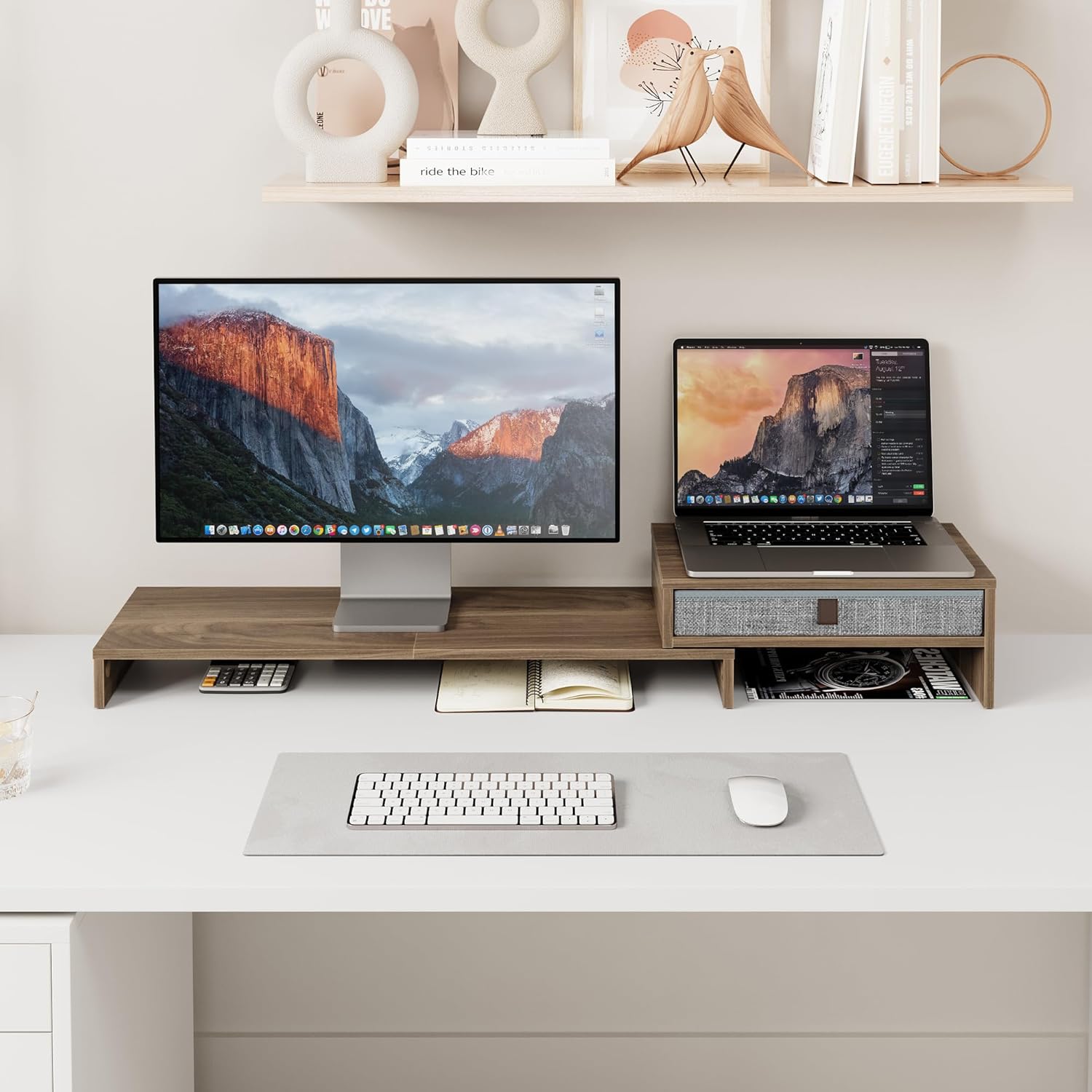
Image 4: An example of a dual-screen setup with a laptop and monitor, utilizing the stand's storage capabilities.
Ergonomic Benefits
Placing your monitor on the stand raises your eye level by 7.35-15.9cm, promoting a natural and correct posture. This helps to alleviate strain on your neck and back during long working hours. When using a computer and laptop simultaneously, the stand allows both monitors to be at a similar height, improving work efficiency.
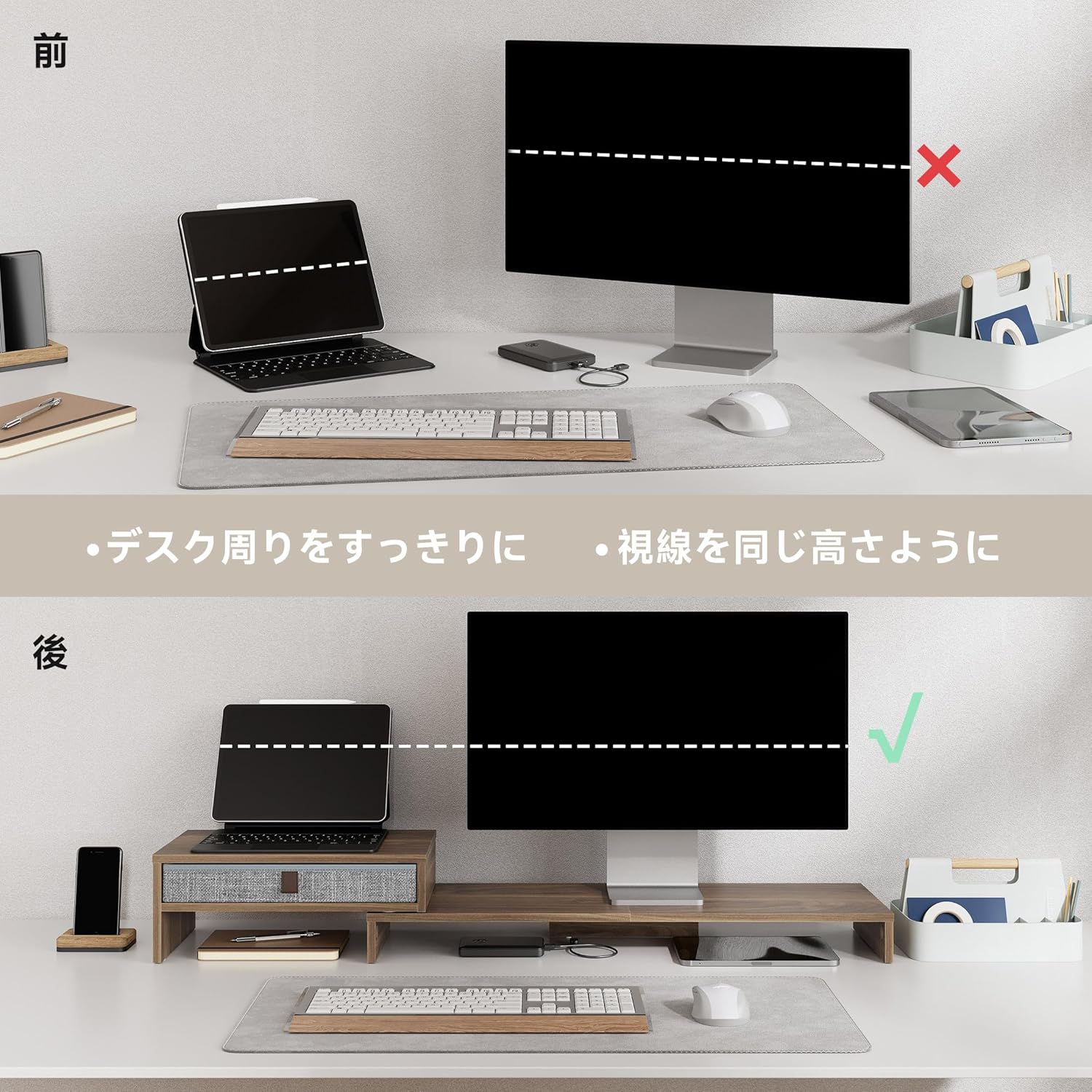
Image 5: Visual comparison demonstrating how the monitor stand elevates the screen to an ergonomic height, improving user posture.
Versatile Applications
The second tier of the PC stand is not only for aligning laptops and computers but can also be used to place telephones, printers, stereos, or decorative items like potted plants and flowers, adding color to your work environment.

Image 6: Various ways to utilize the monitor stand, from supporting office equipment to displaying personal decorations.
Product Overview Video:
Video 2: This brief video demonstrates the Fenge monitor stand in use, highlighting its organizational and ergonomic benefits.
Video 3: This video provides a general overview of Fenge monitor stands, demonstrating their features and versatility in various desk setups.
Video 4: An introductory video for Fenge monitor stands, illustrating different models and their functional aspects.
6. Maintenance
- Cleaning: Wipe the wooden surfaces with a soft, damp cloth. Avoid using harsh chemicals or abrasive cleaners, which may damage the finish.
- Drawer Care: The fabric drawers can be removed for easy cleaning. Gently wipe with a damp cloth and allow to air dry completely before reinserting.
- Inspection: Periodically check all screws and connections to ensure they remain tight. Retighten if necessary.
7. Troubleshooting
- Stand is wobbly: Ensure all assembly screws are tightened. Check that the stand is placed on a flat, stable surface.
- Drawer not sliding smoothly: Check for any obstructions inside the drawer compartment. Ensure the drawer is correctly inserted and the bottom reinforcement panel is flat.
- Difficulty adjusting width: Ensure no items are obstructing the sliding mechanism. Gently apply even pressure when adjusting.
8. Specifications
| Feature | Detail |
|---|---|
| Model Number | G04D108-MAIN |
| Brand | Fenge |
| Color | Brown |
| Adjustable Width | 78.3cm - 113cm (783-1130MM) |
| Depth | 23.5cm (235MM) |
| Height | 7.35cm / 15.9cm (73.5/159MM) |
| Max Load Capacity | 30kg |
| Package Weight | Approx. 4.8kg |
| Assembly Required | Yes |
9. Warranty and Support
Warranty Information
This product comes with a 12-month quality warranty from the date of purchase. The warranty covers defects in materials and workmanship under normal use. It does not cover damage caused by misuse, accidents, unauthorized modifications, or normal wear and tear.
Customer Support
For any questions, concerns, or warranty claims, please contact Fenge customer support through the retailer where you purchased the product. Please have your purchase receipt and product model number (G04D108-MAIN) ready when contacting support.


