
1. Safety Information
Before beginning installation or operation, please read and understand all safety instructions. Failure to follow these instructions may result in electric shock, fire, or serious personal injury.
- Always disconnect power at the circuit breaker before installing, cleaning, or servicing the fan.
- Ensure all electrical connections comply with local codes and ordinances, as well as the National Electrical Code (NEC).
- Consult a qualified electrician if you are unsure about wiring or installation procedures.
- Mount the fan directly to a ceiling joist or an outlet box marked 'Acceptable for Fan Support of 35 lbs (15.9 kg)'.
- Do not operate the fan with damaged blades or housing.
- Keep hands, clothing, and other objects clear of the fan blades when the fan is in operation.
2. Product Components
The cumilo 42-inch Smart Low Profile Ceiling Fan package includes the following components:
- Fan Motor Housing
- Fan Blades (5 pieces)
- LED Light Kit
- Remote Control
- Mounting Bracket
- Hardware Pack (screws, wire nuts, etc.)
- Instruction Manual

Figure 2.1: Exploded view of the cumilo 42-inch Smart Low Profile Ceiling Fan components.
3. Setup and Installation
This section provides an overview of the installation process. For detailed step-by-step instructions, please refer to the comprehensive installation manual included in your package.
3.1 Pre-Installation Checks
- Ensure the power supply to the installation location is turned off at the circuit breaker.
- Verify that your ceiling is suitable for flush mount installation and can support the fan's weight (approximately 10.74 lbs). This fan is designed for flat ceilings.
- Confirm that the existing electrical box is rated for ceiling fan support.
3.2 Installation Steps Overview
- Secure the mounting bracket to the ceiling electrical box.
- Connect the electrical wiring according to the provided wiring diagram.
- Attach the fan motor housing to the mounting bracket.
- Install the fan blades onto the motor housing.
- Connect and secure the LED light kit.
- Attach the light cover.
The installation process is designed to be straightforward, typically taking 25-40 minutes for beginners. An installation video is also available to assist with the process.

Figure 3.1: Visual guide to the fan's dimensions and ease of installation.
4. Operating Instructions
Your cumilo Smart Ceiling Fan offers multiple control options for convenience and flexibility.
4.1 Remote Control Operation
The included remote control allows for direct adjustment of fan speed, light settings, and fan direction.
- Fan Speed: Select from 6 distinct speed settings (Lever 1-2 for soft wind, Lever 3-4 for natural wind, Lever 5-6 for cool wind).
- Light Control: Turn the LED light on/off, dim the brightness (0-100%), and change the color temperature (Warm Light 3000K, Natural Light 4000K, Day Light 5000K).
- Reverse Function: Toggle between downdraft mode (summer) and updraft mode (winter) to optimize air circulation.
- Timer: Set the fan to automatically turn off after 1, 4, or 8 hours.
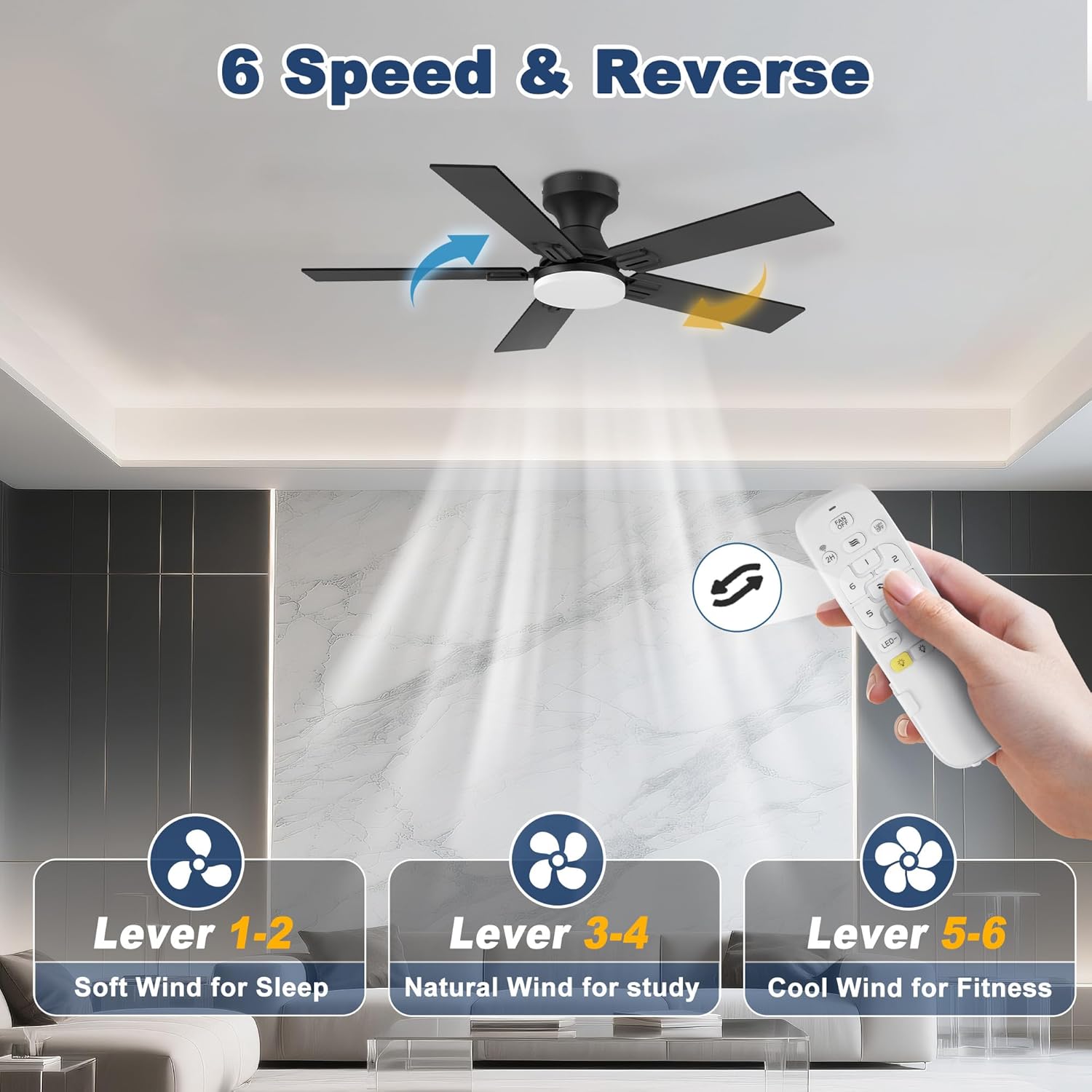
Figure 4.1: Fan speed levels and reversible airflow modes.

Figure 4.2: Dimmable and color-changing LED light functionality.
4.2 APP and Voice Control
The fan can be controlled via a dedicated smartphone application (Smart Life app) and integrated with voice assistants like Amazon Alexa and Google Assistant.
- APP Control: Download the Smart Life app to control all fan functions from your smartphone, including speed, light, timer, and scheduling.
- Voice Control: Link your fan to Alexa or Google Assistant for hands-free operation. Simply use voice commands such as "Alexa, turn on the fan" or "Hey Google, set fan speed to 3."

Figure 4.3: Voice control capabilities with smart home assistants.
4.3 Quiet DC Motor
The fan is equipped with a quiet DC motor, operating at approximately 30dB, ensuring minimal noise disturbance, ideal for bedrooms and quiet environments.

Figure 4.4: Quiet operation of the cumilo ceiling fan.
5. Maintenance
Regular maintenance ensures the longevity and optimal performance of your ceiling fan.
5.1 Cleaning
- Before cleaning, ensure the power to the fan is disconnected at the circuit breaker.
- Use a soft, damp cloth to wipe down the fan blades and motor housing. Avoid using abrasive cleaners or solvents, as they may damage the finish.
- Do not immerse the fan in water or spray water directly onto the fan.
5.2 General Care
- Periodically check all screws and connections to ensure they are secure.
- No lubrication is necessary for the motor; it is permanently lubricated.
6. Troubleshooting
If you encounter issues with your ceiling fan, refer to the following common problems and solutions:
| Problem | Possible Cause | Solution |
|---|---|---|
| Fan does not start | No power to the fan; Loose wire connections; Remote control battery low/dead. | Check circuit breaker; Ensure all wiring is secure; Replace remote control batteries. |
| Light does not work | Loose wire connection to light kit; LED light kit failure. | Check light kit wiring; Contact customer support for replacement if LED is faulty. |
| Remote control not working | Batteries are dead or incorrectly installed; Remote not paired with fan. | Replace batteries, ensuring correct polarity; Refer to pairing instructions in the full manual. |
| Fan wobbles | Loose fan blades; Unbalanced blades; Loose mounting bracket. | Tighten blade screws; Use balancing kit (if included); Ensure mounting bracket is securely fastened. |
| No Wi-Fi connectivity | Incorrect Wi-Fi password; Router too far; Fan not in pairing mode. | Verify Wi-Fi credentials; Move router closer or use extender; Follow app instructions to put fan in pairing mode. |
If the problem persists after attempting these solutions, please contact customer support.
7. Specifications
Key technical specifications for the cumilo 42-inch Smart Low Profile Ceiling Fan:
| Feature | Detail |
|---|---|
| Brand | cumilo |
| Model Name | YJ886-42-FBBW-QH. |
| Color | Black&walnut |
| Size | 42 inch |
| Product Dimensions | 9.18"D x 52"W x 52"H (Note: 52"W x 52"H likely refers to blade span, not physical dimensions of this 42" model) |
| Power Source | Quiet DC Motor |
| Voltage | 110 Volts |
| Light Type | LED (20W CCT, 3000K/4000K/5000K, 0-100% dimmable) |
| Fan Speeds | 6 speeds, reversible |
| Control Method | Remote Control, APP Control, WIFI Voice Control (Alexa, Google Assistant) |
| Sound Level | Approx. 30dB |
| CFM (Max) | 2749 cfm (for 42" model) |
| Indoor/Outdoor Usage | Indoor, Outdoor (Damp-rated) |
| Item Weight | 10.74 pounds |
8. Warranty and Support
cumilo is committed to providing high-quality products and customer satisfaction.
8.1 Warranty Information
This product comes with a 1-year quality period for the entire fan, covering manufacturing defects and material flaws under normal use.
8.2 Customer Support
For any technical assistance, installation queries, or troubleshooting not covered in this manual, please contact our customer support team. We provide 24-hour technical support to ensure your satisfaction.
Please refer to the contact information provided in your product packaging or on the official cumilo website for direct support channels.