1. Introduction
Thank you for choosing the NOVOO 120W USB-C GaN III Charger. This manual provides essential information for the safe and efficient use of your charger, including setup, operation, maintenance, and troubleshooting.
2. Product Overview
The NOVOO 120W USB-C GaN III Charger is a compact, high-power wall charger designed to simultaneously charge up to three devices. It features two USB-C ports and one USB-A port, utilizing advanced GaN III technology for efficient and safe power delivery. The package includes two PD 100W Type-C to Type-C braided cables (1M and 1.5M).
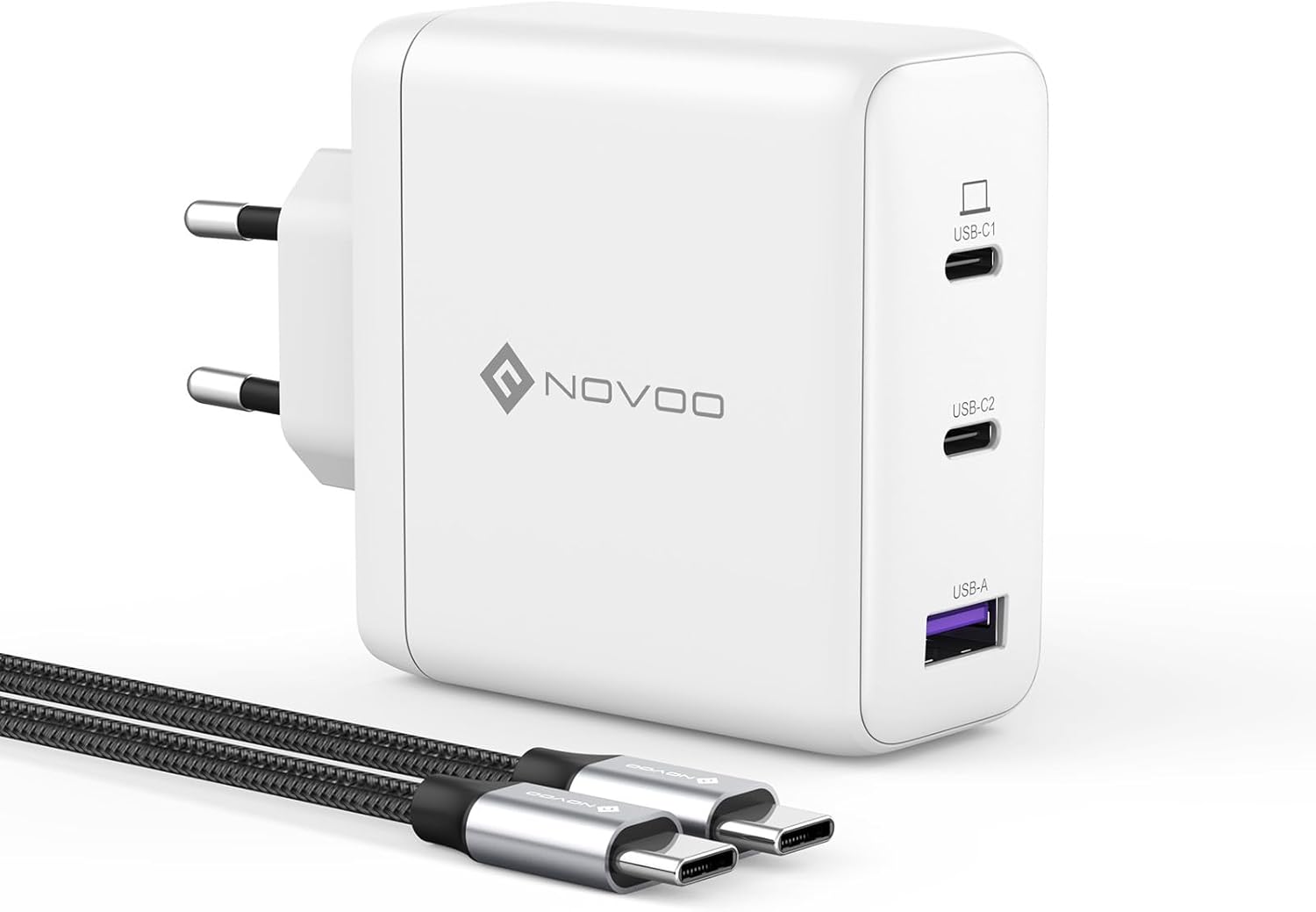
Image 2.1: The NOVOO 120W USB-C GaN III Charger with its two included USB-C to USB-C braided cables.

Image 2.2: Diagram illustrating the charger's three ports (USB-C1, USB-C2, USB-A) and their maximum power outputs. USB-C1 supports up to 100W, while USB-C2 and USB-A combined support up to 20W, with a total maximum output of 120W.
3. Setup
- Connect to Power Outlet: Plug the charger into a standard wall power outlet.
- Connect Devices: Use appropriate USB cables (preferably the included PD 100W Type-C cables for optimal performance) to connect your devices to the charger's USB-C or USB-A ports.
- Initial Power-Up: The charger will automatically detect connected devices and begin charging. When connecting multiple devices, the charger may pause briefly (2-3 seconds) to re-negotiate power distribution for optimal and safe charging protocols.
4. Operating Instructions
4.1 Power Distribution
The NOVOO 120W charger intelligently distributes power across its ports. The total maximum output is 120W. Individual port maximums are:
- USB-C1: Up to 100W (ideal for laptops)
- USB-C2 + USB-A: Up to 20W combined (ideal for phones, tablets, smartwatches, etc.)
For charging a laptop, always use the top USB-C1 port to ensure maximum power delivery.
4.2 Fast Charging
When using the USB-C1 port with a compatible device and cable, the charger can deliver up to 100W of power. For example, a MacBook Pro 14" can reach 55% battery in approximately 30 minutes of charging.

Image 4.1: Illustration of a MacBook Pro 14" charging from 0% to 55% in 30 minutes using the 100W USB-C1 port.
4.3 Usage Scenarios
The compact design and multi-port functionality make this charger suitable for various environments, including home, travel, and office use.

Image 4.2: Examples of the charger in use: at home charging multiple devices, during travel with a laptop, and in an office setup.
5. Compatibility
The NOVOO 120W USB-C GaN III Charger is compatible with a wide range of devices, including but not limited to:

Image 5.1: A visual guide to device compatibility, categorized by type.
- Notebooks: MacBook Pro/Air 16"/13", Dell XPS 15/13, Inspiron 16/15, Lenovo ThinkPad series, Samsung Chromebook 4.
- Phones/Tablets: iPhone 15-8 series, iPad Pro/Air/Mini, Samsung Galaxy S23 Ultra/S22/S21, Samsung Note 20 Ultra/Z Fold 5, Google Pixel 7 Pro/6/5.
- Gaming Consoles: Steam Deck, Nintendo Switch, ASUS Rog Ally.
- Drones: DJI OSMO Pocket 3, DJI Mini 3 Pro.
- Smartwatches: Apple Watch 9, Samsung Galaxy Watch 6, Huawei Watch 4.
- Headphones: AirPods Pro 2, AirPods.
6. Safety Information
The NOVOO 120W GaN III charger incorporates advanced safety features to protect your devices and ensure safe operation. It is certified with PSE, CE, ETL, FCC, and RoHS standards.
6.1 GaN III Technology and Protections
Gallium Nitride (GaN) III technology allows for a smaller, more efficient charger that generates less heat. Built-in protections include:
- Overpower Protection: Prevents damage from excessive power output.
- Over-voltage Protection: Safeguards against voltage spikes.
- Over-charge Protection: Protects batteries from being overcharged.
- Over-heat Protection: Monitors and regulates internal temperature to prevent overheating.

Image 6.1: Visual representation of the GaN III technology and its integrated safety protections: overpower, over-voltage, over-charge, and over-heat protection.
7. Maintenance
- Cleaning: Disconnect the charger from the power outlet and all devices before cleaning. Use a soft, dry cloth to wipe the surface. Do not use liquid cleaners or aerosols.
- Storage: Store the charger in a cool, dry place away from direct sunlight and extreme temperatures.
- Handling: Avoid dropping the charger or subjecting it to strong impacts. Do not attempt to disassemble or modify the charger.
8. Troubleshooting
- Device not charging:
- Ensure the charger is securely plugged into a working power outlet.
- Verify that the charging cable is properly connected to both the charger and the device.
- Try a different cable or port to rule out a faulty cable or port.
- Ensure your device is compatible with the charger's power output.
- Slow charging:
- For laptops requiring high power, ensure you are using the USB-C1 port and a PD 100W compatible cable.
- When multiple devices are connected, the total 120W power is shared. This may result in slower charging for individual devices compared to single-device charging.
- Ensure your device supports fast charging protocols compatible with the charger.
- Charger pauses briefly when connecting a new device:
- This is normal behavior. The charger intelligently re-negotiates power distribution to ensure safe and optimal charging for all connected devices.
- Charger feels warm:
- It is normal for the charger to become warm during operation, especially under heavy load. If it becomes excessively hot or emits smoke/unusual odors, disconnect it immediately and contact customer support.
9. Specifications
| Feature | Specification |
|---|---|
| Model Number | NCEU120D-255C2-W1 |
| Brand | NOVOO |
| Color | White |
| Input Voltage | 220 Volts |
| Output Current | 5 A (Max per port, specific distribution applies) |
| Total Power Output | 120W |
| Ports | 2x USB-C, 1x USB-A |
| Technology | GaN III |
| Dimensions | 64.4 x 66.3 x 32 mm |
| Certifications | PSE, CE, ETL, FCC, RoHS |

Image 9.1: The compact dimensions of the NOVOO 120W charger, measuring 64.4mm x 66.3mm x 32mm.
10. Warranty and Support
The NOVOO 120W GaN III Charger comes with a 2-year warranty. For any questions or support needs, please contact NOVOO customer service, available 24/7.


