1. Introduction
Welcome to your Phenyx Pro PTU-4200-8H 8-Channel UHF Wireless Microphone System. This manual provides detailed instructions for the proper setup, operation, and maintenance of your new wireless microphone system to ensure optimal performance and longevity. Please read this manual thoroughly before using the product.
2. Important Safety Instructions
- Read these instructions carefully before operation.
- Keep these instructions for future reference.
- Heed all warnings on the product and in the operating instructions.
- Follow all instructions.
- Do not use this apparatus near water.
- Clean only with a dry cloth.
- Do not block any ventilation openings. Install in accordance with the manufacturer's instructions.
- Do not install near any heat sources such as radiators, heat registers, stoves, or other apparatus (including amplifiers) that produce heat.
- Do not defeat the safety purpose of the polarized or grounding-type plug. A polarized plug has two blades with one wider than the other. A grounding-type plug has two blades and a third grounding prong. The wide blade or the third prong are provided for your safety. If the provided plug does not fit into your outlet, consult an electrician for replacement of the obsolete outlet.
- Protect the power cord from being walked on or pinched, particularly at plugs, convenience receptacles, and the point where they exit from the apparatus.
- Only use attachments/accessories specified by the manufacturer.
- Unplug this apparatus during lightning storms or when unused for long periods of time.
- Refer all servicing to qualified service personnel. Servicing is required when the apparatus has been damaged in any way, such as power-supply cord or plug is damaged, liquid has been spilled or objects have fallen into the apparatus, the apparatus has been exposed to rain or moisture, does not operate normally, or has been dropped.
3. Package Contents
The Phenyx Pro PTU-4200-8H system includes the following components:
- 1 x UHF Receiver
- 8 x Handheld Microphones
- 1 x Power Adapter
- 1 x 1/4'' Audio Cable
- 1 x 6.35mm to 3.5mm Adapter
- 16 x AA Batteries
- 1 x User Manual
- 8 x Anti-Rolling Rings (various colors)
- 8 x Handheld Mic Windscreens
- 4 x Antennas
- 4 x Rubber Feet
- 2 x Short Metal Brackets for Rack Mounting (Note: Rack mounting requires the ANTK-FR4A BNC antenna kit, sold separately)
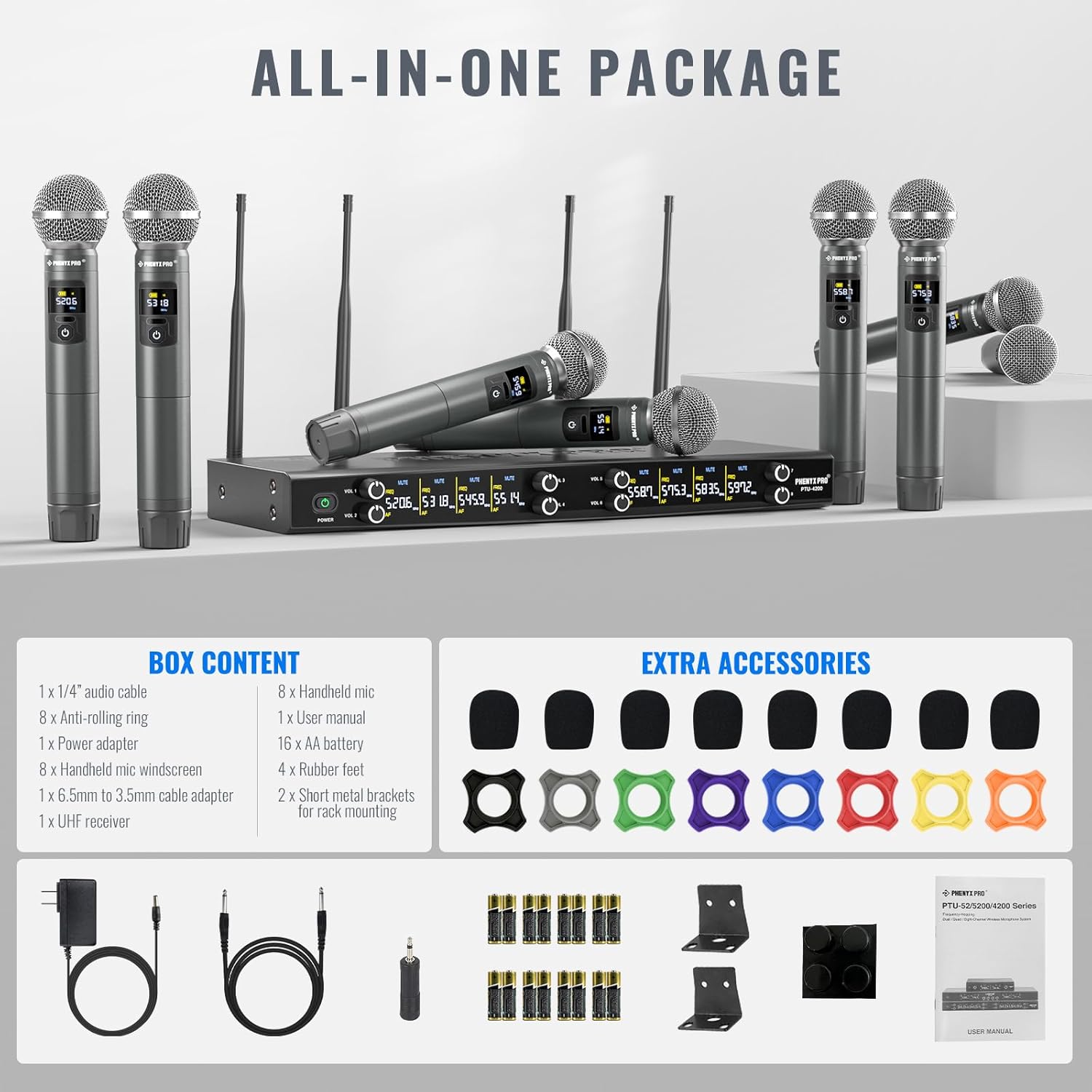
Image: All components included in the Phenyx Pro PTU-4200-8H package, including the receiver, eight microphones, power adapter, cables, batteries, anti-rolling rings, windscreens, antennas, rubber feet, and rack-mount brackets.
4. Product Overview
The Phenyx Pro PTU-4200-8H is an 8-channel UHF wireless microphone system designed for versatile audio applications. It features a robust metal receiver and eight dynamic handheld microphones, offering reliable performance and clear sound.
4.1 UHF Wireless Receiver
The receiver unit is the central hub of your wireless system, managing signals from all eight microphones. It features individual volume controls, XLR outputs for each channel, and a mixed 1/4'' output for flexible connectivity.
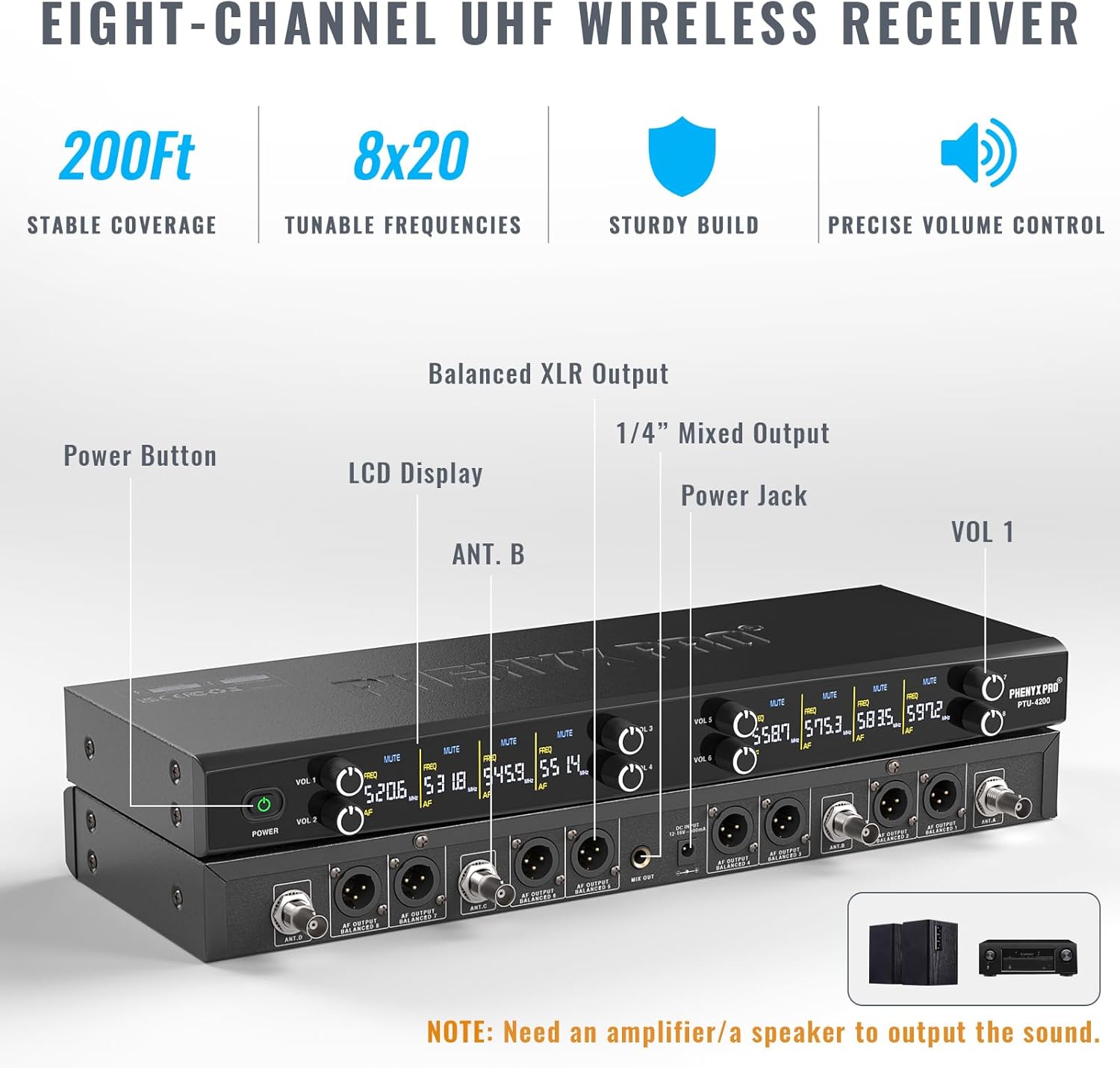
Image: Front and rear view of the 8-channel UHF wireless receiver, highlighting the power button, LCD display, antenna ports, individual volume controls, XLR outputs, 1/4'' mixed output, and power jack.
4.2 UHF Handheld Transmitters (Microphones)
Each handheld microphone is a dynamic unit with a cardioid capsule, designed for clear vocal reproduction and excellent off-axis rejection. They feature an informative display, physical battery indicator, and multi-functional buttons for power, mute, frequency selection, and remote volume adjustment.

Image: A detailed view of a single UHF handheld microphone, showing its informative display, physical battery indicator, ON/MUTE/OFF button, and controls for frequency and volume adjustment.
4.3 System Overview
The complete system provides stable coverage up to 200ft in open space, with 8x20 tunable frequency groups in the 500MHz band to minimize interference. The sturdy metal construction ensures durability for various applications.
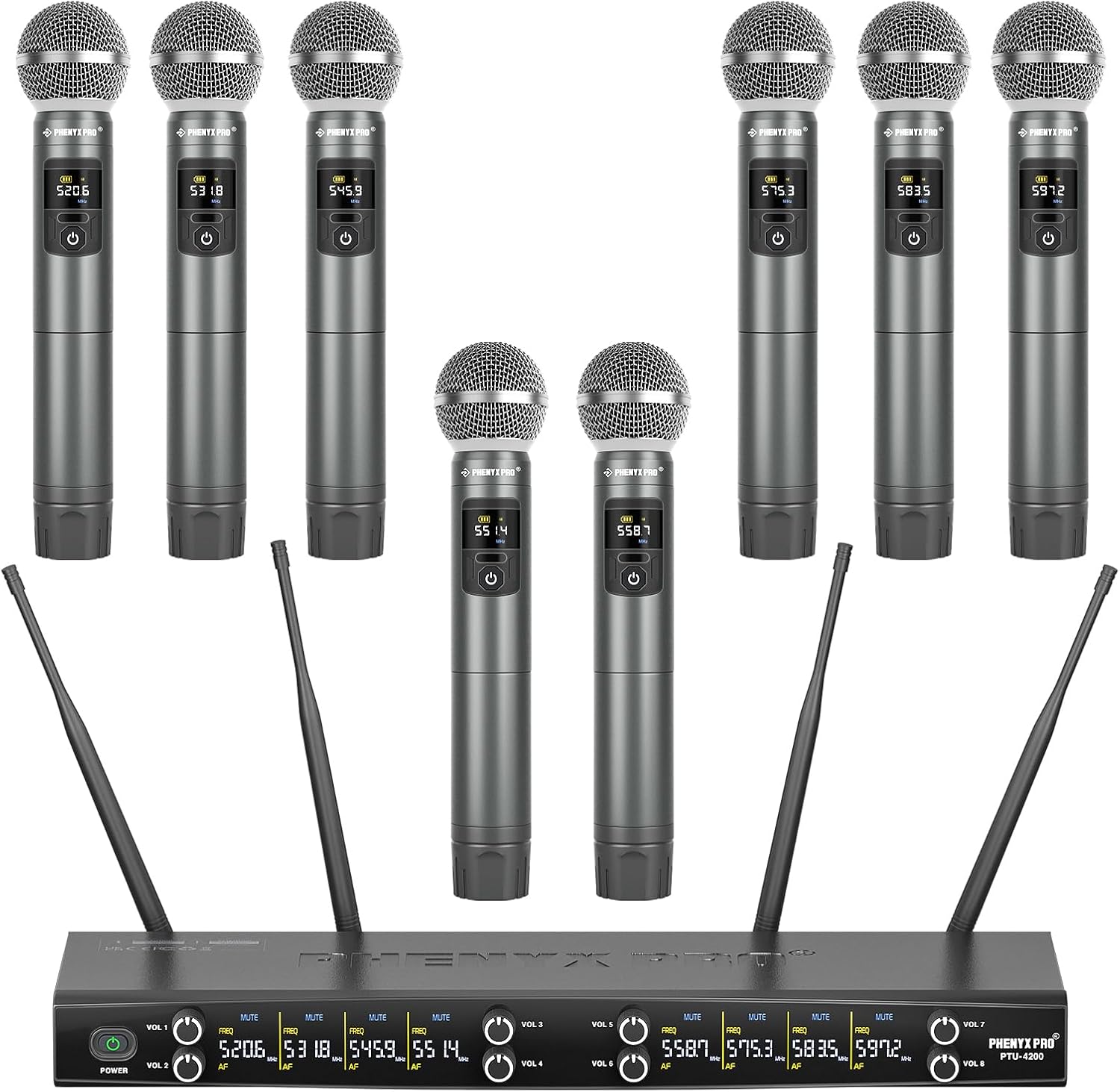
Image: An overhead view of the entire Phenyx Pro PTU-4200-8H system, showcasing the receiver unit with its antennas and all eight handheld microphones.
5. Setup Guide
Follow these steps for initial setup of your wireless microphone system:
- Connect Power: Connect the AC adapter to a wall outlet and then to the receiver's power jack.
- Install Batteries: Open the battery compartment of each handheld microphone and insert two AA batteries, ensuring correct polarity.
- Power On and Pair: Power on the receiver and all handheld transmitters. The system utilizes frequency hopping technology and should automatically connect within seconds. The receiver and microphones will display their paired channel and frequency.
- Connect to Audio System: Connect the receiver to your external audio devices (mixer, speaker, power amplifier) using the 8 XLR outputs for individual channels or the 1/4'' mixed output. Ensure your external device is powered off before making connections.
- Antenna Installation: Screw the four antennas onto the corresponding ports on the rear of the receiver. Position them for optimal signal reception.
- Optional Rack Mounting: If rack mounting, attach the included short metal brackets to the receiver. Note that an ANTK-FR4A BNC antenna kit (sold separately) is required for front-mounting antennas in a rack setup.
Note: This system does not support Bluetooth connection.
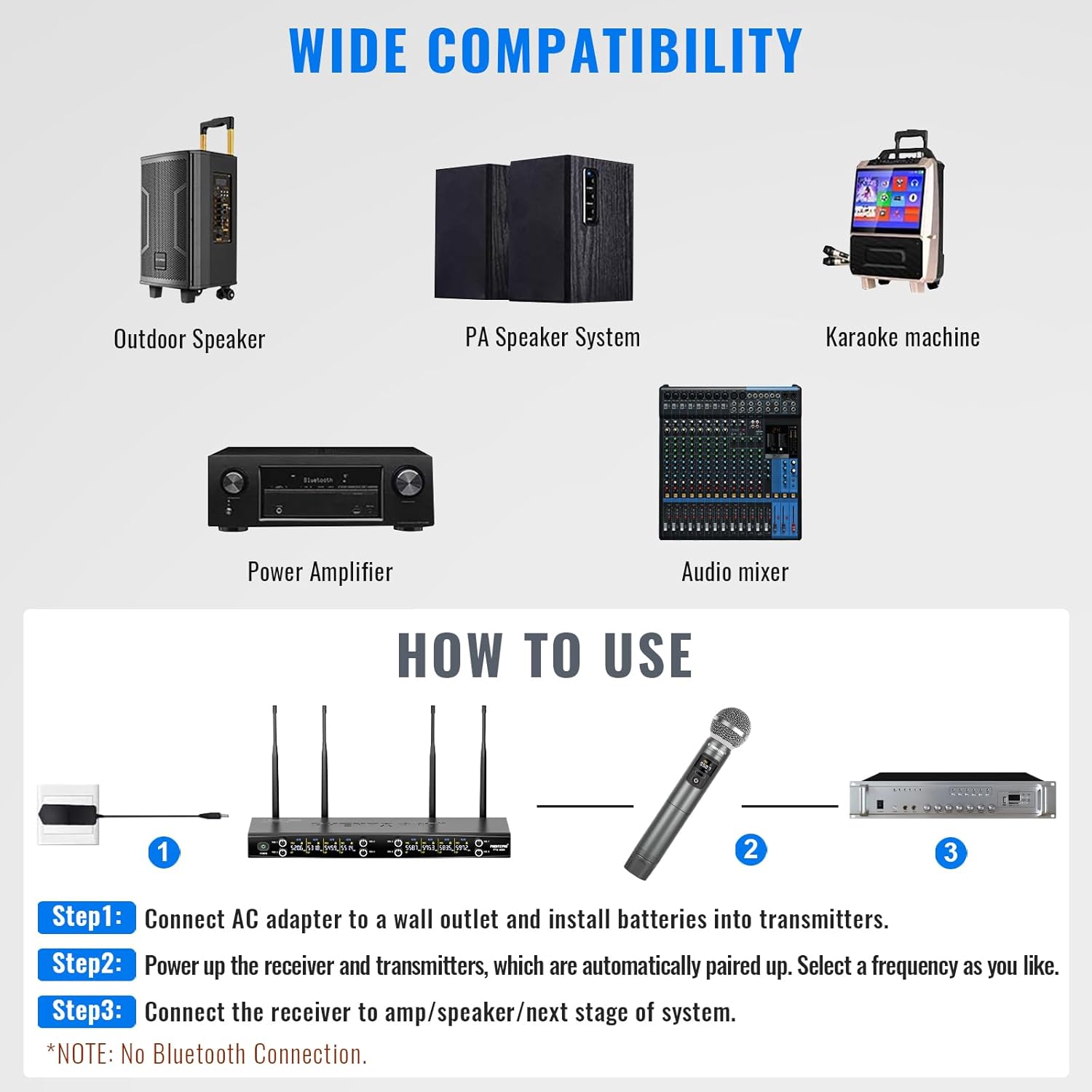
Image: A simplified diagram illustrating the three main setup steps: connecting the AC adapter and installing batteries, powering on and automatic pairing, and connecting the receiver to an amplifier/speaker.
5.1 Wide Compatibility
The PTU-4200-8H system is compatible with a variety of audio equipment, making it suitable for diverse setups:
- Outdoor Speakers
- PA Speaker Systems
- Karaoke Machines
- Power Amplifiers
- Audio Mixers

Image: Visual representation of devices compatible with the wireless microphone system, including outdoor speakers, PA systems, karaoke machines, power amplifiers, and audio mixers.
6. Operating Instructions
6.1 Power On/Off
To power on a handheld microphone, press and hold the power button until the display illuminates. To power off, press and hold the power button again until the display turns off. The receiver has a dedicated power button on its front panel.
6.2 Frequency Selection
The system offers 8x20 tunable frequency groups. If you experience interference, you can change the frequency of a microphone. Tap the 'SET' button on the microphone to instantly select a new frequency. The receiver will automatically synchronize.

Image: A visual guide demonstrating how to tap the SET button for instant frequency selection and press the VOL buttons for remote volume adjustment on the handheld transmitters.
6.3 Volume Adjustment
Each channel on the receiver has an independent volume knob for precise control. Additionally, you can remotely adjust the volume of each microphone by pressing the 'VOL' buttons on the handheld transmitter.
6.4 Mute Function
A short press of the power button on the handheld microphone will mute the microphone. Press it again to unmute. The receiver's display will indicate the mute status.
6.5 Range and Performance Tips
- Maintain a clear line of sight between the microphones and the receiver for optimal range (up to 200ft).
- Avoid placing the receiver near large metal objects or other wireless devices that could cause interference.
- Ensure antennas are fully extended and positioned vertically for best reception.
7. Maintenance
7.1 Cleaning
Wipe the receiver and microphones with a soft, dry cloth. Do not use liquid cleaners or abrasive materials. For microphone grilles, gently remove any debris with a soft brush.
7.2 Battery Replacement
Replace AA batteries in the handheld microphones when the battery indicator shows low power. Always use fresh, high-quality AA batteries for best performance. Remove batteries if the microphones will not be used for an extended period.
7.3 Storage
Store the system in a cool, dry place away from direct sunlight and extreme temperatures. Consider using a protective case for transport and long-term storage.

Image: Accessories designed for convenience, including anti-rolling rings for color-coding and protection, mic windscreens to minimize popping, and AA batteries for up to 8 hours of continuous use.
8. Troubleshooting
This section addresses common issues you might encounter with your Phenyx Pro wireless microphone system.
| Problem | Possible Cause | Solution |
|---|---|---|
| No sound or low output | Microphone muted; low microphone battery; receiver volume too low; incorrect cable connection; external amplifier/speaker off or volume low. | Check microphone mute status; replace batteries; increase receiver channel volume; verify all audio cables are securely connected; ensure external audio equipment is powered on and volume is adequate. |
| Cutoffs, static, or interference | Environmental RF interference; microphone too far from receiver; obstacles blocking signal; frequency conflict. | Relocate receiver for better line of sight; ensure antennas are properly positioned; change microphone frequency (tap SET button); avoid placing receiver near other wireless devices or large metal objects. Consider upgrading to a True Diversity system for challenging environments. |
| Microphone not pairing | Microphone or receiver not powered on; frequency mismatch. | Ensure both receiver and microphone are powered on. The system should auto-pair. If not, manually select a frequency on the microphone. |
| Audio feedback (squealing) | Microphone too close to speakers; microphone gain too high; speaker volume too high. | Move microphone further from speakers; reduce individual channel gain on the receiver; lower overall speaker volume. |
8.1 Extending Operating Range
To extend the operating range beyond the standard 200ft, we recommend using the Phenyx Pro PAS-225X antenna distribution system. This system enhances signal strength and coverage, allowing for greater distance and more reliable performance.

Image: The Phenyx Pro PAS-225X antenna distribution system, which can be used to extend the operating range of your wireless microphone system.
8.2 Connecting to a Computer
If you wish to use the wireless system with a computer, first connect the system to a mixer (e.g., Phenyx Pro PTX-15), and then connect the mixer to your computer via its USB port. Select the mixer as the audio input device on your computer for audio processing.

Image: A Phenyx Pro PTX-15 audio mixer, demonstrating how it can be used as an intermediary to connect the wireless microphone system to a computer.
9. Specifications
| Feature | Detail |
|---|---|
| Model Number | PTU-4200-8H |
| Number of Channels | 8 |
| Frequency Band | UHF (500MHz band, 8x20 tunable frequencies) |
| Operating Range | Up to 200ft (line of sight) |
| Microphone Type | Dynamic, Handheld |
| Microphone Power Source | 2 x AA Batteries per microphone (16 AA batteries included) |
| Receiver Audio Outputs | 8 x XLR, 1 x 1/4'' Mixed Output |
| Material | Metal (Receiver and Microphones) |
| Item Weight | 11.97 pounds (5.44 Kilograms) |
| Package Dimensions | 21 x 12 x 5.75 inches |
| UPC | 810164760357 |
| Recommended Uses | Singing, Karaoke, Live Performances, Church Services, Outdoor Events |
10. Warranty and Support
10.1 Warranty Information
Phenyx Pro products are crafted with premium components and precision engineering, ensuring trusted quality and lasting reliability. For specific warranty details, please refer to the warranty card included with your product or visit the official Phenyx Pro website. Keep your proof of purchase for warranty claims.
10.2 Customer Support
If you encounter any issues or have questions regarding your Phenyx Pro PTU-4200-8H system, please contact Phenyx Pro customer support. Contact information can typically be found on the official Phenyx Pro website or in the product packaging. Our team is dedicated to providing assistance and ensuring your satisfaction.


