
1. Introduction
Thank you for purchasing the cumilo YJ886 42-inch Smart Low Profile Ceiling Fan. This fan is designed to provide efficient air circulation and customizable lighting for your indoor and covered outdoor spaces. Featuring a quiet DC motor, smart control options via remote, app, and voice (Alexa/Google Assistant), and a dimmable, color-changing LED light, this fan enhances comfort and convenience in your home.
Please read this manual thoroughly before installation and operation to ensure proper use and safety. Keep this manual for future reference.
2. Important Safety Information
- Electrical Safety: Always turn off power at the circuit breaker before beginning installation, cleaning, or maintenance. Ensure all electrical connections comply with local codes and ordinances.
- Qualified Electrician: If you are unsure about wiring or installation, consult a qualified electrician.
- Mounting: The fan must be mounted to a ceiling joist or a suitable support structure capable of holding at least 35 lbs (15.9 kg).
- Blade Clearance: Ensure there is adequate clearance between the fan blades and any obstacles.
- Fan Operation: Do not insert objects into the path of the fan blades.
- Damp-Rated: This fan is damp-rated, suitable for indoor use and covered outdoor areas like patios and porches. Do not expose to direct water spray.

Image: Important safety considerations including ceiling types, wall switch compatibility, and the necessity to turn off power before operation.
3. Package Contents
Carefully unpack all components and ensure you have received all items listed below. If any parts are missing or damaged, please contact customer support.
- LED Light Board
- DC Motor Assembly
- Fan Blades (5x)
- Controller
- Remote Control
- Mounting Hardware Kit
- Instruction Manual

Image: Visual representation of the main components included in the package.
4. Installation Guide
The cumilo YJ886 ceiling fan is designed for easy installation. For a detailed visual guide, please refer to the installation video available via the QR code on the product packaging or by contacting customer support.
- Prepare for Installation:
- Turn off power at the circuit breaker to avoid electrical shock.
- Ensure the mounting location is suitable for a flush mount fan and can support the fan's weight. This fan is suitable for flat ceilings.
- Mount the Bracket: Securely attach the mounting bracket to the ceiling junction box.
- Assemble the Fan:
- Attach the fan blades to the motor housing.
- Connect the LED light board to the fan assembly.
- Wire the Fan: Connect the electrical wires from the ceiling to the fan's wiring according to the provided wiring diagram. Ensure all connections are secure.
- Secure the Fan: Lift the fan assembly and attach it to the mounting bracket.
- Test Operation: Restore power at the circuit breaker and test the fan and light functions using the remote control.
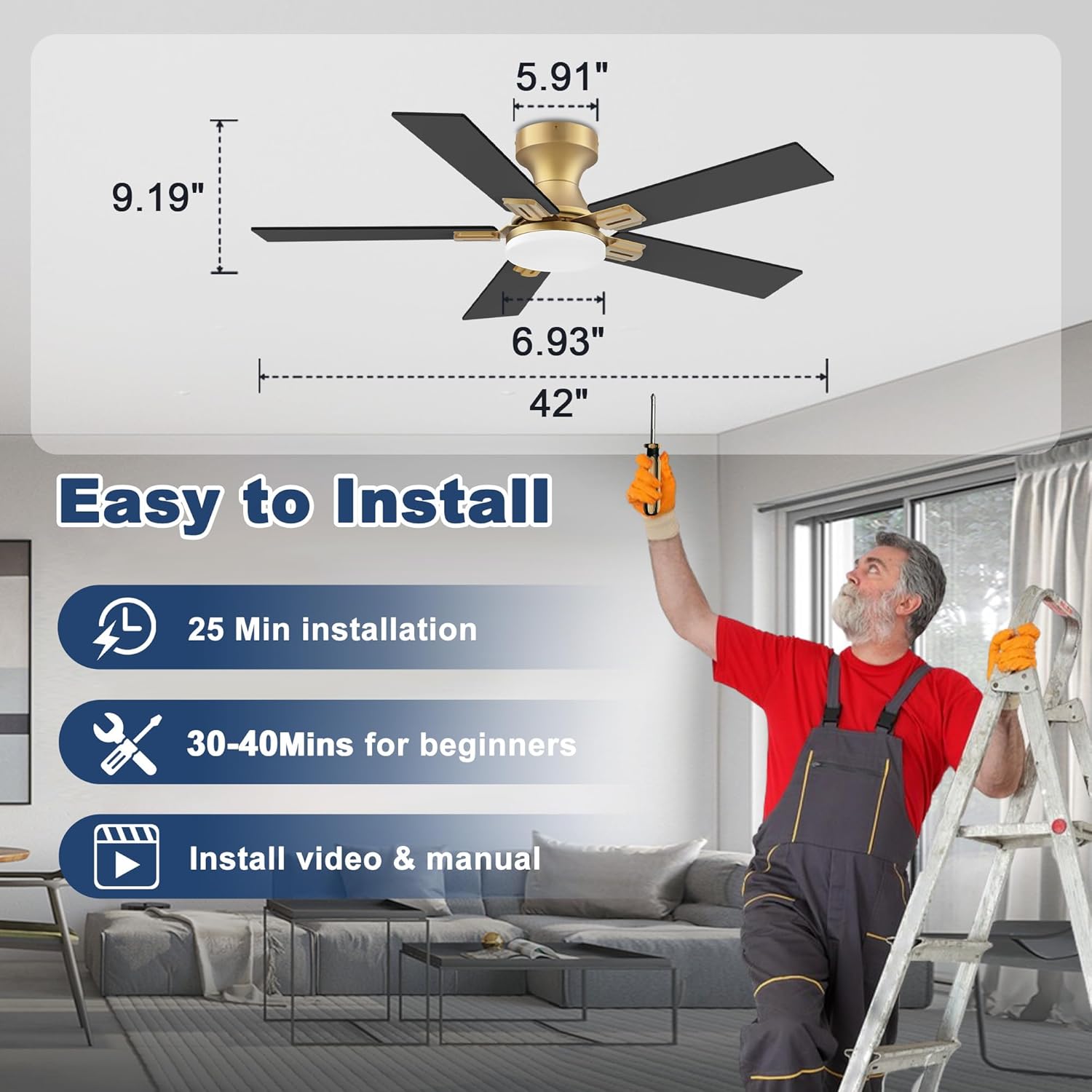
Image: Illustration of a person installing the ceiling fan, highlighting ease of installation and available resources.

Image: Detailed dimensions of the 42-inch flush mount ceiling fan.
5. Operating Instructions
5.1 Fan Speed Control
The fan features 6 adjustable speeds to suit your comfort needs. Use the remote control or smart app to select your desired speed.
- Levels 1-2: Soft wind, ideal for sleep.
- Levels 3-4: Natural wind, suitable for study or light activity.
- Levels 5-6: Cool wind, perfect for fitness or strong air circulation.

Image: Remote control and visual guide for 6 fan speed settings.
5.2 Reversible DC Motor
The fan is equipped with a reversible DC motor, allowing for year-round use. This feature helps optimize air circulation for both warm and cool seasons.
- Downdraft Mode (Summer): Blades spin counter-clockwise, pushing cool air downwards to create a refreshing breeze.
- Updraft Mode (Winter): Blades spin clockwise, drawing air up towards the ceiling to circulate warm air evenly throughout the room.

Image: Explanation of the fan's reversible function for summer and winter modes.
5.3 Dimmable and Color-Changing LED Light
The integrated LED light offers customizable illumination with adjustable brightness and color temperature.
- Brightness: Dimmable from 0% to 100%.
- Color Temperature (CCT):
- Warm Light (3000K): Ideal for relaxation.
- Natural Light (4000K): Suitable for general activities.
- Day Light (5000K): Bright light for tasks and reading.

Image: Visual guide for dimming and color temperature adjustments of the LED light.
5.4 Timer Function
Set the fan to automatically turn off after a specified period using the timer function. Available settings include 1 hour, 4 hours, and 8 hours.

Image: Depiction of the fan's quiet operation (30dB) and timer settings.
6. Smart Control (App & Voice)
This smart ceiling fan offers convenient control via a dedicated mobile app and voice commands through Alexa or Google Assistant.
6.1 Mobile App Control
Download the recommended smart home app (e.g., Tuya Smart or Smart Life) from your device's app store. Follow the in-app instructions to pair your fan. The app allows you to:
- Adjust fan speed (6 levels).
- Change fan direction (reversible).
- Turn the light on/off, dim brightness, and change color temperature.
- Set timers and schedules.
- Control the fan remotely from anywhere with an internet connection.
6.2 Voice Control (Alexa & Google Assistant)
Integrate your fan with Amazon Alexa or Google Assistant for hands-free control. Ensure your fan is connected to the mobile app first, then link the app to your voice assistant account.
- Common Voice Commands:
- "Alexa, turn on the fan."
- "Hey Google, set fan speed to 3."
- "Alexa, turn off the fan light."
- "Hey Google, dim the fan light to 50%."
- Naming Your Fan: For best results, assign a simple, unique name to your fan in the smart home app (e.g., "Living Room Fan") to avoid conflicts with other devices.

Image: Demonstrates voice control via Alexa and app control for the smart ceiling fan.
7. Maintenance
Regular maintenance ensures optimal performance and longevity of your ceiling fan.
- Cleaning:
- Always turn off power at the circuit breaker before cleaning.
- Wipe the fan blades and motor housing with a soft, damp cloth. Do not use abrasive cleaners or solvents.
- Dust the light cover regularly to maintain light output.
- Blade Balance: If the fan wobbles, check that all blade screws are tight and that the blades are properly balanced.
- Light Source: The LED light source is integrated and not user-replaceable. If the light fails, please contact customer support.
8. Troubleshooting
Refer to the table below for common issues and their solutions. If the problem persists, contact customer support.
| Problem | Possible Cause | Solution |
|---|---|---|
| Fan does not start | No power; Loose wiring; Remote battery low; Incorrect pairing. | Check circuit breaker; Verify all wiring connections; Replace remote batteries; Re-pair remote/app. |
| Light does not work | Loose wiring; LED failure; Incorrect light setting. | Check light wiring; Ensure light is turned on via remote/app; Contact support if LED failure suspected. |
| Fan wobbles | Loose blade screws; Unbalanced blades; Loose mounting bracket. | Tighten all blade screws; Use balancing kit (if provided); Ensure mounting bracket is secure. |
| Remote not responding | Low battery; Obstruction; Not paired. | Replace remote batteries; Ensure clear line of sight; Re-pair remote with fan. |
| App/Voice control not working | No Wi-Fi connection; Incorrect app pairing; Voice assistant not linked. | Check Wi-Fi router; Re-pair fan with app; Link smart home app to Alexa/Google Assistant. |
9. Specifications
| Feature | Detail |
|---|---|
| Model Name | YJ886 |
| Size | 42 inch |
| Style | Flush Mount |
| Motor Type | Quiet DC Motor (23W) |
| Air Flow Capacity | Up to 2749 Cubic Feet Per Minute |
| Number of Speeds | 6 |
| Light Source | Integrated LED (20W CCT) |
| Color Temperature | 3000K (Warm), 4000K (Natural), 5000K (Daylight) |
| Dimmable | Yes (0-100%) |
| Control Methods | Remote, Mobile App, Voice (Alexa, Google Assistant) |
| Timer Settings | 1H, 4H, 8H |
| Indoor/Outdoor Usage | Indoor, Covered Outdoor (Damp-rated) |
| Voltage | 110 Volts |
| Item Weight | 10.94 pounds |
| Product Dimensions | 9.18"D x 42"W x 42"H |
10. Warranty and Customer Support
Your cumilo YJ886 Smart Low Profile Ceiling Fan comes with a comprehensive warranty and dedicated customer support.
- Warranty: The product includes a 3-year warranty covering the entire fan and motor.
- Technical Support: We provide 24-hour technical support. If you encounter any issues during installation or operation, please do not hesitate to contact us. Your satisfaction is our priority.
- Contact Information: Please refer to your product packaging or the official cumilo website for the most up-to-date contact details for customer service.

Image: Details on customer satisfaction, after-sales service, quality, and warranty.

Image: Energy efficiency information and confirmation of 3-year warranty.

