
1. Introduction
This manual provides instructions for the XINFUTE CT-8567 replacement remote control. This remote is designed to function as an original replacement unit for specific Toshiba LCD TV models, ensuring compatibility and reliable operation.
Package Contents:
- 1 x XINFUTE CT-8567 Remote Control
- Note: Batteries are not included.
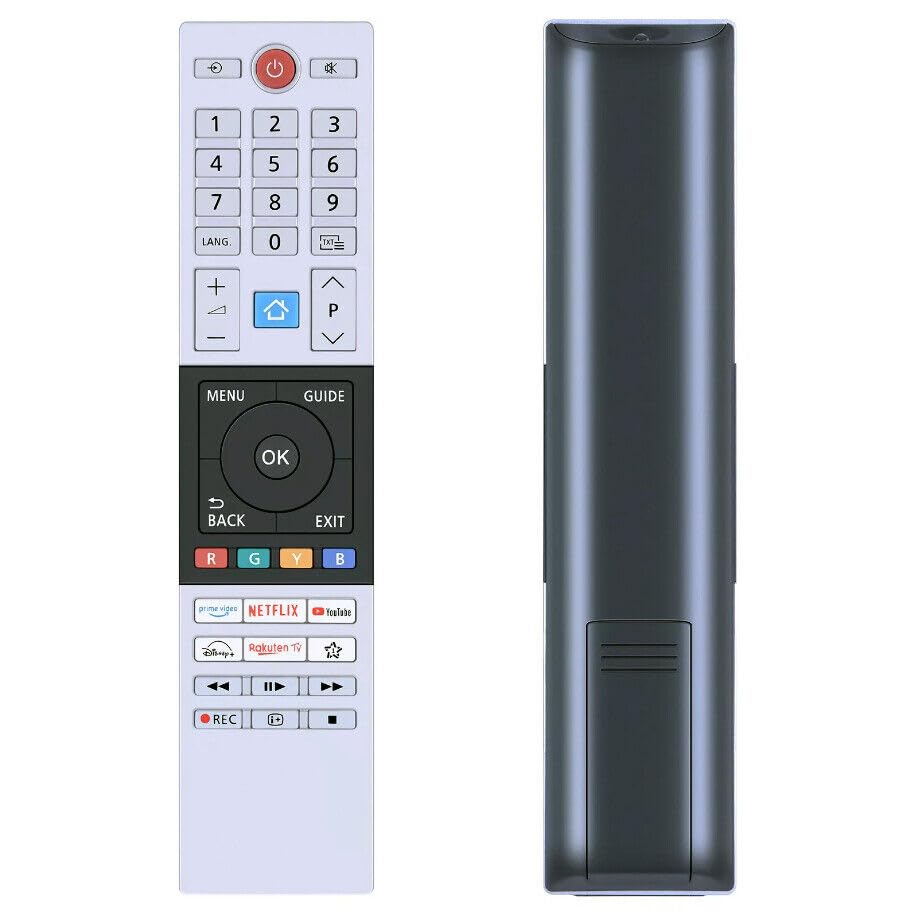
Figure 1: Front view of the XINFUTE CT-8567 remote control.
2. Setup
2.1 Battery Installation
- Locate the battery compartment on the back of the remote control.
- Slide the battery compartment cover downwards or outwards to open it.
- Insert two (2) AAA alkaline batteries, ensuring the positive (+) and negative (-) terminals align correctly with the markings inside the compartment.
- Slide the battery compartment cover back into place until it clicks securely.
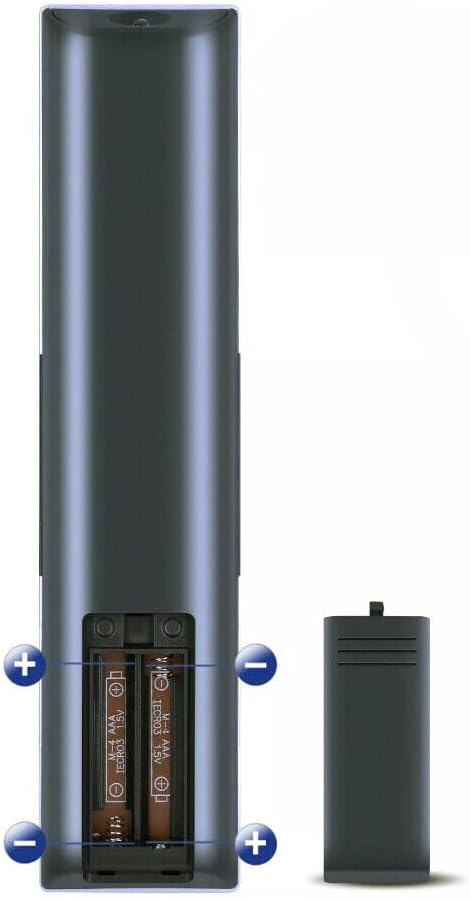
Figure 2: Battery installation in the remote control. Ensure correct polarity.
3. Operating Instructions
The XINFUTE CT-8567 remote control uses infrared (IR) technology to communicate with your Toshiba LCD TV. For optimal performance, ensure a clear line of sight between the remote control and the TV's IR receiver.
- Power On/Off: Press the POWER button to turn the TV on or off.
- Channel Selection: Use the number buttons to directly enter channel numbers or the CH+/CH- buttons to cycle through channels.
- Volume Control: Adjust the volume using the VOL+/VOL- buttons.
- Menu Navigation: Use the directional arrow buttons (UP, DOWN, LEFT, RIGHT) and the OK/ENTER button to navigate TV menus and confirm selections.
- Input Selection: Press the INPUT or SOURCE button to switch between different video inputs (e.g., HDMI, AV).
The maximum effective range for the remote control is approximately 5 meters (16 feet).
4. Maintenance
4.1 Cleaning
To clean the remote control, gently wipe its surface with a soft, dry cloth. Do not use liquid cleaners, abrasive pads, or chemical solvents, as these may damage the remote's finish or internal components.
4.2 Battery Replacement
Replace batteries when the remote control's response becomes sluggish or stops working. Always replace both batteries at the same time with new AAA alkaline batteries. Do not mix old and new batteries, or different types of batteries.
4.3 Storage
If the remote control will not be used for an extended period, remove the batteries to prevent leakage, which can cause damage to the device.
5. Troubleshooting
If you experience issues with your remote control, refer to the following common problems and solutions:
| Problem | Solution |
|---|---|
| Remote control is not working. |
|
| Remote control works intermittently. |
|
6. Specifications
| Feature | Detail |
|---|---|
| Brand | XINFUTE |
| Model Number | CT-8567 |
| Compatible Devices | Toshiba LCD Televisions (43UV2363DB, 50UV2363DB, 32LK3C63DB) |
| Connectivity Technology | Infrared (IR) |
| Battery Type | 2 x AAA Alkaline batteries (not included) |
| Maximum Range | 5 Meters (approx. 16 feet) |
| Material | ABS Material |
| Item Weight | 0.08 Kilograms (approx. 2.8 oz) |
| Item Dimensions (L x W x H) | 6"L x 3"W x 1"H (approx.) |
7. Warranty Information
This product comes with a one-year warranty from the date of purchase. Please retain your proof of purchase for warranty claims.
8. Customer Support
All products are inspected before shipment to ensure quality. If you are not satisfied with your purchase or encounter any issues, please contact the seller within 24 hours of receiving your product for assistance.