
ORICO PSS-6A2U1C-US
ORICO 9-in-1 Power Strip User Manual
Model: PSS-6A2U1C-US
Brand: ORICO
1. Introduction
This manual provides instructions for the safe and efficient use of your ORICO 9-in-1 Power Strip, Model PSS-6A2U1C-US. Please read this manual thoroughly before operating the device and retain it for future reference.

Image 1.1: ORICO 9-in-1 Power Strip, showing the main unit, 5ft extension cord, and flat wall plug.
2. Product Overview
The ORICO 9-in-1 Power Strip is designed to provide multiple power and charging options in a compact form factor. It features a unique 3-sided design for efficient space utilization.
2.1 Components
- 6 AC Outlets: Standard 3-prong outlets for various electronic devices.
- 2 USB-A Ports: For charging USB-A compatible devices.
- 1 USB-C Port: For charging USB-C compatible devices.
- ON/OFF Switch: Controls power to all outlets and USB ports.
- 5ft Extension Cord: A thin, flat cable for flexible placement.
- 45° Ultra-Thin Flat Plug: Designed to fit discreetly behind furniture.
- Anti-Slip Silicone Pads: Located on the base for stability.

Image 2.1: Overview of the 9-in-1 power capabilities, highlighting 6 AC outlets, 1 USB-C port, and 2 USB-A ports.

Image 2.2: Compact size and dimensions of the power strip.

Image 2.3: The ultra-thin flat plug design and anti-slip silicone pads for secure placement.
3. Setup Instructions
- Unpack: Carefully remove the power strip from its packaging.
- Placement: Position the power strip on a stable, flat surface. The anti-slip silicone pads on the base help prevent movement.
- Connect to Wall Outlet: Plug the power strip's 45° ultra-thin flat plug into a standard 125V AC wall outlet. The flat design allows it to be placed behind furniture without obstruction.
- Cable Management: The 5ft flat extension cord can be routed discreetly under doors, behind desks, or under carpets due to its thin profile.

Image 3.1: Examples of routing the thin, flat extension cable in various scenarios.
4. Operating Instructions
- Power On/Off: Press the ON/OFF switch located on the top of the power strip to supply or cut power to all connected devices.
- Connecting AC Devices: Plug your AC-powered devices into any of the 6 AC outlets. The 3-sided design and wide spacing accommodate larger adapters without blocking adjacent outlets.
- Connecting USB Devices:
- For USB-A compatible devices (e.g., Bluetooth speakers, game controllers, power banks), use the 2 USB-A ports.
- For USB-C compatible devices (e.g., cellphones, tablets, smartwatches), use the 1 USB-C port.
- Simultaneous Use: The power strip is designed to power up to 9 devices simultaneously (6 AC, 2 USB-A, 1 USB-C).

Image 4.1: Examples of the power strip's versatile use in various settings.

Image 4.2: USB charging station capabilities for various devices.
5. Safety Information
- Overload Protection: The power strip features an automatic shutoff mechanism to protect against overload, over-current, and over-voltage. If an overload occurs, the power will cut off. Press the ON/OFF switch to reset.
- Fire Safety: Constructed from V0 grade ABS+PC fireproof material, offering protection up to 1382°F (750°C).
- No Surge Protection: This power strip is designed without surge protection, making it suitable for cruise ships and environments where surge protectors are prohibited. However, it does not protect against power surges.
- Indoor Use Only: This device is intended for indoor use in dry locations only.
- Avoid Overloading: Do not exceed the maximum electrical rating of the power strip.
- Children and Pets: Keep out of reach of children and pets.
- FCC Certified: The product is certified by FCC, ensuring compliance with safety standards.
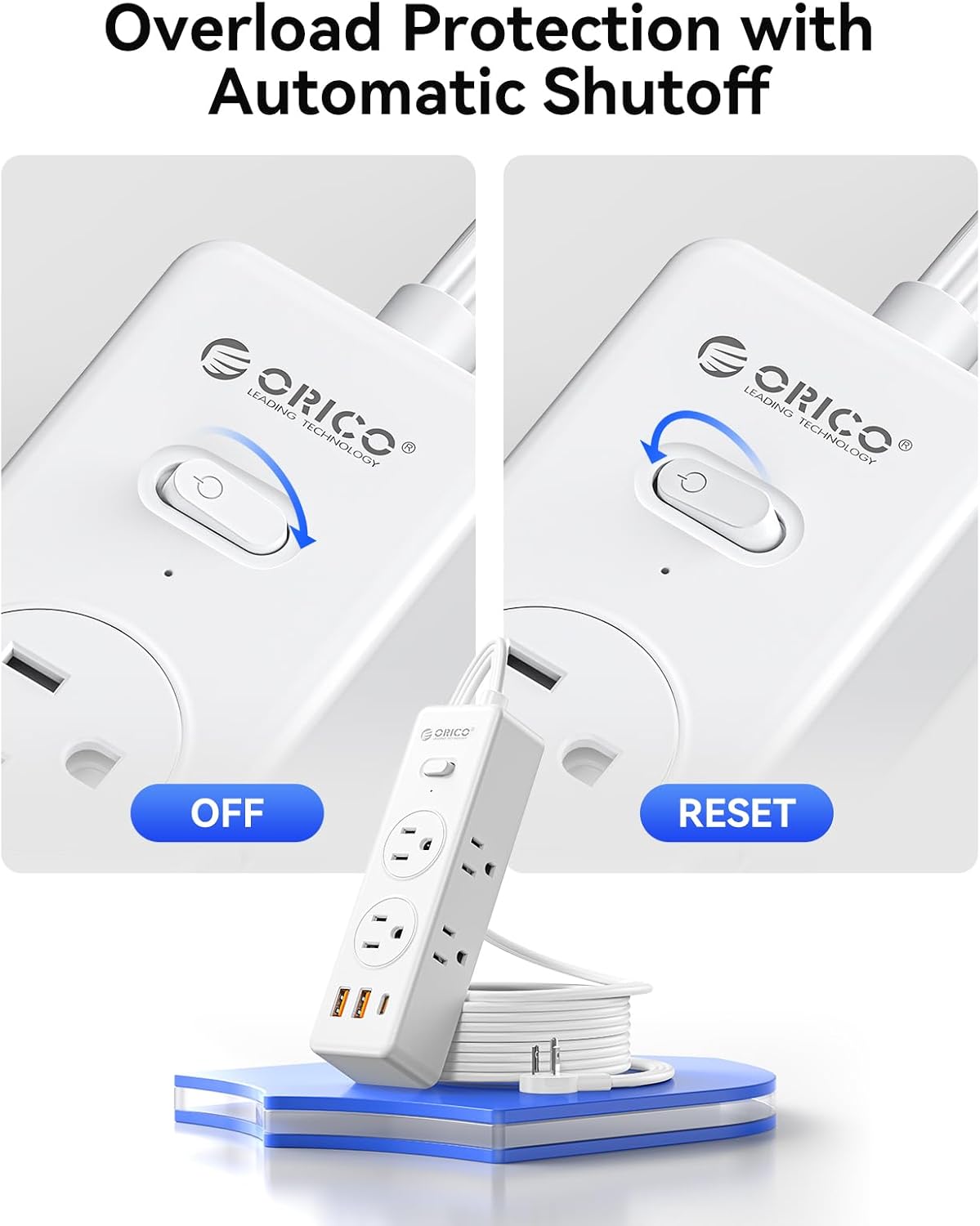
Image 5.1: Overload protection with automatic shutoff and reset function.
6. Maintenance
- Cleaning: Disconnect the power strip from the wall outlet before cleaning. Use a dry, soft cloth to wipe the surface. Do not use liquid cleaners or sprays.
- Storage: When not in use, store the power strip in a cool, dry place away from direct sunlight and moisture.
- Inspection: Periodically inspect the power cord and the unit for any signs of damage. Do not use if damaged.
7. Troubleshooting
| Problem | Possible Cause | Solution |
|---|---|---|
| No power to devices. |
|
|
| USB ports not charging. |
|
|
8. Specifications
| Feature | Detail |
|---|---|
| Model | PSS-6A2U1C-US |
| AC Outlets | 6 |
| USB-A Ports | 2 |
| USB-C Port | 1 |
| Extension Cord Length | 5 ft (1.5 meters) |
| Plug Type | 45° Ultra-Thin Flat Plug (0.35 inches thick) |
| Input Voltage | 125V |
| Material | V0 Grade ABS+PC Fireproof Material |
| Dimensions (L x W x H) | 6.54 x 1.89 x 1.3 inches (16.6 x 4.8 x 3.3 cm) |
| Item Weight | 9.5 ounces (269 grams) |
| Certifications | FCC |
| Special Feature | Cruise Ship Approved (No Surge Protection) |
9. Warranty and Support
For warranty information or technical support, please refer to the product packaging or contact ORICO customer service directly. Contact details can typically be found on the official ORICO website or through your purchase platform.
Related documentsPSS-6A2U1C-US


Ask a question about this manual
Ask about setup, troubleshooting, compatibility, parts, safety, or missing instructions. Manuals+ will review the question and use this page’s manual context to help answer it.